
How-to guide · Beginner · 7 steps · Updated 24 October 2026
Best eBay seller tools: eBay’s free tools first, then apps by job
The best eBay seller tools for most sellers are eBay’s own free ones: Seller Hub, Product Research, the bulk listing tools and eBay Labels. Pay for an app only for a job eBay leaves to you: Vendoo or List Perfectly for crosslisting, Productivo or Price Spectre for repricing, Link My Books or A2X for bookkeeping. Connect it through eBay’s sign-in page, never with your password.
Looking for one thing? Tools by job, what to automate and removing an app’s access each have their own step.
The steps use eBay’s own tools and what other tools say on their own sites. Productivo, the app behind this guide, is in the same tool table, and the last part covers it in detail. You do not need a Productivo account for the steps.
Before you start
In shortYou need an eBay seller account and a list of the jobs that take your time.
Who it is for
LevelBeginner
WholesaleEasy
Every step works as written. Repricing and bookkeeping apps pay off most with many units of one item.
ResellingEasy
Every step works as written. Crosslisting in step 3 suits one-of-a-kind items shown on several sites.
HandmadeEasy
Every step works as written. Crosslisting helps if you also sell the same pieces on Etsy.
Wholesale dropshippingMedium
Step 3 needs care: dropshipping apps have their own guide, and only wholesale-supplier stock is allowed.
Comparing dropshipping apps? See the best eBay dropshipping software guide.
- You finish with
- A short list of tools, one per job eBay leaves to you, each connected through eBay’s sign-in and checked once a month.
- You need
- An eBay seller account
- A list of the jobs that take your time each week
- About 45 minutes, plus free trials over a few weeks
How to choose the best eBay seller tools
The best eBay seller tools are the ones that close a gap on your own list. Steps 1 to 4 pick them. Steps 5 to 7 keep them safe once they run. Repeat step 7 every month.
Step 1 of 7: Start with eBay’s free seller tools
In shortList what eBay already gives you for free, before you pay for any app.
eBay’s selling tools cover most daily jobs. Some are free, and some need an eBay Store subscription. Seller Hub puts them in one place, and eBay calls it free to use.
eBay’s own seller tools, by job
All of them sit in Seller Hub, My eBay or the eBay app. Normal selling fees still apply.eBay tool and cost Job, and what to know Seller Hub
Free, after your first saleRun the store. Orders, listings, ads, performance, payouts and reports in one place. Product Research
FreeCheck what sells. Three years of sold prices and demand. On a computer it sits in Seller Hub’s Research tab; in the app, one active listing opens it. Advanced listing tool
FreeList a few items. eBay suggests it for about 25 to 100 items for sale. Bulk listing tool
FreeList or edit many. For about 100 to 250 items, especially similar ones. Seller Hub Reports
FreeUpload a spreadsheet. For about 250 to 1,000 items, from a CSV or XLSX file. Photo upload (AI)
FreeList from photos. Turns your photos into listing drafts. Best for standard items, like trading cards. eBay app
FreeList on your phone. Its photo tool removes the background or puts the item on an AI-made one. eBay Labels
No subscriptionShip. USPS, FedEx or UPS below retail rates. Tracking uploads by itself. No printer? The carrier prints the label from a QR code. Promoted Listings
Ad feeAdvertise. General: a 2% to 100% ad rate, paid on a sale within 30 days of an ad click. Priority: you pay per click. For Above Standard or Top Rated sellers with enough activity. Discounts Manager
Store subscribersRun discounts. Sale events, volume pricing, coupons, shipping and order discounts, from the Marketing tab. Team access
No fee namedShare the work. Helpers get only the tasks you allow, without your password. Seller Hub opens after your first sale. Before that, you list with the eBay app or the listing form. The eBay bulk listing guide shows each listing tool.
Learn what Seller Hub does before you pay for anything. Many paid apps repeat what it already shows. The eBay Seller Hub guide walks through every tab.
Result: A list of the eBay tools you use now, and the jobs they already cover.
Step 2 of 7: Name the jobs eBay leaves to you
In shortWrite down the jobs eBay’s tools leave to you. Only those need a paid app.
Seller Hub sees only what happens on eBay. Find your situation below. Each row names the kind of tool to look at, and why eBay’s own tools stop there.
Which kind of tool fits your situation
Start from the first row that matches you. Most sellers match one or two.Your situation Look at first You sell on eBay only, up to about 1,000 items eBay’s free listing tools and Seller Hub. A paid app rarely saves enough time yet. The same items are also on Poshmark, Etsy or Mercari A crosslister. eBay lists on eBay only, and a sale elsewhere must end the eBay listing. Many units of one item, and rivals change prices often A repricer that stops at your minimum price. eBay edits many prices at once, but not by your rules. Orders come in from several sites A shipping app. eBay Labels ships eBay orders only. You need profit after the item cost, or books in QuickBooks or Xero A bookkeeping app. Seller Hub shows eBay’s fees, not what you paid for the item. A helper lists or ships for you eBay’s free Team access, before any paid team plan. For one week, note each job and the minutes it takes. Buy a tool for a job on your list, never for a feature list. A job that takes a few minutes a week rarely pays for an app.
Result: Your list of jobs eBay leaves to you, with the time each one takes a week.
Step 3 of 7: Compare third-party tools for each job
In shortShortlist one or two named tools per job, and check price, limits and trial on their own sites.
Most apps charge a monthly fee by listings, orders or features. Start your shortlist with eBay’s own third-party providers page. It lists Gold and Silver partners, such as Rithum, Auctiva, SureDone, Vendoo, Sellbrite and Nifty. It also names eBay connectors for website builders, like Shopify, WooCommerce and Wix.
Third-party seller tools, by job
Monthly list prices, read on each tool’s own site on 24 October 2026, and Productivo’s from its plan cards and code. They change often.Tool and job What its site says Productivo
eBay listing, repricing and profiteBay US only. CSV import of up to 1,000 products per file and bulk publishing, competitor repricing for products whose cost it reads from Amazon, and profit per order after fees. $18.74 a month for 200 listings, $24.99 for 500 and 2 stores. 7-day free trial. 3Dsellers
All-in-one eBay suite$19 a month for 100 listings and 1 eBay account; $39.90 for 500 listings and 2 accounts. AI bulk actions from $9 a month extra, a helpdesk $19 per agent. 7-day free trial. Vendoo
Crosslisting$14.99, $29.99 or $59.99 a month. Lists on 10+ marketplaces and delists sold items. 14-day free trial. List Perfectly
Crosslisting$29, $49, $69 or $99+ a month. eBay, Poshmark, Mercari, Etsy, Depop and others. 25 to 1,000+ AI listings a month by plan. Price Spectre
RepricingeBay only. Checks eBay several times a day and reprices by your rules and floor price. Links through eBay’s API, not your password. Free for one listing; 14-day free trial. Pirate Ship
ShippingNo monthly fee. Imports unshipped eBay orders and sends tracking numbers back. ShipStation
ShippingFrom $14.99 a month for 50 shipments. eBay is among its marketplaces. 30-day free trial. Link My Books
BookkeepingConnects eBay to Xero or QuickBooks Online. Priced by orders a month. 14-day free trial, no card. A2X
BookkeepingSends eBay payout data to QuickBooks, Xero or NetSuite. Plans by channels and order volume; the first 3 summaries are free. Compare the price at your listing count, not the starting price. 3Dsellers, for example, steps up at 100, 500 and 2,000 listings. Then start the free trial on a slow week.
Check that each tool still runs, too. Lists go stale. inkFrog is still named in several “best tools” lists, but on 24 October 2026 its site opened Wix’s page instead.
Two jobs have their own comparison guides. Research tools are in the best eBay product research tools guide, and dropshipping apps in the best eBay dropshipping software guide. Leaving an app? See the AutoDS alternatives, ZIK Analytics alternative and DSM Tool alternative guides.
Chrome extensions: three kinds
- ResearchShows sales or seller data on the eBay pages you open.
- Listing and crosslistingCopies a listing into another site’s form, or fills in eBay’s form for you.
- OrderingFills in a checkout on another website with your buyer’s address.
Each one can read the pages it works on. Step 6 shows how to check what it may see.
AI tools
eBay’s own photo upload turns photos into listing drafts. Many apps add AI titles and descriptions too: List Perfectly counts AI listings in every plan, and 3Dsellers sells AI bulk actions as an add-on. AI writes fast, and it can also write things that are not true. To let ChatGPT or Claude work on your store itself, see how to connect eBay to ChatGPT or Claude.
Result: One or two named tools per job, with the price at your size and the trial dates written down.
Step 4 of 7: Choose an all-in-one tool or single-purpose apps
In shortAdd up the monthly cost and the number of connected apps for both choices, then decide.
An all-in-one tool does many jobs in one app: listing, orders, messages and more. A single-purpose app does one job, like crosslisting or labels.
All-in-one or single-purpose?
Neither is better in general. Pick by the jobs on your list.Point All-in-one tool Single-purpose apps Monthly cost One bill, often higher Several bills; some tools are free Depth Covers many jobs, some lightly Each app goes deep on one job Apps with access to your eBay account One One per app When one part stops working Several jobs can stop together Only that job stops Leaving Move everything at once Swap one app at a time A made-up example
A seller ships 150 orders a month. They need crosslisting, shipping labels and bookkeeping. The suite covers the first two, but not the books. All prices are made up.
Two ways to cover the same three jobs
Made-up prices for a made-up seller with 150 orders a month. Use your own quotes.Stack and what it adds up Per order Per month Three single-purpose apps
$30 crosslisting + $0 shipping labels + $20 bookkeeping$0.33 $50 One all-in-one suite, plus bookkeeping
$60 crosslisting and shipping labels + $20 bookkeeping$0.53 $80 The suite costs $30 more a month, or $360 a year. In return, the seller has one app fewer with access to the eBay account. Pay more for a suite only if it does each job on your list well.
Result: A choice between one suite and a few single-purpose apps, with the monthly total of each.
Step 5 of 7: Decide what to automate and what to approve
In shortAutomate repeated work inside limits you set. Keep money, policy and buyer decisions for yourself.
Automation saves time on jobs that repeat the same way. It also repeats a mistake on every listing. So each automated job needs a limit or a check.
What to automate and what to approve
Our suggested split. Every automated job gets a limit or a check.Job Our call, and the limit or check to set Uploading tracking numbers Automate. Check the late-shipment list in Seller Hub each week. Importing orders into a shipping app Automate. Check that tracking came back to eBay for every order. Repricing Automate, with limits. A minimum price on every item. The tool must stop there. Delisting an item sold elsewhere Automate. It must end the eBay listing within minutes, not hours. Bulk edits and uploads Automate, with a preview. Read the failed rows after every run. AI titles and descriptions Draft only. You read and approve each one before it goes live. Ad rates Draft only. A highest ad rate you accept, worked into your money left. Returns, refunds and disputes Keep manual. Each case needs your judgment and eBay’s deadlines. Buying new stock Keep manual. Your money, your decision. A repricer’s limit is a minimum price: the least you will take after fees and costs. The eBay pricing strategy guide works one out, and the best eBay repricer guide compares the tools. A crosslister’s limit is speed: a sale on another site must end the eBay listing at once. Otherwise you sell an item you no longer have, as the eBay out-of-stock option guide explains.
Watch what the automation does
- In the first week, open the app’s log every day. Read each failed or skipped item.
- After that, check it once a week, on the same day.
- Once a month, compare with Seller Hub: sales, late shipments and your seller level.
Never let a tool change a price, a policy or an order without a limit you set.
eBay’s API or a browser bot
An app that uses eBay’s API works through the access you grant on eBay’s own page. eBay sees the app, and you can remove it. A browser bot clicks through eBay’s website as if it were you. eBay’s User Agreement does not allow that without its permission.
Result: A list of jobs to automate, each with its limit, and a weekly time to check what ran.
Step 6 of 7: Connect each app through eBay’s sign-in
In shortSign in on eBay’s own page, read the permissions it lists, and never give an app your eBay password.
Apps connect to eBay with OAuth, eBay’s sign-in for apps. eBay’s developer guide sets out the steps:
- The app sends you to eBay’s sign-in page.
- You sign in on eBay, not in the app.
- eBay shows a consent form with what the app asks to do.
- You agree, and eBay gives the app a token. The app never sees your password.
The permissions on that form are called scopes. eBay tells developers to ask only for the ones they need, and you must agree to all of them. A repricer needs your listings. A shipping app needs your orders. An app that asks for much more should say why.
Never type your eBay password into anything but eBay. The User Agreement does not allow you to share your login with third parties. For a helper, use Team access: My eBay › Account › Account preferences › Team access. You choose tasks such as publishing listings or printing labels. eBay says your password is not shared, and each helper needs two-factor sign-in.
Check an app before you connect it
- eBay’s sign-inIt connects through eBay’s page, never a form that asks for your eBay password.
- Changes you approveIt shows what it will change on eBay, and lets you approve big changes first.
- LimitsIt has a minimum price, and a way to pause all changes at once.
- Your dataIts privacy policy says what it keeps, and how to have it deleted.
- A way outIt says how to disconnect, and what happens to your listings then.
Chrome extensions
Chrome shows a warning about your data when you install or update an extension. Google says the warning does not mean the extension is dangerous, just that it can be. Read which sites it may see. In Manage Extensions › Details, you can limit site access to On specific sites.
Result: Each app connected through eBay’s consent page, with its permissions written down.
Step 7 of 7: Remove access you no longer use
In shortOnce a month, remove apps, extensions and helpers you no longer use.
An app keeps its access until you remove it. eBay’s developer help gives the path:
- Sign in to eBay and open Account settings.
- Under Account, select Sign in and security.
- Find Third-party app access and select the app to remove.
- Select Apply to remove it.
eBay says the app’s token expires at once when you revoke it. Remove an app on eBay before you stop paying for it. Removing access does not cancel the app’s plan, so cancel that on its own site too.
- ExtensionsIn Chrome, open Extensions › Manage Extensions and select Remove on the ones you no longer use.
- HelpersIn Team access, check each team member’s tasks, and remove the ones who stopped. Its Activity log shows what each one did.
- Your dataAsk each app you leave to delete your data, as its privacy policy describes.
Result: A short list of connected apps, extensions and helpers, each one still in use.
Seller tool mistakes that cost money
In shortEven the best eBay seller tools cost money when they run without limits or checks.
- A repricer with no minimumIt follows a competitor below your costs, on every sale.
- Your password in an app or a helper’s handsIt breaks eBay’s User Agreement. Use OAuth and Team access instead.
- A crosslister that delists lateYou sell an item twice and must cancel one order.
- AI text published unreadA wrong size or material brings returns.
- A browser boteBay does not allow automated access without its permission.
- Old apps still connectedAn app you stopped paying for may still have access.
- Picking from an old listTools close and prices change. Check each one on its own site, on the day you choose.
Common questions about eBay seller tools
What is the best tool for eBay sellers?
For most sellers, eBay’s free Seller Hub. It opens after your first sale. It holds your orders, listings, ads, payouts and Product Research. Add a paid app only for a job it leaves to you, such as crosslisting. For bulk listing, repricing and profit per order in one app, look at 3Dsellers or Productivo. Step 2 finds those jobs.
What are the best free eBay tools for sellers?
Seller Hub, Product Research, the bulk listing tools, the eBay app and eBay Labels. All come with your eBay account. Pirate Ship also has no monthly fee. Our free eBay tools add a shipping calculator, a sell-through rate calculator and a seller lookup.
Are third-party eBay apps safe?
Safer when they connect through eBay’s own sign-in. You see the permissions on eBay’s consent form, and you can remove the app at any time. Never give an app your eBay password. Step 6 has the checks.
Is it against eBay’s rules to use bots?
Yes, without eBay’s permission. The User Agreement does not allow robots, scrapers or other automated access. It names buy-for-me agents and AI bots. Apps that use eBay’s API work through access you grant.
How do I remove an app’s access to my eBay account?
In Account settings › Sign in and security › Third-party app access. Select the app and remove it. eBay says its token expires at once. Step 7 lists the other places to check.
Can a virtual assistant use my eBay account without my password?
Yes, with Team access. Find it in My eBay › Account › Account preferences. You pick their tasks, and they work in Seller Hub under their own account with two-factor sign-in.
Do I need a label printer to sell on eBay?
No. When you buy an eBay label, eBay emails you a QR code. A participating carrier scans it at drop-off and prints the label for you.
Do I need a crosslisting tool?
Only if you sell the same items on other sites. If you sell on eBay only, eBay’s own tools do the listing. If you crosslist, pick a tool that ends the other listings fast after a sale.
Are Chrome extensions for eBay sellers safe?
Check what each one may read before you install it. Chrome shows a data warning at install. Limit its site access to the sites it needs, and remove extensions you stopped using.
How Productivo fits among eBay seller tools
In shortProductivo is an eBay-only tool for listing, orders and profit, with no crosslisting, labels or accounting sync.
Everything above works without Productivo. This part is about Productivo, the app behind this guide. Like every tool in this guide, it fits some jobs and not others.
What Productivo does, and where another tool fits better
| Job | Productivo, and where another tool fits better |
|---|---|
| Listing many items | CSV import of up to 1,000 products per file, with a preview of every row. Bulk publishing with your template and business policies. Better fit: eBay’s free bulk tools may be enough below a few hundred items. |
| Crosslisting | Not offered. Productivo lists on eBay only. Better fit: Vendoo or List Perfectly. |
| Repricing | Competitor pricing for products whose cost it reads from Amazon. Products you add by hand or CSV keep the price you set. Better fit: Price Spectre, for stock you own. |
| Shipping | No labels. It reads what each eBay label cost into the order’s profit. Better fit: eBay Labels, Pirate Ship or ShipStation. |
| Bookkeeping | Reports show profit per order and per month after eBay’s fees, ads and your expenses, for orders with a recorded item cost. Daily profit exports as CSV. Better fit: Link My Books or A2X, for Xero or QuickBooks. |
| Helpers | Up to 10 team members on every plan, each with their own login and only the pages and stores you choose. Better fit: eBay’s own Team access, inside Seller Hub. |
Plans: Starter is $18.74 a month for 200 listings and 1 eBay store. Basic is $24.99 for 500 listings and 2 stores. Pro is $34.99 for 1,000 listings and 3 stores, and adds Listing Optimizer. Scale starts at $44.99 for 2,000 listings and 5 stores. Yearly billing takes 25% off.
How it connects: through eBay’s consent page. It never asks for your eBay password. It asks for selling permissions: listings, orders, account policies, marketing, finances, returns, messages and feedback. Some are not used yet, so a new feature does not mean signing in again. Its Chrome extension may read pages on ebay.com, amazon.com, my.easync.io and productivo.store.
Much of Productivo is built for products from Amazon: imports, price and stock checks, and Auto Buy. eBay’s rule in step 3 applies, as the eBay dropshipping policy guide explains. For stock you own, the CSV import, publishing, templates, Orders and Reports work the same.
Profit per order, not just eBay’s fees
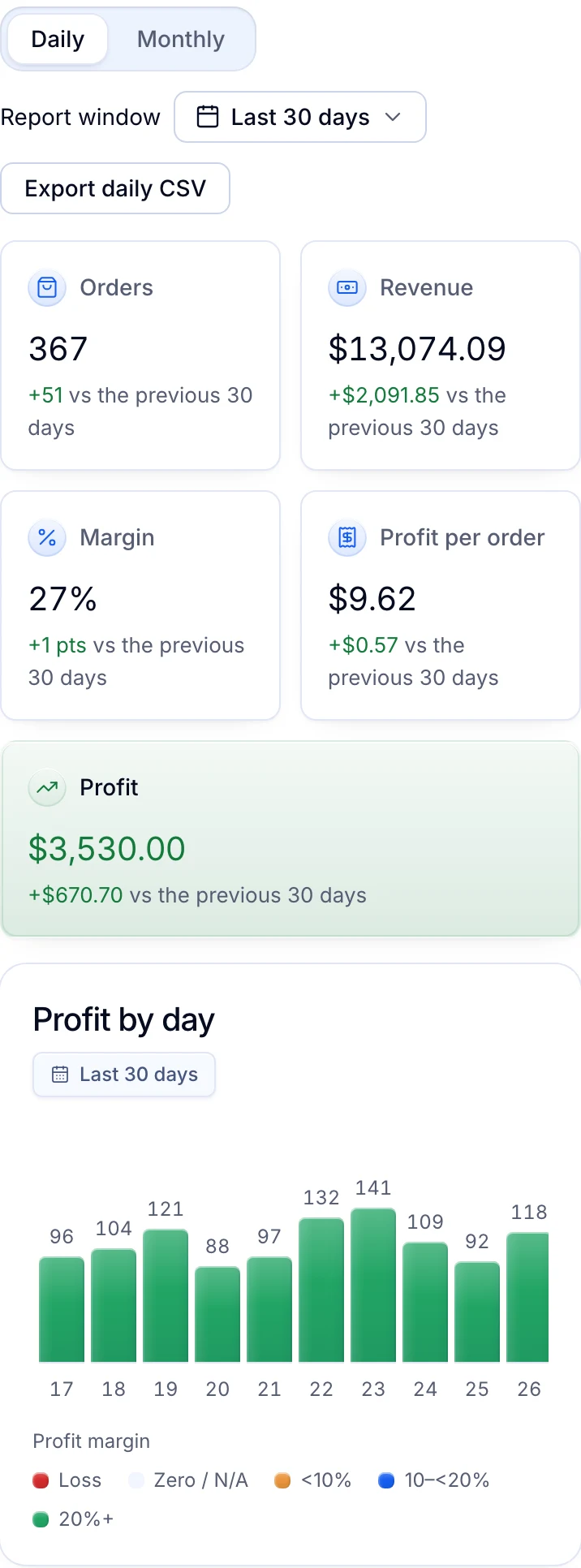
Each order’s profit is the buyer’s payment less eBay’s fees, ad charges and the item cost you recorded. Your own expenses come off the totals, and the daily view exports as CSV.
Written by the Productivo team. Source review: eBay’s selling tools overview, Seller Hub help, Seller Hub tour, October 2024 tools update, listing tools, bulk listing tools, eBay Labels carriers, general campaign strategy, Discounts Manager, Team access help and page, third-party providers and User Agreement, and eBay Developers’ authorization guide, Sign in with eBay and token revocation help, checked 24 October 2026.
Other tools’ facts come from their own pages, read 24 October 2026: 3Dsellers pricing, Vendoo pricing, List Perfectly pricing, Price Spectre, Pirate Ship for eBay, ShipStation pricing, Link My Books pricing and A2X for eBay, with Google’s Chrome help on extension permissions and managing extensions. The tool stacks in step 4 are made up.