
How-to guide · Beginner · 8 steps · Updated 24 October 2026
eBay shipping labels: how to buy, print and ship an order
eBay shipping labels are prepaid USPS, UPS and FedEx labels you buy from the order in Seller Hub, My eBay or the eBay app. You enter the packed weight and size, choose a service, and print the label or take a QR code to the drop-off point. eBay adds the tracking number to the order for you.
New to selling? Start with how to sell on eBay.
Steps 1 to 8 work without Productivo. The last part shows how Productivo, the app behind this guide, can help.
Before you start
In shortThese steps fit any item you pack and send yourself from the US, with eBay Labels.
Who it is for
LevelBeginner
WholesaleEasy
Every step works as written. Step 7 saves the most time once you ship many orders a day.
ResellingEasy
Every step works as written. Odd sizes make step 1 matter more, so weigh and measure each find.
HandmadeEasy
Every step works as written. Fragile items need padding, so step 1’s size rules count.
Wholesale dropshippingHard
Your supplier packs and buys the labels, so most steps are theirs. You add its tracking to the order, as step 5 shows.
- You finish with
- A label bought at the right price and printed at the right size, a parcel handed over on time, and unused labels refunded.
- You need
- An eBay order waiting to ship
- A scale and a tape measure
- A home printer, a 4 x 6 label printer, or just your phone for a QR code
- eBay funds or a payment method on file
How to buy and print eBay shipping labels in 8 steps
Steps 1 and 2 decide the price. Steps 3 to 5 buy, print and send the label. Steps 6 to 8 cover a label you do not need, many orders at once and buyers abroad.
Step 1 of 8: Weigh and measure the packed parcel
In shortWeigh the item in its box, measure the box, and round every number up.
A label’s price depends on the service, the distance and the parcel. So eBay asks for the packed weight: the item with its box, filler and tape. It also asks for the box’s length, width and height.
eBay’s packaging page says to round every number up to the next whole one. A carrier can measure your parcel again. If it finds more than you typed, eBay charges you the difference later. That is a shipping label price adjustment. Never round down to get a cheaper label.
- WeightUnder 1 lb, USPS Ground Advantage prices in steps of 4, 8, 12 and 15.999 oz. From 1 lb, it charges by the pound, rounded up.
- SizeOver 1 cubic foot (1,728 cubic inches), USPS charges by size when that is more. It divides length × width × height by 139 to get a weight in pounds.
- Length and bulkUSPS adds a fee to boxes longer than 22 inches, a bigger one over 30 inches, and another over 2 cubic feet.
- Odd shapesTubes, cans, wooden boxes and items without a box are irregular packages. Tick Irregular package on the label page, so the price includes the carrier’s extra charge.
One mug, packed three ways
A made-up mug. USPS Ground Advantage Commercial prices to zone 5 (up to 1,000 miles), in effect since 4 October 2026.Box and packed weight Priced as Label 8 × 6 × 6 in, 1 lb 10 oz 2 lb, by weight $10.50 14 × 12 × 12 in, 1 lb 14 oz 15 lb, by size $22.90 8 × 6 × 6 in, typed as 1 lb 1 lb paid, 2 lb measured $9.29 + $1.21 later The big box is over 1 cubic foot, so USPS prices it by size. 2,016 cubic inches ÷ 139 = 14.5 lb, rounded up to 15 lb. It costs $12.40 more for the same mug. Use the smallest box that protects the item. Rounding down saves nothing: the $1.21 comes back as an adjustment.
eBay Labels costs less than these prices to most ZIP codes. Since 18 October 2026, USPS also prices Ground Advantage by the buyer’s ZIP code. So two parcels to the same zone can cost different amounts. eBay shows the exact price before you pay. To check a box first, use the free eBay shipping calculator.
Result: The packed weight and the box size, rounded up and written down.
Step 2 of 8: Choose the carrier and service
In shortChoose the cheapest service that still arrives by the date the buyer saw.
eBay Labels sells USPS, UPS and FedEx labels. There is no subscription, and tracking is free. eBay says its label rates average 33% off retail rates. That figure comes from its own comparison of March 2024.
Which service to check first
Start from your parcel. Speeds and limits as eBay’s carrier pages give them.Your parcel Check first How fast Cards, coins or stamps up to 3 oz, sold for $20 or less eBay standard envelope Not listed. Limited tracking Up to 1 lb USPS Ground Advantage 2–5 business days Books and other media USPS Media Mail 2–8 days 1 to 10 lb, to a home FedEx Ground Economy 2–7 business days Small and light, not urgent, 48 states UPS Ground Saver 2–7 business days A close delivery date USPS Priority Mail, with free Flat Rate boxes 1–3 business days A close date, up to 50 lb, 48 states FedEx 2Day One Rate, one price in every zone Second business day Over 70 lb, up to 150 lb UPS Ground or FedEx Ground 1–5 business days The eBay standard envelope takes flat items up to ¼ inch thick, in eight categories. It costs $0.78 for 1 oz and $1.36 for 3 oz. Its tracking shows only in eBay, not on the USPS site.
Buyers saw a delivery date when they bought. Pick a service that arrives by that date, not only the cheapest one. For valuable items, the label page offers a signature at delivery and extra coverage. ShipCover insurance covers up to $15,000 per shipment.
Result: A carrier and service that arrive by the buyer’s date, at the lowest price.
Step 3 of 8: Buy the label from the order
In shortOpen the order, select Purchase shipping label, check every field, then pay.
You buy eBay shipping labels from the sold order, in one of three places. eBay fills in the buyer’s name and address for you.
- Seller HubOpen the Orders tab. Beside the item, select Purchase shipping label.
- My eBayGo to Orders and select Purchase shipping label beside the item.
- eBay appTap Selling, then Orders and the order. Tap the arrow beside Leave Feedback, then Manage shipping. The three dots hold every action.
Check the label page in this order
- Addresses. Your return address ZIP code must match where you ship from.
- Package. The weight and size from step 1. Tick Irregular package or Hazardous materials if they apply.
- Ship on. The day you will hand the parcel over.
- Service and options. A signature, extra coverage, the postage value or your own text, such as the order number. Some options cost extra.
- Format. A printable label or a QR code, and the print size. Step 4 helps you choose.
- Pay with. Then review the cost and select Purchase shipping label.
Some options appear only on the advanced page. Select Switch to advanced shipping, top right. Check the weight, size and ZIP code before you pay.
eBay takes the label’s cost from your eBay funds when you buy it. If they fall short, it charges your payment method on file, or PayPal for a USPS label.
One order in several boxes
After the first label, select Print another label for this order. Each label has its own tracking and price. An order takes at most 5 tracking numbers.
Several orders from one buyer
Select the Buyer has X orders to ship tag and the orders. Then select Shipping, Get Label and Combine orders per buyer. One box and one label cover them all.
Result: A paid label, with its tracking number already on the eBay order.
Step 4 of 8: Print the label at the right size
In shortChoose 4 x 6 for a label printer or 8 x 11 for paper, before you pay.
eBay prints labels in three sizes: 8 x 11 in (a sheet of paper), 4 x 6 in (one label) and 2 x 7 in (USPS only). Set the size before you buy, because eBay cannot change it afterwards.
Paper or a label printer
Both work for eBay shipping labels. The right one depends on how many orders you ship.Point Home printer and paper 4 x 6 thermal label printer Size to choose 8 x 11 in 4 x 6 in What you need Any inkjet or laser printer. Paper, scissors and tape, or half-sheet sticky labels (Avery’s steps). The printer and 4 x 6 sticky labels. It prints with heat, so there is no ink. Suits A few orders a week Orders every day, and labels in bulk Watch for Cut the label out and tape it flat, with no creases over the barcode A small or cut-off label means a size setting is wrong Set up a label printer once
- Open Label preferences from your My eBay Selling page. Pick your printer and how labels print.
- Set the default print format to 4 x 6 in. If a label prints wrong, eBay says to check that this default matches your labels.
- In your computer’s print window, choose the label printer and a 4 x 6 paper size. Zebra’s eBay printing steps show the same settings.
Label printed badly? Reprint it free for 7 days. Go to Shipping Labels in Seller Hub and select Download label. A single label also arrives as a PDF in the confirmation email.
Need a packing slip too? Select the three dots beside the order, then Print packing slip and more.
Result: A sharp label at the right size on the parcel, or a QR code on your phone.
Step 5 of 8: Hand the parcel over on time
In shortGet the carrier’s first scan within your handling time, because that scan makes the shipment on time.
Your handling time is the business days you take to ship after payment. A shipment is on time if the carrier scans it within that time. eBay calls it the acceptance scan. USPS holidays do not count as shipping days.
- USPSFree pickup in most ZIP codes. Book it a day ahead, by 2:00 a.m. Central time, or drop the parcel at a Post Office.
- UPSThe UPS Store, a UPS Access Point such as CVS or Michaels, or a UPS drop box. Ground Saver parcels go to UPS locations only.
- FedExFedEx Office, or a partner store such as Walgreens or Dollar General.
- eBay standard envelopeAny USPS location, or your home mailbox with the flag up. It needs no acceptance scan.
Take each parcel to its own carrier. USPS does not accept FedEx Ground Economy parcels: one dropped at USPS is not sent on, and it is seized. Avoid another carrier’s branded box too. It can be sent back to you. Reusing a box? Remove or cover every old label and barcode, or the parcel can be delayed or returned.
Five or more USPS parcels? Print a SCAN form in the bulk shipping tool. USPS then scans one sheet instead of every parcel. Step 7 shows how.
An eBay label uploads its tracking for you. Used a label bought somewhere else? In Seller Hub, select the order, then Shipping and Add tracking. The eBay tracking number guide explains the rest.
Result: The parcel scanned by the carrier within your handling time.
Step 6 of 8: Void a label you will not use
In shortCancel an unused label within 28 days; the carrier can take up to 21 days to refund it.
Bought the wrong label, or did the buyer cancel? You can cancel an unused USPS, UPS or FedEx label for 28 days after you buy it.
- Go to Shipping Labels in Seller Hub, or Manage shipping labels in My eBay.
- Find the label. In the Actions column, select Cancel Label.
- Choose your reason, then select Send request.
The carrier then approves or rejects the refund. eBay says that can take up to 21 days. If approved, the money goes back to where it came from.
The longest wait for a refund
Worked from eBay’s limits, counting from the day you buy the label.Buy the label Day 0 Last free reprint Day 7 Last day to cancel it Day 28 The carrier can take + 21 days Latest refund Day 49 Cancel the old label the day you buy a new one. Then add the new tracking number to the order as an extra tracking number.
Result: Every unused label cancelled, with its refund request in your Shipping Labels list.
Step 7 of 8: Buy and print labels in bulk
In shortSelect the orders in Seller Hub, check each one in the bulk shipping tool, and pay once.
Shipping several orders a day? Buy all their labels at once.
- In Seller Hub’s Orders tab, tick two or more orders.
- From the Shipping menu, select Purchase Shipping Labels.
- The bulk shipping tool opens. Check each order’s service, address, weight and size. Add a signature or ShipCover where you need it.
- Select Review Purchase to see the total, then Confirm and pay.
- Select Print Labels.
Seller Hub shows up to 200 orders on a page. eBay’s shipping FAQ says you can print up to 100 labels at a time. Work in batches of 100 or fewer.
- Same buyer, several ordersSelect Combine orders per buyer on the bulk page.
- Packing slipsTick the orders, then Shipping and Print packing slip and more.
- SCAN formOn a computer, open SCAN forms at the top right of the bulk shipping tool. You get one per bulk purchase.
Result: One payment, one batch of labels, and a SCAN form for the day’s USPS parcels.
Step 8 of 8: Ship abroad with eBay International Shipping
In shortWith eBay International Shipping, you send the parcel to a US hub and eBay does the rest.
eBay International Shipping is eBay’s program for buyers abroad. You ship to eBay’s hub in the US, with an eBay label, like any US order. eBay handles the customs papers, the trip abroad and returns.
- Who can use itUS sellers. eBay enrolls accounts when they are eligible and tells you by email. Check under Account Settings › Shipping Preferences, or select Enroll there.
- Which itemsItems in eligible categories, located in the US and worth up to $2,500, before taxes and delivery.
- When the sale is doneWhen the item reaches the hub. Loss or damage after that is not your fault.
- ReturnseBay refunds the buyer at no cost to you, and you keep the sale.
- Your recordLate or lost parcels abroad do not count against your seller standards. eBay removes negative or neutral feedback about the trip.
- PackingThe hub does not usually repack. Pack for the whole trip.
To keep some countries out, open Shipping Preferences and select Edit beside the excluded locations. A toggle decides whether eBay International Shipping ignores your exclusions. Check that toggle before you list.
Selling to buyers in the EU? Add your Public Business Information in My eBay. The EU’s Digital Services Act requires it, and eBay shows it to EU buyers. You can also ship abroad yourself with an eBay label. USPS international labels then need a full customs form.
Result: Your enrolment checked, your excluded countries set, and a label ready for the hub.
eBay shipping label mistakes and what each costs
In shortMost extra label costs come from a wrong number typed before you pay. Check weight, size and ZIP code first.
Mistakes and what they cost
| Mistake | What it costs |
|---|---|
| Weight or size typed too low | The carrier measures again, and eBay charges the difference later. |
| No dimensions, or a tube not declared | A USPS Dimensional Noncompliance or Nonstandard fee on top of the label. |
| A box longer than 22 inches | The USPS Nonstandard Length fee: $4.50, or $10 over 30 inches (Ground Advantage). |
| A box over 2 cubic feet | The USPS Nonstandard Volume fee: $21 (Ground Advantage). |
| Label ZIP code is not where you ship from | Extra postage. USPS may ask the buyer to pay it on delivery. |
| Old labels left on a reused box | A delayed parcel, or one sent back to you. |
| The wrong print size | A new label, because the size cannot change after purchase. Then cancel the old one. |
| Cancelling after 28 days | The whole label. The cancel window has closed. |
| A late acceptance scan | A late shipment on your record. Top Rated status needs 3% late or fewer. |
| Extras added after purchase | A charge after the label, for Saturday delivery or an address correction. |
Adjustments show up later. For USPS, open Manage shipping labels and look under Shipping Cost Adjustments. For UPS and FedEx, the Shipping Labels list shows them in the cost column.
Common questions about eBay shipping labels
How do I ship an item on eBay?
Pack and weigh it, buy the label from the order, and hand it over in time. eBay adds the tracking for you. Steps 1 to 5 walk through one order.
How do I print a shipping label on eBay?
Select Purchase shipping label beside the order in Seller Hub or My eBay. Check the weight, size and service, choose a print size, pay, and print. Step 4 covers printer settings.
Can I print an eBay shipping label without a printer?
Yes, with a QR code. Choose QR code as the label format. Show the code at a participating Post Office, The UPS Store or FedEx location, and staff print the label.
How long do I have to void an eBay shipping label?
28 days from purchase. The carrier then has up to 21 days to approve the refund. eBay standard envelope labels cannot be cancelled once printed.
Are eBay shipping labels cheaper than the post office?
For most services, yes. eBay says its rates average 33% off retail, from its own March 2024 comparison. The exact price depends on the parcel, the service and the buyer’s ZIP code.
Does eBay charge a fee on shipping labels?
Its fee counts the shipping your buyer pays, not the label you buy. eBay’s final value fee is a share of the total sale, and that total includes the shipping the buyer paid. The eBay fee calculator shows it.
Who pays for the shipping label on eBay?
You, the seller, buy the label. The buyer pays the shipping cost your listing showed, or nothing with free shipping. Return labels follow your return policy. See eBay returns for sellers.
Where do I find my eBay shipping label after I buy it?
In Shipping Labels in Seller Hub, or Manage shipping labels in My eBay. Select Download label to print it again, free for 7 days. A single label also comes as a PDF in the confirmation email.
Can I use my own shipping label on eBay?
Yes, if you add its tracking number to the order in time. Select the order, then Shipping and Add tracking, within your handling time. The eBay tracking number guide explains the rest.
What size are eBay shipping labels?
4 x 6 in for label printers, or 8 x 11 in on paper. USPS labels also come in 2 x 7 in. Choose the size before you pay.
How Productivo helps with eBay shipping labels
In shortProductivo does not buy or print labels. It counts the eBay labels you buy in each order’s costs.
Buying, printing and voiding labels stay with eBay Labels. In Productivo’s Orders, each sale lists any eBay label you bought for it. Productivo reads it from eBay once a day and counts it in that order’s profit.
Profit per order, after eBay labels
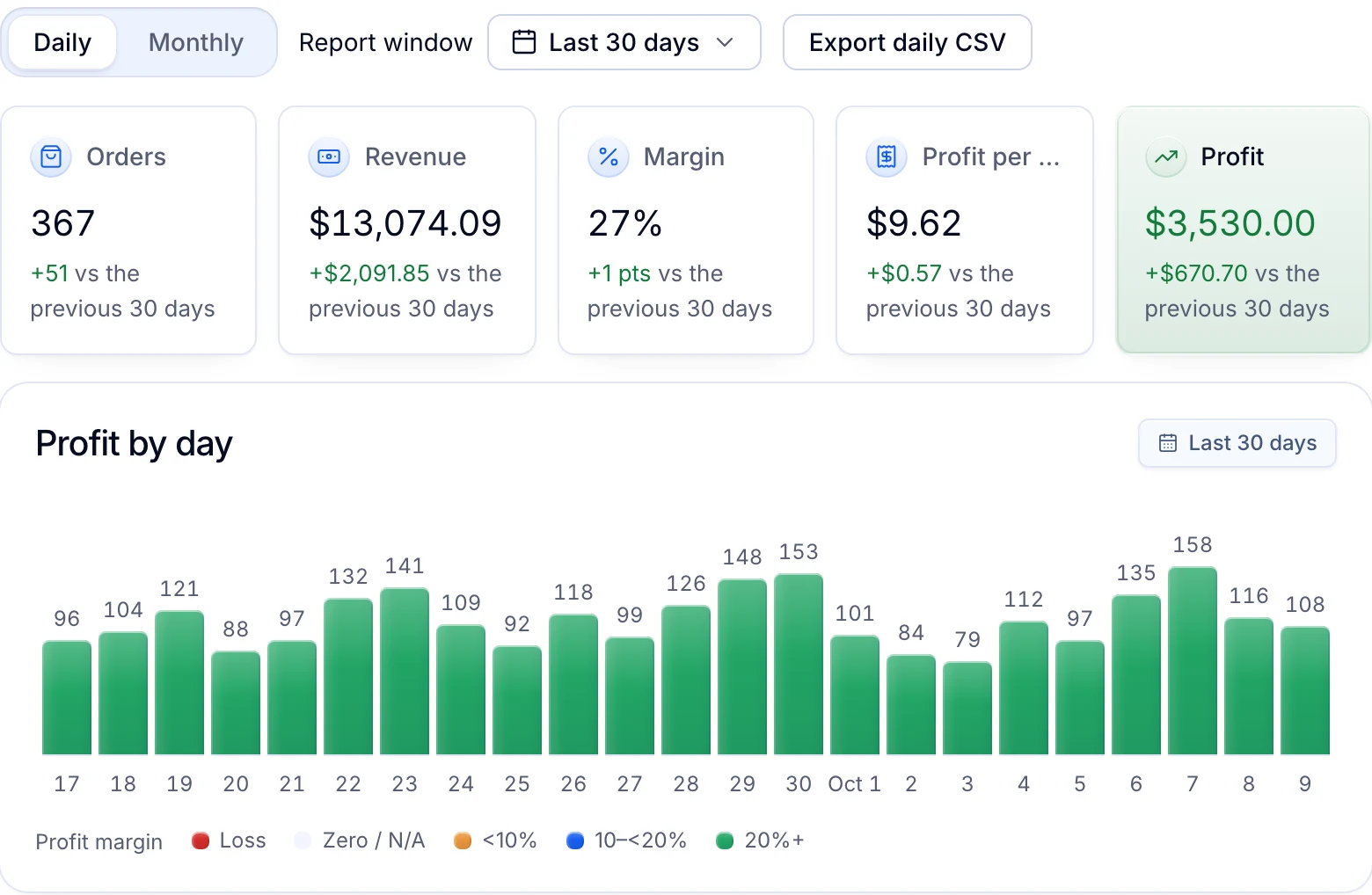
Reports show orders, revenue, margin and profit for a period, with profit by day. Each order’s profit already has the eBay labels bought for it taken off.
Written by the Productivo team. Source review: eBay’s printing and canceling shipping labels, Ship with eBay and selling fees help pages, and its Seller Center pages on shipping FAQs, choosing a carrier, USPS, UPS and FedEx labels, the eBay standard envelope, packaging and measuring, calculated shipping rates and eBay International Shipping; USPS Notice 123 and DMM 283; and the eBay printing steps of Zebra and Avery, checked 24 October 2026. The mug and its boxes are made up.