
How-to guide · Beginner · 5 steps · Updated 18 October 2026
eBay sold listings: how to see what items sold for
eBay sold listings show what buyers paid for an item in about the last 90 days. To see them, sign in to eBay, search for the item and tick Sold items in the filters. This guide shows how on a computer and in the eBay app. You end with a price range for your own item, based on real sales.
Only need the filter? Go to step 2. Want to set a price? Step 5 turns sold prices into your own.
Steps 1 to 5 use only eBay’s own tools. The last part shows how Productivo, the app behind this guide, can help. You do not need a Productivo account for the steps.
Before you start
In shortCheck that this guide fits your business, then get the three things you need.
Who it is for
LevelBeginner
WholesaleEasy
New stock has a brand and model, so finding the same item sold is quick.
ResellingEasy
Sold prices are the usual way to price used items. Steps 3 and 5 cover condition.
HandmadeMedium
No one sold your exact item. In step 5, compare similar items in size, material and quality.
Wholesale dropshippingEasy
The steps work the same. Check sold prices before you add a supplier’s item.
Do you plan to buy each item from another shop after it sells and ship it straight to the buyer? eBay’s dropshipping policy does not allow that. The eBay dropshipping policy guide explains what is allowed.
- You finish with
- A short list of real sales of your item, with dates, and a price range to start from.
- You need
- A free eBay account. eBay asks you to sign in before it shows sold results.
- The exact item: brand, model, condition and what comes with it
- A computer or the eBay app, and about 15 minutes
How to see sold items on eBay, step by step
Steps 1 to 4 show you how to search eBay sold listings. Step 5 turns them into a price. Tick each step when you finish it. Your ticks stay in this browser.
Step 1 of 5: Sign in and search for your exact item
In shortSign in to eBay, then search with the brand, model and key details of your item.
eBay now asks you to sign in before it shows sold results. Any free eBay account works, buyer or seller. On 17 October 2026, we opened a sold search without signing in. eBay showed its sign-in page instead of the results. A normal search still worked.
Then type your item into the search box. Use the words a buyer would use:
- Brand and modelThe maker’s name and the model number.
- Key detailsSize, color or capacity, if they change the price.
- What comes with itA set, a two-pack, or extras like a stand or cable.
Search for the exact item, not the general type. “Milk frother” finds hundreds of different items. A brand and model finds yours.
This guide’s example searches for
Practice MF-01 milk frother. The item is made up, so eBay will not find it. Search for your own item.No item in mind yet? The guide to best selling items on eBay shows how to find ideas first.
Result: A search for your exact item, while signed in to eBay.
Step 2 of 5: Turn on the Sold items filter
In shortTick Sold items in the filters, on a computer or in the app, so only sold listings show.
On a computer
- Search for your item.
- Look at the filters on the left of the results. Find Show only.
- Tick Sold items. Not in the list? Select see all under it.
Where to tick Sold items
The filters sit on the left of the search results.
Search: Practice MF-01 milk frother
Show only
- Free returns (not ticked)
- Returns accepted (not ticked)
- Completed items (not ticked)
- Sold items (ticked)
A drawing, not eBay’s screen. The item is made up.
Next to it is Completed items. It shows every listing that ended, whether it sold or not. Tick Sold items when you want to know what buyers paid.
Sold items or Completed items?
Both look back about 90 days. Only Sold items shows sales alone.Filter What you see Use it Sold items Only listings that sold, each with the date it sold To see what buyers paid Completed items Every listing that ended, sold or not To see which asking prices did not sell In the eBay app
- Check that you are signed in to the app.
- Search for your item.
- Tap Filter at the top right of the results.
- Scroll down the list and turn on Sold items.
- Go back to the results.
These are the steps an eBay Community mentor gives. eBay’s help pages do not list them. Cannot find the filter? Update the app, sign in again and look once more.
Result: Sold results for your item from about the last 90 days.
Step 3 of 5: Narrow the results to your item
In shortUse the condition, format and location filters, or Advanced Search, until only your exact item is left.
Sold results often mix different items. Narrow them with the other filters on the page:
- ConditionPick the one that matches yours, like New or Used.
- Buying FormatPick Auction or Buy It Now (a fixed price) if you plan to sell one way.
- Item LocationUS Only keeps items located in the US. Use it if you ship from the US.
- Brand and sizeThese filters use the item details that sellers fill in. They keep listings of your model, whatever the title says. Sellers who skipped a detail drop out, so check how many results are left.
Then sort the results. eBay starts with Best Match. eBay’s help says it weighs your browsing history and where the item is. So the top sales are not always the newest. In the Sort menu, Price + Shipping: lowest first puts the cheapest sales at the top. A time sort puts the newest sales first.
Too few results left? Remove one filter or one search word at a time, and search again.
How to find sold items with Advanced Search
Advanced Search sets everything in one form. It works on a computer, not in the app.
- Select Advanced next to the search bar.
- Type your keywords. Use Exclude words from your search for words like
brokenorparts. - Model number written two ways? Choose Any words, any order and type both, like
MF-01MF01. For words that must stay together, choose Exact words, exact order. - Under Search Including, tick Sold items.
- Set the Condition, price and item location you want.
- Want one seller’s sales only? Under Sellers, choose Specific sellers and type their user ID.
- Select Search.
Check every title and photo before you trust a result. eBay may add related results. These only partly match your search. eBay adds them most when few items match.
Result: Sold results for your exact item only, in the order you want.
Step 4 of 5: Read each sold result
In shortFor each result, note the sold date, the price plus shipping, the condition and how it sold.
Each sold result shows the date it sold. Sold prices are often shown in green. The date is the surer sign.
Three sold results, and what each one tells you
Made-up results for the same new item.
Sold Oct 10, 2026
Practice MF-01 milk frother with stand and USB-C cable
New
$45.00
+$5.00 shipping
Buy It Now
The buyer paid $50.00 with shipping.
Sold Oct 5, 2026
Practice MF-01 milk frother with stand and USB-C cable
New
$41.00
+$5.00 shipping
Auction, 7 bids
An auction. Bids took it to $41.00, so $46.00 with shipping.
Sold Oct 2, 2026
Practice MF-01 milk frother with stand and USB-C cable
New
Crossed out: $52.00Best Offer acceptedFree shipping
The crossed-out price is the old asking price. The buyer paid less. eBay does not show how much.
A drawing, not eBay’s screen. eBay’s own layout and colors differ and change over time.
For each result, check:
- The sold dateSales from the last few weeks tell you more than sales from two months ago.
- Price and shippingAdd them up. The total is what the buyer paid, before sales tax. eBay may call the shipping cost “delivery”.
- The conditionOpen the result. Check the photos and what came with the item.
- How it soldAn auction shows its number of bids. An auction with only one or two bids may have ended low.
Open a few sold listings that match yours. Note their titles, photos and item details. The eBay listing checklist shows how to write your own listing.
A crossed-out price is not what the buyer paid. It usually means the seller accepted a Best Offer, a lower price the buyer offered. The crossed-out number is the old asking price. Search does not show the real price. eBay lists it as extra data in Product Research, which shows the real price even when a Best Offer was accepted. Some Best Offer sales show no line at all. So treat a price far above the others with care.
Result: For each sold result: its date, its total with shipping, its condition and how it sold.
Step 5 of 5: Turn eBay sold prices into your own price
In shortKeep only sales of the same item, add shipping, then start from the middle of the totals.
Now turn the results into a price. Use only sales that match your item:
- Same itemThe same brand, model and size.
- Same conditionNew with new. Used with used in a similar state.
- Same packOne unit with one unit, and the same extras.
Leave out Best Offer sales with a crossed-out price. Their real price is hidden. Add the shipping to every price you keep. Then compare the totals. Write down each sale you keep, with its date, total and link.
Seven made-up sold results
The search found these for the new MF-01 set with stand and cable. Each total adds shipping to the price.Sold result Total Use it? Oct 10: New, with stand and cable, Buy It Now $45.00 + $5.00 = $50.00 Yes Oct 8: New, with stand and cable, Buy It Now $49.00, free shipping Yes Oct 5: New, with stand and cable, Auction, 7 bids $41.00 + $5.00 = $46.00 Yes Oct 2: New, with stand and cable, Best Offer accepted $52.00, free shipping No. The $52 is crossed out. The buyer paid less, and eBay does not show how much. Sep 28: Used, no stand, Buy It Now $24.00 + $5.00 = $29.00 No. Used and without the stand, so it is a different item. Sep 20: New, two-pack, Buy It Now $88.00, free shipping No. A two-pack does not show the price of one. Sep 14: New, with stand and cable, Buy It Now $47.00 + $5.00 = $52.00 Yes Four sales match. Put their totals in order and find the middle. Start from the middle of what sold, not the highest sale.
The price range from the kept sales
Made-up totals with shipping, before sales tax.From the kept sales Total Lowest total $46.00 Highest total $52.00 Middle total: half sold for less, half for more $49.50 In the example, start near $49.50 with shipping. A price above the highest sale needs a reason, like better condition or faster delivery time.
Good signs
- Several sales in the last few weeks
- Sales from more than one seller
- Totals close together
Weak signs
- Only one or two sales
- All the sales two months ago
- Totals far apart
Weak signs? Treat the range as a rough guide, and check again in a few weeks.
Check what did not sell
eBay sold listings show only the listings that sold. So search again with Completed items ticked instead of Sold items. Listings in that search but not in the sold one ended without a sale.
What sold, and what did not
Made-up listings of the same new set that ended in the last 90 days.Listings of the same set Count or price Ended, in the Completed items search 9 Sold, in the Sold items search 5 Ended without a sale 4 Asking prices that did not sell, with shipping $56.00 to $64.00 In the example, 5 of 9 listings of the same set sold. The 4 that did not sell asked $56.00 or more with shipping. So the highest sale, $52.00, is close to where buyers stopped.
Compare that share with similar items, because eBay gives no good or bad rate. It is a rough check. A listing that sold many units still counts once.
Listing it on eBay? For some items, eBay suggests a price while you create the listing. eBay bases it on similar items that sold recently. Compare it with the matching sales you found in eBay sold listings. Your list shows which sales were really the same item.
Next, check what you keep at that price. eBay’s fees take a share of every sale. Work them out with the eBay fee calculator guide. For the whole decision, with costs, supply and a small test, follow the eBay product research guide.
Result: A price range from real sales of your exact item, and the date you checked it.
What eBay sold listings can and cannot tell you
In shortSold listings show recent prices, but they hide Best Offer prices and older sales.
eBay sold listings are free and quick. But they have limits:
- About 90 days onlyeBay search shows sales from about the last 90 days. A seasonal item may look slower or busier than it is over a year.
- No Best Offer pricesWhen a seller accepted an offer, you do not see what the buyer paid.
- Not one result per saleA listing that sold many units may show up once.
- Extra resultseBay may add related items, mostly when few items match.
- Sign-in neededWithout an eBay account, you cannot see sold results.
Need more? Sellers can use eBay’s Product Research tool (formerly Terapeak). It is in the Research tab of Seller Hub, eBay’s dashboard for sellers, and in the eBay app. It shows up to 3 years of sales. It also shows the real price when a seller accepted a Best Offer.
Selling sports cards? eBay gives card prices based on the last 2 years of market data. Open them with Scan cards in the eBay app, or with My Collection on a computer.
Two free ways to see what sold
| Compare | Product Research | Sold items filter |
|---|---|---|
| Where | Seller Hub › Research, or the Selling tab in the eBay app | eBay search, signed in, with Sold items ticked |
| Sales history | Up to 3 years | About the last 90 days |
| Best Offer sales | The price the buyer paid | Not the accepted price |
| Averages and trends | Worked out for you | You count the sales yourself |
Past sales show what buyers paid. They do not promise that your listing will sell at that price.
Common questions about eBay sold listings
How do I see sold items on eBay?
Sign in, search for the item, then tick Sold items in the filters. On a computer, it is under Show only on the left. In the app, tap Filter and turn on Sold items. Step 2 shows both.
Can you see sold listings in the eBay app?
Yes. Search for the item and tap Filter. Scroll down and turn on Sold items. Make sure you are signed in to the app first.
How far back can you see sold items on eBay?
About 90 days. For older sales, sellers can use eBay’s Product Research in Seller Hub. It goes back up to 3 years.
Why can’t I see the sold price on eBay?
Most often, the seller accepted a Best Offer. Then the price shown is the old asking price, often crossed out. eBay search does not show the accepted offer. Product Research shows the actual sold price. Also check that you are signed in. Signed out, eBay shows no sold results at all.
Why is eBay no longer showing sold items?
Most often, you are not signed in. Since at least 17 October 2026, eBay sold listings open only after you sign in. In the app, update it, sign in again and look under Filter. Check that Sold items is on, not only Completed items. Sales older than about 90 days drop out too.
What is the difference between sold and completed listings?
Sold items shows only listings that sold. Completed items shows every listing that ended, sold or not. Use Sold items to see what buyers paid. Use Completed items to see which asking prices did not sell.
Can I see eBay sold listings without an account?
No, not any more. On 17 October 2026, eBay sent signed-out visitors to its sign-in page instead of sold results. Any free eBay account works.
How do I see a seller’s sold items on eBay?
Use Advanced Search. Tick Sold items. Under Sellers, choose Specific sellers and type the seller’s user ID. Like every sold search, it shows about the last 90 days. The free eBay seller lookup opens that search from a username.
How do I see my own sold items on eBay?
Open the Orders tab in Seller Hub. eBay’s Seller Hub help says you can review your past orders there. Seller Hub opens once you have made at least one sale.
How do I find recently sold items on eBay?
Tick Sold items, then look at the sold dates. Sort by time to bring the newest sales to the top. The newest one shows what the item last sold for. Sales from the last few weeks are closest to today’s prices.
How do I find eBay sold prices for free?
Use the Sold items filter in eBay search. It is free with any eBay account. Sellers can also use Product Research in Seller Hub. It adds averages and real Best Offer prices.
How Productivo helps with eBay sold listings
In shortProduct Scanner reads many eBay listings and their sold counts at once, but you still check dates and matches.
Everything above works with eBay’s own tools. This part is about Productivo, the app behind this guide.
Where Productivo fits in the steps
| Guide step | What Productivo does |
|---|---|
| Steps 1 to 3 | Product Scanner reads eBay US search results for a keyword or up to five categories, many listings at once. You choose how many pages it reads. |
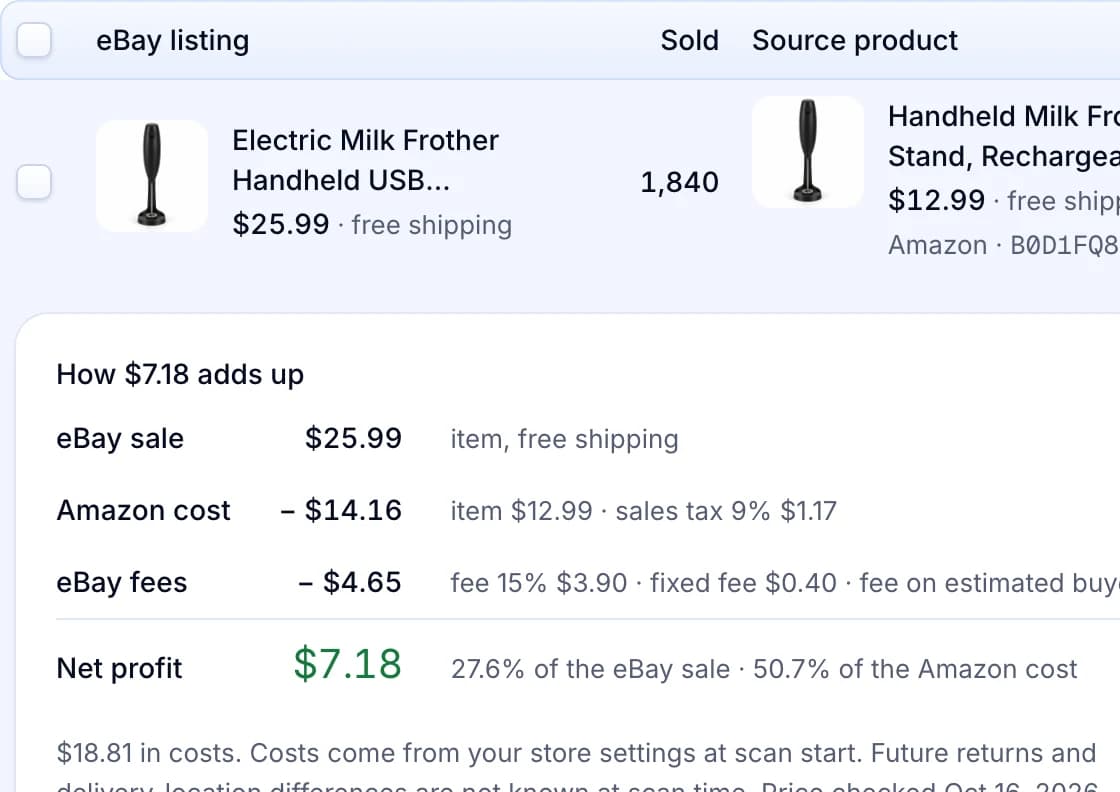
| Step 4 | It shows each listing’s price, shipping and sold count. That count is every sale of the listing since it started, not the last 90 days. Check the dates with the Sold items filter. |
| Step 5 | It finds a matching supplier offer and estimates the profit per item from your store’s cost settings. Unknown supplier shipping is shown as unknown and left out. After you list, competitor pricing follows the cheapest matching active listing and stops at your minimum. |
Product Scanner is part of the Pro and Scale plans. Competitor pricing comes with every plan. Product Scanner reads what eBay’s search pages show. So it cannot see accepted Best Offer prices either. Read more about Productivo’s eBay product research tools.
Each eBay listing with its sold count
A scan result shows the eBay listing, its sold count and a matching supplier offer. Open the costs to see how the estimated profit adds up.
Productivo by business model
Pick how you sell. Each part names the steps where Productivo helps that kind of seller, and what you still do yourself.
In shortType your price for each wholesale item into the form or CSV, and Productivo keeps that price.
| Stage | What Productivo does |
|---|---|
| Step 5 | Type your price in the product form, or in the price column of the CSV template. Items you add by hand or by CSV keep that price and are never repriced. |
| Adding the item | Price a whole supplier sheet at once: one CSV file holds up to 1,000 products. The preview lists every row error before anything is saved. |
| After the sale | In Orders, each sale’s Money section shows what the buyer paid and the fees eBay billed. Check them against the sold prices you started from. |
What it does not do: Competitor pricing works on Amazon products only, so Productivo never moves your price to match other sellers. Importing a sheet again adds only new SKUs, and you change a live listing’s price on eBay. Product Scanner’s profit uses Amazon prices, not your supplier’s.
In shortProductivo lists each find with the condition and details you matched, and shows which ones have not sold.
| Stage | What Productivo does |
|---|---|
| Step 3 | When you add the item, its Condition list is the one eBay gives your store for that category. Pick the condition you filtered by, and describe any wear in the Condition description. |
| Step 4 | The form also asks for the category’s item specifics, such as brand or size. Fill them in from the matching sales you opened. |
| If it does not sell | Reports › Orders lists your Listings with no orders, oldest first. Run the sold search again before you lower the price on eBay. |
What it does not do: Productivo does not read sold results or price used items for you. Product Scanner reads only new Buy It Now listings, and competitor pricing does not work for items you add yourself.
In shortPrice your piece from similar sold items, and Productivo lists it at that price without repricing it.
| Stage | What Productivo does |
|---|---|
| Step 5 | Type the price you chose into the Create product form’s Price field. Productivo lists the piece at that fixed price and never reprices it. |
| After you list | On Pro and Scale, the Listing Optimizer flags a listing that buyers open but rarely buy. It tells you to check the offer, delivery and competitor prices. |
| After the sale | The order shows what the buyer really paid and eBay’s fees. Compare that with the sold prices you used. |
What it does not do: Competitor pricing works on Amazon products only, so it never follows other sellers’ prices for your work. After a piece goes live, you change its price on eBay.
In shortPrice a dropshipping supplier’s item from matching sales, and Productivo lists it at that fixed price.
| Stage | What Productivo does |
|---|---|
| Step 3 | Productivo lists every item at a fixed price, so filter to Buy It Now. Your listings ship from the Store address in Settings › Store, so pick the Item Location that matches your supplier’s warehouse. |
| Step 4 | Note the item specifics of the sales that match. When you add the item by hand, the form asks for the specifics and conditions its eBay category needs. |
| Step 5 | Type your price in the product form or the price column of the CSV template. Items you add yourself keep it: repricing and competitor pricing never touch them. |
What it does not do: Productivo does not look up sold prices for your supplier’s items. Product Scanner shows sold counts only for eBay items it can match to an offer in a shop such as Amazon. Once an item is live, you change its price on eBay.
Written by the Productivo team. Source review: eBay’s Product Research help and FAQ, pricing your items (price suggestions and card prices), how to use search (filters and Best Match), Advanced Search help, the Advanced Search form, Seller Hub help, a search results page and its filters, a sold search opened signed out (it showed eBay’s sign-in page) and the dropshipping policy. Also eBay Community answers on the Sold items filter in the app, crossed-out sold prices and listings that sold many units. All checked 18 October 2026. The example item and its sales are made up.