
How-to guide · Beginner · 7 steps · Updated 18 October 2026
Best selling items on eBay: how to find them yourself
The best selling items on eBay change from week to week, so a fixed list is soon out of date. This guide shows you how to find them yourself with eBay’s free tools. You end with a short list of items that sell now, fit your business and leave you money.
Looking for a list of popular items to sell on eBay? See what eBay itself says first. Ready to search? Start with step 1.
Steps 1 to 7 use only eBay’s own tools. The last part shows how Productivo, the app behind this guide, can help. You do not need a Productivo account for the steps.
Before you start
In shortCheck that this guide fits your business, then pick a broad area to search.
Who it is for
LevelBeginner
WholesaleEasy
You can buy more of an item that sells well, so the steps point straight at what to stock.
ResellingMedium
You can hunt for these items second-hand, but compare only sales in the same condition.
HandmadeHard
You make what you sell, so use the steps to find the styles and categories buyers want.
Wholesale dropshippingMedium
Your supplier may serve many sellers, so check the competition in step 7 with extra care.
Plan to buy each sold item from another shop and ship it straight to the buyer? eBay does not allow that. Our guide to the eBay dropshipping policy explains what is allowed.
- You finish with
- A short list of three to five items that sell now. Each has its sales, its number of sellers, any traps and the money left.
- You need
- An eBay seller account, for Product Research in Seller Hub. No seller account yet? Step 3 works without one.
- A broad area to search: a category, a type of item or a brand you know
- Where you could get stock, or a rough cost per item
- A notebook or sheet, and about one hour
Is there a list of best selling items on eBay?
In shorteBay names broad popular categories, not current items, so use them only as a place to start.
Many websites publish lists of the top selling items on eBay. Most are not from eBay. Check where their numbers come from, and how old they are.
We read eBay’s own pages on 18 October 2026. The closest to a list of best selling items on eBay is eBay’s own guide to high-demand items for 2026. It names categories and types of items, not exact items with sales numbers.
What eBay’s own pages say is popular
| What eBay names | Source, and what it measures |
|---|---|
| Vehicles and parts, trading cards, pre-loved fashion | Seller Center: What to sell. Popular categories, with selling tips. The page shows no date. |
| Electronics, fashion, auto parts and accessories, health and beauty, home and garden, toys and hobbies | eBay’s guide to high-demand items for 2026. Categories and types of items to consider, with selling tips. Its sources were checked in October 2025. Its category shares come from another company’s data, not eBay’s. |
| Everyday fashion, footwear, home and media. Collectibles are growing. | 2026 Recommerce Report. A survey of second-hand shoppers in 10 countries, July 2026. It covers all second-hand shopping, not only eBay. |
| Collectibles & Memorabilia (31%), Electronics & Computers (27%), Books, Movies & Music (24%) | 2026 Recommerce Report. A survey of eBay sellers in 7 countries, July and August 2026. It shows where sellers sell, not what sells best. |
| Discounted items in deal categories, such as tech, fashion, home and garden | eBay Deals: Trending deals. Items on sale now, with prices and discounts. It does not show how many sold or how items are picked. |
Why a list of the hottest selling items goes out of date
- Demand moves with the seasons, the news and new models.
- A popular list sends many sellers to the same items. Prices can then drop.
- A list names a type of item, not the exact model, condition and price that sold.
- It does not say how much money you would have left.
- It may include brands whose owners report listings to eBay. Step 6 shows how to check.
So use eBay’s categories as a place to start. Then check what sells this week with the steps below.
How to find what sells best on eBay this week
These steps find the best selling items on eBay in your own area. Start wide, then narrow to a few items you can really sell. Step 2 needs an eBay Store. Skip it if you have none.
Step 1 of 7: Search a broad term in Product Research
In shortSearch a category or broad term over 90 days, then note how many sold and how many sellers share them.
Product Research (formerly Terapeak) is eBay’s free sales tool for sellers. Open it from the Research tab in Seller Hub, or in the eBay app. It covers up to three years of eBay sales.
Search wide, then narrow
- Type a broad term, such as a type of item or a brand you know.
- Pick a category. Then select Apply to see more filters, such as condition.
- Set the dates to the last 90 days. Then try 30 days. Is the item selling faster or slower now?
- Open the sold listings that come up again and again. Check that they are the same item.
For each item, write down how many sold and how many sellers sold it. Product Research shows both. It also shows the sales trend over time.
For 90 days or less, it shows a sell-through rate too. That compares the items sold with the listings in your search. A low rate means many listings are still waiting for buyers.
Read sales with the number of sellers
Three made-up searches over 90 days. The numbers are for practice, not real eBay sales.Made-up search Sold Sellers Sold per seller Practice item A 600 120 5 Practice item B 180 9 20 Practice item C 400 1 400 Item A sells the most, but each seller gets about 5 sales. Item B sells less, yet each seller gets about 20. Item C has one seller only. A big total shared by many sellers can still mean few sales for you.
Want to learn the whole tool? The Terapeak guide covers every filter and figure.
Result: A first list of items that sold in the last 90 days, each with its sales and number of sellers.
Step 2 of 7: Find busy categories in Sourcing Insights
In shortWith a Basic Store or higher, look for categories that eBay marks “Great Opportunity”.
Sourcing Insights sits next to Product Research in the Research tab. It comes free with a Basic Store subscription or higher. An eBay Store is a paid plan for business sellers.
To see data for a category, you need $500 or more in sales in that category. So it works best in categories you already sell in.
Look for categories marked Great Opportunity. eBay uses this mark when many buyers search but there are not enough listings. Many searches with few listings is a better sign than high sales alone.
Sourcing Insights also shows trends over time. It shows which item specifics (details like brand, size or color) are seen and clicked the most.
Result: Two or three categories with many searches and few listings, or a note that you skipped this step.
Step 3 of 7: Check sold items in eBay search
In shortSearch eBay, tick Sold items, and see what sold lately and at what price.
This check is free and works for any item on your list.
Check one item
- Sign in to eBay and search for the item.
- In the filters, tick Sold items.
- Look at the dates. Count the sales in the last few weeks.
- Look at the sellers. Note if the sales come from one seller or from many.
Sold items shows about the last 90 days. It does not show the price of an accepted Best Offer. eBay search has no sort by number sold, so it cannot put the most sold items on eBay first. You count the sales yourself. Count recent sales, not the number of results on the page.
The guide on how to read eBay sold listings shows each filter in detail.
Result: For each item: sales in the last few weeks, and from one seller or many.
Step 4 of 7: Learn from other sellers’ sold items
In shortOpen the stores of sellers who sell your item well, and learn from them without copying.
eBay seller research means learning from sellers who already sell well. eBay’s research tools are built to show what your competitors are doing. In your results, open a sold listing. Then open the seller’s store and their feedback.
Look at:
- What else they sellOther items in the same category may sell well too.
- Their price and shippingCompare the total a buyer pays with what you could offer.
- Their photos and item specificsSee what details buyers get. Note what is missing, such as measurements or clear photos. That gap can be your reason to win.
- Their feedbackRead what buyers say about the item and the delivery.
See one seller’s sold items
- Open eBay’s Advanced search.
- Under Search Including, tick Sold items.
- Under Only show items from, choose Specific sellers. Enter the seller’s user ID.
Or type the user ID into the free eBay seller lookup. It opens their items for sale, sold items and feedback.
Learn what sells from other sellers. Never copy their photos or words.
Result: Notes on two or three sellers: what they sell, their prices and what buyers say.
Step 5 of 7: Check the same months last year
In shortCompare the same months last year to see if an item sells all year or in one season.
Product Research goes back three years. Set the dates to the same weeks last year. Did the item sell then too?
Then look at the sales trend over a full year. Some items sell all year. Others sell well only before a holiday or in one season. A steady trend is safer than one tall spike.
With a Store, Sourcing Insights also shows trends over time. eBay says it helps you get ready for seasonal demand.
Events move demand too. eBay’s guide to high-demand items points to gift seasons such as Christmas and Mother’s Day. It also says new films can lift sales of toys and collectibles. Check last year’s sales around the same event.
Result: For each item: it sells all year, or only in some months (and which ones).
Step 6 of 7: Sort the good signs from the traps
In shortDrop items whose sales rest on one seller or one week, that you may not sell, or that buyers return.
Good signs
- Sales in most weeks of the last 90 days
- Sales from several sellers
- Sales at the same time last year
- A sold price that leaves you money
Weak signs
- One seller’s huge sold count, with no dates
- A brand or item you are not allowed to sell
- Many returns or complaints
- A price from one busy week
How to spot each trap
- One seller’s huge countA big “sold” number on one listing does not say when those sales happened. Check recent sales and their dates.
- Many returnsRead the feedback on sold listings. Look for words like “wrong size”, “broken” or “not as described”. eBay’s guide says clothes carry a higher return risk because of fit and size. Exact measurements help.
- One busy weekLook at the sales trend. If most sales came in one week, that price may not last.
- Many watchers, few salesAn active listing can show how many people watch it. Watchers are not buyers. A seller can send offers to the 30 most recent ones, so many may be waiting for a lower price. Count sales, not watchers.
One clear trap is enough to drop an item. Write down the reason, so you do not check it again next week.
Result: Your short list without traps. Each item you dropped has a reason.
Step 7 of 7: Turn a best seller into your item
In shortFind your reason to win the sale, work out money left, then run the full check before you buy.
The best selling items on eBay usually have many sellers. Buyers need a reason to pick you. For example:
- A lower cost from your supplier, so you can match the price and still keep money
- Faster delivery, or free shipping
- A version others do not have: a bundle, a color or a better condition
Then work out your money left per item. That is the sold price minus the item’s cost, shipping and eBay fees. The eBay fee calculator guide shows how. If little is left at today’s sold price, pass on the item.
Two kinds of best sellers can leave less than they seem. A cheap item can sell many times and still leave little after fees. A heavy or bulky item can lose most of its money left to shipping. Weigh the packed item before you decide.
The best selling items on eBay bring one more cost. eBay’s help says promoted listings rank higher in search. In a crowded search, you may need ads to be seen. Add an ad rate to your money left before you buy.
Last, run the full check on each item. Our guide to eBay product research takes one item from the first search to a small test.
Result: Three to five items, each with your reason to win, its money left and a date for the full check.
What this can and cannot tell you
In shortPast sales show what buyers wanted, but they do not promise the same sales for you.
Sales data shows what buyers paid for and when. It does not show how many sales a new seller will get. It does not show what you will have left after your own costs.
The best selling items on eBay change fast. An item that sold well last month may slow down when many sellers join. Check your short list again before each new order.
Before you buy stock
- Every item has recent sales from more than one seller.
- You checked the brand and eBay’s rules for it.
- You know your money left at today’s sold price.
- Your monthly selling limit has room for the stock. It is on the Overview tab of Seller Hub.
- You start with a few items and a spending limit.
Common questions about best selling items on eBay
What sells best on eBay right now?
It changes, so check it this week. eBay names popular categories like vehicles and parts, trading cards and pre-loved fashion. Within those categories, the best selling items on eBay change with the season. Search your category in Product Research for the last 30 days. Step 1 shows how.
What are the most profitable items to sell on eBay?
The ones that leave you the most money, and that differs for each seller. It depends on what you pay for the item, shipping and fees. A busy item with many sellers may leave less than a quiet item you get cheaply. Step 7 shows how to check.
What are the eBay fees for selling?
In most categories, 13.6% of the buyer’s total plus $0.40 per order. The per-order fee is $0.30 for orders of $10 or less. Your first 250 listings each month have no insertion fee. The eBay fee calculator guide works out what you keep.
How do I find items to sell on eBay?
Start with what you can get, then check that it sells. Search a broad term in Product Research. Check the sold items in eBay search. Then drop the traps. Steps 1 to 6 walk you through it.
What does not sell well on eBay?
Items with few recent sales and many listings waiting. In Product Research, look for few sales in the last 90 days and a low sell-through rate. Some items cannot be listed at all, or have their own rules. Step 6 shows how to check.
What are the best clothing brands to resell on eBay?
eBay publishes no brand ranking, so check brands in your own category. Pre-loved fashion is one of the popular categories eBay names. In Product Research, pick a clothing category and use the Brand filter. Compare sold per seller, as in step 1. Then read each brand’s VeRO profile. Men’s and women’s clothing from eligible brands at $200 or more goes through Authenticity Guarantee.
How can I see what other sellers sold?
Use Product Research or the Sold items filter. Both show sold listings. Open one, then open the seller’s store and feedback. Learn from them, but write your own text and take your own photos. Step 4 has more.
What are good things to sell on eBay?
Things you can get at a good price that sell every week, from more than one seller. Start with what you know, such as a hobby or a trade. Then check each idea with steps 1 to 6. Selling things you already own? The guide to reselling on eBay shows how to start.
Is it worth selling popular items with lots of competition?
Only if you have a reason to win the sale. That could be a lower cost, faster delivery or a version others do not have. If you have none, look for a less busy item. Sourcing Insights marks categories with many searches and few listings.
How Productivo helps you find best selling items on eBay
In shortProductivo can read eBay listings and sales for many items at once, but you still check dates and costs.
Everything above works with eBay’s own tools. This part is about Productivo, the app behind this guide.
Where Productivo fits in the steps
| Guide step | What Productivo does |
|---|---|
| Step 1 | Product Scanner searches eBay US by keyword, or in up to five categories. It shows how many each listing has sold. That is the listing’s all-time count, so check the dates in Product Research. |
| Step 4 | Competitor hijack starts from eBay categories you pick. It finds the stores there that dropship and reads what they sold, with how many and when. |
| Step 6 | Settings › Blacklist holds eBay’s VeRO list of rights owners and your own entries. A product that matches is never published. |
| Step 7 | Both tools estimate the profit per item from your store’s cost settings, next to a matching Amazon offer. eBay’s dropshipping rule still applies. |
Product Scanner is part of the Pro and Scale plans. Competitor hijack is part of Basic, Pro and Scale, with a monthly number of product checks. The Blacklist is in every plan. None of them replaces the three years of sales history in Product Research.
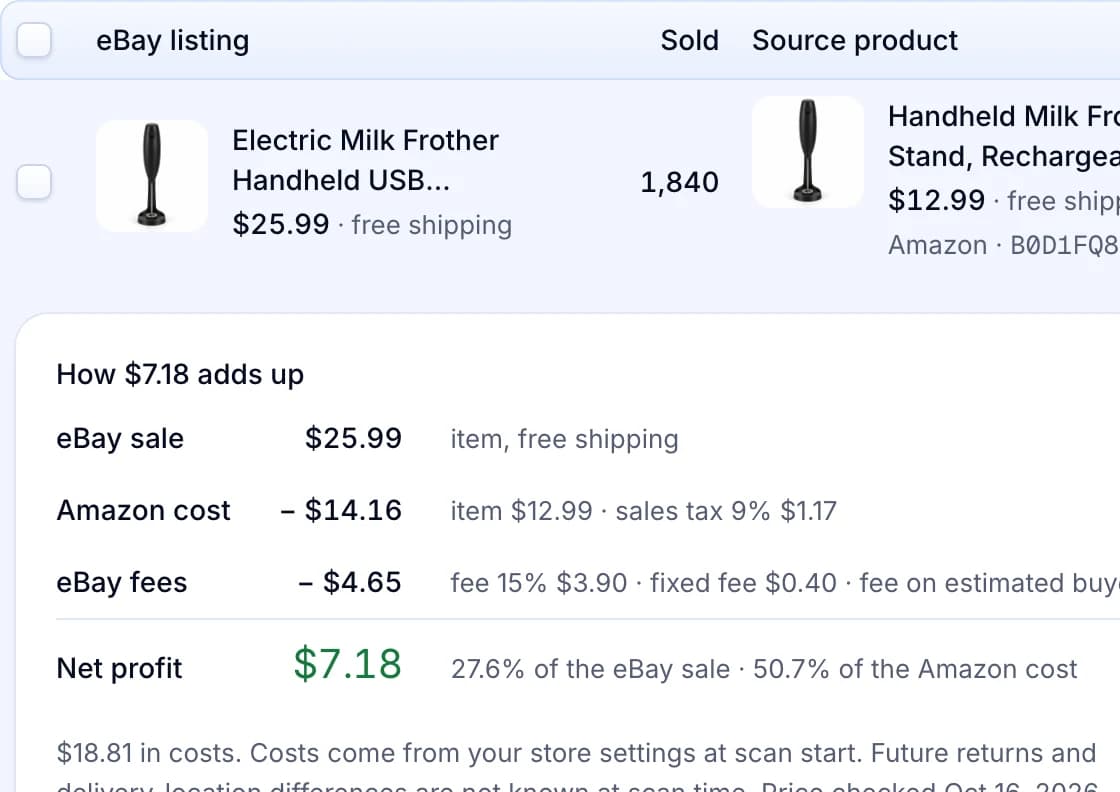
One scan result, with its sold count and costs
Each result shows the eBay listing, how many it has sold and a matching source offer. Open it to see how the estimated profit adds up.
Productivo by business model
Pick how you sell. Each part names the steps where Productivo helps that kind of seller, and what you still do yourself.
In shortYour blacklist checks every bulk lot you import, and private label items list under your own brand.
| Stage | What Productivo does |
|---|---|
| Step 6 | Your blacklist checks every item you import by CSV or add by hand. A brand on eBay’s VeRO list stays unpublished, even inside a mixed liquidation lot. |
| Step 7 | Selling it under your own brand? Put the brand in the CSV’s specific:Brand column, and it goes to eBay as the item’s brand. |
| Before you reorder | On Pro and Scale, the Listing Optimizer shows how often buyers saw, opened and bought each live listing in the last 30 days. Each listing gets one diagnosis, such as “no demand”. |
What it does not do: Product Scanner and Competitor hijack work out profit from Amazon offers, so they do not price wholesale stock. Reports’ Products and Top sellers tabs list Amazon products only.
In shortHunt second-hand versions of what sells, and Productivo lists each one with its exact condition and your own photos.
| Stage | What Productivo does |
|---|---|
| Step 5 | Bought seasonal finds early? Keep them as drafts, then schedule them to go live at a set time, up to 7 days ahead. |
| Step 6 | For items you add yourself, the Blacklist checks the Brand item specific, so type the brand exactly. Keyword rules also read the title and description. |
| Step 7 | Better condition can be your reason to win. Pick the exact condition and describe it in the Condition description, which goes to eBay with the listing. |
What it does not do: Product Scanner reads only new Buy It Now listings, and Competitor hijack studies dropshipping stores. Neither finds second-hand stock for you.
In shortMake your version of a style that sells, list it, and drop styles few buyers search for.
| Stage | What Productivo does |
|---|---|
| Step 4 | Show buyers what other listings leave out. Each piece takes up to 12 of your own photos, from your computer or phone. |
| Step 7 | Add your version by hand, or a whole range of designs from one CSV file, up to 1,000 per file. The preview shows every row error before anything is saved. |
| After you list | On Pro and Scale, the Listing Optimizer tells you when few buyers search for a piece. Then you can drop that style and make another. |
What it does not do: Product Scanner and Competitor hijack look for items to buy on Amazon, so they cannot find styles for you to make. Each product lists at a fixed price with one variation, so it cannot list one print-on-demand shirt in several sizes.
In shortList your picks with your own photos, but check how many other eBay dropshippers sell the same items.
| Stage | What Productivo does |
|---|---|
| Step 4 | Sellers who share your supplier may all use its catalog photos. Give each item up to 12 photos of your own, from your computer or phone. |
| Step 5 | For a seasonal pick, save its listings as drafts early. Then schedule them to go live up to 7 days ahead, before the busy weeks. |
| Listing | Bring your short list in from one CSV file, up to 1,000 items. The preview shows every row error, and every SKU you already have, before anything is saved. |
What it does not do: Productivo cannot see how many other sellers list your supplier’s items. Product Scanner and Competitor hijack pair eBay sales with offers in shops such as Amazon, and competitor pricing works on Amazon products only.
Written by the Productivo team. Source review: eBay’s Product Research documentation, Advanced search form, research tools overview, Product Research and Sourcing Insights guide, What to sell page, guide to high-demand items for 2026, Trending deals page, 2026 Recommerce Report, intellectual property policy, prohibited and restricted items policy, dropshipping policy, help on offers to buyers, Authenticity Guarantee, search ranking, selling limits and selling fees, and a search results page with watcher counts, checked 18 October 2026. The numbers in the sales table are made up.