
How-to guide · Intermediate · 7 steps · Updated 18 October 2026
eBay dropshipping policy: what is allowed and how to follow it
The eBay dropshipping policy allows dropshipping from a wholesale supplier. It does not allow buying the item from another retailer or marketplace after it sells, to ship straight to your buyer. This guide explains the rule. Then it takes you through an allowed setup, step by step.
Only need the rule? Read what the policy says. Ready to set up? Start with step 1.
Steps 1 to 7 use only eBay’s own tools. The last part shows how Productivo, the app behind this guide, can help. You do not need a Productivo account for the steps.
Before you start
In shortCheck that this guide fits how you sell, then gather what you need.
Who it is for
LevelIntermediate
WholesaleMedium
Steps 3 and 4 change: you ship from your own stock, so you set the handling time and count the stock yourself.
ResellingHard
You hold each item yourself, so skip the supplier steps and keep eBay’s rules on brands, shipping and returns.
HandmadeHard
You make the items, so skip the supplier steps and keep eBay’s rules on shipping and returns.
Wholesale dropshippingEasy
This guide is written for it: a wholesale supplier ships each order to your buyer.
Do you plan to buy each item from another retailer or marketplace after it sells, like Amazon or another eBay seller? eBay does not allow that. See what the policy says.
- You finish with
- A dropshipping setup that follows eBay’s policy: a checked wholesale supplier, honest listings, and a routine for stock, tracking, returns and your seller numbers.
- You need
- An eBay seller account with Seller Hub
- One or more wholesale suppliers to check
- The supplier’s prices, delivery times and return terms, or a list of questions to ask
- A place to keep written terms and notes
What the eBay dropshipping policy says
In shortWholesale suppliers may ship to your buyer, but buying from another retailer or marketplace after the sale is not allowed.
Dropshipping (also written drop shipping) means a supplier sends the item straight to your buyer. You never handle it yourself.
eBay allows dropshipping “where you fulfill orders directly from a wholesale supplier”. You are still responsible for the safe delivery of the item, within the delivery time in your listing. You are also responsible for the buyer’s satisfaction.
In eBay’s own words, “listing an item on eBay and then purchasing the item from another retailer or marketplace that ships directly to your customer is not allowed on eBay.”
So the question is where you buy. A wholesale supplier is fine. A shop that sells to the public is not. It makes no difference who places the order: you, a tool or an app.
eBay’s longer version of the policy, on its export site, adds detail. You must own the items before you list them, or have an agreement with a wholesale supplier to list and sell its items. A user agreement from another retailer or marketplace does not count.
Buying from a shop is fine if you buy the item before you list it and ship it yourself. That is reselling, and the guide to reselling on eBay covers it.
Dropshipping on eBay: allowed or not
| Setup | On eBay |
|---|---|
| A wholesale supplier ships your order straight to your buyer | Allowed. eBay allows orders fulfilled directly from a wholesale supplier. You stay responsible for the delivery. |
| A fulfillment company ships stock you already own | Allowed. You must be named as the seller on packing slips and invoices. Your contract must stop the company from using eBay order details for anything else. |
| Amazon to eBay dropshipping: after the sale, you buy the item on Amazon and Amazon ships it to your buyer | Not allowed. Amazon is another retailer and marketplace. |
| eBay to eBay dropshipping: after the sale, you buy the item from another eBay seller, who ships it to your buyer | Not allowed. The other eBay seller is another retailer. |
| After the sale, you buy the item in any other online shop, which ships it to your buyer | Not allowed. The rule covers every other retailer or marketplace. |
What eBay can do when sellers break the policy
The dropshipping policy lists these actions, as examples only:
- Removing the listing or other content
- Issuing a warning
- Restricting activity
- Suspending the account
The longer version on the export site lists more:
- Ending or canceling listings
- Hiding or demoting listings in search results
- A lower seller rating
- Limits on buying or selling
- Loss of buyer or seller protections
eBay does not refund fees on listings or accounts it acts on.
How to dropship on eBay the allowed way
Follow the steps in order. Each one ends with a result you can tick off. Your ticks stay in this browser.
Step 1 of 7: Find and check a wholesale supplier
In shortChoose a supplier that sells to businesses, test it with a sample, and sign an agreement before you list.
A wholesale supplier sells stock to businesses that resell it. It may be a maker, a brand or a distributor. A retailer sells to the public. A shop that anyone can buy from at the same price is a retailer, whatever it calls itself.
Before you call suppliers, check that the item sells on eBay. The guide to eBay product research shows how, and eBay sold listings show what buyers really paid. Then use the supplier’s price to work out your money left after fees, with the eBay fee calculator guide.
Questions for eBay dropshipping suppliers
- Do you sell at wholesale to businesses, and what do you need from me to open an account?
- Will you ship single orders to my buyers, with my business name on the packing slip and none of your prices or ads?
- Will you use my buyers’ details only to ship their orders?
- Which address do you ship from? If it is abroad, who pays US import duties?
- How many business days from my order to the carrier’s first scan, at the slowest? Which days do you close?
- Which carriers do you use, and when do I get the tracking number?
- How do I see your stock, and how often does it change?
- Where do returns go, and who pays for them?
- Can you show that you may sell this brand?
- When do I pay you: with each order, or on monthly terms?
- Will you take my resale certificate and charge me no sales tax?
Is it a supplier or a shop?
Good signs
- You apply for a business account before you see wholesale prices
- Written terms for prices, delivery time, stock and returns
- A named warehouse address that ships your orders
- Tracking from the carrier that picks up the parcel
Weak signs
- Anyone can buy at the same price, with no account
- Its prices match a public online shop
- You place each order in a public online shop
- The parcel arrives in another shop’s box or with its receipt
- No written terms
Order a sample to your own address first. Check the item, the packing, the delivery time and the tracking.
Sign a written agreement with the supplier before you list its items. eBay asks for an agreement to list and sell the supplier’s items. Name the items it covers, with prices, delivery time, stock, returns and what happens when an item runs out. The terms you accept to shop on a retail site or marketplace do not count.
Plan the money before you list
You pay the supplier when you send it each order. eBay pays you later. New sellers who use a label bought elsewhere usually get their money within 7 days of delivery. A supplier’s own label counts as bought elsewhere.
Money you pay before eBay pays you
Made-up example for a new seller. You pay the supplier with each order.Part Amount You pay the supplier each day (10 orders × $30) $300 Days until eBay pays you (7 to delivery, then up to 7 more) 14 days Money you have paid and not yet got back $4,200 Have that money ready before your first sale, or ask the supplier for monthly terms. The amount grows with every extra order a day.
Sales tax. In the states on eBay’s list, eBay collects sales tax from your buyer at checkout. A US supplier may still add sales tax to what you pay. If you buy to resell, a resale certificate can stop that. The Multistate Tax Commission’s uniform resale certificate works in 36 states, if you are registered in one of them. Each state sets its own rules, so ask your state’s tax office.
In a made-up case, 7% tax on a $40 item takes $2.80 from every order.
Suppliers abroad. Since 29 August 2025, US customs no longer lets low-value parcels in duty-free. Goods worth $800 or less, from any country, now pay all the duties, taxes and fees that apply. Get the supplier’s answer in writing on who pays them.
Result: A signed agreement with a wholesale supplier, a sample you checked, an answer to every question above, and money ready for the days before eBay pays you.
Step 2 of 7: Check that you may sell each brand
In shortMake sure every item is genuine, and use photos and words you are allowed to use.
eBay’s intellectual property policy makes you responsible for each item you list. It must be genuine. Your listing must not break anyone’s brand rights, copyrights or designs.
Rights owners can report listings through eBay’s Verified Rights Owner program (VeRO). Many of them explain their rules in the VeRO participant profiles in eBay’s Seller Center. Read the profile of each brand you plan to sell.
Use your own photos and words, or get written permission to use the supplier’s. eBay names photos and text copied from websites or catalogs as possible copyright problems.
Never say you are an authorized dealer unless you are. Selling a case made for a brand’s phone? Write “for” or “fits” before the brand name.
eBay’s longer policy also rules out selling items you do not own or have no right to sell. Then check that eBay allows the item at all. Some items are banned or have extra rules. The eBay listing checklist covers this in its first step.
Result: A list of brands you may sell, the supplier’s proof for each, and photos you may use.
Step 3 of 7: Set an honest handling time and item location
In shortChoose a handling time the supplier can always meet, and list the address the item really ships from.
Handling time is the number of days from the buyer’s payment to the carrier’s first scan. With 1-day handling, the carrier must scan the parcel by 11:59:59 p.m. the next day, in your time zone. eBay’s handling time guide advises the quickest time you can always meet.
With dropshipping, two people work before that scan: you and the supplier. Add up both, and use the supplier’s slowest promise, not its average.
Work out your handling time
Made-up example. Handling time runs from the buyer’s payment to the carrier’s first scan.Part of the order Business days You send the paid order to the supplier 1 The supplier packs it and the carrier scans it (its slowest promise) 2 Handling time to set on eBay 3 In the example, the handling time is 3 business days. A shorter time looks faster to buyers, but each missed scan can count as a late shipment.
Next, the item location. eBay’s item location policy asks for the ZIP code, city and country the item ships from. The title, description and item specifics must say the same. The item location is where the parcel leaves from: the supplier’s warehouse, not your home.
Result: A handling time built from the supplier’s slowest promise, and the supplier’s ship-from address in every listing.
Step 4 of 7: Keep your stock in sync with the supplier
In shortChange your eBay quantity whenever the supplier’s stock changes, so you never sell what you cannot ship.
With dropshipping, you do not see the shelf. The supplier’s stock can run out while your listing still shows items for sale.
An order you cancel because the item is out of stock counts as a defect on eBay. Too many defects can drop your seller level. Step 7 explains the limits.
An example on eBay’s seller standards page: 25 out-of-stock cancellations in 1,000 orders, for 25 different buyers, drop a seller to Below Standard.
A simple stock routine
- Check the supplier’s stock at the same time each day, or more often for items that sell fast.
- List fewer than the supplier has. Other sellers may buy from the same stock.
- When the supplier runs low or runs out, lower your eBay quantity at once.
- Ask the supplier to tell you before an item ends or its price changes.
Keep the listing when stock runs out
Open Selling preferences and find Multi-quantity listings. Turn on Listings stay active when you’re out of stock. A listing at quantity 0 then stays active but hidden from search. It comes back when you raise the quantity. After 180 days in a row at 0, eBay ends it.
eBay says this may help protect you from a defect for running out. A listing at 0 for a whole billing month may also get its insertion fee back as a credit.
List only what you can check
Every listing you keep also costs something. A Good ’Til Cancelled listing renews each month, and each renewal uses one of your free listings. Without an eBay Store, you get 250 a month. After that, most categories charge a $0.35 insertion fee each.
So a made-up catalog of 2,000 listings costs $612.50 a month in renewals alone. Your monthly selling limit counts active listings too. The eBay bulk listing guide explains insertion fees for large uploads.
Result: A daily stock check, the out-of-stock setting turned on, and a rule for what you do when the supplier runs low.
Step 5 of 7: Upload tracking within your handling time
In shortGet the tracking number from the supplier and add it to the eBay order before the handling time ends.
Ask the supplier to send you the tracking number on the day it ships. Upload it to eBay within your handling time.
A tracking number is not a scan
Some suppliers print the label as soon as they get your order and send you the number. The parcel can still wait in the warehouse for days. USPS tracking then shows Shipping Label Created, USPS Awaiting Item. USPS says this means the package has not been given to it yet.
Only a carrier scan counts for your handling time. So on its last day, open each new tracking number. If it shows only a label, ask the supplier that day.
Add tracking in Seller Hub
- On the Orders page, go to Paid and shipped and find the order.
- Tick the box next to it.
- Open the Shipped menu and choose Add tracking number.
- Enter the tracking number and the carrier, then select Save.
eBay then emails the buyer the tracking details. You can add up to 6 tracking numbers per order.
Use a carrier that works with eBay. eBay calls them integrated carriers. Tracking from one of them, uploaded within your handling time, protects you if the buyer says the item never came.
Result: Tracking from the supplier’s carrier on every order, uploaded before the handling time ends.
Step 6 of 7: Set a return policy you can honor
In shortPick a return option on eBay, and agree with the supplier where returns go and who pays.
On eBay.com, you choose one return policy per listing:
- No returns
- 30-day returns, paid by the buyer or free
- 60-day returns, paid by the buyer or free
Some categories, like jewelry and digital cameras, also allow 14-day returns.
“No returns” does not stop a return for an item that does not match your listing. Under the eBay Money Back Guarantee, the buyer can still send it back.
So agree with the supplier, in writing, where returns go and who checks them. Also agree who pays the return shipping, and how the supplier pays you back. In your Returns preferences, eBay lets you set return addresses by return reason, refund amount or category.
The eBay dropshipping policy also makes the buyer’s satisfaction yours. A return goes back to the supplier, so you do not see it arrive. Once it arrives, you have 2 business days to refund the buyer. If return tracking shows delivery, eBay may refund the buyer for you. Ask the supplier to tell you the same day a return arrives, with a photo of what came back.
Result: A return policy on eBay, and the supplier’s written terms for returns.
Step 7 of 7: Watch your seller performance numbers
In shortCheck your Seller Dashboard each month and fix the cause of every cancellation, case or late shipment.
eBay checks every seller on the 20th of each month. It gives you a seller level: Top Rated, Above Standard or Below Standard. You see yours on the Seller Dashboard.
eBay’s seller standards on eBay.com
eBay checks these on the 20th of each month. Other eBay sites and international sales can have other limits.Number What eBay counts, and the limit Transaction defect rate Orders you cancel, for example because the item is out of stock. Also cases closed without seller resolution. Limit: No more than 2% of transactions. It counts against you only with more than 4 different buyers. Cases closed without seller resolution You did not solve the buyer’s problem. eBay stepped in and found you responsible. Limit: No more than 2, or 0.3% of transactions, whichever is higher Late shipment rate No carrier scan within your handling time, and delivery after the latest estimated date. Limit: No minimum on its own. Top Rated needs no more than 5, or 3%. Tracking uploaded (Top Rated only) Tracking uploaded within your handling time and confirmed by the carrier. Limit: At least 95% of transactions Dropshipping touches each number. A supplier that runs out causes cancellations. A slow supplier causes late shipments. A return nobody handles can become a case.
Below Standard has costs. eBay’s seller standards policy says it may:
- Show your items lower in search results
- Lower your selling limits
- Block you from Promoted Listings
- Hold your money until tracking shows the item is on its way
- Charge higher final value fees, from the 1st of the next month
eBay may also act at any time if it sees fraud, or selling that puts buyers at risk.
Result: A monthly date in your calendar to check the Seller Dashboard, and a fix for each problem you find.
What this guide can and cannot tell you
In shortThis guide explains eBay’s written rules on the date above, and eBay still decides each case.
This guide puts the eBay dropshipping policy and the related pages in plain words. It is not legal advice. eBay can change its policies, so check the pages in the sources before you start.
Things eBay’s pages do not settle
- eBay does not define “wholesale supplier” or name approved suppliers. The signs in step 1 are our reading, not eBay’s list.
- The policy names no shop. The Amazon and eBay rows in the table apply its words to common setups.
- eBay’s help page is short. Its export site has a longer version with more detail. This guide uses both.
- eBay decides each case itself. Seller Help shows any policy issue on your own account or listings.
- The eBay dropshipping policy says nothing about sales tax or import duties. They depend on your state and your goods, so the lines on them in step 1 are general, not tax advice.
Common questions about eBay dropshipping
Is dropshipping allowed on eBay?
Yes, from a wholesale supplier. eBay allows a wholesale supplier to ship your orders straight to your buyers. Make your agreement with the supplier before you list. You stay responsible for delivery on time and for the buyer’s satisfaction.
Can I dropship from Amazon to eBay?
No. You would list the item on eBay, then buy it on Amazon to ship to your buyer. That is buying from another retailer or marketplace, which the eBay dropshipping policy does not allow.
Is eBay to eBay dropshipping allowed?
No. Here, dropshipping from eBay means buying the item from another eBay seller after your own sale. That seller is another retailer, so the same rule applies.
What happens if you break eBay’s dropshipping policy?
eBay may act on your listings or account. The policy lists removing the listing, a warning, restricted activity or account suspension, as examples. See the full list.
How do I find dropshipping suppliers for eBay?
Look for wholesale suppliers, not shops. Contact makers, brands and distributors that sell to businesses. Ask the questions in step 1, order a sample and sign an agreement before you list. eBay’s policy does not name suppliers.
Do I need a business account to dropship on eBay?
The dropshipping policy does not say so. eBay lets you register as an individual or a business seller. If you are a registered business, like a single-member LLC, eBay asks you to create a business account. Your bank account type should match your eBay account type.
How Productivo helps with wholesale dropshipping
In shortProductivo can import, list and screen your wholesale stock, but checking suppliers and stock stays with you.
Everything above works with eBay’s own tools. This part is about Productivo, the app behind this guide.
Where Productivo fits in the steps
| Guide step | What Productivo does |
|---|---|
| Step 2 | Settings › Blacklist holds eBay’s VeRO list of rights owners and your own entries. Productivo never publishes a product that matches. |
| Step 3 | Your wholesale stock comes in from one CSV file, up to 1,000 products per file. The preview checks every row before anything is saved. When you list, you pick the shipping policy from your eBay account, with its handling time. |
| Step 5 | Orders from all your stores come into one list, each linked to the product it came from. For your own stock, you still add tracking on eBay. |
| Step 6 | When you list, you also pick the return policy from your eBay account. It goes on every listing you publish. |
Product imports, publishing, the blacklist and Orders come with every plan. Productivo does not check suppliers or follow a supplier’s stock. Once a product of your own is live, you change its quantity on eBay.
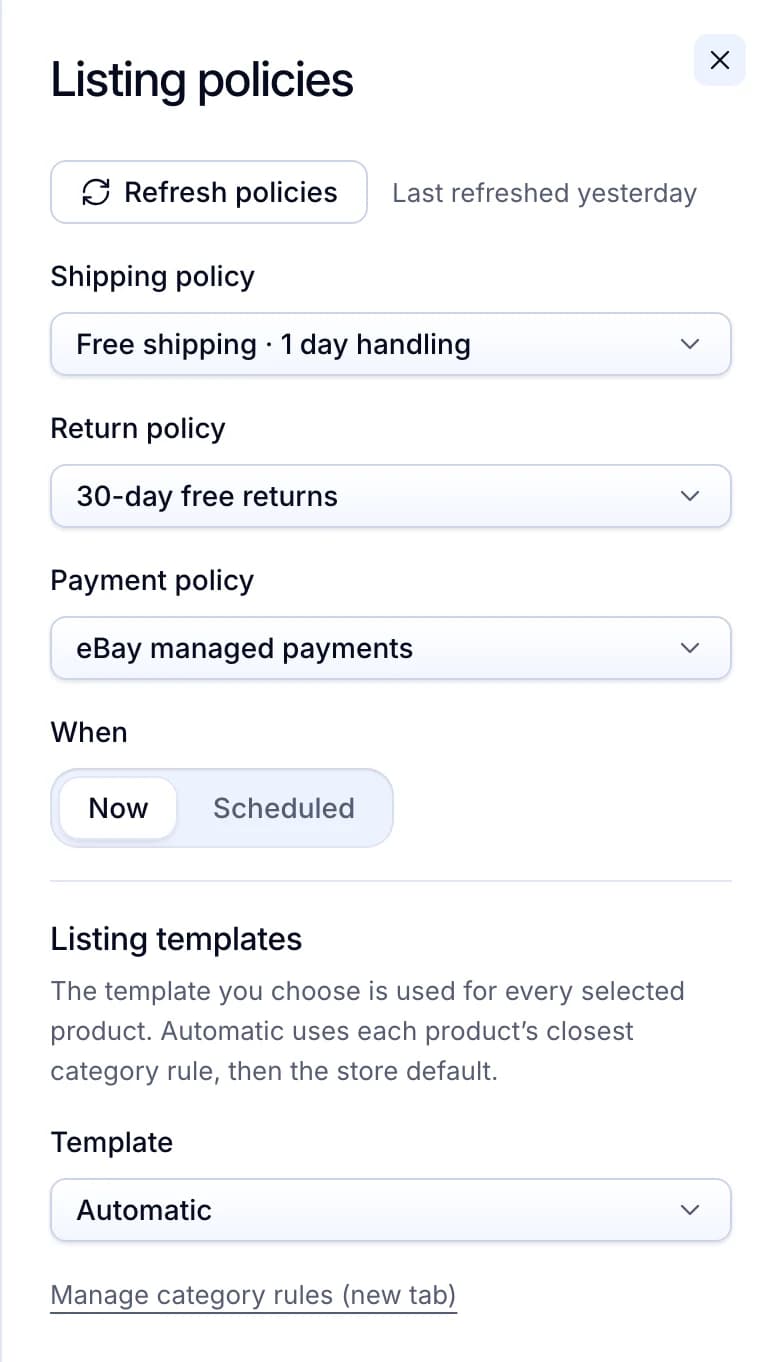
Your eBay policies on every listing
Before you list, you choose the shipping, return and payment policies saved in your eBay account. Pick a shipping policy whose handling time your supplier can meet.
Productivo by business model
Pick how you sell. Each part names the steps where Productivo helps that kind of seller, and what you still do yourself.
In shortYou set the handling time, stock and tracking for your wholesale products, and Productivo alerts you to unshipped orders.
| Stage | What Productivo does |
|---|---|
| Step 3 | Use an eBay shipping policy with a handling time your own shelf can always meet. Productivo reads your policies from eBay, and the one you choose for the store goes on every new listing. |
| Step 4 | Set the quantity you hold in the product form or the CSV. Once the item is live, you change the quantity on eBay, and Products shows the listing’s quantity. |
| Step 5 | Orders marks each sale Manual product, and it moves to Shipped at the next sync after you add tracking on eBay. If it is not shipped 3 hours after the sale, Telegram alerts you. |
What it does not do: Productivo does not count your shelf stock or follow a supplier’s. Once an item has been on eBay, Productivo does not list it again, so relist it on eBay.
In shortYou ship each find yourself, so Productivo’s alerts help you ship on time and answer returns before eBay’s deadline.
| Stage | What Productivo does |
|---|---|
| Step 2 | Settings › Blacklist checks each item you add, from the Brand you type to the words in its title and description. A match never publishes. |
| Step 5 | Add tracking on eBay, and the order moves to Shipped at the next sync. A Telegram or email alert comes if a sale is still not shipped 3 hours after it. |
| Step 6 | When a buyer opens a return, the order shows eBay’s deadline for your reply. An alert comes 2 days before it. |
| Step 7 | In Orders, the Past ship-by deadline filter shows sales not shipped in time. Ship those first, since late shipments count in your seller numbers. |
What it does not do: It does not show your seller level or rates from eBay’s Seller Dashboard, or check that an item is genuine. An item that comes back is relisted on eBay, not in Productivo.
In shortSet a handling time that covers making the piece, and add tracking on eBay within it.
| Stage | What Productivo does |
|---|---|
| Step 2 | Pieces you add by hand or CSV go through Settings › Blacklist too. Add a brand or character name as a keyword, and no piece that uses it publishes. |
| Step 3 | Pick a shipping policy whose handling time covers the days you need to make the piece. Productivo puts it on each listing. |
| Step 5 | A Telegram alert comes when an order is not shipped on eBay 3 hours after the sale. Two more follow before the ship-by date. |
| Step 6 | When a buyer opens a return, the order shows eBay’s reason, the buyer’s comment and your deadline. An alert comes two days before it. |
What it does not do: Productivo has no print-provider connection. It never places your print orders or reads their tracking, so you add that tracking on eBay.
In shortList from your supplier’s warehouse address, and let Productivo warn you before an order misses its ship-by date.
| Stage | What Productivo does |
|---|---|
| Step 2 | Photograph the sample from step 1, and give each item up to 12 photos of your own from your computer or phone. A brand you add to Settings › Blacklist later, such as after a rights notice, has its live listings ended too. |
| Step 3 | Set the Store address in Settings › Store to the supplier’s warehouse: Productivo publishes every listing from that location. New listings take the shipping policy you pick when you list, so choose one your slowest supplier can meet. |
| Step 5 | Each sale shows in Orders as Manual product, and moves to Shipped at the next sync after you add the supplier’s tracking on eBay. If it is not shipped 3 hours after the sale, Telegram or email alerts you, and again 24 and 6 hours before ship-by. |
| Step 6 | When a buyer opens a return, the order shows eBay’s reason, the buyer’s comment and your deadline to act. An alert comes when that deadline is 2 days away, and you answer on eBay. |
| Step 7 | The Past ship-by deadline filter in Orders lists sales not shipped in time. Cancellations in Reports counts the orders eBay cancelled and the sales they lost. |
What it does not do: Productivo has no supplier connection: it does not read the supplier’s stock, order from the supplier or bring in its tracking. A CSV row with a SKU you already have is skipped, not updated, so change live quantities on eBay. It does not show your seller level, so check eBay’s Seller Dashboard.
Written by the Productivo team. Source review: eBay’s dropshipping policy and its longer export-site version, seller standards policy, handling time guide, item location policy, tracking help, return policy options, intellectual property (VeRO) policy, account registration help, payment holds, sales tax help, Time Away, out-of-stock option, zero insertion fee listings, selling fees, selling limits, return shipping for sellers and Money Back Guarantee policy, with the Seller Dashboard and Seller Help tools they link to (both need a sign-in). Also US Customs and Border Protection’s de minimis notice, the Multistate Tax Commission’s resale certificate page and USPS’s tracking status help. All checked 18 October 2026. The handling time, money, tax and catalog examples are made up.