
How-to guide · Intermediate · 8 steps · Updated 18 October 2026
How to bulk list on eBay and fix the rows that fail
eBay bulk listing, also called batch listing, means putting many items up at once, from one file or one screen. This guide shows how to bulk list on eBay with eBay’s free tools. You fill in a template, test a few rows and upload the rest. You end with every item live, after fixing only the rows that failed.
New to this? Follow the example first. It takes six made-up rows through two uploads. Ready to list? Start with step 1.
Steps 1 to 8 use only eBay’s own tools. The last part shows how Productivo, the app behind this guide, can help. You do not need a Productivo account for the steps.
Before you start
In shortCheck that this guide fits your business, then gather your item details, photo links and eBay policies.
Who it is for
LevelIntermediate
WholesaleEasy
You have a stock list of many different items. Each item becomes one row.
ResellingMedium
Steps 2 and 3 need care: each one-off item needs its own photos and condition. The drafts template lets you add photos later.
HandmadeMedium
Step 1 needs care: many copies of one design need one listing with a quantity. Each new design gets its own row.
Wholesale dropshippingMedium
Step 3 needs care: Location is where your supplier ships from, and Quantity is the stock your supplier can send. You are still responsible for the delivery.
Selling many units of one item? You need one listing with a quantity, not a bulk upload. Step 1 shows your options. Do you plan to buy each item from another shop after it sells and have it shipped to your buyer? The eBay dropshipping policy does not allow that.
- You finish with
- Many listings live on eBay from one file. If some rows fail, you have a short list of them, with the reason for each.
- You need
- An eBay seller account with Seller Hub. Business sellers have it. Private sellers get it after their first sale.
- Your item details: title, price, quantity, condition and item specifics. Item specifics are details like brand, size or color.
- A photo link for each photo. No links yet? Step 2 shows the drafts template.
- Your shipping, return and payment policies, set up in your eBay account.
- A spreadsheet app, like Excel or Google Sheets.
Worked example: six rows, two uploads
In shortFour of six made-up rows go live at once, and only the two that failed go up again.
This is eBay bulk listing on a made-up practice case. The shop, the items and the error notes are invented.
What happens to each row
eBay checks each row on its own. A row that fails comes back with a reason.
First upload · all 6 rows
- Row 2CDL-01 Soy candle 8 oz, lavender, amber jar — Live
- Row 3CDL-02 Soy candle 8 oz, cedar, amber jar — Failed: Shipping policy not found
- Row 4CDL-03 Soy candle 8 oz, unscented, clear jar — Live
- Row 5CDL-04 Soy wax melts, vanilla, pack of 6 — Failed: Photo did not load
- Row 6CDL-05 Cotton candle wicks, pack of 50 — Live
- Row 7CDL-06 Brass candle snuffer, wood handle — Live
Second upload · only rows 3 and 5
- Row 3CDL-02 Soy candle 8 oz, cedar, amber jarFixed: copied “Free Shipping” from Business policies — Live
- Row 5CDL-04 Soy wax melts, vanilla, pack of 6Fixed: put %20 in place of the space in the photo link — Live
6 of 6 rows live after two uploads.
A drawing, not eBay’s screen. The reasons are plain words for this example. eBay’s messages use other wording.
The first upload put four rows live. Rows 3 and 5 failed. The four good rows went live without them.
Row 3: It says “free shipping”. The shop named its eBay policy “Free Shipping”. Policy names must match exactly, capital letters included.
Row 5: Its photo link has a space in it. eBay needs %20 in place of each space.
The second file held only rows 3 and 5. Both went live. The shop left the four good rows out. Upload them again, and eBay tries to list them twice.
Now do the same with your own items. Follow the steps below.
How to bulk list on eBay, step by step
These eBay bulk listing steps work for wholesale stock, second-hand goods and handmade products. Not sure what to list yet? Start with eBay product research.
Step 1 of 8: Choose the right bulk listing tool
In shortUse Seller Hub Reports for new items in a sheet, and one listing for many units of one item.
eBay has several free bulk tools. Each one fits a different job. Pick the one that fits what you have now.
Which eBay bulk listing tool fits?
Pick by what you have now. Normal eBay fees apply to every listing.If you have Use Good to know Many units of one item One listing with a quantity Not a bulk job. Make one Buy It Now listing and enter the quantity. One item in several sizes or colors One listing with variations Most categories allow it. One listing holds up to 250 variations. New items in a spreadsheet Seller Hub Reports Upload an Excel or CSV template. This guide uses it. Listings already on eBay Bulk Listing Tool Edit, relist or sell similar items, up to 2,000 listings at a time. Photos, but no details yet AI bulk listing tool Makes draft listings from your photos. For US and UK sellers. Thousands of items from a feed Merchant Integration Platform or eBay’s APIs CSV or XML feeds, up to 25 MB per file. Needs more setup. More than 500 listings to edit often Third-party tools on eBay’s partner list They handle thousands of listings at a time. Some charge a fee. This guide uses Seller Hub Reports to list new items from a spreadsheet. Step 8 uses the Bulk Listing Tool to change listings later.
For many units of one item, make one listing with a quantity. Sizes or colors of one item can share one listing with variations. Bulk listing is for many different items.
Result: The tool you will use for this batch of items.
Step 2 of 8: Download a listing template
In shortGroup your items by category, then get a template from Seller Hub Reports for those categories.
A template is a spreadsheet with the right columns for your category. You get it from Seller Hub.
- In Seller Hub, open the Reports tab. Select Upload on the left.
- Select Get template. For Source, choose Listings.
- For Type, choose Create new listings template.
- Pick a file type. Excel (.xlsx) is the default. CSV (.csv) works in most spreadsheet apps.
- Tick your categories. In an Excel file you can pick up to 10, and each gets its own tab. Then select Download.
Group your items by category before you download. Each category has its own item specifics, so its columns change.
No photo links yet? Choose Create drafts template instead. You can leave the photo column empty. You add the photos on eBay when you finish each draft.
Result: A template for your categories, saved on your computer.
Step 3 of 8: Fill in one row per item
In shortWrite Add in each row, then fill in Format, photo links, policy names and the colored cells.
Each row is one listing. Write
Addin the Action column. Then fill in the row from left to right.The columns to fill in
Examples come from row 2 of the made-up sheet. Your template has more columns.Column What to write Action Add, for a new listing. Example: AddCategory ID The category’s number. The template lists them on its own tab. Title Up to 80 characters, with the words buyers search for. Example: Soy candle 8 oz, lavender, amber jarCondition ID A number for the condition. 1000 means New. Example: 1000P:UPC The barcode number. eBay.com requires this column. No barcode, like a candle you made? Write Does not apply. Example: Does not applyStart price The price, with no $ sign. Example: 18.00Quantity How many you have to sell. Example: 12Format FixedPrice for Buy It Now. Example: FixedPriceDuration GTC (Good ’Til Cancelled) for Buy It Now. Example: GTCItem photo URL A link to each photo, up to 12. Put a pipe ( | ) between links. Example: https://example.com/cdl-01-front.jpg|https://example.com/cdl-01-top.jpgDescription The text buyers read. Simple HTML like <p> works. Example: <p>Hand-poured soy candle in an amber jar.</p>Location The city and state the item ships from. Example: Austin, TXShipping, Return and Payment profile name Your three policy names, exactly as eBay shows them. Example: Free ShippingFill in Format on every row. For Buy It Now, write
FixedPriceand set Duration toGTC. eBay’s guide lists Auction as the default format.The template colors the empty cells you still need. One color marks required fields. Other colors mark item specifics that are required soon or recommended. Buyers use item specifics to filter search results, so fill in all you can.
Before you fill in many rows, get one listing right with the eBay listing checklist. Then copy its pattern into every row.
Result: One complete row per item, with category, title, condition, price, photos and policies.
Step 4 of 8: Check the sheet before you upload
In shortCopy policy names from eBay, test a few photo links and keep each title within 80 characters.
Check these six things before you upload.
- Policy names match exactlyCopy each name from your Business policies page on eBay. Capital letters count.
- Photo links workEach link starts with https:// and ends in .jpg or .png. Open a few to test them. Put %20 in place of any space.
- Barcodes keep every digitExcel drops leading zeros and turns long numbers into a short form like 1.23E+15. So format the P:UPC column as Text before you paste the barcodes. Microsoft explains it on its leading zeros page.
- Titles fitEach title has 80 characters or fewer.
- Every row has its own SKUThe SKU, or Custom label, is your own code for the item. Buyers do not see it. It helps you find each row in eBay’s report later.
- You have room to listYour monthly selling limit is on the Overview tab of Seller Hub. eBay may end listings that go over it.
Copy policy names from eBay instead of typing them. One wrong capital letter can fail a row.
Result: A sheet that passes all six checks.
Step 5 of 8: Upload a test with a few rows
In shortPut two or three rows in a file, upload it, then check each new listing as a buyer would.
Start with a small test file. eBay suggests listing one product first if Reports is new to you. Copy two or three rows into a new file. Keep the template’s header rows.
- Go back to Reports and select Upload.
- Select Upload template.
- Choose the file type: .xlsx for Excel, otherwise .csv.
- Choose the template type you used. Then select Upload.
Rows with Add become real listings as soon as eBay runs them. So the test file holds only a few rows.
eBay usually finishes in less than 15 minutes. Then open each test listing as a buyer would. Check the photos, price, shipping and returns. If something looks wrong, fix the whole sheet before the big upload.
Result: A few test listings that look right on eBay.
Step 6 of 8: Upload the rest and read the report
In shortWhen the upload ends, download eBay’s report and list each failed row with its reason.
Now upload the full file the same way. When eBay is done, you see Your upload is complete. eBay also makes a report of every action it ran.
eBay runs each row on its own. So the good rows go live, even when some rows fail.
Download the report from Recent uploads on the Upload page. Open it in your spreadsheet app. List the rows that failed before you change anything. Note eBay’s reason next to each one.
Result: A list of the failed rows, each with eBay’s reason.
Step 7 of 8: Fix and upload only the failed rows
In shortCopy only the failed rows into a new file, fix each by eBay’s reason, then upload that file.
Keep the template’s header rows at the top of the new file.
Upload only the rows that failed. The other rows are live already. If you upload them again with Add, eBay tries to list the same items twice. Its duplicate listings policy allows one Buy It Now listing of an identical item at a time.
The common errors below show the usual fixes. Repeat until every row is live. If you drop a row, write down why. Then you will not try it again by mistake.
Result: Every row live, or a short list of rows you chose to drop.
Step 8 of 8: Bulk edit your eBay listings later
In shortSelect listings in Active listings, choose Edit and change prices or details for up to 2,000 at once.
To bulk edit eBay listings, use the Bulk Listing Tool. It works with up to 2,000 listings at a time.
- In Seller Hub, open your Active listings.
- Tick the Edit box next to each listing you want. Or tick Select all.
- Choose Edit, then make your changes.
You can raise or lower many prices at once, by a percentage or a dollar amount. You can also set start times for many listings. For price and quantity alone, a Reports template works too.
Set a lowest price for each item before you cut prices in bulk. See eBay pricing strategy to work it out.
Result: A way to change prices, quantities or details for many listings at once.
Common eBay bulk listing errors and how to fix them
In shortFind your problem in the table, fix the row, then upload it with the other failed rows.
Problem, cause and fix
| Problem | Why it happens | Fix |
|---|---|---|
| Policy not found | The policy name in the row is not the one on eBay. | Copy the name from your Business policies page. Capital letters count. |
| Photos missing | The link has a space, or does not start with https://. | Put %20 in place of each space. Open the link to test it. |
| Listed as an auction | Format was empty or set to Auction. | Write FixedPrice and set Duration to GTC. |
| Title too long | It has more than 80 characters. | Shorten it. Keep the brand, model and size. |
| Item specifics missing | A required item specific is empty. | Fill in the colored cells. Pick values from the dropdowns. |
| Barcode not accepted | Excel dropped a leading zero or turned the barcode into a short form like 1.23E+15. | Format the P:UPC column as Text, then paste the barcodes again. |
| Category not accepted | The Category ID is mistyped or missing. | Copy the number from the template’s category tab. |
| Listings ended after the upload | The upload went over your monthly selling limit. | List the rest next month, or ask eBay for a higher limit. |
| The same item listed twice | Rows that worked were uploaded again with Add. | End the extra listing. Next time, upload only the failed rows. |
Common questions about eBay bulk listing
Does eBay have a bulk listing tool?
Yes, several, all inside Seller Hub. Seller Hub Reports lists new items from a file. The Bulk Listing Tool changes up to 2,000 listings at once. The AI bulk listing tool makes drafts from photos. The table in step 1 shows which eBay bulk listing tool fits your job.
Is the eBay bulk listing tool free?
Yes. The Bulk Listing Tool and Seller Hub Reports are part of Seller Hub, which is free. You still pay normal eBay fees. An insertion fee applies once your free listings run out. When the item sells, eBay charges a final value fee, its main fee.
How many items can I bulk list on eBay at once?
Up to 2,000 listings at a time with the Bulk Listing Tool. For new items, Seller Hub Reports takes a whole file, and big files take longer. Your monthly selling limit still applies to everything you list.
How much does it cost to list 1,000 items on eBay?
In most categories, $262.50 in insertion fees, if you have no eBay Store. Under eBay’s selling fees, your first 250 listings each month are free, and each of the other 750 costs $0.35. Each monthly renewal of an unsold listing counts again. An eBay Store gives you more free listings. Final value fees come on top when items sell. Work them out with the eBay fee calculator.
Can I bulk list on eBay with a CSV or Excel file?
Yes. In Seller Hub Reports, download a template and choose CSV as the file type. Fill it in, save it as .csv and upload it. Excel (.xlsx) works too.
What happened to eBay File Exchange?
It is now Seller Hub Reports. eBay calls Reports the tool formerly known as File Exchange. Old File Exchange templates do not carry over, so download new ones.
Do I need bulk listing for many units of the same item?
No. Make one Buy It Now listing and enter the quantity. Bulk listing is for many different items.
Can I bulk list without photo links?
Yes, as drafts. The drafts template lets you leave the photo column empty. You add photos on eBay when you finish each draft.
Can eBay make listings from my photos?
Yes, as drafts, if you sell in the US or UK. Upload your product photos to eBay’s AI bulk listing tool. It suggests a category, title and item specifics for each draft. Check every detail before you publish.
Can I schedule a bulk upload?
Yes. Fill in the Schedule Time column for each row. A listing can start up to 3 weeks later. Write the time in 24-hour GMT, like 2026-11-02 14:00:00.
Can I bulk end eBay listings?
Yes, in Seller Hub. In Active listings, tick the box next to each listing. Then choose End from Actions. You can end a fixed-price listing at any time. eBay’s rules for ending a listing limit when an auction can end early.
How Productivo helps with eBay bulk listing
In shortProductivo can do parts of steps 2 to 7 for many products at once, and you still check each result.
Everything above is eBay bulk listing with eBay’s own tools. This part is about Productivo, the app behind this guide.
Where Productivo fits in the steps
| Guide step | What Productivo does |
|---|---|
| Steps 2 and 3 | Productivo has its own CSV template. It has columns for SKU, title, price, quantity, category and photo links. Condition and each item specific get a column too. |
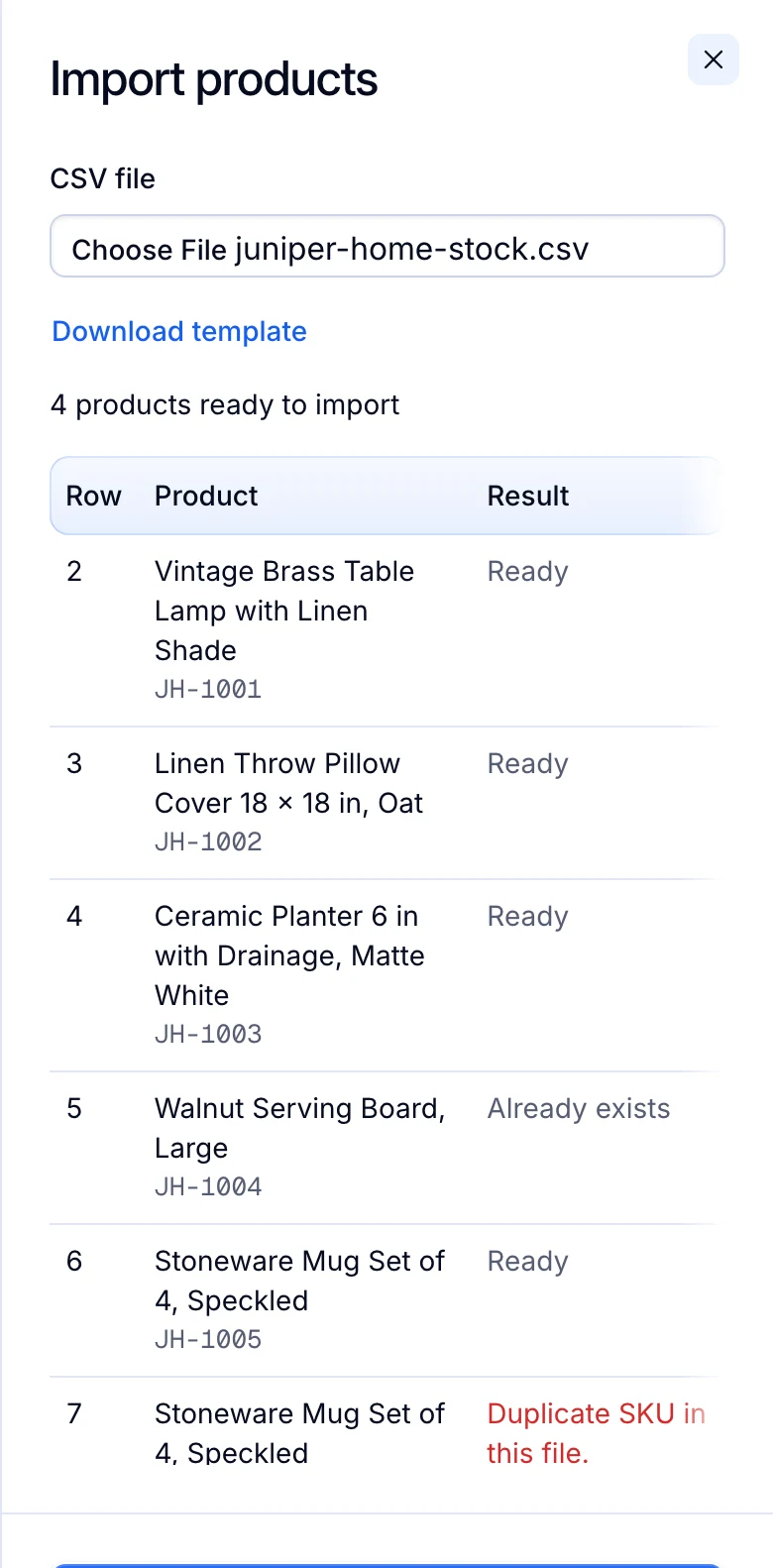
| Step 4 | A preview checks every row before Productivo saves anything. It checks titles, photo links, conditions and required item specifics. Rows that already exist or have an error show their reason, and Productivo leaves them out. One file takes up to 1,000 products. |
| Step 5 | Imported products wait for your approval. Approve a few, list them and check them on eBay first. |
| Step 6 | Select up to 1,000 approved products and list them together, each with your description template. Productivo also lists approved products by itself. It checks for ready ones every 15 minutes. If your monthly selling limit runs out, the rest wait until it renews or rises. |
| Step 7 | When eBay refuses a product, the Activity page shows eBay’s reason. Productivo skips a product already on eBay under one of your stores, so the same item does not go up twice. |
Product imports and bulk publishing come with every Productivo plan. Your plan sets how many products and listings you can have.
Every row checked before import
In Productivo, choose your CSV file. The preview shows each row as ready, already added or refused, with the reason.
Productivo also has pages for wholesale stock, second-hand goods and handmade products.
Written by the Productivo team. Source review: eBay’s bulk listing tools help, Seller Hub Reports help, inventory onboarding guide (template columns), guide to uploading listings with the Reports tab, bulk listing tools overview (AI bulk listing tool and feeds), multi-quantity and variations help, zero insertion fee listings, selling limits, selling fees, ending a listing, duplicate listings policy and dropshipping policy, and Microsoft’s page on leading zeros, checked 18 October 2026. The example sheet and its error notes are made up.