
How-to guide · Beginner · 9 steps · Updated 18 October 2026
eBay listing checklist: optimize each listing before you publish
Use this eBay listing checklist on one listing before you publish. You check the category, title, photos, item specifics, description, price, shipping and returns against eBay’s own rules. eBay listing optimization means you give buyers a complete, honest listing they can find and trust.
New to listing? See the example first: one weak listing, fixed part by part. Have your item ready? Start the checklist.
Steps 1 to 9 use only eBay’s own tools. The last part shows how Productivo, the app behind this guide, can help. You do not need a Productivo account for the checklist.
Before you start
In shortCheck that the checklist fits your business, then get the item, a camera and sold prices ready.
Who it is for
LevelBeginner
WholesaleEasy
The steps work as written. Type the barcode from the box in step 2 to find a catalog match.
ResellingMedium
Steps 4 and 5 need extra care. Photograph every flaw, use no stock photos and pick the exact condition.
HandmadeEasy
The steps work as written. With no product code, you choose “Does not apply” in step 5.
Wholesale dropshippingMedium
Steps 1 and 7 need extra care. Use the supplier’s photos only with written permission, and match the handling time and item location to the supplier.
Do you plan to buy each item from another shop after it sells and ship it straight to the buyer? eBay does not allow that. See what the eBay dropshipping policy allows.
- You finish with
- One listing that passes every check. It is allowed, easy to find, and clear about price, shipping and returns.
- You need
- The item itself, with its box or label
- A phone or camera, and a plain background
- Sold prices for the same item. The eBay product research guide shows how to find them.
- An eBay seller account
Listing many items at once? Check one listing with this guide first. Then follow the eBay bulk listing guide.
- The 9 steps
Worked example: one weak listing, fixed
In shortCompare the before and after columns, then fix the same parts on your own listing.
This is eBay listing optimization on one made-up listing, for the Practice MF-01 milk frother from our product research guide. The item is not real, so you will not find it on eBay.
One listing, before and after
| Part | Before | After |
|---|---|---|
| Title | MILK FROTHER *** GREAT GIFT *** FAST SHIPPING!!! | Practice MF-01 Rechargeable Milk Frother with Stand and USB-C Cable, Black (74 of 80 characters) |
| Category | A broad category, picked by hand | eBay’s suggested category, found from the UPC |
| Photos | One dark photo with “BEST PRICE” written on it | Five photos on white: the frother on its stand, the buttons up close, the cable, a ruler for size and the box |
| Condition | “New” in the condition field, “like new” in the description | New, the same in every place |
| Item specifics | Brand and model empty. UPC set to “Does not apply”, but the box has one | Brand, model, type, power source and color filled in. UPC copied from the box |
| Description | Long text with shipping rules, a link to another website and photos | Two short lines: what it is and what is in the box |
| Price and shipping | $59 plus $9 shipping, a guess | $50 with free shipping, based on sold prices of the same item |
| Handling and returns | Ships within 5 business days. No returns | Ships within 1 business day. 30-day returns |
The seven parts this checklist covers
Each number is the step that checks that part.
- Step 2: Category
- Step 3: Title
- Step 4: Photos
- Step 5: Condition and item specifics
- Step 6: Description
- Step 7: Price, shipping and handling time
- Step 8: Returns and policies
A drawing, not eBay’s screen. The item is made up.
Now do the same for your own item. Follow the steps below and tick each one off as you go.
The eBay listing checklist: 9 checks before you publish
Go through the steps in order. Each one checks one part of eBay listing optimization and ends with a result you can tick off. Your ticks stay in this browser.
Step 1 of 9: Check that you can sell the item
In shortLook up the item on eBay’s prohibited items list, and use only your own photos and words.
eBay bans some items. It allows others only under extra rules. Check eBay’s prohibited and restricted items list first.
Next, think about the brand. Rights owners can report listings through eBay’s Verified Rights Owner program (VeRO). eBay may then remove the listing.
Use your own photos and your own words. eBay asks for this in its images, videos and text policy. Do not copy them from another seller.
Result: The item is allowed, and the photos and words are your own.
Step 2 of 9: Pick the right category
In shortType the barcode first, and accept eBay’s catalog match only when it is the exact same product.
Buyers browse and search by category. eBay also uses the category to choose the condition options and item specifics you fill in.
Have the barcode number (UPC) or another product code? Type it in first. If the item is in the eBay catalog, eBay suggests a match. It then fills in key details for you.
Only accept a catalog match for the exact same product. A model from another year is a different product. With a wrong match, buyers get the wrong facts and send the item back.
No match? Start with the category eBay suggests. Then check that it fits your item.
Result: A category that fits, and a catalog match if one exists.
Step 3 of 9: Write a title buyers search for
In shortStart with the brand and model, then the item type and key details, within 80 characters.
The title is the first thing buyers read in search. eBay allows 80 characters. Use them for words a buyer would type.
Not sure which words? Read the titles of eBay sold listings for the same item: search for it, then turn on the Sold items filter.
This order works for most items:
- Brand and model
- What the item is
- Key details, like size, color or what comes with it
Check the spelling. Leave out symbols like *** or !!!. eBay’s item description policy asks for words instead. Also leave out words that do not describe the item.
Never add other brand names to get more views. eBay’s search manipulation policy bans words that are not about the item.
The example title uses 74 of 80 characters: “Practice MF-01 Rechargeable Milk Frother with Stand and USB-C Cable, Black”.
Result: A title of up to 80 characters that starts with the words buyers type.
Step 4 of 9: Add clear photos of the real item
In shortShow the whole item from the front first, then every side, flaw and size, with no added text.
Every listing needs at least one photo. It must be at least 500 pixels on the longest side. eBay suggests about 1600 × 1600 pixels. You can add up to 24 photos for free.
The first photo is your main photo. It shows next to your title in search results. Show the whole item from the front in the main photo.
Then add photos of:
- The other sides, and the details buyers ask about
- Every flaw or scratch, up close
- The size, with a ruler or a coin next to the item
- Everything included, if you sell a set
Use a plain background. White works for most items. Avoid the flash, because it adds glare. No white wall? In eBay’s photo tool, the Background button turns the background solid white.
Result: A main photo and detail photos that follow eBay’s rules.
Step 5 of 9: Set the condition and item specifics
In shortFill in every required field, and copy product codes from the box instead of choosing “Does not apply”.
Pick the condition from eBay’s list. The choices depend on the category. Use the same condition in the title, the description and the item specifics.
Item specifics are facts in eBay’s own fields, like brand, model, size and color. Buyers use them as search filters. If an item specific is empty, your listing can drop out of that filter’s results.
Fill in every required item specific. Then add the recommended ones you know. Put each fact in its own field. A brand does not go in the size field.
Most new branded items have product codes on the box. These are the UPC, EAN or ISBN, and the brand with its MPN (the maker’s part number).
Selling clothes or shoes? Pick the size from eBay’s list. Since August 2026, eBay may hide those listings when the size is missing or unclear.
Result: One condition used everywhere, every required item specific, and the product codes from the box.
Step 6 of 9: Write a short, honest description
In shortPut the key facts in the first lines, and keep shipping, returns and outside links out of the text.
Many buyers read your listing on a phone. On a phone, eBay first shows a short version of the description. So put the key facts at the top.
Cover these points in a few short lines:
- What the item is, in one sentence
- What is in the box
- The condition, with any flaw named
- The size or measurements, if they matter
Use short lines and bullet points. Write in the language of the eBay site, like English on eBay.com.
Put shipping, payment and returns in eBay’s own fields, not in the description. Add photos with eBay’s photo tool, not inside the text.
Result: A short description a buyer can read on a phone, with no scripts or outside links.
Step 7 of 9: Set the price, shipping and handling time
In shortPrice from recent sales of the same item, and pick a handling time you can always meet.
Pick the format first. Buy It Now sells at your fixed price. An auction lets buyers bid, which suits a rare item when you are unsure of its value.
Selling one item in several sizes or colors? With Buy It Now, put them in one listing with variations. Each size or color gets its own price, quantity and photos.
Set the price from what the same item sold for. Learn how to see what items sold for on eBay.
Decide your lowest price before you list, with eBay’s selling fees counted in. The guide to eBay repricing rules shows how to set one that keeps your profit. Turn on Best Offer? Then set the Minimum offer amount at that price. eBay declines lower offers for you.
Show the full shipping cost. Buyers compare the total price, with shipping.
Weigh and measure the packed parcel, and round up. The shipping charge uses the scale weight or a weight worked out from the size, whichever is greater. eBay’s packaging guide shows how to measure.
Handling time is the number of days from payment to the carrier’s scan. With 1-day handling, the carrier must scan the parcel by 11:59 p.m. on the next business day, in your time zone. Choose the fastest handling time you can always meet. eBay’s handling time guide explains why.
Set the item location to where the item ships from: the ZIP code, city and country.
Result: A price based on sales, the full shipping cost, a handling time you can meet and the right item location.
Step 8 of 9: Choose returns and business policies
In shortSave your payment, shipping and return details once, and pick a return window you can honor.
Every listing needs payment, shipping and return details. With business policies, you save these details once and reuse them on every listing. If you change a policy, eBay updates every listing that uses it.
For returns, choose no returns, 30 days or 60 days. With 30 or 60 days, you also choose who pays for return shipping: the buyer, or you (free returns).
“No returns” does not stop every return. Under the eBay Money Back Guarantee, a buyer can still return an item that does not match the listing.
Same-day or 1-day handling plus returns of at least 30 days can help you qualify for Top Rated Plus. It brings a discount and a seal on your listings.
Result: Business policies set, with a return policy you can honor.
Step 9 of 9: Check it all, then publish
In shortRead the preview as a buyer would, on your phone too, and save a draft if anything is missing.
Your listing so far
Parts light up when you mark their step as done. 0 of 7 parts checked.
- Step 2: Category (not checked yet)
- Step 3: Title (not checked yet)
- Step 4: Photos (not checked yet)
- Step 5: Condition and item specifics (not checked yet)
- Step 6: Description (not checked yet)
- Step 7: Price, shipping and handling time (not checked yet)
- Step 8: Returns and policies (not checked yet)
A drawing, not eBay’s screen. The item is made up.
Open the preview and read the listing as a buyer would. Then look at it on your phone.
Before you publish, check that:
- The title, photos and item specifics describe the same item
- The condition is the same everywhere
- The price, quantity and shipping cost are right
- The handling time and returns are ones you can honor
Not ready yet? Save it as a draft. eBay keeps drafts for 75 days after your last edit.
A new listing should show in eBay search within 24 hours. After that, you can start to read its numbers.
Result: A listing that passes every check, published or saved as a draft.
After you publish: read the numbers
In shortWait a week or two, check impressions and page views in Seller Hub, then change one thing at a time.
eBay listing optimization goes on after you publish. Passing every check does not promise views or sales. eBay’s Best Match sort also looks at how popular the item is, the price, the returns and handling time, and your record as a seller.
Give the listing a week or two. Then open the Traffic page on the Performance tab in Seller Hub. It shows impressions, page views and the click-through rate: page views from eBay divided by impressions.
Read the numbers, then fix one thing
| What you see | Check first |
|---|---|
| Few impressions in search | The category, the words in the title and the item specifics |
| Impressions, but few page views | The title, the main photo and the total price |
| Page views, but no sales | The price, shipping, handling time, returns and description |
Change one thing at a time. Then wait and check the numbers again. This way you know which change helped.
Keep a listing that sells. Its sales history helps its place in Best Match. So add new stock to the same listing, not a new one.
Out of stock for a while? In Selling preferences, turn on Listings stay active when you’re out of stock. At zero, the listing hides from search but stays live. It comes back when you add stock. eBay ends it after 180 days at zero.
Ads can lift a listing too. eBay’s search help says promoted listings rank higher. An ad still sends buyers to this listing, so pass the checks first.
Many listings with missing item specifics? On the Active listings page, choose Download, then Missing required or recommended item specifics. Fill in the file and upload it. For bigger jobs, see the eBay bulk listing guide.
Common questions about eBay listing optimization
What is eBay SEO?
It means helping eBay search show your listing to the right buyers. Sellers also call it eBay listing optimization. eBay sorts search results by Best Match. It looks at how closely a listing matches the search and how complete it is. It also weighs the photos and description, the price, the returns and handling time, and your record as a seller. Steps 3 to 8 cover the parts you control.
What does eBay listing optimization include?
Every part of the listing you control. That is the category, title, photos, item specifics, description, price, shipping and returns. Steps 2 to 8 check each one. After you publish, eBay listing optimization means reading the numbers and changing one thing at a time.
How long can an eBay title be?
80 characters. Use them for the words buyers search for: brand, model, item type and key details. Leave out symbols and words that do not describe the item.
How many photos can I add to an eBay listing?
Up to 24, for free. You need at least one photo of 500 pixels or more on the longest side. eBay suggests about 1600 × 1600 pixels.
What are item specifics on eBay?
They are the facts in eBay’s own fields, like brand, model, size and color. Buyers filter search results by them. A listing without the matching item specific can drop out of those results.
Can I use “Does not apply” for the UPC?
Only if the item has no UPC. That fits an antique or an item you made yourself. If the maker printed a code on the box, eBay does not allow “Does not apply”.
Can I use HTML in an eBay description?
Yes, for simple formatting. eBay blocks active content: JavaScript, Flash, plug-ins and forms. Links to other websites are banned, apart from a few, like product videos or legally required information. The free eBay listing templates give you plain HTML to paste.
Why is my new eBay listing not showing in search?
Give it up to 24 hours. A new listing should show in search within that time. After that, check the category, the title words and the item specifics.
Does it cost money to list on eBay?
Not for your first 250 listings each month, in most categories. After that, each listing costs $0.35. eBay’s main fee comes when the item sells: for most categories, 13.6% of the total plus $0.30 or $0.40 per order. The total is what the buyer pays, with shipping and sales tax. eBay’s selling fees page lists the other categories. To see what you keep from one sale, use the eBay fee calculator. The eBay pricing strategy guide shows how to build these fees into your price.
Do I need a tool for eBay listing optimization?
Not for one listing. This checklist and Seller Hub’s traffic numbers are enough to start. A tool helps with eBay listing optimization when you have many listings. Before you trust one, check what it changes and whether you approve each change.
How Productivo helps with eBay listing optimization
In shortProductivo can do parts of steps 1 to 6 for many Amazon products, and you check each result.
Everything above is eBay listing optimization with eBay’s own tools. This part is about Productivo, the app behind this guide.
Where Productivo fits in the checklist
| Guide step | What Productivo does |
|---|---|
| Step 1 | Blacklist rules keep the brands, keywords and ASINs you choose off eBay. Productivo never publishes a product that matches. It takes down a live listing that starts to match. |
| Step 2 | Category matching uses AI to pick one eBay category for each Amazon category, once. Every product in it then lists there, in every store. Productivo does not publish a product with no match. |
| Steps 3 to 5 | For Amazon products, the Listing Optimizer rewrites the title from Amazon’s facts and drops any claim they do not support. Moderate and Expert also order the photos and add missing ones, up to eBay’s 24. Expert fills item specifics, starting with eBay’s search filters. |
| Step 6 | The Optimizer rewrites the description the same way. A listing template puts every description in one design. You preview it on desktop and mobile, and can set a design per eBay category. |
| After you publish | The Optimizer reads each listing’s last 30 days from your Seller Hub traffic report. It names the problem: buyers do not see the listing, do not open it or do not buy. |
The Listing Optimizer is part of the Pro and Scale plans. It never changes your price. Category matching and listing templates come with every plan.
Every change, checked before it goes to eBay
The Optimizer writes two drafts of the title and description. It checks each claim against the product’s facts and keeps the better draft, or your own copy. You can review each change, before and after, and apply it to eBay yourself.
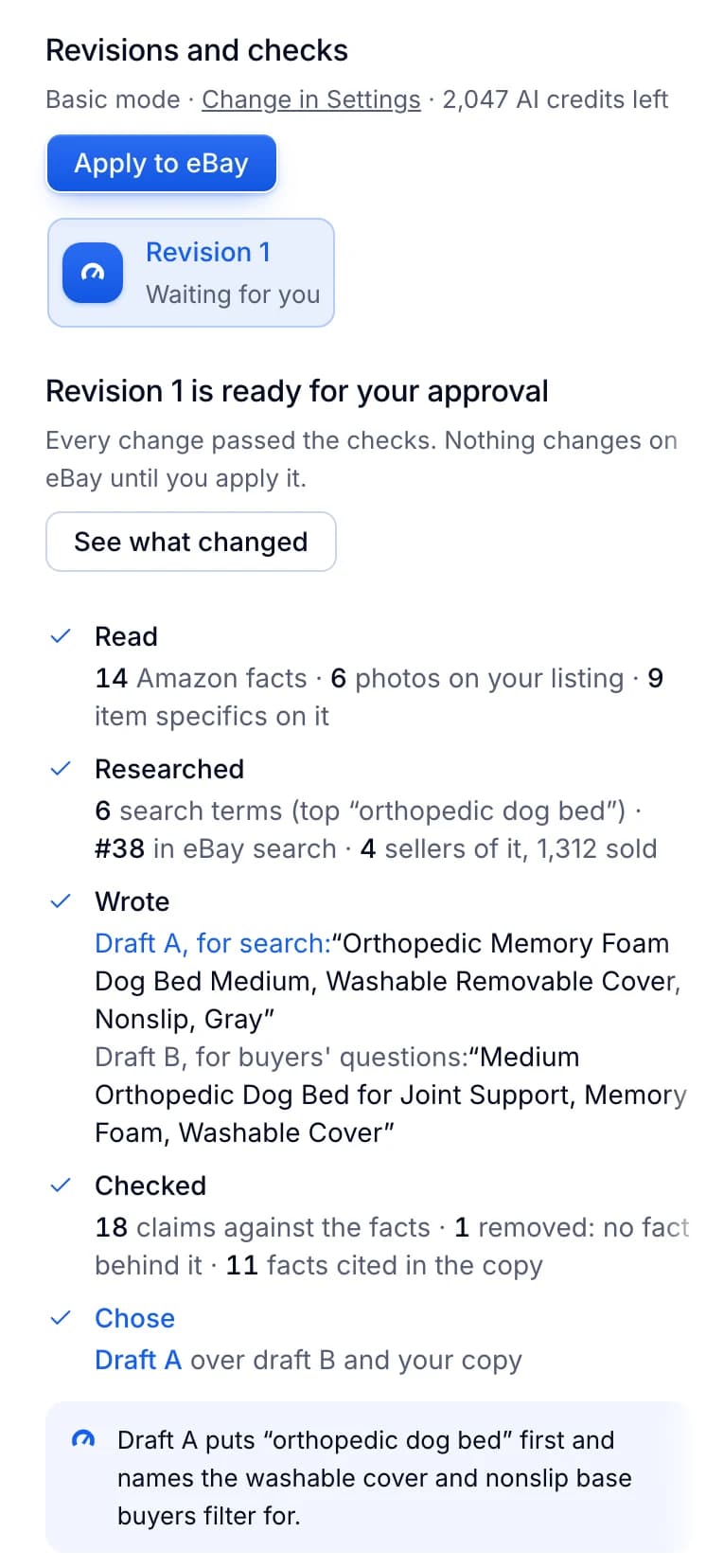
Productivo also has pages for Amazon to eBay dropshipping, wholesale stock, second-hand goods and handmade products.
Written by the Productivo team. Source review: eBay’s Best Match tips, listing best practices, creating a listing, picture policy, photo help, item description policy, product identifiers guide, search manipulation policy, JavaScript policy, links policy, mobile-friendly listings guide, handling time guide, item location policy, business policies, return policy options, Money Back Guarantee policy, dropshipping policy, selling fees, auction guide, packaging and measuring guide, prohibited and restricted items, intellectual property (VeRO) policy, images, videos and text policy, page views help, Seller Hub performance guide, Best Offer help, variations and out-of-stock help and search help, checked 18 October 2026. The example listing is made up.