
How-to guide · Beginner · 9 steps · Updated 18 October 2026
Reselling on eBay: how to start with second-hand items
Reselling on eBay means buying used items for less than they sell for, then selling them on eBay. You can also start with things you already own. This guide takes one item at a time from the shelf to a sale. You end with a routine you can repeat: check, list, ship and record each item.
New to this? Follow the example first. It takes one thrift store lamp from the shelf to a sale. Ready to start? Check that reselling on eBay fits your week.
Steps 1 to 9 use only eBay’s own tools. The last part shows how Productivo, the app behind this guide, can help. You do not need a Productivo account for the steps.
Before you start
In shortCheck that this guide fits how you sell, then get the few things you need.
Who it is for
LevelBeginner
WholesaleMedium
Most steps work, but you buy new stock in bulk, so finding items and grading condition work differently.
ResellingEasy
This guide is written for second-hand items, so every step works as written.
HandmadeHard
You make your items, so finding stock and grading used condition do not apply. Listing, shipping and records do.
Wholesale dropshippingHard
A supplier ships new items for you, so finding, grading and packing do not apply. Pricing and records do.
Do you plan to list items from another shop and buy them only after they sell? eBay’s dropshipping policy does not allow buying from another retailer or marketplace to ship to your buyer. Read the eBay dropshipping rules guide first.
- You finish with
- One item checked, listed, shipped and recorded, with its money left and your time. Plus a weekly routine you can repeat.
- You need
- An eBay account with its verification done, and a checking account or debit card for payouts
- A few things you own, or a small budget for your first items
- Space to store items, a scale and a tape measure
- A phone camera, and a notebook or spreadsheet for records
- The 9 steps
- Check that reselling on eBay fits your week
- Find items to resell
- Check sold prices and fees before you buy
- Grade the condition and check it is genuine
- Write the listing: photos, title and item specifics
- Price it from sold prices in the same condition
- Set up shipping, pack and list
- Record fees, money left and taxes
- Handle returns and grow your eBay reselling business
Worked example: one thrifted item, from shelf to sale
In shortOne made-up lamp is checked, listed and sold, with its money left and the time it took.
A made-up practice case: the item, prices, tax rate and minutes are not real.
What the search shows
| Result | Price + shipping | Use it? |
|---|---|---|
| A: sold, used, works | $36.00 + $11.00 | Keep it |
| B: sold, used, works | $40.00 + $10.00 | Keep it |
| C: sold, used, works | $38.00 + $12.00 | Keep it |
| D: for sale, used, works | $65.00 + free | Leave it out: an asking price, not a sale |
| E: sold, for parts or not working | $12.00 + $11.00 | Leave it out: a different condition |
Three sales match: used and working. The middle one is $38.00. So you plan to list at $38.00, and the buyer pays the shipping.
Money left on the lamp
| Per item | Amount |
|---|---|
| The lamp at the thrift store | $8.00 |
| A new bulb and cleaning | $3.00 |
| Shipping label | $11.00 |
| Box and padding | $1.50 |
| eBay fees | $7.60 |
| Money kept for returns | $1.00 |
| Total costs | $32.10 |
| The buyer pays | $49.00 |
| Money left | $16.90 |
Your time on the lamp
| Task | Minutes |
|---|---|
| Find and buy it (part of a thrift store trip) | 20 |
| Test and clean it, fit the bulb | 20 |
| Photos, title and listing | 25 |
| Answer a buyer’s question | 5 |
| Pack it and drop it off | 15 |
| Total time | 1 h 25 min |
| Money left per hour | $11.93 |
The lamp leaves $16.90 for 1 h 25 min of work. That is about $11.93 an hour, before income tax.
What if it goes worse?
| Case | The buyer pays | Money left |
|---|---|---|
| It sells at $38.00 | $49.00 | $16.90 |
| You accept a $30.00 Best Offer | $41.00 | $10.07 |
| It does not sell | $0.00 | −$11.00 |
Is this worth your time? Only your own numbers can say. Do the same for your own item in the steps below, starting with step 1.
How to start reselling on eBay, step by step
Follow the steps with one item first. Then repeat them for every item you sell.
Step 1 of 9: Check that reselling on eBay fits your week
In shortCount the hours, space and cash you can give it before you buy anything to resell.
Reselling means you sell items for more than they cost you. With used items, each one is a small project. You find it, check it, list it, ship it and record it.
It suits people who like the hunt and can work in short blocks of time. Be honest about the work:
- TimeEach item needs testing, cleaning, photos, a listing and a trip to ship it.
- StorageItems wait in your home until they sell. Some wait for weeks.
- ShippingYou need boxes, padding, a scale and a tape measure.
- ReturnsSome buyers send items back. That costs you time and money.
- Uneven incomeSome weeks bring many sales, and some bring none.
Only spend money you can leave in unsold items for a while. Write down your hours per week and where the items will live.
Result: Your hours per week, your storage space and the most you will spend on stock, written down.
Step 2 of 9: Find items to resell
In shortStart with things you own, then buy only items you can check on your phone first.
Start close to home. These are the usual places to find stock:
- Your own thingsThe cheapest way to learn. You practice listing, shipping and fees without buying stock.
- Thrift storesPrices are low, but it can take many visits to find good items.
- Garage, yard and estate salesYou can look closely, ask questions and often test an item on the spot.
- Flea markets, clearance shelves and local online listingsMore choice in one place. Check sold prices on your phone before you pay.
- Liquidation lotsBoxes or pallets of returns and extra stock. You cannot see every item first, so start small or skip them.
Wherever you shop, pick items you can look up. A brand and model number, or a book’s ISBN, makes that quick. Learning one or two kinds of items well helps you spot good buys faster. Buy what you checked, not what you hope is worth something.
Keep every receipt, or write down what you paid. You need it to work out your money left, and for taxes.
Result: A short list of places to buy, and your first items with what you paid for each.
Step 3 of 9: Check sold prices and fees before you buy
In shortLook up what the same item sold for, then work out what is left after fees and shipping.
Look up sold prices
- Search eBay for the exact item, with the brand and model.
- In the filters, turn on Sold items. eBay shows listings that sold in about the last 90 days.
- Keep only sales in the same condition and with the same parts. A lamp without its shade is a different item.
- Skip a sold price with a line through it. It usually means the seller took a lower Best Offer, and the real price is hidden.
- Note each sold price and the shipping the buyer paid.
Use sold prices, not asking prices. An asking price is what a seller hopes to get for an item still for sale. A sold price is what a buyer really paid. The eBay sold listings guide shows the search in detail.
Then work out your money left. Start with what the buyer pays: the price and the shipping. Take away the item, eBay’s fees, the shipping label and packaging. The eBay fee calculator guide works out the fees.
Result: For each item: its sold prices, its money left after costs, and buy or skip.
Step 4 of 9: Grade the condition and check it is genuine
In shortChoose the eBay condition that matches the item, then photograph and describe every flaw.
On the listing form, you choose a condition from eBay’s list. The choices depend on the category. eBay says choosing the right one is part of its selling practices policy.
Some of eBay’s condition names
eBay’s words, shortened. Read the full list for your category.Condition What it means New Brand new, unused, unopened and undamaged, in its original packaging where there is one. Found in most categories. Used Used before. It may show some cosmetic wear, but it is fully operational and works as intended. Found in most categories. For parts or not working Does not work as intended. This includes items that need repair or miss essential parts. Found in electronics, business and industrial, and others. Pre-owned - Good Gently used, in good condition, with a few signs of wear. Every flaw should be shown and described. Found in clothing and shoes. Show every flaw in a photo, and name it in the description. Say what works, what does not and what is missing. “Scratch on the base, about 1 inch” is clear. “Some wear” is not.
A buyer can return an item that does not match your listing. That is true even when your listing says no returns.
Result: The eBay condition for your item, a photo of each flaw and a plain list of what works and what does not.
Step 5 of 9: Write the listing: photos, title and item specifics
In shortTake clear photos, write a title buyers would search, and fill in every item specific.
- PhotosShow the whole item, the brand or model label and every flaw. Use even light and a plain background.
- TitleUse the words a buyer would search: brand, model, type, size or color. eBay suggests using all 80 characters.
- Item specificsThe item’s details, like brand, size and color. Fill in the required ones, and more where you can.
- DescriptionRepeat the condition and the flaws in plain words. Say what is included.
Does the item have a barcode number (UPC), an ISBN or a part number (MPN)? Enter it. If the item is in eBay’s catalog, eBay fills in key details for you. Pick the catalog entry for your exact version, not a similar one.
For every check on a listing, use the eBay listing checklist.
Result: A draft listing with clear photos, a full title, item specifics and an honest description.
Step 6 of 9: Price it from sold prices in the same condition
In shortStart near the middle of recent sold prices in the same condition, then decide on offers.
Go back to the sold prices from step 3. Start near the middle of them. Compare the total each buyer paid: the price plus shipping.
A worn item does not sell for the price of a mint one. Compare only with sales in the same condition.
Fixed price or auction?
eBay has two main formats. Buy It Now is a fixed price. In an auction, buyers bid and so set the price. eBay says most sales now happen at a fixed price. It suggests an auction for a rare item, or when you are not sure what it is worth.
Best Offer
With a fixed price, you can turn on Allow offers. Buyers can then offer you less. You accept, decline or counter within 24 hours. Add a Minimum offer amount, and eBay declines lower offers for you. An Auto accept amount accepts offers at or above it.
Before you accept an offer, work out your money left at that price. The worked example shows what a lower offer takes off.
Result: Your price, your format and the lowest offer you will accept.
Step 7 of 9: Set up shipping, pack and list
In shortPack the item, weigh and measure it, set calculated shipping and a handling time, then list.
Pack the item first. Then weigh and measure the box. You need both numbers for the shipping cost.
A big, light box is priced by its size. Once a box is over 1 cubic foot (1,728 cubic inches), USPS Ground Advantage works out its dimensional weight: length × width × height ÷ 139. You pay for that or the real weight, whichever is more. The free eBay shipping calculator does this sum and shows the label price for every zone.
One lamp, two boxes
Made-up boxes for the 4-pound example lamp. The rule is from USPS Ground Advantage.Box Size USPS counts it as A snug box: 14 × 10 × 10 in 1,400 cubic in 4 lb, its real weight A roomy box: 16 × 12 × 12 in 2,304 cubic in 16.6 lb, by size Long boxes cost extra too: $4.50 over 22 inches, and $10 over 30. So use the smallest box that still fits the padding. Round the weight and size up when you enter them. If they are too low, USPS can charge more after the sale. eBay shows it under shipping cost adjustments.
With calculated shipping, eBay works out each buyer’s shipping from their location, your package and the delivery service. In the listing’s shipping section, choose Calculated: Cost varies by buyer location. Then enter the package type, size and weight.
Set your handling time. That is the number of days from the buyer’s payment to the carrier’s first scan of your package. Pick a handling time you can always meet. Now list the item.
When it sells, you can buy the label on eBay. In Seller Hub, open Orders and select Purchase shipping label. For most services, eBay says its label rates cost less than the post office. The tracking number goes into the order by itself.
An eBay label also gets you paid sooner. New sellers usually get their money within 2 days of delivery with it. With a label bought elsewhere, it takes up to 7 days, and without tracking up to 31 days after payment.
Pack it so it arrives the way you listed it: padding on every side, and fragile parts, like a lamp shade, wrapped on their own.
Result: The box measured, shipping and handling time set, the item listed, and packing supplies ready for the sale.
Step 8 of 9: Record fees, money left and taxes
In shortWrite down each item’s costs, sale and time, and know when eBay reports your sales.
eBay has two main selling fees. The insertion fee is for creating a listing. eBay gives you up to 250 listings a month without it. The final value fee is charged when the item sells.
A fixed price listing renews every month until it sells, and each renewal counts as a listing again. So items that wait for months use up your 250.
For most categories, the final value fee is 13.6% of the total sale, which includes shipping and sales tax. eBay adds $0.40 per order, or $0.30 at $10 or less. Books, movies and music pay 15.3%. Check the current eBay fees first.
eBay takes its fees out of each sale before it pays you. The rest goes to your linked checking account or debit card.
Keep one record per item. A notebook or a spreadsheet is enough:
- The date, the place and what you paid
- Other costs: parts, cleaning, packaging
- The sold price, the shipping paid, eBay’s fees and the label
- The money left and the minutes you spent
Write down what you paid on the day you buy it. Once a week, add up the money left and the hours. That tells you if reselling on eBay pays for your time.
Result: A record for each item, a weekly total of money left and hours, and receipts kept for taxes.
Step 9 of 9: Handle returns and grow your eBay reselling business
In shortChoose a return policy you can keep, then grow only what your records show is working.
In each listing, you choose a return policy: no returns, or 30 or 60 days. The buyer pays the return shipping, or you offer free returns. An honest listing is your best protection.
Before you ship, photograph the item and any serial number. When an item comes back, compare it with those photos.
- It came back used, damaged or missing partseBay’s returned items policy lets you take up to 50% off the refund for the lost value.
- The buyer’s claim is falseUse “Report buyer” in the return. If eBay agrees, it removes the buyer’s negative feedback, and the return does not count in your “not as described” rate. It may also pay up to $6 of the return label.
A very high “not as described” rate raises your eBay fees. Add each refund and any return shipping to the item’s record.
From side income to a small business
Grow one step at a time, based on your records:
- Keep the kinds of items with the best money left per hour. Drop the rest.
- Group the work: one day to buy, one to photograph and list, set times to ship.
- Buy more stock only with money your sales already made.
- Someone is watching an item? Send them an offer from Seller Hub’s Active listings, at least 5% below your price.
- Item still unsold after months? Lower the price in small steps, or sell slow items together as a lot. The eBay pricing strategy guide shows how far you can go.
- Listing more than 250 items a month? An eBay Store gives you more listings without an insertion fee. Compare its monthly cost first.
- Every account has a monthly selling limit, and your active listings count toward it, not only sales. eBay raises it as your sales and feedback grow. Seller Hub’s Overview tab shows yours.
Let your records decide what you buy next, not one lucky sale.
Result: A return policy, a plan for returns that come back worse, and what to buy more of or drop.
What this guide can and cannot tell you
In shortIt gives you a method. It cannot promise that an item sells, or what you will earn.
Sold prices show what buyers paid before. They do not promise that your item sells, or at that price. Prices change with the season, the condition and how many others are for sale.
Nobody can promise an income from reselling on eBay. Your own records are the best guide to what works for you.
Fees, tax rules and eBay policies change. Check eBay’s own pages before you rely on a number.
Common questions about reselling on eBay
Is reselling on eBay worth it?
It can be, if the money left pays for your time. Many items leave little after fees, shipping and packaging. Some take weeks to sell. Record the money left and the minutes for your first items. Then decide with your own numbers, not someone else’s.
How do I start reselling on eBay?
Start with things you already own. List a few to learn photos, shipping and fees. Then buy a few cheap items you checked first. Step 1 helps you set your hours and budget.
What are the best things to resell on eBay?
The best items to resell on eBay are ones you can check fast and ship easily. No single list fits everyone, because it depends on what you find near you. Look for items that:
- Have a brand and model number, or an ISBN, so you can look up sold prices
- You can test, like electronics that power on
- Are small and light enough to ship cheaply
- Sold several times lately in the same condition
Then check each one with step 3. To see which items sell often, read our guide to the best selling items on eBay.
Do I have to pay taxes on eBay sales?
You must report your income. The IRS counts payments for goods you sell as income, including personal items sold at a gain. You report it whether or not eBay sends you a Form 1099-K. Step 8 has the reporting limit. Ask a tax professional how it applies to you.
How much money do I need to start?
You can start with no money for stock. Sell things you already own first. eBay’s main fee comes out of each sale, and your first 250 listings each month have no insertion fee. You need boxes, padding and labels. When you start buying, set a small limit you can afford to lose.
How Productivo helps with reselling on eBay
In shortProductivo can list your one-off items with eBay’s conditions and keep your records. You still find and check each item.
Everything above works with eBay’s own tools. This part is about Productivo, the app behind this guide.
Where Productivo fits in the steps
| Guide step | What Productivo does |
|---|---|
| Step 4 | Add each item by hand. The form offers the conditions eBay allows in the item’s category. A used condition needs a short note on its flaws. |
| Step 5 | Up to 12 photos and the category’s item specifics for each item. Or bring up to 1,000 items from one CSV file. Its preview shows each row’s errors before anything is saved. |
| Step 7 | Choose your shipping, return and payment policies before you list. List now, or at a date and time you pick, with your description template. |
| Step 8 | Reports show sales and profit by day or by month. Its Expenses tab takes costs outside orders, like packaging or storage. |
Adding items, publishing, templates and Reports are part of every plan. Productivo does not find thrift items or check their sold prices. Items you add by hand keep the price you give them. Repricing, price tracking and the Listing Optimizer’s AI work only with Amazon products. Productivo also does not know what you paid at a thrift store. Until you record that cost on the order, Reports leaves the order out of its sales and profit totals and says so.
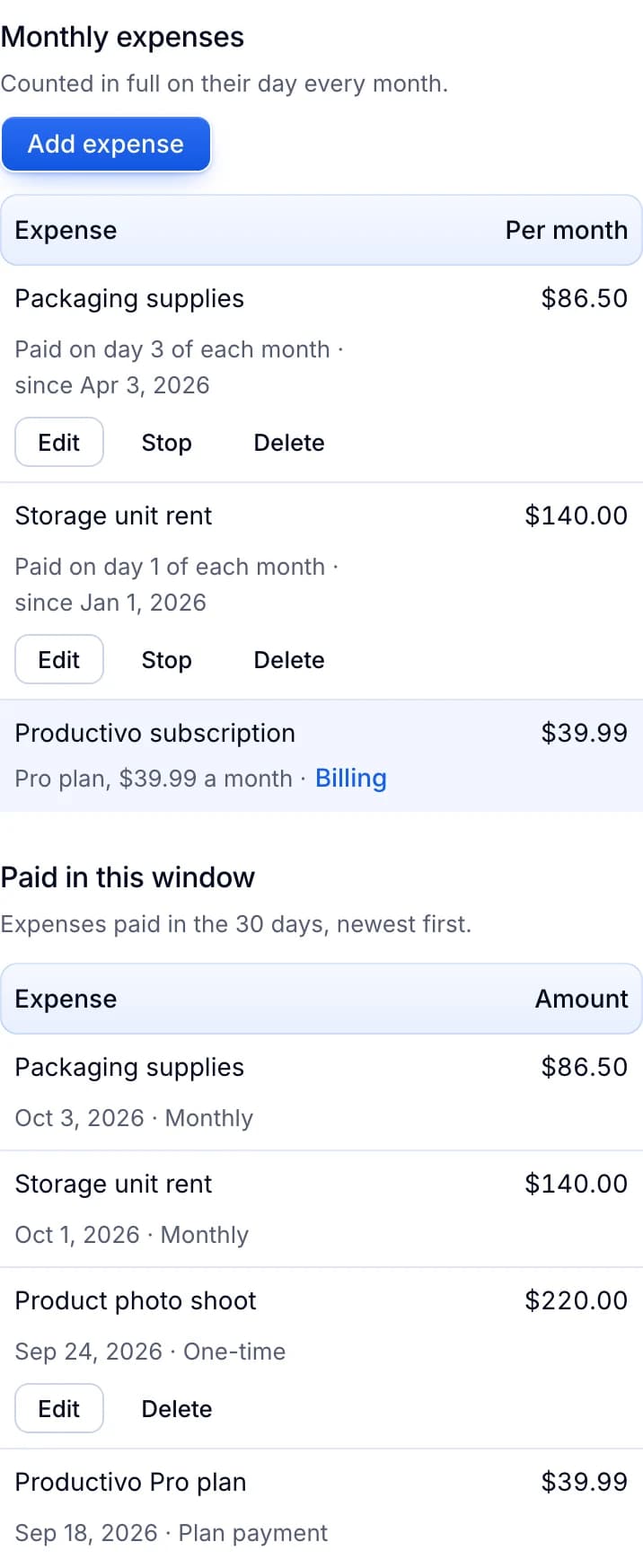
Costs outside orders, in Productivo
The Expenses tab with example costs: packaging supplies and storage unit rent each month. Reports take them off your totals, which end on net profit.
Productivo by business model
Pick how you sell. Each part names the steps where Productivo helps that kind of seller, and what you still do yourself.
In shortBring a whole pallet in by CSV, each row with its own condition, then publish the lot together.
| Stage | What Productivo does |
|---|---|
| Step 4 | Give each CSV row its own eBay condition in the condition_id column, from those its category allows. Anything not new needs a note on its flaws in condition_description, or the preview flags the row. |
| Step 5 | Put each item from the pallet on its own row of the CSV template, up to 1,000 rows per file. The preview checks each row for the item specifics its category requires before anything is saved. |
| Step 7 | List the whole lot together, up to 1,000 per click, with the shipping, return and payment policies you pick. If your monthly selling limit runs out, the rest wait in the queue. |
| Step 8 | Reports export a daily CSV of orders, revenue, profit, expenses and net profit for your accountant. |
| Step 9 | A team member with Products access can add stock by hand or CSV, edit titles and prices, and publish with your templates. Every plan includes up to 10 members. |
What it does not do: Productivo does not grade items or check that they are genuine. CSV photos must be public HTTPS links, so add an item by hand to upload photos from your phone. Until an item’s cost is recorded on the order, Reports leaves that order out of its sales and profit totals.
In shortBeyond listing, Productivo gives an eBay reseller shipping alerts, each sale’s label cost and a list of unsold items.
| Stage | What Productivo does |
|---|---|
| Step 4 | Conditions that need grading details, like a graded card’s grade, are left out, so list those items on eBay itself. Settings › Blacklist checks the Brand you type for each item, and a match never publishes. |
| Step 5 | Under Settings › Listing template › Category rules, give a category its own design, like Collectibles & Art or Auto Parts. Once live, Products shows Missing filters if a buyer filter, like Size, is left empty. |
| Step 6 | The item goes up at your price as a fixed-price listing with no end date (Good ’Til Cancelled). To lower the price later, change it on eBay. |
| Step 7 | If a sale is not shipped on eBay 3 hours later, a Telegram or email alert comes. Two more come as the ship-by date gets close. |
| Step 8 | In Orders, each sale’s Money section lists the fees eBay billed and any eBay label you bought, read from eBay. Add cost lists a part or cleaning there too. |
| Step 9 | When a buyer opens a return, an alert comes 2 days before eBay’s deadline for your reply. Reports › Orders lists your Listings with no orders, oldest first, so you know what to lower or sell as a lot. |
What it does not do: It does not list auctions or set Best Offer. It does not add the list of vehicles an auto part fits. Sold items stay in Products and count toward your plan’s product limit until you remove them.
In shortAdd each piece with its quantity and photos, list it in the Crafts design, and log materials as expenses.
| Stage | What Productivo does |
|---|---|
| Step 5 | List several of the same piece on one listing with the Create product form’s Quantity field. Your photos upload straight from your phone. |
| Step 7 | Under Settings › Listing template › Category rules, give your craft category the Crafts design. Pieces you list there then show on a gridded cutting mat. |
| Step 8 | Add materials and tools to Reports › Expenses, as one-time or monthly costs. Net profit takes each one off on the day you pay it. |
| Step 9 | Invite a helper through Teams with access to Products, and stay at the bench. They can add pieces and publish them with your templates. |
What it does not do: Products have no field for materials, so Reports leave a sale out of their totals until a cost is recorded on its order. Once a piece is live, you change its price and quantity on eBay.
In shortWith a supplier shipping for you, Productivo lists at your price and keeps each sale’s numbers for your records.
| Stage | What Productivo does |
|---|---|
| Step 6 | Productivo lists each item at a fixed price, with no end date. It keeps the price you typed and sets no auction or Best Offer. |
| Step 8 | Each sale’s Money section in Orders lists what the buyer paid, eBay’s fees and any refund, as eBay reports them. That is the sale half of your record. |
| Step 9 | Reports › Orders lists Listings with no orders, each with its price, quantity and last order. Drop the supplier items that stopped selling. |
What it does not do: Productivo does not know what your supplier charged, so keep that half of each record yourself, for profit and taxes.
Written by the Productivo team. Source review: eBay’s item condition by category, counterfeit policy, Authenticity Guarantee for sellers, Product Research documentation, listing best practices, Best Offer, selling through auctions, shipping calculator, shipping labels, handling time, selling fees, Form 1099-K, return policy options, start selling, getting paid, seller protections, signature confirmation policy, offers outside eBay policy, dropshipping policy, transaction holds, shipping FAQs, changing shipping details, CPSC regulations, condition of returned items policy and selling limits, the USPS page USPS Ground Advantage, the CPSC page Recalls & Product Safety Warnings and the IRS page Understanding your Form 1099-K, checked 18 October 2026. The numbers in the example are made up.