
How-to guide · Beginner · 8 steps · Updated 18 October 2026
eBay product research: how to find items worth testing
eBay product research means checking what sold on eBay, for how much, and how much money you keep after costs. This guide uses eBay’s free Product Research tool (formerly Terapeak). At the end, you choose what to do with one item: try a few, wait or pass.
New to this? Follow the example first. It takes one item through every step. Already have an item? Start your first search and fill in your research notes as you go.
Steps 1 to 8 use only eBay’s own tools. The last part shows how Productivo, the app behind this guide, can help. You do not need a Productivo account for the steps or the notes.
Before you start
In shortCheck that this guide fits your business, then get the few things you need.
Who it is for
LevelBeginner
WholesaleEasy
You can check the exact item and its sales before you buy any stock.
ResellingMedium
Each item differs in condition and what is included, so matching sales takes more care.
HandmadeMedium
Your item is one of a kind, so you compare it with similar items that sold.
Wholesale dropshippingEasy
The same steps work. Check the supplier’s stock and delivery times with extra care.
Do you plan to buy each item from another shop after it sells and ship it straight to the buyer? Read step 6 first. eBay does not allow that. The eBay dropshipping policy guide explains what is allowed.
- You finish with
- A short note about one real item. It lists matching sales and your costs, and ends with your choice: try a few, wait or pass.
- You need
- A product idea with exact details. No idea yet? Step 1 helps.
- Your supplier’s price and a shipping quote. If you do not have them yet, note what is missing.
- A free eBay account, for the Sold items filter in eBay search. Product Research on a computer needs Seller Hub, which opens after your first sale. The eBay app needs one active listing, or a sale in the last 90 days.
- A calculator and about one hour per item
Worked example: one product, step by step
In shortOne made-up item goes through every step and ends on “wait”.
This is a fictional practice case. The product, sales and prices are made up. You will not find them on eBay.
Compare sold items with sold items
Here are four results from the last 30 days. Each price is what the buyer paid, with shipping. Sales tax is not included.
Sold comparison A — $50 total
The same new MF-01 set, with stand and cable. 9 sales at $45 plus $5 shipping.
Keep it. Same model, condition, contents and shipping area.
Sold comparison B — $49 total
The same new set from another seller. 6 sales at $49 with free shipping.
Keep it too.
Active listing C — $52 asking price
The same set, still for sale.
Use it to see the competition. An asking price is what a seller wants. It is not what a buyer paid.
Excluded listing D — $29 total
A used MF-02 that runs on batteries and has no stand.
Leave it out. The model, power, condition and contents are different.
A and B sold for $49–$50 with shipping. So start your cost check at $50. Listing C asks $52, but that does not mean you will get $52.
Where does the $50 go?
In this made-up example, the costs are $40. That leaves $10 per item.
- Buying the item and shipping it to you
- $22
- Shipping to the buyer, packaging, fees and returns
- $18
- Money left per item
- $10
The costs behind the example
| Cost | Per item |
|---|---|
| Buy the item ($20) and ship it to you ($2) | $22 |
| Shipping to the buyer | $7 |
| Packaging | $1 |
| eBay fees (about 13.6% of the order + $0.40) | $8 |
| Money kept for returns | $2 |
| Total costs | $40 |
| Money left per item | $10 (20%) |
What if the price drops?
| Case | Sell for | Costs | Money left |
|---|---|---|---|
| Expected price | $50 | $40 | $10 |
| Lower price | $45 | $40 | $5 |
| Lower price and $10 shipping | $45 | $43 | $2 |
| Lower price and a 5% ad rate | $45 | $43 | $2 |
Would you buy stock yet?
Say you want at least $6 left per item, even at $45. You have not checked the supplier’s stock or delivery time yet.
- Current decision: waitAt $45 you keep $5. That is below your $6 minimum, and you have not checked the supplier. Next, get the supplier’s price, stock and delivery time, and a shipping quote.
- What would change itIf the supplier is $1 cheaper, costs drop to $39. Then $45 leaves exactly $6. This only works if shipping stays at $7.
- When to passPass if you cannot get the same set every time, or if no realistic price leaves $6. Do not switch to the cheaper MF-02 and still use the MF-01 sales.
Try a few, with a clear stopping point
If those checks pass, try up to 3 items: 3 × $39 = $117. That is inside your $120 budget. Keep some extra cash. You pay for stock and shipping before eBay pays you. One refund can also cost more than the $2 per item kept for returns.
Check the result 30 days after you list. If none sell, record zero sales and stop buying. More stock will not fix a slow test. Also stop if a sale leaves less than $6.
Now do the same for your own item. Follow the steps below and fill in your research notes as you go.
How to do eBay product research for your own item
A low buying price is not enough on its own. The same steps work for wholesale stock, second-hand goods and handmade products.
Step 1 of 8: Write down exactly what you want to sell
In shortWrite down the exact item, where you will sell it and how much you can spend, before you look at any prices.
For your idea, write down:
- The itemBrand, model, size and condition.
- What comes with itHow many come in one pack, and extras like a cable or stand.
- Where it goesWhere you will sell (for example eBay.com), where you will ship, and who will store and send the stock.
Set a spending limit now, before you look at possible profits. Make sure you have space and time for a few test items.
Result: Your item, where you will sell and ship, and your spending limit, all written down.
Step 2 of 8: Search eBay’s Product Research tool
In shortSearch the exact item in eBay’s free Product Research tool and look at what sold in the last 30 days.
eBay Product Research (formerly Terapeak) is free for sellers. You find it in the Research tab in Seller Hub. Seller Hub opens after your first sale: select Start using Seller Hub. The tool is also in the Selling tab of the eBay app. The app needs one active listing, or a sale in the last 90 days. It shows up to three years of eBay sales. It even shows the real price when a seller accepted a Best Offer.
Run your first search
- Type the exact brand and model. You can also filter by barcode number (UPC) or part number (MPN).
- Try every way sellers write the model. Product Research counts only titles that have all your words. Join the spellings with OR, like
frother AND (MF-01 OR MF01). - Choose where you will sell, like eBay.com. Set the dates to the last 30 days.
- Pick the item’s category. Then use the filters that appear, such as condition.
- Set the seller location to the country you ship from, and the buyer location to where you sell. Sellers abroad can have other prices and delivery times. Check their sales in a separate search.
- Remove items you do not want with a minus sign. For example,
-replacementremoves every title with the word “replacement”. Add-lot,-bundleand-partsto drop multi-packs and broken items. - Open the results. Check the photos and what is included. Titles with the same words can still be different products.
For the example, the search is
Practice MF-01 milk frother -replacement. This item is made up, so eBay will not find it. Search for your own item.What the sold-items summary shows
The example search over the last 30 days, with made-up sales.
Search: Practice MF-01 milk frother -replacement
- eBay.com
- Last 30 days
- New
- Sold
- Average sold price
- $46.60
- Average shipping
- $3.00
- Total sold
- 15
- Sellers
- 2
A drawing, not eBay’s screen. Here the sold price does not include shipping. $46.60 + $3.00 = $49.60 on average. That matches the $49–$50 totals in the example.
The tool also shows active listings. These are items that are still for sale. They show your competition, not what buyers paid.
Two free ways to see what sold
Use Product Research if you can. The Sold items filter is fine for a first check.Compare Product Research Sold items filter Where Seller Hub › Research, or the Selling tab in the eBay app eBay search, signed in, with Sold items ticked Sales history Up to 3 years About the last 90 days Best Offer sales The price the buyer paid Not the accepted price Averages and trends Worked out for you You count the sales yourself Result: Your search words, filters and dates, saved for your own item.
Step 3 of 8: Compare the same item
In shortKeep only sales of the same item, and keep sold prices apart from asking prices.
Only keep listings for the same model, condition and pack size. A used item or a two-pack does not show the price of one new item. Compare the total each buyer paid, with shipping. Also check delivery times, returns and accessories.
Keep auctions apart from fixed-price sales too. An auction price depends on who bid that day. Product Research has a filter for the listing format.
Keep sold prices and asking prices in two separate lists. An asking price is only what a seller hopes to get. A listing that ended may not have sold. If a seller accepted a Best Offer, use the price Product Research shows. Do not use the old asking price.
Look at the price trend before the average. Did prices fall during your dates, for example after a newer model came out? Then use the latest 30 days. The average still counts the older, higher prices.
Save each useful link with the date you checked it. Product Research opens only sales from the last 90 days. For older sales, write down the title, price, date and condition, or take a screenshot. If you leave a result out, write down why. “Different model” is a good reason. “The price is lower than I hoped” is not.
Result: A list of matching sold listings, kept apart from active listings. Each result you left out has a reason.
Step 4 of 8: Check how often it sells
In shortCheck that the item sells in most weeks, and from more than one seller.
Look for the same item selling again and again in the last 30 days.
Good signs
- Sales in most weeks
- Sales from more than one seller
Weak signs
- Sales from only one seller
- All the sales in one busy week
- A listing’s all-time sold count
Product Research shows each seller’s share of the sales. If one seller has most of them, you compete with that seller’s price and feedback.
For dates of 90 days or less, Product Research also shows a sell-through rate. It compares items sold with the listings in your search. Read it next to the total sold. A high rate from only a few listings still means low demand. eBay gives no good or bad rate, so compare it with similar items. The free eBay sell-through rate calculator works it out from your own counts.
Too few sales in 30 days? Check 90 days. Still too few? Write “not enough evidence”. Then wait or try another item. For a seasonal item, compare the same months last year.
How long would yours wait?
eBay product research tells you what sold. This check tells you how long your listing may wait. Divide the matching active listings by the items sold in 30 days. In the example, 30 listings are for sale and 15 sold, so there are about 2 months of stock.
A new listing may wait about that long, unless your price or offer stands out. Your money stays in that stock until it sells. This is our rule of thumb, not an eBay number.
Result: A short note on how often the item sells and how long a new listing may wait, or “not enough evidence”.
Step 5 of 8: Add up the costs
In shortAdd up every cost per item, then see what is left at the normal price and at a worse price.
Start with a selling price from the middle of your matching sold prices, not the highest. Then list every cost per item: buying price, shipping to you, packaging, shipping to the buyer, eBay fees, ads, and money kept for returns.
Product Research shows the average shipping and how many listings ship for free. Use them to plan your own shipping offer.
On eBay.com, the main fee for most categories is 13.6% of what the buyer pays. That total includes shipping and sales tax. eBay also adds $0.40 per order ($0.30 if the order is $10 or less). Some categories have other rates, so check the current eBay fees. Promoted listings cost extra if you use them. eBay suggests an ad rate for each listing, as a percent of the sale. If you plan to promote, add it to your worse case, as the example does. The eBay fee calculator guide works out the fees for you.
What is left is your money left per item. This is not your final profit. You still need to pay for your time, other business costs and income tax.
Put your own numbers into the worked cost calculation. Then check a worse case: a lower price and higher shipping. Decide the lowest amount you need left before you see the result.
Result: Your own cost total and money left per item, at the normal price and in a worse case.
Step 6 of 8: Check the supplier and delivery
In shortMake sure you can get the same item at that price, and that eBay allows the item and your plan.
Can you get the exact item at the price you used? Ask the supplier about the model, stock, delivery time and returns. Also check what it costs to get the item to you, with shipping. Order a sample if you can. Used items need time for testing. Handmade items need time to make.
Check that the product is real. Then check eBay’s prohibited and restricted items list. Some items are banned, and others have extra rules. A banned item can get your listing removed or your account limited.
New to the category? eBay may limit how much you can sell there at first. Your monthly limits are on the Overview tab of Seller Hub. Plan your first order around them.
Get a shipping quote for the packed item. Write down the date of the quote.
Result: Current supplier and shipping quotes. Anything still open means “wait”.
Step 7 of 8: Choose: try a few, wait or pass
In shortChoose one of three answers (try a few, wait or pass) and write down why.
Choose your next step
- Try a fewIt is the same item, the supplier is checked, and the money left stays at or above your minimum, even in the worse case
- WaitYou still need to check a price, a cost or the supplier
- PassIt is the wrong item, or no realistic price leaves your minimum
For the MF-01 example, choose wait. $45 leaves too little, and the supplier is not checked.
Write your choice and the reason in your research notes. Waiting? Write what you still need to check, and by when. Passing? Save the reason. Then you will not research the same item again next week.
Result: Your choice (try a few, wait or pass), the date, the reason and your next check.
Step 8 of 8: Start with a few items and a spending limit
In shortBuy only a few items, with a spending limit, a review date and a point where you stop.
Before you order, decide four things:
- How many items to try
- The most you will spend
- When you will check the result
- When you will stop
Track the real selling price, fees, shipping, time spent, cancellations and returns. Compare them with your plan. On the review date, stop, change the offer or try another small batch.
Nothing sold? Write down the stock and cash you still have in it. Then check the page views next to the listing in Seller Hub. Few views can mean buyers did not find it. Many views but no sales? Check if the total price and shipping were competitive. Make one change within your budget, or stop. Buying more stock will not fix a test that failed.
Result: A small test plan: number of items, spending limit, review date and when to stop.
Make your own research notes
In shortFill in the notes for your own item, then copy them somewhere safe.
Fill in your own item and sources below. These notes are not saved. Copy them before you close or reload the page. Your ticked steps stay in this browser, but your notes do not.
What the research can and cannot tell you
In shortPast sales help you choose what to test. They do not promise a sale or a profit.
eBay product research shows what sold before. It helps you decide what to try. It does not promise that your listing will sell or make money.
Is shipping, stock or another number missing? Mark it “unknown” and check it before you spend money. The MF-01 example is for practice. It is not a product tip.
Before you act on your notes
- Every price and shipping cost has a source and a check date. Check again anything that may have changed.
- Your choice matches the evidence. Open cost or supplier questions mean “wait”, not “try a few”.
- Your notes are copied to a place you can open again. Your review date is in your calendar.
Common questions about eBay product research
Is eBay Product Research free?
Yes, but it needs a sale or an active listing. On a computer, it is in Seller Hub, which opens after your first sale. The eBay app needs one active listing, or a sale in the last 90 days. Sourcing Insights, the category tool next to it, needs a Basic Store subscription or higher.
Is Terapeak still available?
Terapeak is the old name. eBay now calls it Product Research. You find it in the same place: the Research tab in Seller Hub. For each filter and figure, read the Terapeak guide.
Can I do eBay product research without Seller Hub?
Yes, partly. Sign in to eBay, then use the Sold items filter in eBay search. It shows about the last 90 days. It does not show accepted Best Offer prices or averages, so you count the sales yourself. Step 2 compares the two.
Do I need a paid eBay product research tool?
Not to start. Use the free eBay research tools first. Product Research shows sold prices, demand and competition on eBay. Paid tools help you go faster, for example by scanning many items at once and estimating profit. Before you trust any tool, check where its numbers come from.
How much evidence is enough?
Before a small test, you should have matching sales and their dates, your full costs and your spending limit. There is no magic number of listings. The more you plan to spend, the more you should check. Before a bigger order, add your own test results and check the supplier again.
Should I match the cheapest competitor?
First check that it is the same item, condition, pack and shipping. Then work out your money left at that price. Is it below your minimum? Then find a real reason buyers would pay more, find a lower cost, or pick another item.
When should I revisit the research?
On your review date, before you buy more stock, or when prices, stock or shipping change. Update the numbers that changed and write down your new choice.
How Productivo helps with eBay product research
In shortProductivo can do parts of steps 2 to 8 for many items at once. You still check each result.
Everything above works with eBay’s own tools. This part is about Productivo, the app behind this guide.
Where Productivo fits in the steps
| Guide step | What Productivo does |
|---|---|
| Steps 2 to 4 | Product Scanner reads eBay US results for a keyword or up to five categories. It shows how many each listing has sold. That is the listing’s all-time count, so check the dates in Product Research. |
| Step 5 | It estimates the profit per item from your store’s cost settings. If the supplier’s shipping is unknown, it says so and leaves it out. |
| Step 6 | It shows a matching supplier offer, such as an Amazon listing, and when its price was checked. eBay’s dropshipping rule still applies. |
| Step 8 | If you sell with Productivo, Reports show profit per order after fees and the store costs you enter. |
Product Scanner is part of the Pro and Scale plans. A scan does not replace eBay’s three years of sales history, so check each match yourself. Read more about Productivo’s eBay product research tools.
Set the search before you start
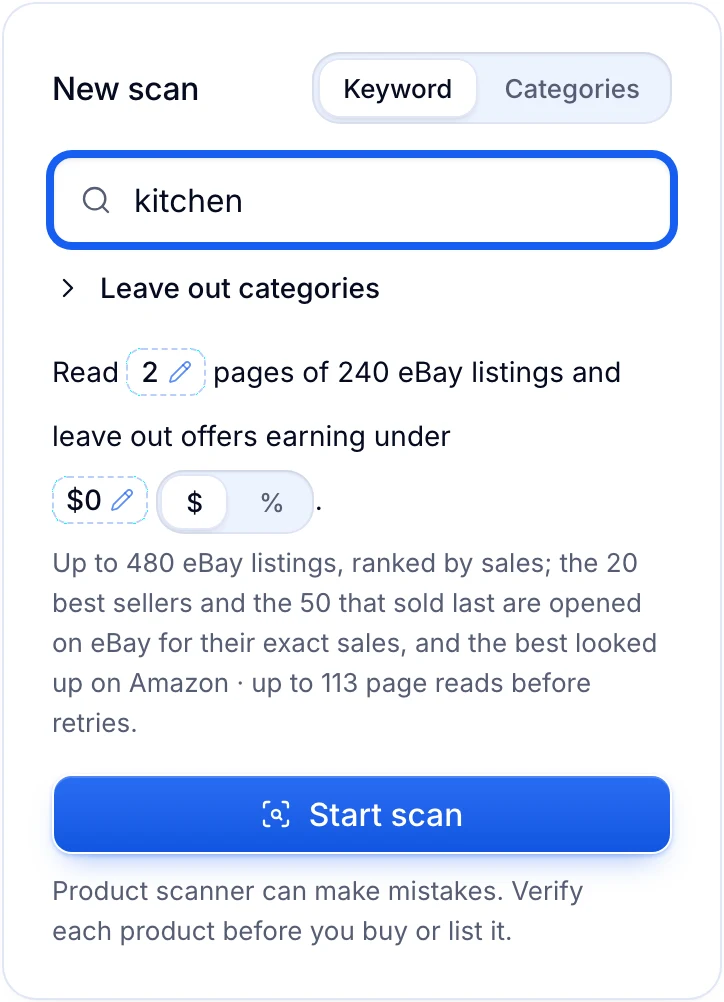
In Productivo, type a clear search and choose how many pages of eBay results to read. Start small and check the matches. Then make the search wider.
Productivo by business model
Pick how you sell. Each part names the steps where Productivo helps that kind of seller, and what you still do yourself.
In shortProductivo lists a test batch of wholesale items and shows what sold, but you do the research yourself.
| Stage | What Productivo does |
|---|---|
| Step 8 | Add each test item by hand, with up to 12 photos. Pick its eBay category, and the form asks for that category’s item specifics and conditions. |
| Listing | Approve the batch and publish it at a fixed price, with your store’s description template and business policies. A brand on your VeRO blacklist is stopped before it goes live. |
| After the sale | Orders marks each sale Manual product. You ship it and add tracking on eBay, and Telegram alerts you if it is not shipped 3 hours after the sale. |
| Your review date | Reports › Orders lists Listings with no orders, the longest-listed first, with each one’s last sale. Check it on the review date you set in step 8. |
What it does not do: Product Scanner is built for Amazon sourcing, so its profit does not use your supplier’s price. Productivo does not check suppliers or add up your costs before you buy. Until an item’s cost is recorded on the order, Reports leaves that order out of its sales and profit totals and says so.
In shortMatch used sales yourself, then Productivo checks brands, lists your test items and keeps each sale’s costs.
| Stage | What Productivo does |
|---|---|
| Step 6 | Settings › Blacklist starts with over 1,000 brands whose owners report listings to eBay (VeRO), and you add your own. It checks the Brand you type for each item, and a match never publishes. |
| Step 8 | Add each test find under Products › Add product › Create manually, with its condition and a Condition description of any wear. It stays a draft until you publish. |
| After the sale | In Orders, each sale’s Money section lists what the buyer paid, the fees eBay billed and any eBay label you bought. Add cost lists a part or cleaning there too. |
What it does not do: Product Scanner reads only new Buy It Now listings, so it cannot research used items. Productivo does not match used sales for you or work out profit before you buy. Until you record an item’s cost on its order, Reports leaves that order out of its sales and profit totals and says how many it left out.
In shortList a few pieces, then see if buyers find, open and buy them before you make a batch.
| Stage | What Productivo does |
|---|---|
| Step 8: Test pieces | Add each test piece under Products › Add product › Create manually, with up to 12 photos and its category’s item specifics. It stays a draft until you publish it. |
| Step 8: Review date | On Pro and Scale, the Listing Optimizer reads each live listing’s Seller Hub traffic through the Chrome extension. From day 28, it says where buyers drop off: not seen, not opened or not bought. |
| After the sale | Each test sale shows in Orders, marked Manual product, with what the buyer paid and eBay’s fees. It moves to Shipped at the next sync after you add tracking on eBay. |
What it does not do: Product Scanner only lists eBay items it can match to a product in another shop, such as Amazon, so it cannot research your own designs. Reports leave a sale out of their totals until a cost is recorded on its order.
In shortList a few of your supplier’s items as a test, and Productivo shows how buyers respond.
| Stage | What Productivo does |
|---|---|
| Step 8: List a few | Add only your test items with Add product › Create manually or Import CSV on the Products page. Nothing goes to eBay until you publish it, and each item keeps the price you typed. |
| Step 8: Read the traffic | On Pro and Scale, the Listing Optimizer shows each test listing’s impressions, views and sales, read from Seller Hub through the Chrome extension. From day 28, it adds a diagnosis, such as “no demand”. |
| Step 8: Review date | Reports › Orders lists your Listings with no orders in the window you pick, oldest first, with each one’s last order. |
What it does not do: Productivo does not check suppliers, their stock or their delivery times. Product Scanner pairs eBay items with offers in shops such as Amazon, which eBay does not let you dropship from. Until you record an item’s cost on its order, Reports leaves that order out of its sales and profit totals and says how many it left out.
Written by the Productivo team. Source review: eBay’s Product Research documentation, eBay research tools overview, Product Research and Sourcing Insights guide, July 2024 seller update (formerly Terapeak, now in the app), October 2024 seller update (who can open it), selling fees documentation, suggested ad rate help, selling limits help,dropshipping policy, prohibited and restricted items policy and page views help, checked 18 October 2026. The numbers in the example are made up.