
Comparison guide · Intermediate · 6 steps · Updated 24 October 2026
DSM Tool alternative: where DSM went and how to compare what replaces it
DSM Tool is closed. AutoDS bought it, and its sign-up and pricing links now open AutoDS pages. So a DSM Tool alternative is AutoDS itself or another tool that does the same jobs, such as Productivo, Easync or Yaballe. This guide shows what DSM did, then compares tools on monitoring, ordering, price, VeRO checks and the switch.
Short on time? Where DSM went, prices at your size and the switch each have their own part.
The steps work with any tool, or with eBay’s free tools alone. Step 3 prices AutoDS beside Productivo, the app behind this guide, and the last part covers Productivo in detail. You do not need a Productivo account for the steps.
Before you start
In shortYou need your eBay seller account, a list of what your old tool did, and a week to test.
Who it is for
LevelIntermediate
WholesaleMedium
Steps 3 to 6 work as written. Step 2 matters less, because you hold the stock and order it yourself.
ResellingNot a fit
One-off items need no supplier monitoring or ordering. Seller Hub covers the rest.
HandmadeNot a fit
You make the items, so there is no supplier to monitor or order from.
Wholesale dropshippingEasy
Every step works as written. In step 2, ask whether the tool reads your supplier’s stock.
The part What happened to DSM Tool says which supplier models eBay allows.
- You finish with
- A short list of tools priced at your size, checked on monitoring, ordering and VeRO, and a safe plan to switch.
- You need
- Your eBay seller account, with Seller Hub
- A list of the jobs your old tool did
- About 45 minutes, then a week to test on a few listings
What happened to DSM Tool
In shortDSM Tool was an eBay dropshipping tool. AutoDS bought it, and it is now closed.
DSM Tool’s own site now carries a banner: “DSMTool has migrated.” Its migration page says, “We’re now part of AutoDS.” AutoDS’s comparison page is plainer: “DSM Tool has been acquired by AutoDS and is now officially closed.” On 24 October 2026, DSM’s links led here:
Where DSM Tool’s links lead today
| DSM Tool link | Where it leads |
|---|---|
| Home page (dsmtool.com) | The migration banner, on a page titled “Free AI eCommerce Website Builder for Dropshipping” |
| Join Free (sign-up) | The page “DSMTool has Migrated! We’re now part of AutoDS” |
| Pricing | AutoDS’s pricing page |
| The app (app.dsmtool.com) | DSM Tool’s home page, under the migration banner |
| Help center (support.dsmtool.com) | No answer: the page did not load |
Your listings never lived in DSM Tool. They live on eBay, with their sales history. A tool only reads and changes them. So a move changes the tool, not the listings.
If no tool updates your listings now, their prices and stock stay as they are. Do these three things today:
- Keep a recordDownload your active listings from Seller Hub’s Reports tab. Step 6 shows the path.
- Check your best sellersOpen each one’s supplier page. Compare today’s price and stock with your eBay listing.
- Set gone items to 0For items your supplier no longer has, turn on the out-of-stock option first, as step 2 shows. The listing then stays, hidden, with its history.
DSM Tool’s eBay page still lists the jobs it did:
- ListingOne-click listing from over 50 supplier websites, title keyword ideas, a photo collage maker, scheduled listings and eBay templates.
- MonitoringSupplier price and stock, read “multiple times per day”, with pricing strategies for the eBay price.
- OrdersAn auto-order feature, tracking for buyers in one click, automatic feedback requests and a chat with saved replies.
- SafetyA “3-layered eBay VeRO detector” against blocked brands.
- TeamAccess for virtual assistants, and several stores in one account.
DSM Tool’s own comparison table listed its Basic plan at $19.97 a month, for eBay and Shopify. Its eBay page still offers a 7-day trial. Neither can be bought now: the sign-up link opens the migration page.
How to compare a DSM Tool alternative
Run these steps on AutoDS, on any other tool, or on eBay’s free tools alone. Each one ends on something you write down.
Step 1 of 6: List the jobs you still need
In shortWrite down which DSM jobs you used, then check which ones eBay already does for free.
Few sellers used every part of DSM Tool. Write down the jobs you used each week. Every DSM Tool alternative is priced by the jobs it does, so a shorter list often means a cheaper plan.
Then check what eBay itself does. Seller Hub is free, and several of its tools cover part of a DSM job.
DSM jobs and eBay’s free tools
From eBay’s Reports, out-of-stock, tracking and Team access help, read 24 October 2026.Job eBay’s free tool A paid tool helps when Listing many items Reports adds, revises or ends listings from one file. You add supplier items every day. Price and stock Reports takes price and quantity files. The out-of-stock option hides a listing at 0. Supplier prices or stock change often. Ordering from the supplier None. You order on the supplier’s site. Many orders a day, from a supplier the tool connects to. Tracking Add tracking in Seller Hub, up to 6 numbers per order. Many orders a day, with tracking from the supplier. Helpers Team access, without sharing your password. Helpers also work inside the tool. The Reports tab also downloads your listings and orders as files. You use it again in step 6.
Mark each job as a must-have or a nice-to-have. Compare tools only on the must-haves.
Result: A list of must-have jobs, and the ones eBay already does for free.
Step 2 of 6: Compare monitoring and auto ordering
In shortAsk how often each tool reads your supplier, what it does at zero stock, and when it holds an order.
Monitoring means the tool reads your supplier’s price and stock, then changes your eBay listing. DSM Tool’s eBay page said it read suppliers “multiple times per day”. AutoDS’s eBay page says every hour.
Speed matters because of eBay’s seller standards. An order you cancel because the item is out of stock counts as a transaction defect. eBay allows defects on up to 2% of transactions. Below that standard, eBay may limit your selling and charge higher fees.
A listing that drops to 0 before it sells cannot cause that cancellation. So turn on eBay’s out-of-stock option first. In Selling preferences, under Multi-quantity listings, switch on Listings stay active when you’re out of stock. A listing at 0 then stays active but hidden from search, and comes back when you add stock. eBay ends it after 180 days at 0. The eBay out-of-stock option guide covers it in full.
Questions to ask about monitoring and ordering
Ask each tool in writing, or check the answer during the trial.Ask A clear answer looks like How often do you read my supplier? A fixed schedule, and the time of the last read on each product. Which plan includes monitoring? The plan you will pay for. AutoDS’s Import 200 lists no price and stock monitor. Starter 400 does. What happens when stock runs out? The eBay quantity drops to 0, and the listing hides from search. What happens when the price rises? The eBay price rises with it, so the money left stays above a minimum you set. Who places the supplier order? Your own account with the supplier, in your name. When is an order held for me? A higher price, a buyer’s cancel request, or a delivery date the supplier cannot meet. What does ordering cost? A clear price. AutoDS lists automatic ordering as a $9.90 monthly add-on. Result: Written answers from each tool on reads, zero stock, price rises and held orders.
Step 3 of 6: Price each tool at your listing count
In shortPrice each tool at your real listing count, with every add-on you need, not at its entry plan.
Entry prices hide the real cost. Compare the price at your listing count, never the entry price. Plans count different things: listings, products or variations. Monitoring, ordering and helper seats can sit in higher plans or cost extra.
Start with AutoDS, the DSM Tool alternative its sign-up page now sends you to. Its eBay plans are sized by variations.
What AutoDS charges eBay sellers
AutoDS’s eBay page and its plan list, billed monthly, read 24 October 2026. The plan list caps each plan by variations. The plan text says products.Plan A month What it adds Import 200 $26.90 Importer, research and order manager, 1 store. No price and stock monitor listed. Starter 400 $49.90 Price and stock monitor, bulk import, buyer messages, unlimited stores. Advanced 800 $86.90 VIP live chat and tickets. Advanced 1.2K $101.90 A larger size. Advanced 2K $131.90 A larger size. Add-ons cost extra on its pricing page. Automatic ordering is $9.90 a month and VA access $14.97. A product finding hub costs $14.97 and a mentor $39.97. Billed yearly, plans cost 25% less. The trial runs 3 days for $0.99.
Now price your own size. Say your store has 500 listings and you want automatic ordering:
An example store: 500 listings, with automatic ordering
A made-up store, priced with AutoDS’s published monthly prices.Advanced 800, the first plan with room for 500 $86.90 Automatic ordering add-on $9.90 A month $96.80 Here are AutoDS and Productivo, the app behind this guide, at four sizes:
Monthly price at four store sizes
Billed monthly, read 24 October 2026. Import 200 has no price and stock monitor. AutoDS counts variations, connects unlimited stores from Starter 400 and sells ordering as an add-on. Productivo counts listings and connects 1 to 5 stores.Listings AutoDS (eBay) Productivo 200 Import 200, $26.90 Starter, $18.74 500 Advanced 800, $86.90 Basic, $24.99 1,000 Advanced 1.2K, $101.90 Pro, $34.99 2,000 Advanced 2K, $131.90 Scale, $44.99 Do the same sum for each tool on your list. Then check these in every plan:
- What it countsListings, products or variations.
- Where each job startsThe first plan with monitoring, and the first with ordering.
- Add-onsOrdering, helper seats or research sold on top.
- Stores and sitesHow many eBay stores, and which eBay countries.
- TermsThe yearly price, the trial length and the refund rules.
Result: Each tool’s monthly price at your listing count, with the add-ons you need.
Step 4 of 6: Check how each tool screens VeRO brands
In shortAsk whether the tool checks brands before listing and while live, and whether you can add your own.
VeRO is eBay’s Verified Rights Owner program. Brands in it report listings that break their rights. eBay may then remove the listing, warn you, restrict your selling or suspend your account.
Both tools here check brands. DSM Tool’s eBay page listed a “3-layered eBay VeRO detector”. AutoDS’s help center describes a VeRO list that blocks a product at upload. It reads the title, the description and the manufacturer field. You can add your own keywords. A bypass box lets a blocked item through.
A brand check reads words. It cannot make a risky item safe. eBay’s policy also names photos used without permission, and text copied from websites or catalogs. A tool that copies a supplier’s photos and text carries that risk. So ask your supplier in writing if you may use them.
Questions to ask about VeRO checks
Test each answer in the trial with a brand you know is on the list.Ask Why it matters Does it block a match before the listing goes up? A blocked draft costs nothing. A removed listing can count against your account. Does it check live listings again later? A brand can join the VeRO program after you list. Ask whether the tool ends those listings. Can you add your own brands and keywords? After a removal notice, you add that brand once and every new import is checked. Can a user override a block? AutoDS allows it and calls it risky. Decide who on your team may do it. Before you list a brand, read its page in eBay’s VeRO participant profiles in Seller Center. If a listing was already removed, the eBay VeRO violation guide shows what to do next.
Result: Each tool’s VeRO check before and after listing, and your own list of brands to avoid.
Step 5 of 6: Check listings, team access and support
In shortOpen one listing each tool made and check it. Then settle team access and time one support answer.
Listing quality
A tool that copies a supplier page can pick the wrong category or leave item specifics empty. During each trial, list one item and open it on eBay. Check it against the eBay listing optimization checklist:
- CategoryThe one eBay buyers search in, not the supplier’s own.
- Item specificsBrand, size, color and model, filled in as eBay names them.
- TitleWords buyers search, with no supplier or marketplace names.
- Photos and textYour own, or used with the supplier’s written permission.
Team access
eBay’s own Team access comes with your account. Helpers can publish and revise listings or view orders in Seller Hub, without your password. Each helper must turn on two-factor sign-in, and you can read a log of what they did. You only need a tool’s seats for work inside the tool. AutoDS sells VA access as a $14.97 monthly add-on.
Support
Open one support ticket during each trial, and time the answer. Ask a real question about your store, such as how a held order is released. AutoDS lists 24/7 ticket support, and VIP live chat from Advanced 800. On 24 October 2026, DSM Tool’s old help center did not load.
Result: One test listing checked per tool, a plan for team access and one timed support answer.
Step 6 of 6: Switch without ending your listings
In shortDownload your listings, connect the new tool to them, move a few first, then remove the old tool’s access.
Moving to a DSM Tool alternative changes the tool, not the listings. Keep the same listings live, so their sales history stays with them. Move in this order:
- Download your active listings. In Seller Hub, open Reports, then Download › Download report. Choose Listings as the source and the active listings report. Keep the file.
- Save a record before you cancel the old tool. You want each listing’s eBay item number and its supplier link or code. AutoDS’s help center says it has no export for products, and that cancelling a selling channel deletes its stores, products and orders. If your DSM account never moved, there is no export either: its app link opens DSM’s home page. Download eBay’s active listings report, look for supplier codes in its Custom label column, and add missing links by hand.
- Import, do not relist. Connect the new tool to the listings you have. eBay allows only one fixed price listing of an identical item at a time.
- Set your price rules again. The old tool’s minimum profit does not carry over. Enter it in the new tool before it changes any price.
- Move a few first. Hand 20 to 30 listings to the new tool for a week. Check one price change, one stock-out and one order from sale to tracking.
- Stop the old tool on moved listings. Never let two tools change the same listing. They undo each other’s price and stock.
- Remove the old tool’s access. In eBay’s Account settings, open Sign in and security, then Third-party app access. Select the old app and revoke it.
- Check tracking. For the first orders, check that tracking reaches eBay. If a buyer reports an item not received and no tracking is uploaded, you have 3 business days to add it.
One tool per listing, at every stage
The made-up 500-listing store from step 3, moving to a new tool.
- Before
Old tool: 500New tool: 0
The old tool runs every listing.
- Test week
Old tool: 475New tool: 25
The old tool stops on the listings you moved.
- After
Old tool: 0New tool: 500
Then remove the old tool’s access on eBay.
A drawing, not a tool’s screen.
Result: Your listings on the new tool, live the whole time, with the old tool’s access removed.
When AutoDS fits better
In shortIf DSM Tool moved you to AutoDS and it works, a switch costs time. These cases favor staying.
- You sell on other channelsAutoDS’s pricing page lists Shopify, Etsy, TikTok Shop, Facebook, Wix, WooCommerce and Amazon beside eBay.
- You use many suppliersIts plan list names over 25 suppliers worldwide.
- You want sourcing help or print on demandIt lists a sourcing agent service and print on demand.
- Your orders and tracking already run wellA setup that works is worth more than a lower price. Count the hours a move takes first.
In those cases, AutoDS is the DSM Tool alternative that needs no move. If none of them fit you, compare at least two tools with the steps above, such as Productivo, Easync or Yaballe. The guide to eBay dropshipping software compares Easync, Yaballe and Hustle Got Real with AutoDS, job by job, and the AutoDS alternatives guide covers what a move off AutoDS costs. The best eBay seller tools guide sorts the other tools by job.
Common questions about a DSM Tool alternative
What is the best DSM Tool alternative?
AutoDS, if DSM moved your account there and it runs well. Otherwise, the tool that fits your supplier and your size. AutoDS reads over 25 suppliers and sells on eight channels. Productivo runs eBay US stores with VeRO checks on every plan, from $18.74 a month for 200 listings; its monitoring and ordering work with Amazon products. Easync starts at $49.99 for 2,000 listings and Yaballe at $26 for 200, by their pricing pages on 24 October 2026. Run the six steps on two of them.
Is DSM Tool still available?
No. AutoDS says DSM Tool is “now officially closed”. Its sign-up link opens a page that says DSM Tool is now part of AutoDS. Its pricing link opens AutoDS’s pricing page. All were checked on 24 October 2026.
Who owns DSM Tool now?
AutoDS. AutoDS’s comparison page says it acquired DSM Tool. DSM Tool’s own migration page says, “We’re now part of AutoDS.”
How do I cancel a DSM Tool subscription?
If your account moved to AutoDS, cancel it in AutoDS. Its help center gives the path: Settings › Account & Billing › Manage/Cancel Account. Save eBay’s active listings report first, because cancelling a selling channel deletes its stores, products and orders, and AutoDS has no product export. A pause instead stops billing for up to 30 days and keeps your data.
How much did DSM Tool cost?
Its Basic plan was $19.97 a month, by DSM Tool’s own comparison table. There is no DSM plan to buy now. AutoDS’s eBay plans start at $26.90 a month. Price and stock monitoring starts at $49.90. Productivo starts at $18.74 for 200 listings.
What happens to my listings if I stop using DSM Tool?
They stay live on eBay. A tool only changes them. Without one, their price and stock stay as they are until you change them. Step 6 moves them to a new tool safely.
Is there a free DSM Tool alternative?
eBay’s own tools are free, but they do not watch a supplier. Seller Hub’s Reports tab changes prices and quantities in bulk from a file. The out-of-stock option hides a listing at 0, and Team access shares the work. Paid tools add supplier monitoring and ordering.
Does AutoDS check VeRO brands?
Yes, at upload. Its help center describes a VeRO list that blocks a match when a product is uploaded, and a keyword list you add to. Step 4 lists what else to ask.
How Productivo compares as a DSM Tool alternative
In shortProductivo is an eBay US app with VeRO checks and listing tools on every plan. Its monitoring and ordering work only with Amazon products.
Everything above works with any tool. This part is about Productivo, the app behind this guide.
Where Productivo fits in the steps
| Guide step | What Productivo does |
|---|---|
| Step 1 | Bulk publishing, listing templates, order and tracking sync, Reports and Teams come with every plan. |
| Step 2 | Reads Amazon products’ price and stock twice a day. Items you add by hand or by CSV keep the price and quantity you set. On Pro and Scale, Auto Buy places Amazon orders: 300 or 1,000 a month. |
| Step 3 | Starter is $18.74 a month for 200 listings. Basic is $24.99 for 500, and Pro $34.99 for 1,000. Scale starts at $44.99 for 2,000. Each plan starts with a 7-day free trial. |
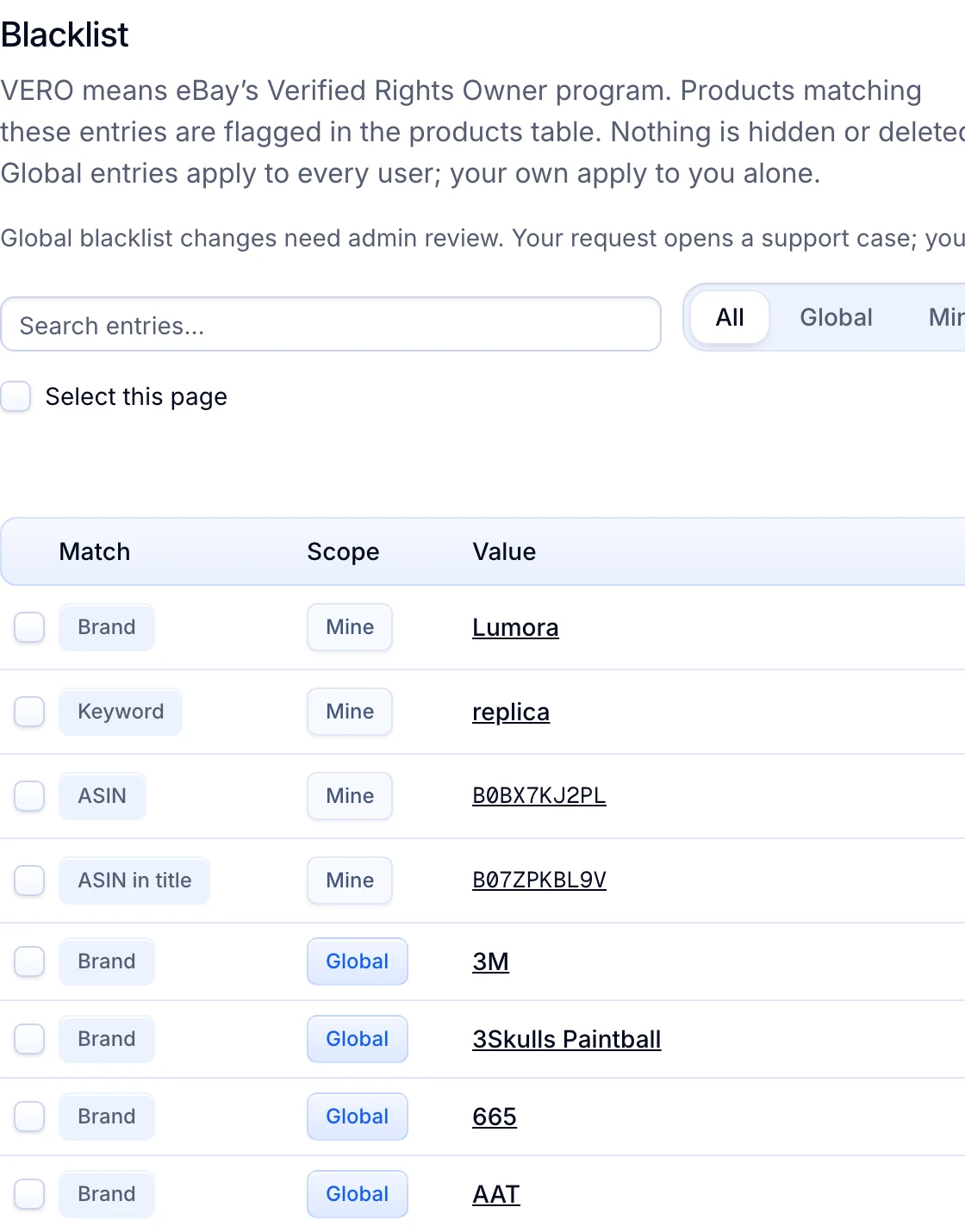
| Step 4 | The Blacklist starts with over 1,000 VeRO brands, and you add your own. A match never lists. A live listing that starts matching is ended. |
| Step 5 | For Amazon products, AI category matching picks the eBay category and fills its required item specifics. Items you add by hand carry the ones you enter. Teams gives up to 10 helpers their own login. |
| Step 6 | Pick the app you leave under Coming from and upload a file with each listing’s eBay item ID and ASIN. With no such file, as from AutoDS, choose Find Amazon matches automatically. Listings stay live, and each counts once toward your plan. |
The two tools do different jobs, so the prices in step 3 are not like for like. AutoDS reads over 25 suppliers and sells on eight channels. Productivo reads only Amazon as a supplier and sells only on eBay US. Its price and stock reads, repricing and Auto Buy work only with Amazon products: the sourcing eBay’s rule covers, as the DSM part explains.
For stock from a wholesale supplier, Productivo has no supplier connection. You add the items by hand or by CSV. It checks them against the Blacklist and publishes them. After that, you change their price and stock on eBay. AutoDS fits better in the cases listed in When AutoDS fits better.
Already moved to AutoDS? The AutoDS alternative page shows how a move to Productivo works, with your listings live throughout.
The Blacklist in Productivo
Your own brands, keywords and ASINs sit above eBay’s global VeRO brands. The same eBay VeRO list checks items you add by hand or by CSV.
Written by the Productivo team. Read on 24 October 2026: DSM Tool’s home page, eBay page and migration page, and where its sign-up, pricing, app and help links led. AutoDS’s eBay page with its plan list, pricing page, DSM Tool comparison page, VeRO help article and cancel help article. eBay’s dropshipping policy, seller standards policy, out-of-stock option, intellectual property (VeRO) policy, Seller Center intellectual property page, duplicate listings policy, tracking help and Team access help, eBay Export’s Seller Hub Reports and eBay Developers’ token revoke article, checked 24 October 2026. Productivo’s prices and limits come from its plan cards. The 500-listing store is made up.