
How-to guide · Intermediate · 7 steps · Updated 24 October 2026
eBay Promoted Listings: what they cost and how to set them up
eBay Promoted Listings are ads for your own listings, run from the Advertising tab in Seller Hub. A General campaign charges a percent of the sale, and only when the item sells within 30 days of an ad click. Priority and Offsite campaigns charge for each click instead. This guide shows which to pick, how to set an ad rate that still leaves you money, and how to check that ads added sales.
Steps 1 to 7 work without Productivo. The last part shows how Productivo, the app behind this guide, can help.
Before you start
In shorteBay Promoted Listings fit sellers with some sales behind them and listings that already sell at a fair price.
Who it is for
LevelIntermediate
WholesaleEasy
Every step works as written. Listings with many units are what eBay suggests for Priority.
ResellingMedium
Steps 2 and 3 need care: Priority and Offsite skip auctions, and each item has its own cost.
HandmadeMedium
Step 6 needs care: with few sales a month, a test takes longer to show anything.
Wholesale dropshippingMedium
Step 5 needs care: an order you cancel because the supplier ran out gets no ad fee back.
- You finish with
- A campaign on listings that can afford it, a rate or budget that leaves money, and a way to check that ads added sales.
- You need
- An eBay account rated Above Standard or Top Rated, with recent sales
- Seller Hub on a computer
- Each listing’s item cost, shipping and packaging
- About an hour to set up, then a few minutes each week
How to promote a listing on eBay, step by step
Steps 1 and 2 choose what to promote and how. Steps 3 to 5 set the cost and show when you pay. Steps 6 and 7 check the result and protect your minimum price.
Step 1 of 7: Choose which listings to promote
In shortPromote listings that already sell at a fair price and still leave room for an ad fee.
eBay Promoted Listings bring more buyers to a listing. They do not fix a high price or a weak title. eBay says it plainly: after a higher ad rate, a listing can get more clicks while sales lag. The eBay listing optimization checklist fixes those first.
You can promote once your account is Above Standard or Top Rated, with enough recent sales. Then fixed price listings in most categories qualify. You do not need an eBay Store.
eBay names the listings that gain most. New listings have no sales history yet, and Priority’s extra traffic helps them. In competitive categories, eBay’s suggested ad rate is a helpful start. High-demand, high-margin items with many units suit Priority.
Good signs
- A new listing with no sales yet
- An item many sellers list
- High demand, a good margin and many units
- Money left that covers the ad fee
Weak signs
- A price above similar sold listings
- Money left that is already thin
- Views, but no sales
- Sells well without ads: those sales would pay the fee too
Skip listings whose money left is already thin. The ad fee comes out of every promoted sale. Since 2026 that includes sales to buyers who never clicked the ad (step 5). Gets views but no sales? Read why eBay listings are not selling before you pay for more clicks. Not sure an item sells at all? Start with eBay product research.
Result: A short list of listings to promote, each with stock, a fair price and room for a fee.
Step 2 of 7: Pick General, Priority or Offsite
In shortStart with General to pay only on sales. Use Priority when you know which searches you want to win.
eBay Promoted Listings has two campaign types, General and Priority. A third ad type, Promoted Offsite, shows your listings outside eBay. You find all three in Seller Hub, under Advertising › Create new campaign. General and Priority used to be called Promoted Listings Standard and Advanced.
The three campaign types
From eBay’s Promoted Listings and Promoted Offsite help pages, read 24 October 2026.Campaign You pay eBay suggests it for General A percent of the sale, only if it sells within 30 days of a click Reaching more buyers Priority Each click, sale or not Searches you want to win, new listings Offsite Each click from Google and other sites Buyers outside eBay - GeneralYou set an ad rate from 2% to 100% of the total sale. A listing can be in only one General campaign at a time. Its ads can also show off eBay, on sites like search engines.
- PriorityYou set a target daily budget, $3 at least. A month never costs more than 30.4 times it, but one day can cost up to twice it. Auctions and out-of-stock listings cannot join. Since 13 January 2026, only Priority ads can take the first ad slot at the top of search.
- OffsiteYou set only a daily budget and dates. The campaign promotes all your eligible fixed price listings, and eBay adjusts each listing’s cost per click daily. The same 30.4 times and twice-a-day limits apply. One active campaign per eBay site. eBay’s AI may rewrite the ad’s title for Google; your eBay title stays the same.
What one Priority sale costs (made-up)
The same Practice TL-3 table lamp as in step 3, with made-up click figures.Average cost per click $0.20 Clicks for each sale 25 Cost of one sale, 11.6% of the $43.20 total $5.00 To keep $8 from this sale, it can take at most 16 clicks. A $5 daily budget caps the month at $152. One busy day can still cost $10.
Each click’s price comes from an auction. With Smart targeting, you can set a maximum cost per click, and eBay never charges more. At 25 clicks per sale, a maximum of $0.12 keeps the $8. A lower maximum shows the ad less often. With Manual targeting, your keyword bids do this job.
eBay says Priority suits sellers who know which searches they want to target. Start with General unless you know the searches you want to win. You can add Priority later. One listing can be in one General campaign and several Priority ones, but then one sale can pay both.
Result: One campaign type for your list, with how it charges written down.
Step 3 of 7: Set an ad rate your money left can pay
In shortWork out the most an ad can take from one sale, then pick a fixed rate under it or a capped dynamic rate.
In a General campaign, the ad rate is the percent of the sale you pay eBay. It counts the whole total: the price, shipping and sales tax. On the made-up Practice TL-3 table lamp, 5% of the $34 price is $1.70. But 5% of the buyer’s $43.20 total is $2.16.
One sale at four ad rates (made-up)
Practice TL-3 table lamp: $34 plus $6 shipping and a made-up 8% sales tax, so the buyer pays $43.20. eBay’s fee is 13.6% of that plus $0.40. Your costs are $22.50. With no ad, $11.22 is left.Ad rate Ad fee Money left 2% $0.86 $10.36 5% $2.16 $9.06 8% $3.46 $7.76 12% $5.18 $6.04 Say you want at least $8 left from each sale. Then 7.4% is the most this sale can pay. Write that rate down for each listing. The eBay fee calculator works it out for your own item.
Suggested rate or your own?
eBay shows a suggested ad rate for each listing, and it changes daily. It weighs other sellers’ ad rates, demand, your price, photos and description, and past clicks and sales. eBay says a rate at or above the suggestion generally does better, but not always.
- Dynamic ad rateeBay moves your rate to its suggested rate every day. Set an ad rate cap, the most you will pay, at your highest rate.
- Fixed, suggestedSelect Apply suggested ad rate. The rate stays until you change it.
- Fixed, your ownType your own rate. It never moves by itself.
eBay’s quick listing tool only offers the dynamic rate. Set your own rate or a cap from the Advertising dashboard, never above your highest rate.
Result: The highest ad rate each listing can pay, and a fixed rate or capped dynamic rate under it.
Step 4 of 7: Create the campaign in Seller Hub
In shortIn Seller Hub, open Advertising, select Create new campaign, and add listings by hand or by a rule.
Open the Advertising dashboard in Seller Hub. Then:
- Select Create new campaign.
- Choose Promote your listings.
- Select the General or Priority campaign strategy.
- Add listings: by hand, by a rule, by item numbers or from a CSV file.
- For General, choose Dynamic ad rate or Fixed ad rate. For Priority, choose Smart targeting or Manual targeting, then a daily budget.
- Name the campaign, set its start and end dates, and launch it.
For a single listing, open Active listings, select Edit and then Promote. To promote up to 200 at once, tick them and use Sell it faster.
By hand or by a rule?
- By handYou pick each listing, or paste item numbers. eBay’s developer guide calls these key-based campaigns. Best for a short list you watch closely.
- Rule-basedYou set a rule by Category, Price range, Brand, Condition, Days on site or Quantity available. eBay checks your listings daily, adds new matches and removes ones that stop matching. You can still exclude a listing.
Priority with Manual targeting adds keywords and bids. Add negative keywords for searches that are not your item. You are never charged for them. Set an end date on every test campaign, so it cannot run on unnoticed.
Result: A live campaign with your chosen listings, rate or budget, and an end date.
Step 5 of 7: Know when eBay charges the ad fee
In shortGeneral charges when anyone buys the item within 30 days of any ad click. Priority and Offsite charge per click.
Since 13 January 2026, eBay Promoted Listings has a new rule for General. eBay charges the ad fee when any buyer buys the promoted item within 30 days of any click on its ad. The buyer who pays does not have to be the one who clicked. eBay said it expected more sales to count as ad sales after this change.
Which sales pay the ad fee (made-up)
The Practice TL-3 table lamp in a General campaign at 5%, so each ad fee is $2.16. A sale pays when any ad click came in the 30 days before it.Day What happens Ad fee 1 Buyer A clicks the ad and leaves None, no sale 10 Buyer B finds it in search and buys $2.16, click on day 1 25 Buyer C clicks the ad and buys $2.16, click on day 25 50 Buyer D finds it in search and buys $2.16, click on day 25 70 Buyer E finds it in search and buys None, last click 45 days before Three of the four sales pay the ad fee, and only one of those buyers clicked an ad. A listing that gets an ad click at least every 30 days pays the ad fee on every sale. So price as if all its sales pay it (step 7).
- More than a clickAdding the item to a watchlist or cart, or a quick view, from the ad all count as clicks.
- The rate when it sellsYou pay the ad rate in effect at the time of sale, Best Offer sales too. A higher rate today also applies to sales from last week’s clicks.
- Every unitOn a listing with many units, each purchase within the 30 days pays the fee.
- Promoted at click and saleThe item must be in the campaign when it is clicked and when it sells. Stop promoting it, and later sales pay no ad fee.
- Off eBay tooGeneral ads can show on other sites. You can ask to opt out; it takes about 7 days.
- Relisted itemsA relisted item stays promoted unless you turn it off in the relist flow.
Priority charges each valid click, whether the item sells or not. Clicks on your own Priority ads count too. eBay bills them up to 72 hours later, in Payments, as Promoted Listings - Priority fees.
A Halo sale is when a buyer clicks one ad, then buys a different item from you within 30 days. Priority and Offsite report it but charge nothing more: you already paid for the click.
In both General and Priority? You pay for the Priority clicks, and eBay still charges the General ad fee when a General click counts for the sale. The same sale can show in both reports.
Before you raise an ad rate, remember it also applies to sales from earlier clicks.
Result: When each ad fee lands, so no charge in Payments is a surprise.
Step 6 of 7: Read the reports and test for extra sales
In shortCheck the Advertising dashboard weekly, then compare money left with and without ads, not ad sales alone.
The Advertising dashboard shows every eBay Promoted Listings campaign. Select a campaign’s name to open its own dashboard, with figures for each listing.
- Impressions and ClicksHow often your ads appeared, and how often buyers used them.
- Quantity sold and SalesItems bought within 30 days of a click. Sales include shipping, tax, returns and cancellations.
- Ad feesThe final amounts, with credits, are in the Payments tab.
- Sales conversion rateQuantity sold divided by clicks, times 100.
- ROASReturn on ad spend: sales divided by ad fees.
Figures can take up to 72 hours to settle. For each sale, download the Sales report from the dashboard. Its Sale type column says Attributed sale for General, or Direct or Halo for Priority. For a regular file, use Seller Hub Reports, with Advertising as the source.
What the numbers tell you to check
From eBay’s suggested ad rate help and its 2026 announcement. The last row is our suggested method.You see Check More clicks, no more sales Price, photos (eBay suggests at least 4), description and item details. Offers, free shipping or a shorter handling time can help. Few impressions, even at the suggested rate Competition is high, or the listing is not strong enough yet. Improve it before you raise the rate. Priority ads missing for your keywords Your bid, budget, keyword relevance and listing quality decide each placement. Nothing is guaranteed. Many ad sales, total sales flat The ads are counting sales you would make anyway. Run the test below. Did the ads add sales?
An ad sale is not always an extra sale. General counts any buyer who buys after a click, so some ad sales would have happened anyway. ROAS cannot tell them apart.
Our suggested test: split similar listings into two groups for the same weeks. Promote one group and leave the other. Then compare the money left after ad fees.
A 28-day test (made-up)
Two groups of 10 similar listings on the same dates. Each sale leaves $11.22 before ads, and a 5% ad costs $2.16.Group Sales Ad sales Money left A, no ads 12 0 $134.64 B, ads helped 16 13 $151.44 B, ads did not help 13 12 $119.94 In the first case, ads cost $28.08 but brought 4 more sales. Money left rose by $16.80. In the second, eBay still counted 12 ad sales, but group B sold only 1 more. Money left fell by $14.70.
Judge ads by money left over equal periods, never by ad sales alone. With only a few sales, run the test longer: one order can change the answer.
Result: A weekly look at the dashboard, and a test that shows whether ads add money.
Step 7 of 7: Keep ads inside your minimum price
In shortAdd the ad rate to eBay’s fee before you set a minimum price, a repricing rule or an offer.
Your minimum price is the least you will sell for. Work it out with the ad rate added to eBay’s fee. On the made-up lamp, keeping $8 needs at least $30.22 with no ad. With a 5% ad, the minimum rises to $32.67.
- Dynamic rates moveA dynamic rate can rise any day. Cap it at the rate your minimum price assumes.
- OffersA Best Offer sale pays the ad rate on the total at the accepted price. Keep the auto-accept amount at or above your minimum.
- Sales and couponsA discount lowers the price, and the ad fee still comes out of what is left.
- Repricing rulesA rule that follows the cheapest seller must stop at a minimum that includes the ad fee.
The eBay pricing strategy guide shows the minimum price formula and simple repricing rules. Put the ad rate into your minimum price before any rule can lower the price.
Result: A minimum price for each promoted listing that already pays for the ad.
eBay Promoted Listings mistakes that cost money
In shortMost ad losses come from a rate counted on the wrong amount, or one that rises past what the sale can pay.
- Counting the rate on the price onlyThe rate counts shipping and tax too. On the made-up lamp, 5% is $2.16, not $1.70.
- A dynamic rate with no capeBay moves it every day. Without a cap, it can pass what the sale can pay.
- Raising the rate on a busy listingThe new rate applies to every sale from the last 30 days of clicks.
- Promoting a listing priced too highClicks rise and sales do not. Fix the price first.
- Reading ROAS as profitIt counts sales you would have made anyway, and leaves out your costs.
- A Priority budget read as a daily limitOne day can cost twice the daily budget. The limit is monthly.
- One listing in General and Priority, one cost countedA sale can pay the clicks and the General ad fee. Count both.
Common questions about eBay Promoted Listings
How much does eBay charge to promote a listing?
In a General campaign, the ad rate you choose, from 2% to 100% of the total sale, and only if it sells. The total includes shipping and sales tax. Priority and Offsite charge for each click instead, within a daily budget you set.
Is it worth promoting listings on eBay?
It can be, when the listing already sells at a fair price and the fee fits your money left. eBay says a rate at or above its suggestion generally does better, but it is not a promise. Test it as in step 6.
What is a good ad rate for eBay Promoted Listings?
One under the most your sale can pay, and close to eBay’s suggested rate. eBay names no single good rate: its suggestion differs per listing and changes daily. Step 3 shows how to find your highest rate.
Do I pay the ad fee if the buyer never clicked my ad?
In a General campaign, yes, if anyone clicked the ad in the 30 days before the sale. Since 13 January 2026, the buyer does not have to be the one who clicked. The item must be promoted at the click and at the sale.
What happened to Promoted Listings Standard and Advanced?
eBay renamed them. Standard is now the general campaign strategy, and Advanced is the priority campaign strategy.
Do I need an eBay Store to promote listings?
No, not for General or Priority in Seller Hub. eBay’s help asks only for an Above Standard or Top Rated account. Promoted Stores, which advertises the Store itself, needs one. So do outside tools that run campaigns through eBay’s Marketing API.
Why can’t I promote my listings?
Your account may not qualify yet. eBay lets Above Standard and Top Rated sellers with enough recent sales promote fixed price listings in most categories. Priority also leaves out auctions, out-of-stock listings and a few categories.
How do I stop promoting a listing?
In Seller Hub’s Active listings, open the listing’s actions and select Edit promoted listing. Turn off the campaign’s switch and select Apply. Later sales then pay no General ad fee.
How Productivo helps with eBay Promoted Listings
In shortProductivo counts your ad rate in its prices and your ad fees in profit. It does not run your campaigns.
Every step above runs eBay Promoted Listings with eBay’s own tools. This part is about Productivo, the app behind this guide.
Where Productivo fits in the steps
| Guide step | What Productivo does |
|---|---|
| Steps 3 and 7 | Settings › Pricing has a Promoted Listings rate. Productivo adds it to eBay’s fee, raised by your sales tax setting, in every price it sets and in your minimum profit. |
| Step 6 | Each order’s Promoted Listings fee is read once a day from eBay’s payment records, net of credits. Reports take it off the order’s profit, next to eBay’s fee and your costs. |
Profit per order, after eBay’s fee and ads
Reports show orders, revenue, margin and profit for a period, with profit by day. Each order’s profit already has eBay’s fee and its Promoted Listings fee taken off.
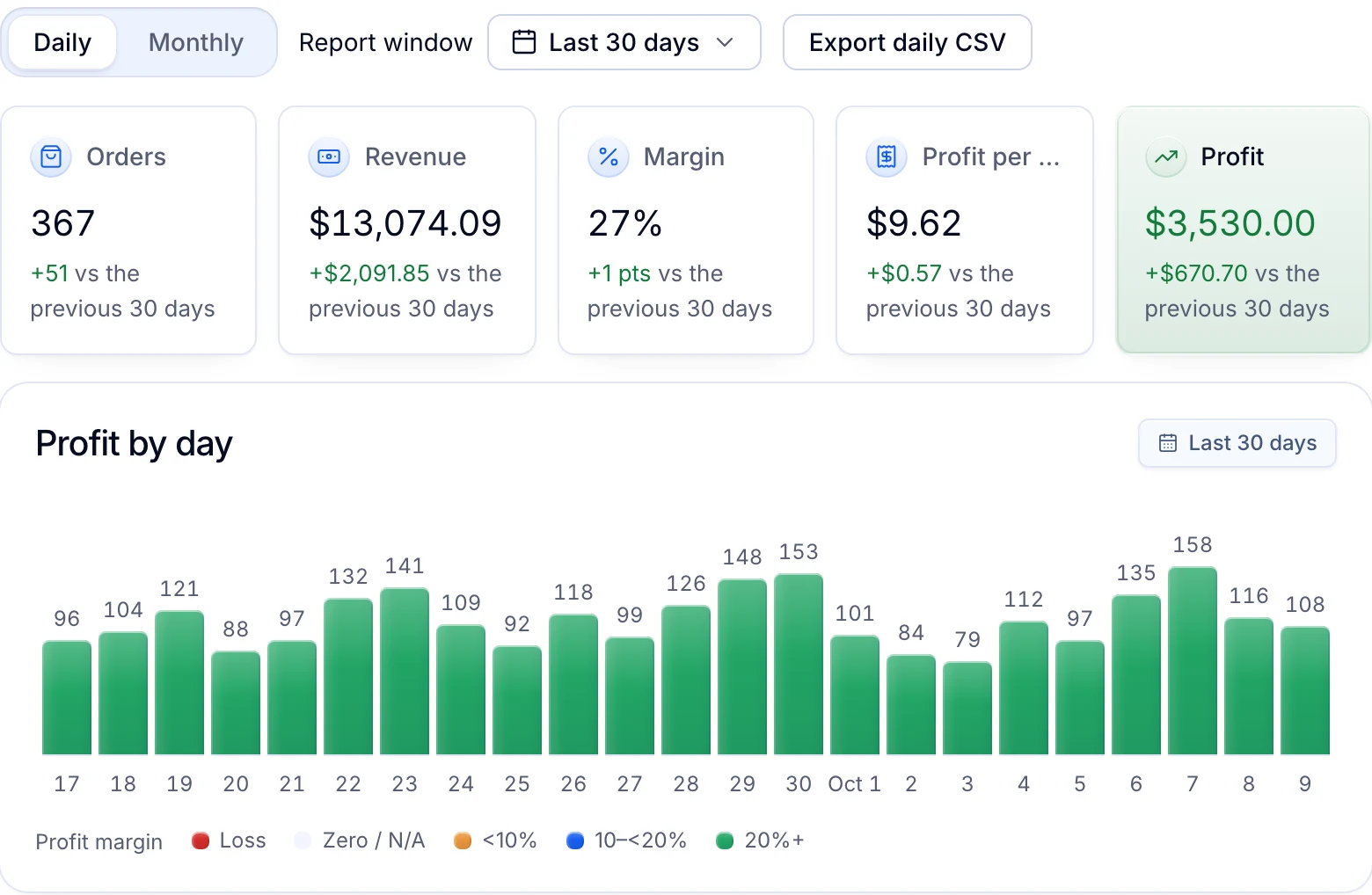
Reports are in every plan. Automatic pricing covers products whose cost Productivo reads from Amazon; products you add by hand keep the price you give them. eBay does not allow buying an item from another retailer after the sale to ship to your buyer, as the eBay dropshipping policy guide explains.
Productivo does not create, change or end your campaigns, or set ad rates on eBay. On Pro and Scale, Listing Optimizer reads eBay’s keyword suggestions through a scheduled Priority campaign named “__optimizer__ do not use”. It holds no listings, and Productivo deletes it afterwards.
Written by the Productivo team. Source review: eBay’s Promoted Listings overview, general campaign strategy, priority campaign strategy, Promoted Offsite, eBay Advertising overview, suggested ad rate, how attribution works, January 2026 Promoted Listings update, summer 2024 seller update (the new names), fee credits and the developer guides to key-based and rules-based campaigns and the Marketing API, checked 24 October 2026. The test in step 6 is our suggested method, not eBay’s.