
How-to guide · Beginner · 9 steps · Updated 24 October 2026
eBay Store subscription: costs, levels and how to open a Store
An eBay Store subscription costs $4.95 to $2,999.95 a month on a yearly plan, or $7.95 to $349.95 month to month. Basic and higher lower your final value fee and give 1,000 or more free listings a month. Starter adds a storefront but no fee cut. This guide compares the five levels, shows when one pays for itself, and walks through opening, setting up, changing and cancelling a Store.
Only want the prices? Step 2 has them. Already have a Store? Step 9 covers changing level and cancelling.
Steps 1 to 9 work without Productivo. The last part shows how Productivo, the app behind this guide, can help.
Before you start
In shortYou need an eBay seller account, a checking account for payouts and a payment method for fees.
Who it is for
LevelBeginner
WholesaleEasy
Every step works as written. Many listings of the same items make step 3’s sums pay off fastest.
ResellingEasy
Every step works as written. One-off items mean many listings, so count them carefully in step 1.
HandmadeEasy
Every step works as written. Steps 6 to 8 build the brand repeat buyers come back to.
Wholesale dropshippingEasy
Every step works as written. The supplier ships, but the Store, its fees and its listings are yours.
- You finish with
- The Store level that costs you least, on the right plan, with a storefront set up and a safe way to change or cancel it.
- You need
- An eBay seller account with a checking account for payouts
- A payment method on file for your selling costs
- Last month’s listing count and sales, or your best estimate
- A logo and a billboard image, if you have them
- About an hour for the setup
- The 9 steps
- Count your listings and sales for one month
- Compare the five Store levels
- Work out when a Store pays for itself
- Choose a monthly or a yearly plan
- Open your Store and name it
- Add a logo, billboard and description
- Sort listings into Store categories
- Bring buyers back with discounts and newsletters
- Change your level or cancel without surprises
Never sold on eBay? How to sell on eBay covers your first sale. You do not need a Store for it.
Choose and set up your eBay Store subscription in 9 steps
Steps 1 to 4 decide the level and the plan. Steps 5 to 8 open and set up the Store. Step 9 is for later, when your sales change.
Step 1 of 9: Count your listings and sales for one month
In shortWrite down three numbers: listings a month, sales a month and your main category.
A Store saves money in two ways: more free listings and a lower final value fee, the main fee eBay takes from each sale. To compare levels, you need three numbers.
- Listings a monthCount your active fixed-price listings, plus the new ones you plan to add. A Good ’Til Cancelled listing renews once a month, and each renewal uses one free listing. Seller Hub’s Listings tab shows your active listings.
- Sales a monthWhat buyers paid, with shipping. eBay’s fee also counts sales tax, so add it if you can. Seller Hub’s Performance tab builds a sales report for any period.
- Your main categoryThe fee cut differs by category. In a few, it is zero.
Use a normal month, not your best one. The Store costs the same in a slow month. New to selling? Estimate the numbers, and come back to them after a month.
Then look at Monthly limits in Seller Hub’s Overview. Opening a Store does not raise your selling limits. A level with 10,000 free listings is no use under a limit of 500 items.
Result: Your listings a month, sales a month and main category, written down.
Step 2 of 9: Compare the five Store levels
In shortStarter adds a storefront only. Basic and higher add lower fees, more free listings and more tools.
An eBay Store subscription comes in five levels. The yearly plan costs less each month. eBay still charges it monthly.
The five eBay Store levels: price and free listings
eBay.com’s prices and allowances, read on 24 October 2026. Free listings are fixed-price listings in all categories, per month.Level Price a month: yearly plan (monthly plan) Free listings, then each No Store $0 250, then $0.35 Starter $4.95 ($7.95) 250, then $0.30 Basic $21.95 ($27.95) 1,000, then $0.25 Premium $59.95 ($74.95) 10,000, then $0.10 Anchor $299.95 ($349.95) 25,000, then $0.05 Enterprise $2,999.95 (yearly only) 100,000, then $0.05 What else each level adds
From eBay’s benefits table. Free auctions are in select categories only.Level Adds Starter A storefront and Discounts Manager. No fee cut. Basic Lower final value fees, free Sourcing Insights, a $25 shipping-supplies coupon each quarter, 250 free auctions Premium As Basic, with a $50 coupon and 500 free auctions Anchor As Basic, with a $150 coupon, 1,000 free auctions and dedicated phone and email support Enterprise As Anchor, with 2,500 free auctions. Extra listings come in bundles: 10,000 for $250 or 50,000 for $1,000 a month. Starter does not lower your final value fee. It pays the same rates as a seller without a Store. It gives you a storefront and Discounts Manager, and an extra listing costs $0.30 instead of $0.35.
Starter’s 250 free listings cover auctions and fixed price together. From Basic up, auctions get their own allowance, and eBay credits the insertion fee when an auction sells. In select categories, like Collectibles, Books and Music, fixed-price allowances are bigger: Basic gets 10,000 and Premium 50,000.
Sourcing Insights sits in Seller Hub’s Research tab and helps you find new stock. On Starter it costs extra. The guide to eBay product research shows how to use that tab. You can hold only one Store subscription across all eBay sites.
Result: The one or two levels that fit your listing count.
Step 3 of 9: Work out when a Store pays for itself
In shortAdd the free-listing saving and the fee cut, then compare the sum with the Store’s monthly price.
An eBay Store subscription pays for itself when two savings together beat its price:
- Free listingsWithout a Store, each listing after the first 250 costs $0.35. Basic’s yearly price equals 63 such listings. So from 313 listings a month, Basic pays for itself on listings alone.
- The fee cutDivide the price by the cut. In most categories, Basic cuts 0.9 points: $21.95 ÷ 0.9% = $2,439 of sales a month.
How much Basic and higher cut the final value fee
eBay’s rates for items up to $2,500, or $1,000 in Motors parts. The last column is the monthly sales, with shipping and tax, that pay Basic’s yearly $21.95 from the cut alone. Dearer items save more in most rows.Category No Store → Basic Basic pays from, a month Most categories, like Home & Garden, Clothing and Toys 13.6% → 12.7% $2,439 Books, Movies & TV, Music 15.3% → 15.3% Never Guitars & Basses 6.7% → 6.7% Never Trading cards, Comic Books 13.25% → 12.35% $2,439 Women’s Bags & Handbags (up to $2,000) 15% → 13% $1,098 eBay Motors Parts & Accessories 13.6% → 11.5% $1,045 Coins & Paper Money (not Bullion) 13.25% → 9% $516 Cell Phones, Cameras, Computers, Consumer Electronics (not accessories) 13.6% → 9.35% $516 Laptops, desktops, tablets, Video Game Consoles 13.6% → 7.35% $351 Three made-up shops, three answers
Each shop sells in Most categories. Add up a month at each level: the price, the insertion fees and the final value fee.
A month at each level, yearly plan
Made-up shops, a month each. Small shop: 200 listings and 40 sales of $25. Middle shop: 600 listings and 100 sales of $30. Large shop: 3,000 listings and 400 sales of $30. Rounded to the dollar. The $0.40 per-order fee is the same at every level, so it is left out. The cheapest level is in bold.Level Small shop Middle shop Large shop No Store $136 $531 $2,595 Starter $141 $518 $2,462 Basic $149 $403 $2,046 Premium $187 $441 $1,584 The middle shop, line by line
600 listings and 100 sales of $30 a month, made up. Without a Store, 350 listings pass the free 250.Cost No Store Basic, yearly Subscription $0.00 $21.95 Insertion fees 350 × $0.35 = $122.50 $0.00, within 1,000 free Final value fees 100 × 13.6% of $30 = $408.00 100 × 12.7% of $30 = $381.00 Total a month $530.50 $402.95 Basic saves the middle shop $127.55 a month. The small shop is better off without a Store. The large shop’s 3,000 listings pass Basic’s 1,000, so Premium wins there.
Pick the level with the lowest total, not the most free listings. For one sale in your own category, turn on Basic Store or higher in the eBay fee calculator.
Result: Your monthly total at each level, and the cheapest level for your numbers.
Step 4 of 9: Choose a monthly or a yearly plan
In shortStart on a monthly plan, and move to yearly once your own numbers show the Store pays.
A yearly plan costs less each month: Basic is $21.95 instead of $27.95. But leaving it early costs money. eBay’s Stores Subscription Terms set the rules:
- Early termination feeCancel or move down a yearly plan before its last month, and eBay charges the months left × the yearly plan’s monthly price ÷ 3. A monthly plan has no such fee.
- A minimum periodA monthly plan runs at least to the end of the first full calendar month. Subscribe on May 22, and you pay until June 30.
- The first chargeYou pay for the days left in the month you subscribe. The month’s full free-listing allowance arrives at once.
- RenewalEvery eBay Store subscription renews by itself. eBay writes at least 30 days before a yearly plan renews.
Early termination fee, and when yearly pays
The fee is eBay’s formula, which matches its own table to the cent. The last column adds the fee to the yearly price: the fewest months, counting the month you cancel in, for yearly to cost less than monthly.Level Fee per month left Yearly is cheaper if you keep it Starter $1.65 5 months or more Basic $7.32 7 months or more Premium $19.98 7 months or more Anchor $99.98 8 months or more Enterprise $999.98 Yearly only Made-up example: you quit a yearly Basic plan with 6 months left. The fee is $43.90. Your 6 cheaper months saved $36.00. So quitting cost $7.90 more than a monthly plan. Kept 7 months or more, the yearly plan would have come out ahead.
Choose monthly until your own numbers show the Store pays. Moving from monthly to yearly at the same level counts as an upgrade. eBay credits the unused part of the month and charges no fee.
Result: A monthly or yearly plan, and a date to check whether the Store pays.
Step 5 of 9: Open your Store and name it
In shortChoose a level and a plan on eBay’s subscription page, name your Store and submit the order.
You need an eBay seller account with a checking account for payouts, and a payment method on file for your selling costs. Then:
- Open Choose a Store Subscription. In Seller Hub it is under Store › Manage subscription, in My eBay under Account › Subscriptions.
- Find your level and select Select and review.
- Pick the term, yearly or monthly, and enter your Store name.
- Select Submit order.
Pick a name you will keep
The name becomes your Store’s web address. eBay drops spaces and symbols, adds hyphens and uses lowercase. So “Fine Jewelry!” becomes ebay.com/str/fine-jewelry. Say what you sell: eBay’s own example prefers “Ben’s Computers” to “Zebra Park”.
- Letters and symbolsStart and end with a letter or a number. No <, > or @, and no two spaces or symbols in a row.
- WordsNo “eBay”, no “www”, no ending like .com, and no other member’s username. Your own username is fine.
- TrademarksNo other company’s protected name, or one confusingly like it.
You can rename the Store later, but eBay advises against it. Old links and bookmarks stop working, and some search engines rank the Store as a new site.
What changes the day you subscribe
Your free-listing allowance grows the day your eBay Store subscription starts. The lower final value fee covers listings you create, relist or renew from that day. Listings you already have get the lower fee only when they renew. Good ’Til Cancelled listings renew once a month. Your selling limits stay the same.
Result: An open Store with a name that says what you sell, and its ebay.com/str address.
Step 6 of 9: Add a logo, billboard and description
In shortIn Seller Hub, open Store › Edit store, then add a logo, billboard, description and policies.
Everything is in Seller Hub: select the Store tab, then Edit store. Check each change with Preview before you select Publish.
The parts of your storefront
Steps 5 to 8 fill each part. The sizes are eBay’s.
Billboard1280 × 290 pixels, or a carousel · Step 6Featured categoriesUp to 6, each with a 300 × 300 image · Step 7Marketing banner640 × 640, opens a category, a listing or a promotion · Step 6Featured listingsUp to 4 rows of 6 items · Step 7A drawing, not eBay’s screen. eBay sets the real layout and order.
eBay Store image and video sizes
From eBay’s Store help page, read on 24 October 2026.Part Size File limit Logo 300 × 300 pixels Under 12 MB Billboard, the banner at the top 1280 × 290 pixels Under 12 MB Clickable marketing banner 640 × 640 pixels Under 12 MB Featured category image 300 × 300 pixels Square works best Store or billboard video .MP4 or .MOV, about 1 minute Up to 150 MB The billboard can be one image or a carousel. A carousel needs at least two of these: a billboard image, a Store video and a description. No image yet? Select the + sign, then Generate with eBay, and eBay’s AI draws one.
Write your description in the Tell Your Story tab, under About this Store. It holds 1,000 characters, and eBay translates it for visitors abroad. Use AI description writes a first draft. Say what you sell and why buyers can trust you. Add Store policies there too, such as Shipping and Returns, up to 4,000 characters each. They must fit every listing in the Store.
A video is checked first, typically within 48 hours. Its first frame is what buyers see, so it must be sharp. Use the same name and logo everywhere you sell. eBay adds your Store branding to your listings by itself.
Result: A storefront with your logo, billboard, a short description and your policies.
Step 7 of 9: Sort listings into Store categories
In shortPlan your Store categories first, sort your listings into them, then feature the best ones.
Store categories are your own shelves, apart from eBay’s categories. You can make up to 300, and put each listing in two at no charge.
- In Seller Hub, select Store, then Store Categories.
- Select Add Categories. You can add 5 at a time.
- Select Save. For subcategories, select Edit next to a category.
Plan subcategories before you move listings in. eBay cannot add subcategories to a category that already holds listings. It also advises against categories with only a few items, as too many choices confuse buyers.
To move listings, open Active listings in Seller Hub, select them and choose Edit. Set the Store category under Listing details, then select Update listing.
Then fill the storefront. Feature up to 6 categories, each with a square image. A category shows only while it holds an active listing. Add up to 4 rows of featured listings, 24 items in all, or let eBay fill a row with your newest listings.
Result: Store categories in place, every listing sorted, and your best items featured.
Step 8 of 9: Bring buyers back with discounts and newsletters
In shortRun sales and coupons from Marketing › Discounts, then email them to past buyers and followers.
Every Store level gets Discounts Manager, in Seller Hub’s Marketing tab under Discounts. It works on fixed-price listings and offers five kinds of discount:
- Sale eventA lower price on chosen items or categories for a set time. Once it runs, you cannot change its discount.
- Volume pricingMoney off when a buyer takes 2 or more of one item.
- CouponA code you share. A Sale tab appears on your storefront once you run one.
- Shipping discountFree or cheaper shipping, for a set time or under conditions you choose.
- Order discountMoney off a bigger order, such as buy one, get one free.
Send a Store newsletter
Newsletters go to buyers who signed up for emails from your Store.
- In Seller Hub, select Store, then Store newsletter and Create campaign.
- Pick one of the six templates.
- Choose who gets it: buyers from the last 30 days, buyers from 31 to 365 days ago, your followers or all subscribers.
- Add a running discount and the listings to show. A promotional newsletter needs a coupon, volume pricing or sale event.
- Send it once, or every 1, 2 or 4 weeks. Select Review, then Activate.
eBay sends each buyer one email from you every 14 days at most. A newsletter may not hold phone numbers, email addresses or links away from eBay.
Result: One discount running, and one newsletter scheduled to the buyers most likely to return.
Step 9 of 9: Change your level or cancel without surprises
In shortChange or cancel on the Subscriptions page, and end the listings you do not need first.
To change or cancel your eBay Store subscription, open Manage subscription, or Account › Subscriptions in My eBay. It shows your current level and plan. Select Change subscription or Cancel subscription. To switch plans at the same level, select Change to monthly or Change to yearly. Your live listings stay live when you change level.
When a change takes effect, and the fee
From eBay’s Stores Subscription Terms. Until a change takes effect, you pay this month’s price and keep its benefits.Change Takes effect Early termination fee Move up, or monthly to yearly At once. A new term starts that day. None. Unused days are credited. Move down Next month On a yearly plan, unless in its last month Yearly to monthly, same level Next month Yes, unless in the last month Cancel a monthly plan Next month. A new Store waits out the minimum period. None Cancel a yearly plan Next month Yes, unless in the last month Moving up resets your start and renewal dates. On a yearly plan, an upgrade starts a new 12-month term. The old level’s free listings end that day, and the new level’s full allowance starts.
What happens to your listings when you cancel
Your listings stay up until they end or sell. From the first day of the next month, Store fees and benefits stop. New and renewed listings then pay standard fees.
That hits Good ’Til Cancelled listings hard. Made-up example: a shop with 1,000 of them cancels Basic. Next month, 750 renewals fall outside the free 250, at $0.35 each: $262.50 in insertion fees. Before you cancel, end the listings you do not need, or move to a lower level.
eBay keeps your Store settings for 30 days, in case you reopen. Away for a while? Use Time Away instead of closing. It can pause sales and keeps the Store.
Result: A change or cancellation timed for the end of a month, with unneeded listings ended first.
eBay Store subscription mistakes, and what they cost
In shortMost costly mistakes come from the wrong level, a yearly plan you quit, or cancelling with many listings live.
- Starter for the fee cutStarter pays standard final value fees. You pay $4.95 a month for a storefront and a cheaper extra listing.
- A yearly plan you quit earlyBasic with 6 months left costs $43.90 to cancel. Kept under 7 months, monthly is cheaper.
- Upgrading late in a yearly termAn upgrade starts a new 12-month term. The early termination fee then counts the months left in it.
- Expecting the lower fee at onceListings you already have get it only when they renew.
- Expecting higher selling limitsA Store does not raise them. Free listings above your limit are wasted.
- Unused free listingsThey do not carry over to the next month. A level far above your listing count is money spent for nothing.
- Cancelling with many listings live1,000 Good ’Til Cancelled listings cost $262.50 the next month without a Store.
- Renaming the StoreOld links and bookmarks stop working.
Common questions about an eBay Store subscription
How much does an eBay Store cost?
$4.95 to $2,999.95 a month on a yearly plan. Month to month, Starter is $7.95, Basic $27.95, Premium $74.95 and Anchor $349.95. Enterprise is yearly only. Step 2 compares the levels.
Is an eBay Store worth it?
Only when its savings beat its price. For Basic’s yearly price in most categories, that is about 313 listings a month, or about $2,439 in sales, or a mix of both. Step 3 has the sums.
Do I need an eBay Store to sell on eBay?
No. Every seller gets 250 free listings a month without an eBay Store subscription. A Store adds more free listings, a storefront and, from Basic up, lower fees.
What is the difference between a Starter and a Basic Store?
Basic lowers the final value fee. Starter does not. Basic also gives 1,000 free fixed-price listings instead of 250, Sourcing Insights and a $25 shipping-supplies coupon each quarter. It costs $21.95 a month on a yearly plan, against $4.95.
What size is an eBay Store banner?
The billboard is 1280 × 290 pixels, under 12 MB. The logo is 300 × 300 pixels. A clickable marketing banner is 640 × 640. Step 6 lists every size.
Can I cancel my eBay Store at any time?
Yes, but a yearly plan has a fee. Cancelling it before its last month costs the months left × the yearly plan’s monthly price ÷ 3. A monthly plan has no such fee. Store benefits stop at the end of the month you cancel.
What happens to my listings if I close my eBay Store?
They stay up until they end or sell. From the next month, new and renewed listings pay standard fees, with 250 free a month. End the ones you do not need first.
How do I set up an eBay Store?
Subscribe on eBay’s Choose a Store Subscription page, then build the storefront in Seller Hub’s Store tab. Pick a level and a plan, name the Store and submit the order. Then add a logo, billboard, description, categories and featured listings. Steps 5 to 8 walk through each screen.
Does an eBay Store bring more sales?
eBay does not promise a higher place in search. Its Store pages promise lower fees, more free listings, a storefront and marketing tools like coupons and newsletters. Those help buyers who already found you come back. If your listings get no sales, a higher level will not fix that. Find out why eBay listings are not selling first.
Is my Store level the same as my seller level?
No. Your Store level is the subscription you pay for. Your seller level, Top Rated, Above Standard or Below Standard, comes from your service record. A Store does not change it.
How Productivo works beside an eBay Store subscription
In shortProductivo does not manage your eBay Store subscription. It keeps your fee rate and counts the subscription in profit.
Everything above works with eBay’s own tools. This part is about Productivo, the app behind this guide.
Where Productivo fits in the steps
| Guide step | What Productivo does |
|---|---|
| Step 1 | Listings published from Productivo are fixed-price and Good ’Til Cancelled, so each one uses a free listing every month, like any other. |
| Step 3 | Settings › Pricing keeps your store’s eBay fee. When a Store lowers your rate, change it there, and Productivo’s automatic prices use the new rate. |
| Step 4 | Reports show each order’s profit after eBay’s fees and ad charges. Add the Store’s price once as a monthly expense, and net profit counts it, so you can see whether the Store pays. |
A monthly bill in Reports, in Productivo
A Store subscription is one more monthly bill. Add it once, and every payment comes off net profit on its day.
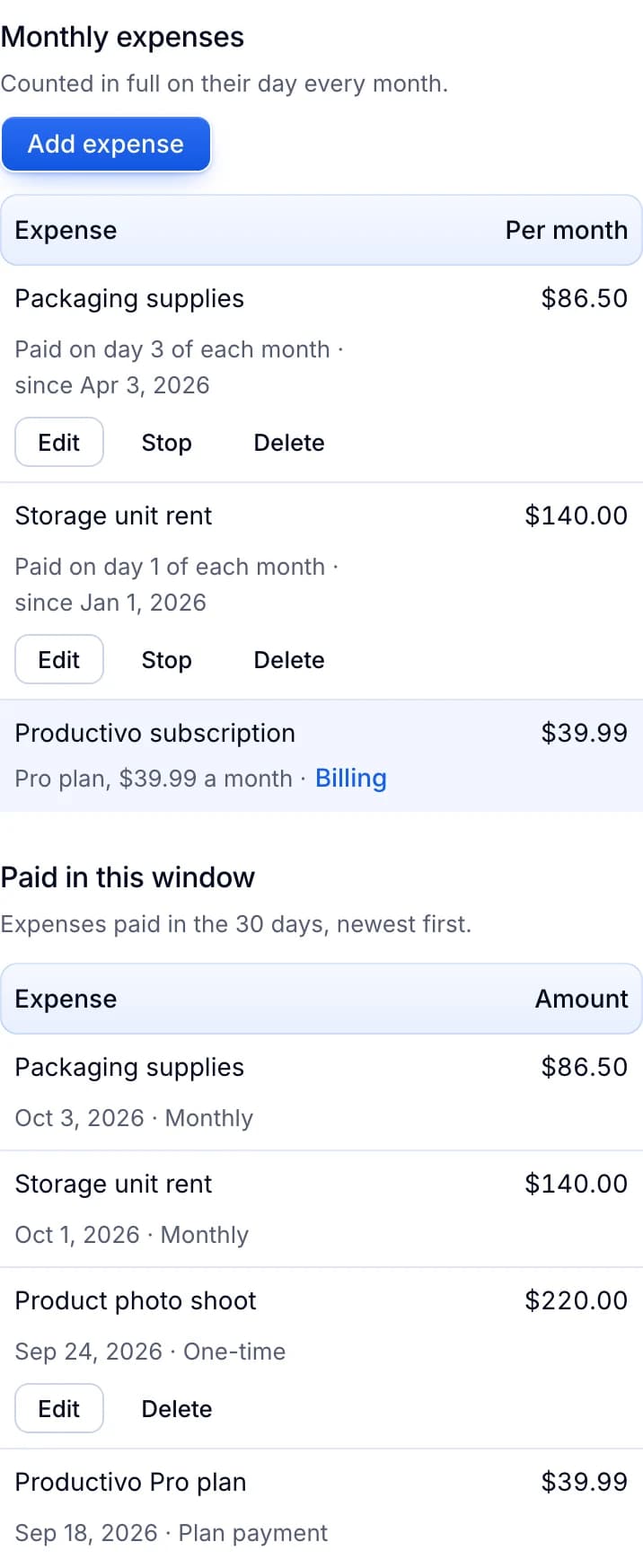
Productivo does not open, change or cancel a Store. It does not set Store categories, discounts or newsletters either.
Written by the Productivo team. Source review: eBay’s Store selling fees, selling fees, Seller Center’s Store subscriptions and Store setup, eBay Export’s Store subscriptions and fees and Store setup, the Stores Subscription Terms of Service, opening, managing and closing a Store, Store newsletters, Discounts Manager, selling limits and seller standards, checked 24 October 2026. The shops and the quitting and cancelling examples are made up.