
How-to guide · Intermediate · 7 steps · Updated 24 October 2026
Why eBay listings are not selling, and how to find the fix
Here is why eBay listings are not selling: buyers do not see them, see them but do not click, or click but do not buy. Seller Hub’s free traffic report shows which one it is for each listing. Fix that stage first, and leave the parts that work alone.
Sales slow across your whole store? Start with your account. One listing stuck? Start with step 1.
Steps 1 to 7 work without Productivo. The last part shows how Productivo, the app behind this guide, can help.
Before you start
In shortThese checks explain why eBay listings are not selling, for any fixed price item on eBay.com.
Who it is for
LevelIntermediate
WholesaleEasy
Every step works as written. With many units in one listing, its sales history is worth keeping.
ResellingMedium
Step 2 needs care: a one-off item gets little traffic, so judge it over a longer period.
HandmadeMedium
Step 5 needs care: few sold items match yours, so compare prices with similar handmade items.
Wholesale dropshippingMedium
Steps 5 and 6 need care: your supplier’s speed sets your delivery date and your late shipments.
- You finish with
- Each unsold listing labelled with the stage where it stalls, one fix chosen for it, and a date to check the result.
- You need
- Seller Hub, on a computer
- Listings that have been live for 30 days or more
- Recent sold prices for your items, or a way to look them up
- About an hour for your first ten listings
Why eBay listings are not selling: 7 steps to find and fix the cause
Steps 1 and 2 find the stage. Steps 3 to 5 fix one stage each, so do only the one your listing needs. Step 6 checks your account, and step 7 chooses the move.
Step 1 of 7: Open the traffic report for your listings
In shortIn Seller Hub, open Performance, then Traffic, and read four numbers for each listing over 30 days.
In Seller Hub, open the Performance tab, then Traffic. Pick the eBay site and the dates. eBay’s Seller Hub guide explains the numbers you see there:
- ImpressionsHow often eBay showed the listing. eBay splits them by place: the top 20 search spots, the rest of search, and pages outside search.
- Page viewsHow often someone opened the listing. Your own visits and visits by bots do not count.
- Click-through ratePage views from eBay divided by impressions. Views from outside eBay are left out.
- Sales conversion rateThe quantity sold divided by all page views, from eBay and from outside it.
Lower down, the report lists each listing, active and sold. You can filter promoted and non-promoted listings apart. Or download the Active listings traffic report and sort it by impressions.
Read 30 days or more, never a single day. The view count beside a fixed price listing covers only the last 30 days, so it can go down. Click that number for the Listing traffic history report, up to two years back.
Result: Your unsold listings in one list, each with its impressions, page views, click-through rate and sales over the same 30 days.
Step 2 of 7: Find the stage where each listing stalls
In shortRead the numbers in order: impressions, then page views, then sales. Fix the first stage that fails.
A sale needs three things in a row. eBay shows the listing, a buyer opens it, and the buyer buys. So read the numbers in that order. Fix the first stage that fails, and nothing after it. A better description cannot help a listing nobody sees.
Where the listing stalls
Read the rows from the top. The first one that fits is the stage to fix.eBay publishes no good or bad rate. Compare each listing with your similar listings, and with its own earlier months. A rate built on a handful of visits says little. Our rule of thumb, not eBay’s: judge clicks after about 100 impressions, and buying after about 20 page views.
Here is how that works on three made-up listings. The stage that stalls is marked:
Three listings, three different problems
Made-up listings from a made-up shop, 30 days each. Read each one from seen to bought.
Lamp ANot seen: fix it in step 3
- Seen: stalls here
- 240
- impressions
- Opened
- 9
- 9 ÷ 240 = 3.8% click-through
- Bought
- 0
- sold
Lamp BSkipped: fix it in step 4
- Seen
- 5,400
- impressions
- Opened: stalls here
- 27
- 27 ÷ 5,400 = 0.5% click-through
- Bought
- 0
- sold
Lamp CNot bought: fix it in step 5
- Seen
- 2,600
- impressions
- Opened
- 104
- 104 ÷ 2,600 = 4.0% click-through
- Bought: stalls here
- 0
- 0 ÷ 104 = 0% sales conversion
A drawing, not eBay’s screen. The numbers are made up.
Lamp A’s click-through is fine, but it gets far fewer impressions than the other two. A new main photo cannot help it, because buyers barely see it. One fix for all three would miss two of them.
Result: Each unsold listing labelled: not seen, skipped, not bought, or an account problem.
Step 3 of 7: Fix listings buyers do not see
In shortCheck that the listing is live and searchable, then fix its category, title and item specifics.
Start with the plain checks. eBay says a new listing should show up in search within 24 hours. Search for it with the words in your title, then tick the filters a buyer would use. Not there? eBay lists what to check:
- It is activeOnly active listings show in search. In Seller Hub, check that it is not a draft, ended or unsold.
- The title is cleanNo typos, no two words run together and no special characters like ! @ / *. A typo that spells a rude word blocks the listing from search.
- It is not a duplicateeBay allows one fixed price listing of an identical item per seller. A second one breaks its duplicate listings policy.
- Your sales are not pausedWith Time Away set to Pause item sales, your fixed price listings leave search. They come back a few hours after it ends.
- eBay did not remove or hide iteBay emails you when it removes a listing that breaks a rule, such as an item it does not allow. Since July 2026, clothing and shoe listings with unclear size or condition details may be hidden until you update them.
- It has stockWith the out-of-stock option on, a listing at quantity 0 stays live but hidden from search. It comes back when you add stock. The eBay out-of-stock option guide covers the setting.
Then check what eBay search matches. eBay’s Best Match sort weighs seven things. The first is how closely the listing matches the buyer’s search. Three parts of the listing decide that:
- CategoryPick the most relevant one. A buyer who browses or filters by category will not find an item filed somewhere else. eBay also lets you add a second category.
- TitleThe words buyers type for this item, spelled right, in up to 80 characters.
- Item specificsBuyers filter results by brand, color, size and condition. A listing without that detail drops out once a buyer ticks the filter.
Now look at where the impressions came from. Many in the rest of search, but few in the top 20 spots? Buyers find the listing, but it ranks low. The eBay listing optimization checklist goes through each part that lifts it.
Few impressions everywhere can also mean few buyers search for the item. Check demand with eBay product research before you rewrite anything.
Result: A live listing you can find with its own words and filters, in the right category, with every item specific filled in.
Step 4 of 7: Fix listings buyers see but skip
In shortCompare your listing with the ones around it in search: main photo, title, total price and shipping.
In search results, buyers see each listing’s first photo, its title and its price. They decide from that alone. Search your item’s main words, and look at your listing among the others on the page. Then check four things:
- Main photoA sharp photo of the real item, with no borders or text added. If the item is not brand new, do not lead with the catalog’s stock photo, as eBay’s Best Match tips say.
- TitleIt should say what the item is at a glance: the item first, then the brand, model and size. Buyers skim a page of similar titles.
- Total priceBuyers add the price and shipping, and they can sort by lowest price first. Check what the same item sold for, not what others ask. A higher total needs a reason buyers can see, like a newer model.
- ShippingBuyers can tick a Free shipping filter. Shipping built into your price keeps you in those results.
Two extras can also show on the result. The Top Rated Plus seal goes to Top Rated sellers with a handling time of 1 business day or less and free 30-day returns. A sale price shows if you have an eBay Store and run a sale event.
Result: A listing that holds its own beside its neighbours on photo, title and total price.
Step 5 of 7: Fix listings buyers open but do not buy
In shortAnswer the buyer’s last doubts: price against sold items, delivery, returns, description and photos.
A buyer who opens the listing wants the item. Something on the page stops them. Compare your listing with ones that sold, not with ones still waiting.
- Price against sold itemsLook up what the same item, in the same condition, sold for lately. The eBay sold listings guide shows how. If yours is well above, lower it or show what makes it worth more.
- Delivery dateeBay shows buyers an estimated delivery date. A long handling time pushes it back. Shorten it only if you can always meet it.
- ReturnsBest Match weighs your return policy, and buyers can filter for sellers who accept returns. Read the eBay return policy for sellers guide before you change yours.
- Description and photosAnswer what buyers ask before paying: size, what is in the box, condition. Show every flaw in a photo, from every angle. A free responsive eBay listing template keeps the description readable on a phone.
- Buyer requirementsYour buyer requirements can block buyers from buying, for example buyers in a country you do not ship to. Their activity log shows who was blocked, and by which rule.
Watchers, but no sales
Buyers can watch a listing straight from search results, without opening it. Many watchers and no sales may mean they wait for a lower price. In Seller Hub, you can send them an offer:
- At least 5% offThe offer must be at least 5% under your Buy It Now price.
- Who gets itThe 30 most recent interested buyers: people watching the item or holding it in their cart.
- How long it lasts96 hours, or until the item sells.
Result: A listing whose price, delivery, returns and description hold up next to recent sales of the same item.
Step 6 of 7: Check your seller level and selling limits
In shortWhen every listing slows at once, check your seller level and monthly limits before you change any listing.
Some causes sit in your account, not in a listing. They hit every listing at once. Check them first when sales drop across your whole store.
Your seller level
eBay rates every seller on the 20th of each month: Top Rated, Above Standard or Below Standard. Find yours in Seller Hub’s Performance tab, under Seller level. Two numbers can drop you to Below Standard:
- Transaction defectsAn order you cancel because you cannot send it, or a buyer’s problem you leave unresolved. More than 2% of your transactions, with more than 4 buyers, is Below Standard.
- Cases closed without your helpA case eBay closes because you did not resolve it. More than 2 cases, or 0.3% of your transactions if that is higher.
Below Standard reaches every listing. Right after the evaluation, eBay may:
- Place your items lowerYour items may appear lower in Best Match search results.
- Cut your limitsYour selling limits may go down.
- Stop your adsYou cannot create or edit Promoted Listings campaigns.
- Raise your feesFrom the 1st of the next month, higher final value fees may apply.
Resolve open cases and avoid cancellations first. A new title cannot undo a Below Standard rating. eBay looks again at the next evaluation.
Your monthly selling limits
Newer sellers can list only so many items, and so much money, each month. Find your selling limits in Seller Hub’s Overview tab, under Monthly limits. Active and sold listings both count.
- Listings over the limiteBay may end them. You can list them again when the limit renews or rises.
- Good ’Til Cancelled listingsThey do not renew once you reach the limit. So a listing can end even though you changed nothing.
- New categoriesA category you are new to can have its own limit.
- More roomeBay messages you as you near your limit. You can ask for more from that message.
Result: Your seller level and monthly limits checked, with any account problem fixed before you touch a listing.
Step 7 of 7: Decide: revise, promote or end the listing
In shortRevise a listing with one weak part, promote one that sells once seen, and end what nobody wants.
You know where each listing stalls. Now choose one move for it. Each move has a cost.
Revise, offer, promote or end
Choose one move per listing, from the stage it stalls at.Move When it fits What eBay’s rules say Revise One part is weak: title, photos, item specifics or price Free, unless you add a paid upgrade. It stays the same listing, so it keeps its sales history. Send offers or run a sale Watchers and page views, but no sales Offers go to the 30 most recent interested buyers, at least 5% off. Sale events need an eBay Store. Promote Buyers who see it often buy, but few see it You pay only if it sells within 30 days of a click on the ad. Open to Above Standard and Top Rated sellers with enough account activity. End Few buyers search for it, or no price leaves you money Allowed at any time for a fixed price listing. Listing it again costs a listing fee or a free listing. Revising is the usual move. Change one thing, write down the date, and compare the next 30 days with the last 30. Keep a listing that has sold before: its sales history counts in Best Match. eBay’s multi-quantity page says to add new stock to the listing you have, not to a new one.
Promoting suits a listing that sells once buyers see it. Count the ad rate in your money left first. The eBay Promoted Listings guide shows how to pick a rate, and the eBay fee calculator adds it to your fees.
Before you end and relist
You can end a fixed price listing at any time. But ending and relisting is not a fix on its own. eBay’s relisting page shows what it costs:
- A listing feeA manual relist charges an insertion fee, or uses one of your free listings. If it sells, you may get the fee back.
- TimeA relisted item can take a few hours to appear on eBay.
- Nothing newA Good ’Til Cancelled listing already renews every month until it sells or you end it.
- One at a timeNever keep the old and the new listing live together. Two fixed price listings of the same item break the duplicate listings policy.
End a listing for good when few buyers search for the item, or when no price leaves you money. Then spend the time on an item that sells.
Result: One move chosen for each unsold listing, with the date written down to compare the next 30 days.
Myths about slow eBay sales
In shortCheck a quick fix against eBay’s own pages before you act on it.
Seller forums pass around fixes for slow eBay sales. Here is what eBay’s own pages say about the common ones.
- “End and relist to get back on top”eBay’s Best Match list does not name a listing’s age, and eBay says there is no secret to the sort order. It does count a listing’s sales history. The ages in step 7 show old listings on page one too.
- “New listings get a boost for a few days”No eBay page says so. eBay only says a new listing should show in search within 24 hours.
- “eBay hides listings that are not promoted”eBay says promoted listings that match a search appear higher. It does not say others are hidden. See the numbers below.
- “A lower price fixes it”Price is one of the seven things Best Match weighs. A price cut cannot help a listing nobody sees, so find the stage first.
- “Lots of views means a sale is close”A buyer who comes back, or refreshes the page, counts as a new view. Read sales against views, not views alone.
- “Revising a listing hurts its ranking”No eBay page says so. eBay lets you change the title and photos at any time, for free.
Common questions about why eBay listings are not selling
Why are my eBay listings not selling?
Buyers do not see them, see them but skip them, or open them but do not buy. Seller Hub’s Performance tab, under Traffic, shows which one for each listing. Step 2 reads the numbers in order.
Why are my eBay sales so slow?
If every listing slowed at once, check your account first. Your seller level and your monthly limits reach every listing. Step 6 shows where to look. If only some listings slowed, check the season: the Listing traffic history report goes back two years, so compare the same weeks last year.
Why do my eBay listings get views but no sales?
Something on the listing stops the buyer. Compare your price, delivery date, returns and description with listings of the same item that sold. Watchers may wait for a lower price, so send them an offer. See step 5.
Why is my eBay listing not showing up in search?
Give it 24 hours, then check that it is active, not paused and not removed. A typo, a special character or a second identical listing can also keep it out. Step 3 lists eBay’s checks.
Why are my eBay listings not getting views?
How long does it take for an eBay listing to sell?
eBay gives no set time. It depends on the item. A fixed price listing renews every month until it sells. We suggest 30 days of traffic before you judge a listing, and longer for a rare or pricey item.
Should I end and relist my eBay listings?
Only after you fix what stalled them. A manual relist costs an insertion fee or a free listing, and takes a few hours to show. A listing that has sold before keeps its sales history if you revise it instead. See step 7.
Does eBay hide listings that are not promoted?
No eBay page says so, but promoted listings that match a search appear higher. Most of the first page was not ads in the searches we read, as the myths part shows. Promote only when your money left covers the ad rate.
What happens to my listings if I am Below Standard?
They may appear lower in search. eBay may also lower your selling limits and block Promoted Listings. From the 1st of the next month, it may charge higher final value fees. Resolve cases and avoid cancellations before the next evaluation on the 20th.
How Productivo helps when eBay listings are not selling
In shortProductivo reads the same traffic for every live listing and names the stage where each one stalls.
Every step above works with eBay’s own tools. This part is about Productivo, the app behind this guide.
Where Productivo fits in the steps
| Guide step | What Productivo does |
|---|---|
| Steps 1 and 2 | Listing Optimizer reads each live listing’s last 30 days from your Seller Hub traffic report, through the Chrome extension. Each listing gets one diagnosis: not shown in search, not clicking, not converting, or no demand. |
| Step 2 | By default, not clicking means under 1% of at least 100 impressions became page views. Not converting means under 2% of at least 20 page views became sales. A listing gets no verdict before day 28. |
| Step 3 | It shows the searches buyers use for each listing, with how many sellers compete. When few buyers search, the diagnosis says so. Expert mode fills item specifics in eBay’s own spelling. |
| Steps 4 and 5 | AI drafts a title that leads with the words buyers type, and a description built around what buyers ask before paying, from the Amazon details only. Moderate also orders the photos. No mode changes your price. |
| Step 6 | Productivo watches each store’s monthly selling limit. With under 20% left, an alert links to eBay’s request for a higher limit. Once it runs out, new listings wait in the queue. |
| Step 7 | After a change, Moderate and Expert check the listing again 7 days later. A sale or a clear rise in search ends the follow-up. |
Where each listing stalls, in Productivo
Each live listing shows how often buyers saw it, opened it and bought it over 30 days. Each one gets a diagnosis and what to do about it.
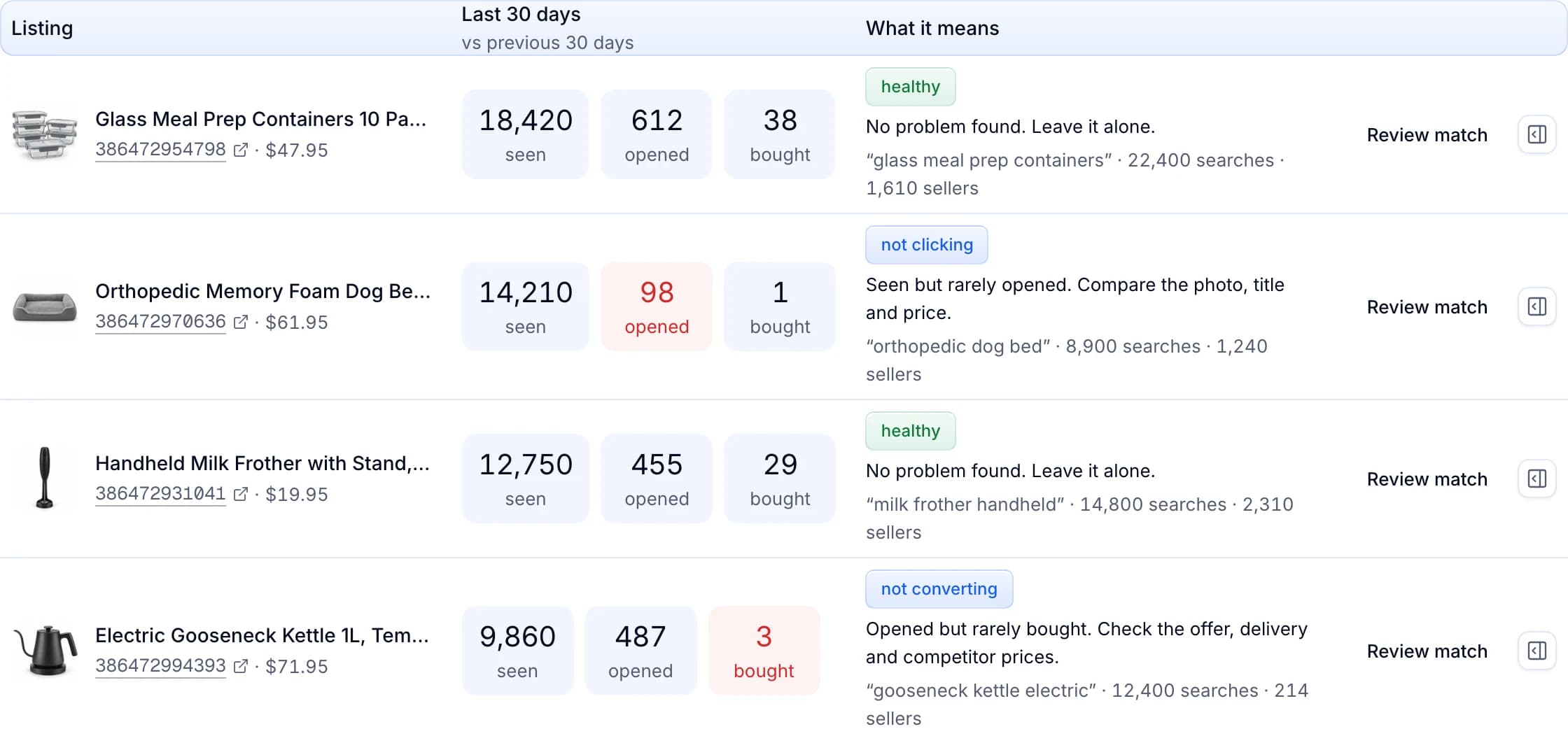
Listing Optimizer is part of the Pro and Scale plans. The selling limit alert comes with every plan. The diagnosis covers every live listing. AI drafts need a matched Amazon product, so items you added by hand or by CSV get the numbers, not the drafts.
Your products come from Amazon? eBay does not allow listing an item and buying it from another retailer or marketplace after the sale, for delivery to your buyer. The eBay dropshipping policy guide explains what is allowed.
Written by the Productivo team. Source review: eBay’s Seller Hub performance guide, page views, finding a listing, Best Match, search and filters, revising a listing, duplicate listings policy, multi-quantity listings and the out-of-stock option, seller standards, selling limits, offers to buyers, sale events, Promoted Listings general campaigns, relisting, listing durations and ending a listing, Time Away and buyer requirements, checked 24 October 2026. The three lamps in step 2 are made up.