
Comparison guide · Beginner · 7 steps · Updated 24 October 2026
Best eBay product research tools: free and paid, compared
The best eBay product research tools for most sellers are eBay’s own: Product Research (formerly Terapeak) and the Sold items filter. Both are free and show real eBay sales. Paid tools such as ZIK Analytics, Algopix and Productivo’s Product Scanner add speed, other markets and supplier prices. This guide compares what each tool shows, where its numbers come from, how fresh they are, its limits and its price.
In a hurry? Step 3 opens with every tool at a glance. Step 7 tests any tool on items you know.
The steps use eBay’s own tools and each tool’s own pages. Productivo, the app behind this guide, is in the same tables, and the last part shows where it fits.
Before you start
In shortHave one or two items whose eBay sales you already know. They are your yardstick.
Who it is for
LevelBeginner
WholesaleEasy
You check exact items before you buy stock, which every tool here does.
ResellingEasy
The free tools cover one-off items. Step 6 shows when a paid tool helps.
HandmadeMedium
No tool has sales of your own design, so you compare similar items.
Wholesale dropshippingMedium
Price-gap research needs your supplier’s real prices, which no tool has.
Plan to fill orders by buying from another shop? Read the warning in step 1 first.
- You finish with
- A short list of research tools that fits how you source, with each tool’s data, limits, cost per item and test result.
- You need
- One or two items whose eBay sales you already know
- A free eBay account. Product Research also needs Seller Hub
- How many items you research in a normal month
How to choose the best eBay product research tools
Go in order. Each step drops eBay product research tools that do not fit, so the last step tests only one or two.
Step 1 of 7: Decide which question the tool must answer
In shortWrite down what you need to know: whether an item sells on eBay, or whether you can buy it for less.
Research tools answer different questions. Some show demand: what buyers paid on eBay, and how often. Others show a price gap: what an item sells for on eBay, minus what you pay for it. A tool that is good at one can be weak at the other.
Which question, which tool
Write your question first. Then pick the kind of tool that answers it.Your question Kind Where to look Do buyers pay for this item on eBay, and how much? Demand research eBay’s sold data: Product Research or the Sold items filter What sells in my category that I do not list yet? Demand research Sourcing Insights (with a Store), or a paid tool’s product database Can I buy it for less than eBay buyers pay, after fees? Price-gap research Your supplier’s price list, your fees and shipping, or a paid tool that adds them up Which marketplace pays most for it? Cross-market research A tool that covers several marketplaces Demand research comes first. A price gap means nothing if the item does not sell. Pick the tool for your question, not for its list of features.
Result: One question written down, marked as demand research or price-gap research.
Step 2 of 7: Start with eBay’s free research tools
In shortUse Product Research and the Sold items filter first. They are free and use eBay’s own sales.
eBay has its own research tools, built on eBay’s own sales. Product Research even shows the real price when a seller accepted a Best Offer. It sits in the Research tab of Seller Hub and in the eBay app. It used to be called Terapeak.
eBay’s own research tools
All three use eBay’s own sales data. None costs extra, apart from the Store that Sourcing Insights needs.Tool What it shows Who can use it, how far back Product Research (formerly Terapeak) Average sold price, price range, trend, shipping, number of sellers, selling format and active listings. Sell-through rate for 90 days or less Any seller, in Seller Hub’s Research tab or the eBay app. From 1 day to 3 years back Sold items filter in eBay search Each sold listing and its price. You count and average them yourself Anyone signed in to eBay. About the last 90 days Sourcing Insights Categories with high demand and low supply, marked “Great Opportunity”. Monthly trends and top item specifics Business sellers with a Basic Store or higher, in categories where they sold $500 or more Product Research only counts sales that match your words and filters. Normal eBay search, and so the Sold items filter, can add “related” results when few items match. So check what each result really is.
Run every item through Product Research before you pay for any tool. It shows whether the free numbers already answer your question. The Terapeak guide explains each figure. The eBay sold listings guide shows the filter step by step, and the free eBay sell-through rate calculator turns sold and unsold counts into one rate.
Result: Product Research results for one item you know, to measure every other tool against.
Step 3 of 7: Compare paid tools on the same points
In shortLine up each paid tool by what it shows, where its numbers come from, its limits and its price.
Paid eBay product research tools run the same kind of search faster, for many items at once. Some add other eBay sites, other marketplaces or supplier prices. The paid tools below are the ones most comparison articles name, plus Productivo’s Product Scanner. Each fact comes from the tool’s own pages, and Productivo’s from its code.
The tools at a glance
Prices a month, read on each tool’s own page on 24 October 2026, and Productivo’s from its plan cards. “Best for” is this guide’s view, not the tool’s claim.Tool Best for Price a month eBay Product Research Demand and sold prices for any item. Start here Free Sold items filter A quick look at single sales from the last 90 days Free Sourcing Insights Gaps in categories you already sell in Part of a Basic Store: $21.95 a month on a yearly plan 3Dsellers eBay Research One listing’s recent sales, on its own page Free Chrome extension Productivo Product Scanner Price gaps between eBay US listings and the same product on Amazon, with the profit after fees Part of Pro, $34.99, and Scale, from $44.99 ZIK Analytics Many eBay items a week, on several eBay sites PRO $39.90, PRO+ $59.90. Billed yearly: $14 and $20 Algopix One product across Amazon, eBay and Walmart Free plan. Paid from $29. Check if that is the yearly price What each tool shows, and where its numbers come from
Each cell is what the tool’s own pages said on 24 October 2026, and Productivo’s what its code does. Quotes are their words.Tool What it shows Where the numbers come from Productivo Product Scanner eBay US results for a keyword or up to five categories, each with its Amazon match and the profit at your pricing eBay’s result pages, read while the scan runs. Sold counts are each listing’s all-time total, not sales in a date range ZIK Analytics Sold data by item, seller and category, on 9 eBay sites. Supplier matches and a title builder “Sourced directly from eBay’s marketplace” and “real-time”, its FAQ says. Top 500 list refreshed every 24 hours. 3+ years of history Algopix One product, or many from a CSV file, across Amazon, eBay and Walmart. Sales estimates for Amazon US only Its own database of over 2 billion products, it says. 7 eBay sites. Freshness: Not listed on its site 3Dsellers eBay Research On one listing: units sold from the last 24 hours to 30 days, the sold price spread and the seller’s recent sales eBay’s purchase history, read by your browser when you open the page. Only the last 100 purchases. None for single-quantity listings What each plan limits
Read on each tool’s own page on 24 October 2026, and Productivo’s from its plan limits. A limit counts searches, scans or reports, not items.Tool Limits eBay Product Research None listed Sourcing Insights Only categories with $500 or more of your sales ZIK Analytics PRO Product, competitor and category research unlimited. Product Explorer: 20 a month ZIK Analytics PRO+ Product Explorer: 100 a month. Bulk Scanner unlimited. Turbo Scanner and Autopilot: 10 a month each Productivo Pro and Scale Product Scanner: 270 requests a day on Pro, 830 on Scale. One scan uses many requests. The count resets at 00:00 UTC Algopix Higher plans give “higher limits”. The numbers are not listed on its pricing page 3Dsellers eBay Research Ranges up to 365 days. Seller analysis: one page of sold listings, 240 at most Read the limits as closely as the price. ZIK’s Product Explorer, for example, allows 20 a month on PRO. Write down what one unit of each limit is before you compare plans.
Looking at ZIK in particular? The ZIK Analytics alternative guide sets it beside eBay’s own data. Tools that also list items and handle orders are a different group. The guide to the best eBay dropshipping software compares those, and the best eBay seller tools guide sorts every kind of tool by job.
Result: A short list of two or three tools, each with what it shows, its limits and its price.
Step 4 of 7: Check how fresh each number is
In shortFind out when each number was counted. A listing’s all-time sold count is not this month’s demand.
Tools show three kinds of sales numbers. They look alike, but each one counts a different part of a listing’s life.
Three sales numbers on one listing
Each bar is the part of the listing’s life that the number counts.
- A listing’s sold countEvery sale since the listing started. Many tools sort by it.
- Product ResearchOnly the dates you pick, such as the last 90 days.
- Purchase historyThe listing’s last 100 buyers, however long ago.
A drawing, not eBay’s screen. The bars show no real listing.
Decide with sales in a date range. eBay says Product Research data is in real time, up to today. A purchase history goes back only 100 purchases, 3Dsellers says.
Then find out how often each tool updates. “Real-time” on a sales page does not say when a figure was counted. Open the listing behind a number and compare. Trust a number only when you know its dates.
Result: For each number a tool shows, a note of what it counts and over which dates.
Step 5 of 7: Work out what each check costs
In shortDivide the monthly price by the items you check, then compare it with the time the tool saves.
A price means little on its own. What counts is the cost of each item you check, and the time you save. Work it out with your own numbers:
- Count the items you research in a normal month.
- Divide the tool’s monthly price by that count. This is the cost per item.
- Time one check with the free tools, then with the paid tool. Multiply the minutes saved by your items.
- Divide the price by the hours saved. This is the cost per hour saved.
One made-up $40 tool, two sellers
A made-up price, and 6 minutes saved on each item. Cost per hour saved = $40.00 ÷ hours saved.Seller Cost per item Time saved Cost per hour saved Checks 15 items a week (60 a month) $0.67 6 hours $6.67 Checks 2 items a week (8 a month) $5.00 48 minutes $50.00 The tool and its price are made up. For the busy seller, each hour saved costs $6.67. For the light seller, it costs $50.00. If your hour is worth less than the cost per hour saved, the free tools win.
Use the normal price, not the first-month offer. A cheap first month does not change month two. A yearly plan costs less a month, but you pay for the whole year at once. Count the limits from step 3 too. A plan that runs out mid-month leaves checks undone.
Result: Your cost per item checked and per hour saved, for each tool on your short list.
Step 6 of 7: Match the tool to how you source
In shortUse the free tools first, then add one paid tool only where your way of sourcing needs it.
Which tool fits how you source
Start with the free column. Add the second only when step 5’s sum says it pays.How you source Start with Add when needed Reselling one-off or used items Product Research and the Sold items filter A free extension that shows a listing’s recent sales. Paid databases help less, because each item differs Wholesale: you buy stock first Product Research, searched by exact model or barcode number (UPC) Sourcing Insights once you have a Basic Store. A paid tool if you check many items every week Wholesale dropshipping: your supplier ships Product Research for demand, and your supplier’s price list A price-gap tool, fed with your supplier’s prices, your fees and your shipping Handmade Product Research for similar items: material, size, use Rarely needed. No tool has sales of your own design Selling on eBay and other marketplaces Product Research for eBay A tool that covers several marketplaces, such as Algopix Resellers check one item at a time, and each one differs. Wholesale sellers check the same items again and again, so speed pays. Wholesale dropshippers need the supplier’s real price, stock and delivery time. No research tool knows those.
Pay for one tool at a time. Two tools that do the same job double the cost, not the evidence.
Result: The free tools you will use, and at most one paid tool to try, matched to how you source.
Step 7 of 7: Test the tool on items you know
In shortRun five items whose sales you already know through the tool, and compare it with eBay’s numbers.
Every tool makes mistakes. Test it during the free plan or trial, before you trust it:
- Pick five items whose sales you know: your own sales, or items you checked in Product Research.
- Use the same eBay site, dates and condition in both tools.
- Compare the number sold, the average sold price and the number of sellers.
- Open five of the tool’s matches. Check the model, size, pack and condition.
- Write down each gap. Keep the tool only if the gaps are small, or it explains them.
Decide before the trial ends. A trial that ends before your test does is a reason to wait, not to pay.
Result: Five test items with the tool’s numbers beside eBay’s, and a decision: keep it or cancel.
What no research tool can tell you
In shorteBay product research tools show past sales. Your costs, your supplier and your listing stay your job.
- Your money leftA tool guesses fees and shipping. Your packaging, returns and real shipping cost are yours to add. The eBay fee calculator works out eBay’s part.
- Whether your listing will sellPast sales show what buyers wanted. They do not promise the same for your listing, price or photos.
- Your supplier’s stock and delivery timeOnly the supplier knows them. Ask before you list.
- Whether you may sell the itemBrand rights and restricted items are rules you check on eBay yourself.
Common questions about eBay product research tools
What is the best eBay product research tool?
For most sellers, eBay’s own Product Research. It is free, it uses eBay’s own sales data and it goes back 3 years. A paid tool is worth it when you check many items each week, or need other sites or supplier prices. ZIK Analytics covers 9 eBay sites and Algopix three marketplaces. Productivo’s Product Scanner finds price gaps between eBay US and Amazon. Step 5 shows the sum.
Is Terapeak still free?
Yes, for all sellers, and it needs no Store. It is now called Product Research. You find it in the Research tab of Seller Hub, which opens after your first sale, and in the eBay app once you have an active listing. Only Sourcing Insights needs a Basic Store or higher. Step 2 lists what each one shows.
How much does ZIK Analytics cost?
$39.90 a month for PRO and $59.90 for PRO+, billed monthly. Billed yearly, its pricing page shows $14 and $20 a month. On 24 October 2026 it also offered the first month at half price, and a $1 trial. It says Enterprise plans start at $89.90 a month.
Can I research eBay sold prices without Seller Hub?
Yes. Sign in to eBay, search and tick Sold items. It shows about the last 90 days. It does not average the prices for you, so you count them yourself.
Where do eBay research tools get their data?
Each tool says it differently, and some do not say. eBay’s tools use eBay’s own sales. 3Dsellers says its extension reads eBay’s public pages in your browser. ZIK says its data comes directly from eBay. Algopix does not say how fresh its eBay data is. Productivo’s Product Scanner reads eBay’s result pages while the scan runs. Step 7 tests any of them.
Do eBay research tools work outside the US?
Most do, but check your eBay site first. Product Research has an eBay marketplaces filter. ZIK lists 9 eBay sites, Algopix 7 and the 3Dsellers extension 19. Productivo’s Product Scanner reads eBay US only. Run step 7’s test on your own site.
Does a beginner need a paid research tool?
Not before the first sales. The free tools answer the first questions: does it sell, and for how much. A paid tool saves time once you check many items. Work out step 5 with your own count.
Where Productivo fits among eBay product research tools
In shortProduct Scanner does price-gap research against Amazon, on eBay US, in the Pro and Scale plans.
Everything above works without Productivo. This part is about Productivo, the app behind this guide, and how it compares with the other eBay product research tools.
Product Scanner on the same points
| Guide step | What Productivo does |
|---|---|
| Step 1 | Product Scanner does price-gap research. It reads eBay US results for a keyword or up to five categories. Then it looks for the same product on Amazon and estimates the profit at your pricing. The warning in step 1 still applies. |
| Step 4 | It reads eBay’s result pages while the scan runs. Its sold count is each listing’s all-time count, so check the dates in Product Research. |
| Step 5 | Pro gives 270 requests a day and Scale 830. One scan uses many requests, and New scan shows the estimated page reads first. The limit resets at 00:00 UTC. |
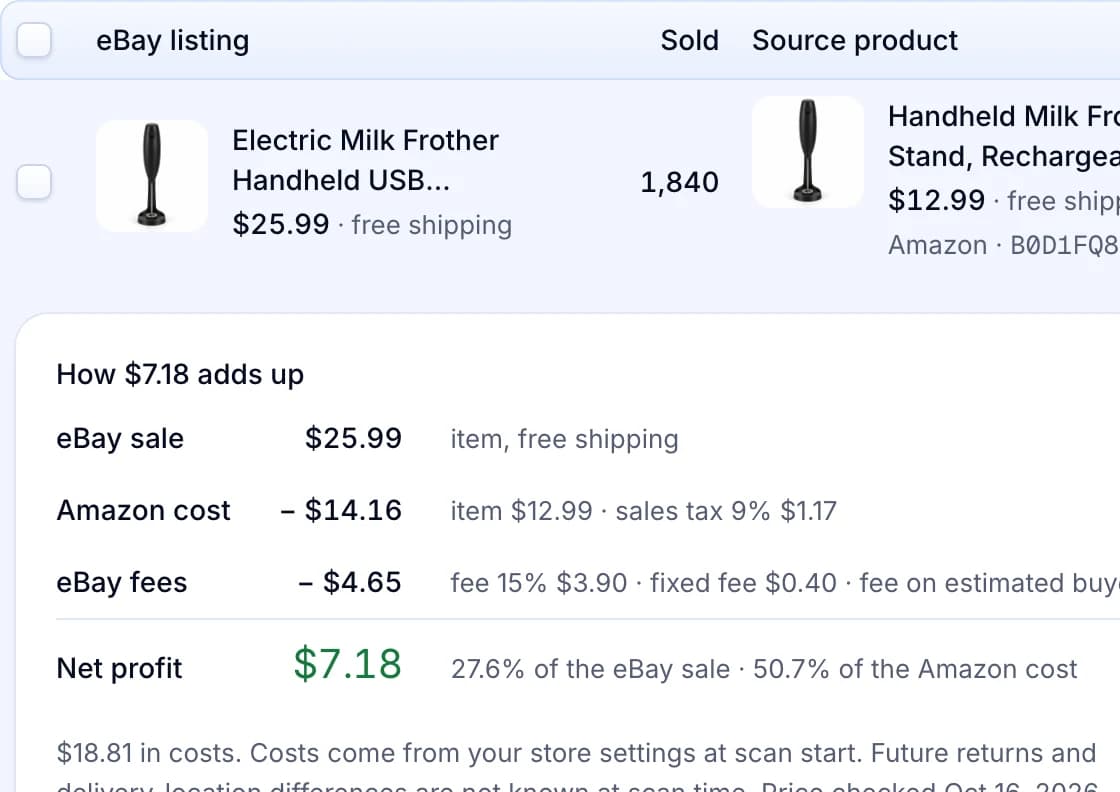
| Step 7 | Each result shows the eBay listing, the Amazon match and the cost breakdown. Check results and reasons shows why the other items did not qualify. |
Product Scanner is part of Pro, at $34.99 a month for 1,000 listings. Scale has it too, from $44.99 a month for 2,000 listings. Starter and Basic do not include it.
Where it does not fit: it shows no sales by date, no other eBay sites and no wholesale suppliers. Only Amazon offers with an ASIN can become Products. If you hold your own stock or buy from a wholesale supplier, eBay’s free Product Research fits you better.
An eBay listing, its Amazon match and the cost breakdown
Each result shows how many the eBay listing has sold, the matching Amazon offer and the estimated profit at your store’s pricing.
Written by the Productivo team. Source review, each page checked 24 October 2026: eBay’s Product research help, eBay research tools, Product research and Sourcing insights and Store subscriptions and fees; ZIK Analytics’ pricing and eBay product research pages; Algopix’s home and pricing pages; 3Dsellers’ eBay Research extension help, which also confirms that sold results need an eBay sign-in. Prices and limits change, so check each page before you pay. The tool and numbers in step 5 are made up.