
How-to guide · Beginner · 10 tips · Updated 21 October 2026
eBay tips for sellers: 10 ways to sell more and sell faster
These eBay tips for sellers come from eBay’s own help pages and seller rules, not from guesswork. Each tip is one change you can make this week, from your first payout to your seller level. Work through them in order, or jump to the one you need.
Never sold on eBay? How to sell on eBay walks through your first sale, then tip 1 picks up with payouts and limits. Already selling? Jump to sending offers or your seller level.
Steps 1 to 10 use only eBay’s own tools. The last part shows how Productivo, the app behind this guide, can help. You do not need a Productivo account for the tips.
Before you start
In shortThese eBay tips for sellers fit any item you sell at a fixed price on eBay.com.
Who it is for
LevelBeginner
WholesaleEasy
Every tip works as written. With many of the same item, tips 3 and 8 pay off on every sale.
ResellingEasy
Every tip works as written. For one-of-a-kind items, tip 3 compares only items in the same condition.
HandmadeMedium
Tip 3 needs care: few items match yours, so compare similar handmade items that sold.
Wholesale dropshippingMedium
Tips 6 and 10 need care: your supplier ships, so its speed decides your late shipments.
- You finish with
- A store set up to get paid without delays, listings that buyers find, and a seller level that keeps your fees down.
- You need
- An eBay account you sell from, or plan to
- A personal or business checking account in the same name
- One item you sell, to try each tip on
- About an hour, spread over a week
- The 10 steps
- Set up payouts before you list
- Know your first limits and payout holds
- Price from sold items, not asking prices
- Write the title buyers search and fill in item specifics
- Add clear photos, up to 24
- Ship fast, and build shipping into the price
- Earn Top Rated Plus on your listings
- Send offers to buyers who watch your items
- Promote listings only where the money allows
- Keep defects and late shipments low
10 eBay tips for sellers, in the order you need them
These eBay tips for sellers follow the order you need them. Tips 1 and 2 come before your first sale. Tips 3 to 5 make each listing sell. Tips 6 to 10 keep buyers happy and your fees low.
Step 1 of 10: Set up payouts before you list
In shortLink a checking account in your own name, and let eBay confirm your details before your first sale.
When you register as a seller, eBay confirms your identity, the checking account or debit card for your payouts, and your business details if you sell as a business. Do it before you list, so a sale is not stuck waiting for checks.
- A checking account, not savingseBay pays into a personal or business checking account. It cannot be a savings account.
- Names that matchThe name on the bank account must match the name on your eBay account. A business account needs a business checking account.
- Time to confirmeBay checks the account by your bank login, a bank statement or two small test deposits. A changed account takes about 2 business days to confirm.
In Payments, choose how often eBay sends your money: daily, weekly, every two weeks or monthly. Answer any banner that asks for your details at once. eBay uses a banner on your account, and My eBay Messages, when it needs you to verify something.
Result: A confirmed checking account for payouts and a payout schedule you chose.
Step 2 of 10: Know your first limits and payout holds
In shortCheck your monthly limit in Seller Hub, and expect new-seller payouts to wait for delivery.
New sellers start with selling limits: how many items, and how much money, you can list each month. Your active and sold listings both count. Good ’Til Cancelled listings count too, and they do not renew once you reach the limit. Find yours in Seller Hub, under Monthly limits.
A category you have never sold in can have its own limit. Never list an item in the wrong category to get around one. When eBay writes that you are close to your limit, you can ask for more from that message.
New sellers also wait longer for their money. eBay’s transaction holds page says new private sellers typically get their funds 2 days after delivery with an eBay label, or 7 days after delivery with another label. Without tracking, it can take up to 31 days.
Buy your first labels on eBay, with tracking. Your money then comes 2 days after delivery instead of 7. After that, eBay takes its fees out of each sale and sends the rest by your payout schedule.
Result: Your monthly limit, written down, and a plan to ship your first orders with eBay labels.
Step 3 of 10: Price from sold items, not asking prices
In shortPrice from what the same item sold for lately, never from what other sellers ask.
An asking price is only what a seller hopes to get. A sold price is what a buyer paid. Search the same item, in the same condition, and filter by Sold items. The eBay sold listings guide shows how.
Then check what each sale leaves you. eBay’s fee is a percent of the total the buyer pays, plus a per-order fee. The eBay fee calculator shows your fees and money left.
Choose a price among recent sold prices, above the least you will take. The eBay pricing strategy guide turns that least amount into a minimum price. Not sure the item sells at all? Start with eBay product research.
Result: A price set from recent sold prices, with your money left worked out.
Step 4 of 10: Write the title buyers search and fill in item specifics
In shortUse the 80 characters for the words buyers type, then fill in every item specific.
eBay gives you 80 characters for a title, and asks you to use as many as you can. Put in the brand, the model or type, the color, the style and the model number. Leave out special characters and words that do not describe the item.
Item specifics are the facts in the listing form, like Brand, Size and Color. Buyers filter search results by them. eBay says they help your item appear in a buyer’s search results. Fill in every item specific that fits your item, not only the required ones.
Describe the condition as it is, flaws included. eBay says an accurate condition can lower the chance of a return. The eBay listing optimization checklist goes through each field before you publish.
Result: A full title with the words buyers search, and every item specific that fits.
Step 5 of 10: Add clear photos, up to 24
In shortAdd several sharp photos on a plain background, at least 500 pixels, about 1600 is better.
A listing can have up to 24 photos. eBay says the more photos you add, from all angles and with any flaws, the more sure buyers feel.
- SizeAt least 500 × 500 pixels. eBay recommends about 1600 × 1600.
- ShapeSquare (1:1) or wide (16:9) photos look best in listings and search results.
- BackgroundA plain, uncluttered space. White is usually best, but a darker one can suit shiny items like jewelry.
- LightNo flash or overhead light, to cut glare. A tripod, or the camera’s timer on a flat surface, keeps the photo sharp.
- Nothing addedNo badges, logos, copyright notices or watermarks. eBay says they can lower your place in search results.
Result: Several sharp photos per item, on a plain background, with every flaw shown.
Step 6 of 10: Ship fast, and build shipping into the price
In shortWeigh the packed item, ship within your handling time, and put shipping into the price where you can.
Buyers compare the total: the price plus shipping. eBay’s own listing tips say buyers love free shipping. Free shipping still costs you the label, so add it to your price.
Weigh the item packed, with the box and filler. The free eBay shipping calculator shows the USPS price for your box in every zone. Use the farthest zone’s price, so a far buyer does not cost you money.
Set a handling time you can always meet. Handling time is the number of business days you take to ship after payment. Late shipments count against Top Rated, as tip 10 explains. A short handling time you meet is better than a fast one you miss.
Result: A shipping price that covers the label, and a handling time you can keep.
Step 7 of 10: Earn Top Rated Plus on your listings
In shortOnce you are Top Rated, offer 1-day handling and 30-day free returns for the seal and a fee discount.
Top Rated is eBay’s highest seller level. Once you have it, a listing can earn Top Rated Plus. It needs two things:
- Fast handlingSame-day or 1-business-day handling time.
- Free returnsFree returns for 30 days or longer.
The listing then shows the Top Rated Plus seal in search results and in the listing. You also get 10% off the final value fee, counted on the total with shipping and tax. The discount does not cover the per-order fee. On eBay.com, it is only for sellers who live in the US.
Free returns cost money when buyers send items back. Count that cost before you turn them on. The eBay fee calculator shows what the 10% saves on your price.
Result: A yes or no on Top Rated Plus for your listings, with its cost and saving counted.
Step 8 of 10: Send offers to buyers who watch your items
In shortSend offers at least 5% under your price to buyers who watch the item or keep it in their cart.
A buyer who watches your item, or keeps it in their cart, is already interested. In Seller Hub, you can send them an offer, one by one or all at once.
- At least 5% offThe offer must be at least 5% less than your Buy It Now price.
- Who gets itThe 30 most recent interested buyers. An item must sit in a cart for at least 2 days before you can send an offer to that buyer.
- How long it lasts96 hours, or until the item sells.
- Automatic offersTurn on automation, and eBay sends your offer to future interested buyers too.
You can also turn on Best Offer in the listing, so buyers can offer you a price. Check every offer against the least you will take. The eBay pricing strategy guide shows how to set a Minimum offer amount.
Result: Offers sent to interested buyers, each one above the least you will take.
Step 9 of 10: Promote listings only where the money allows
In shortPromote a listing only if the money left still covers the ad rate on the total.
With Promoted Listings in a general campaign, you choose an ad rate from 2% to 100%. You pay it only when the item sells within 30 days of a click on your ad. A click includes watching the item or adding it to the cart from the ad.
The ad rate counts the whole total: the price, shipping and tax. So a 5% ad on a $40 item with sales tax costs more than $2. Put the ad rate into the fee calculator before you promote. If the money left is too small, lower the rate or leave the listing out.
A priority campaign works differently: you pay for clicks, whether the item sells or not.
Result: An ad rate for each promoted listing that still leaves you money.
Step 10 of 10: Keep defects and late shipments low
In shortShip on time, resolve every problem yourself, and check your seller level each month.
eBay rates every seller against its seller standards. Two numbers can drop you to Below Standard:
- Transaction defectsAn order you cancel because you cannot send it, or a problem the buyer reports that you do not resolve. More than 2% of your transactions, with more than 4 buyers, is Below Standard.
- Cases closed without your helpA case eBay closes because you did not resolve it. More than 2 cases, or 0.3% of your transactions if that is higher, is Below Standard.
A high late shipment rate alone does not make you Below Standard. But Top Rated needs a low one, and with it the Top Rated Plus discount. Upload tracking within your handling time, every time.
Below Standard costs money too. The eBay fee calculator guide lists the extra final value fee. Check your level each month in Seller Hub’s Performance tab. The eBay Seller Hub guide shows where.
Result: Your seller level, checked monthly, and no order shipped late or left unresolved.
eBay selling mistakes that slow sales
In shortMost slow sales come from a price, a title or a promise that does not match the item. The eBay tips for sellers above prevent each one.
- Pricing from asking pricesOther sellers may never sell at those prices. Use sold prices.
- A short titleEvery unused character is a word a buyer could have searched.
- Empty item specificsA buyer who filters by Size or Color never sees the listing.
- Photos with logos or watermarkseBay says they can lower your place in search.
- A handling time you cannot meetEach late shipment counts against Top Rated.
- An ad rate counted on the price onlyThe rate counts shipping and tax too.
Common questions about selling on eBay
How can I sell faster on eBay?
Price from sold items, write a full title and send offers. A price among recent sold prices, a title with the words buyers search and every item specific filled in help buyers find the item. Offers to watchers turn interest into sales. Tips 3 to 8 show each one.
How do I get paid on eBay?
Into your checking account, by the schedule you choose. eBay takes its fees out of each sale. The rest shows as Processing funds, then Available for payout, typically 1 to 2 days after the buyer’s payment is confirmed. The bank then takes 1 to 3 business days.
Why is my eBay money on hold?
New sellers’ funds wait for delivery. eBay says new private sellers typically get their funds 2 days after delivery with an eBay label, or 7 days with another label. Ship with tracking to get paid sooner. Tip 2 has the details.
What is the selling limit for new eBay sellers?
It differs by account, and eBay shows yours in Seller Hub. Look under Monthly limits. Active and sold listings both count. eBay raises limits as you ship on time and follow its rules, and you can ask for more.
How many photos should an eBay listing have?
Enough to show every side and every flaw, up to 24. eBay asks for at least 500 × 500 pixels and recommends about 1600 × 1600, on a plain background.
Is free shipping worth it on eBay?
Often, if your price covers the label. Buyers compare the total price. Add the farthest zone’s label price to your price, so no sale costs you money.
Do Promoted Listings help sell on eBay?
They can, but they cost a share of the total. In a general campaign you pay only when the item sells within 30 days of a click on your ad. Check that the money left still works at your ad rate.
What are the best eBay tips for sellers who are new?
Set up payouts first, then sell a few items well. Confirm your checking account, learn your monthly limit and ship your first orders with eBay labels. Then follow tips 3 to 6 on each listing.
How Productivo helps you sell on eBay
In shortProductivo takes over some of the repeated work in these tips for listings it manages.
Every one of these eBay tips for sellers works with eBay’s own tools. This part is about Productivo, the app behind this guide.
Where Productivo fits in the tips
| Guide step | What Productivo does |
|---|---|
| Tip 3 | Competitor pricing keeps a product just under the cheapest matching seller and stops at your minimum profit. It is in every plan, for products whose cost Productivo reads from Amazon. |
| Tip 4 | Each Amazon category is matched once to an eBay category, and its required item specifics are filled from Amazon, up to 25 per listing. On Pro and Scale, Listing Optimizer finds why a listing stalls and drafts a new title for your approval. |
| Tip 6 | Amazon tracking is turned into a tracking number for the eBay order twice a day, and the order moves to Shipped. |
| Tip 10 | A paid order nobody has bought yet sends a Telegram message or email 3 hours after the sale, and twice more before the ship-by date. |
Why a listing stalls, in Productivo
Listing Optimizer reads each live listing’s last 30 days on eBay: how often buyers saw it, opened it and bought it. Each listing gets one diagnosis and what to do about it.
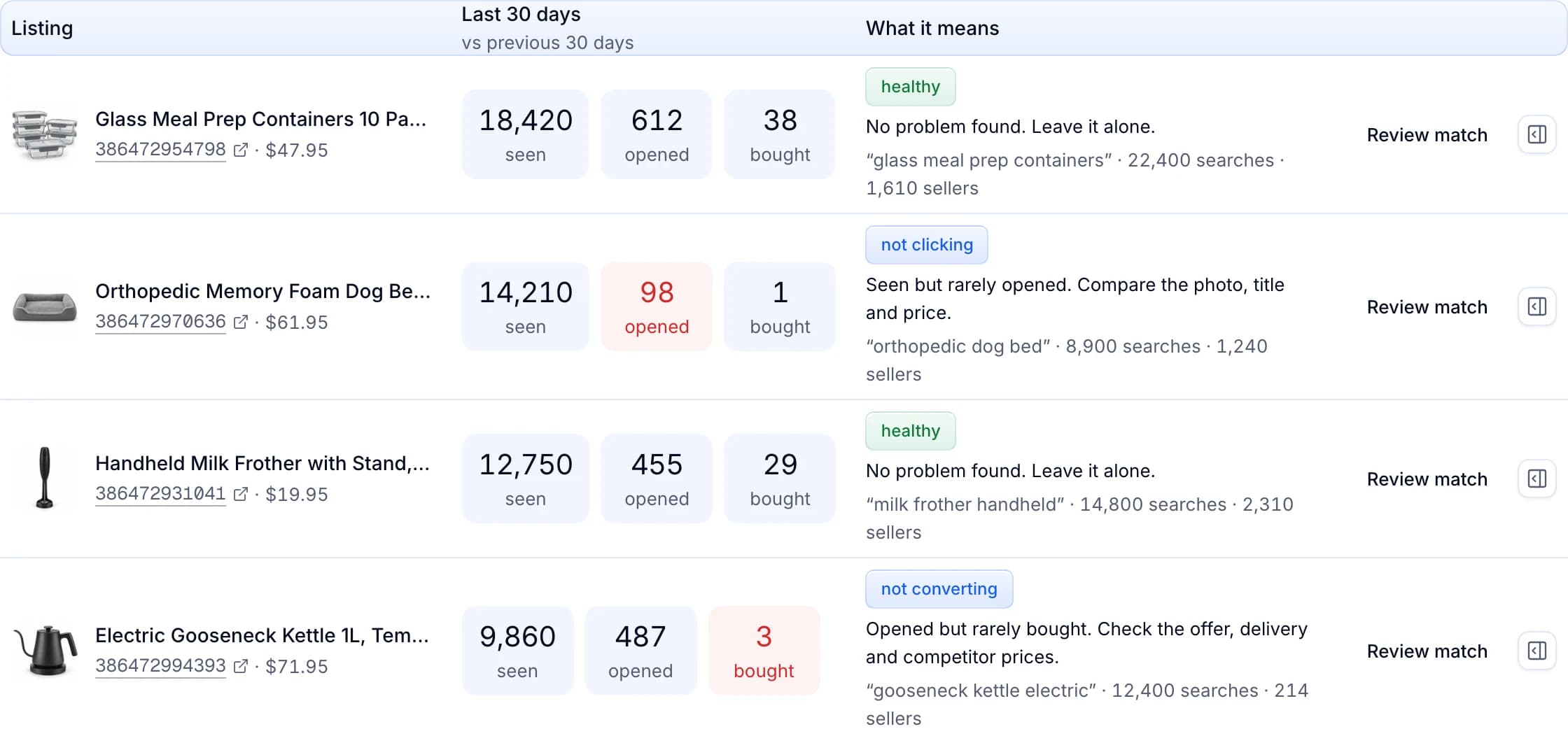
Listing Optimizer is part of the Pro and Scale plans. A product you add by hand keeps the price you give it, and Productivo leaves it out of competitor pricing and Listing Optimizer’s drafts.
Written by the Productivo team. Source review: eBay’s registering as a seller, checking account for payouts, getting paid, transaction holds, selling limits, create great listings, listing best practices, adding pictures, seller standards, Best Offer and offers to buyers and Promoted Listings general campaigns, checked 21 October 2026.