
How-to guide · Beginner · 8 steps · Updated 24 October 2026
How to set up an eBay seller account and keep it safe
To set up an eBay seller account, sign up on eBay and choose a personal or business account. Then register as a seller: eBay asks for your ID details, your SSN or EIN, a phone number and a checking account for payouts. This guide covers each step, how to secure the account and connect apps, the limits and holds new sellers start with, and eBay’s rules on more than one account.
Already registered? Jump to 2-step verification, limits and holds or more than one account.
Steps 1 to 8 work without Productivo. The last part shows how Productivo, the app behind this guide, can help.
Before you start
In shortYou need an email address, a mobile phone, your SSN or EIN and a checking account.
Who it is for
LevelBeginner
WholesaleEasy
Every step works as written. If you buy stock as a registered business, use step 1’s business column.
ResellingEasy
Every step works as written. A personal account fits if you sell as an individual.
HandmadeEasy
Every step works as written. Register as a business only if your shop is a registered business.
Wholesale dropshippingMedium
Step 7 needs care: your supplier’s tracking decides when your holds end.
Dropshipping from a wholesale supplier is allowed. Buying the item from another retailer or marketplace after a sale, for delivery to your buyer, is not. The eBay dropshipping policy guide explains the rule.
- You finish with
- A verified eBay seller account that gets paid, protected by 2-step verification, with its limits and holds known.
- You need
- An email address and a mobile phone
- Your Social Security Number or ITIN, or your business’s EIN
- A checking account in the same name as the eBay account
- About 30 minutes, plus up to 4 business days if eBay checks your bank by deposits
- The 8 steps
How to set up an eBay seller account in 8 steps
Steps 1 to 4 open the eBay seller account and link your bank. Steps 5 and 6 secure it. Steps 7 and 8 cover limits, holds and more than one account.
Step 1 of 8: Choose a personal or business account
In shortPick business if you run a registered business, and personal if you do not. Your bank must match.
eBay has two account types. A personal account is for people who sell as individuals. A business account is for a registered business. eBay’s own rule is short: if you do not represent a registered business, create a personal account.
Personal or business account
Personal Business Who it is for You sell as an individual. A registered business: sole proprietor, LLC, corporation or partnership. What eBay checks Your name, address, date of birth and Social Security Number. The legal name, EIN and address, and everyone who owns or runs it. Checking account A personal one, in your name. A business one, in the business name. Name on invoices Your name. Your business name. New-seller holds Money 2 days after delivery with an eBay label. Money 24 hours after delivery with an eBay label. Selling fees eBay.com’s one fee table. The same table. Switching You can upgrade to business later. You cannot go back to personal. When to switch to business
Switch when you register a business, or when you want payouts in a business checking account. In My eBay, open Account, then Personal information. Select Edit next to Account type, then Confirm. Say whether you run a legal entity or are a sole proprietor, and enter the business details.
eBay then asks for the business name, type and address, and who owns or runs it. It may ask for documents too, with a banner in Seller Hub. An upgrade to business cannot be undone.
An eBay Store is not an account type. It is a separate monthly plan you can add later. The eBay Store subscription guide says when one pays off.
Result: Your account type, chosen to match how you are registered and which checking account you use.
Step 2 of 8: Gather the details eBay asks for
In shortHave your ID details, SSN or EIN, phone and checking account ready before you start.
eBay checks who you are before it pays you. Its page on registering as a seller lists what it asks for. Have it ready, so you can finish in one sitting.
- For a personal accountYour full name, home address and date of birth, and your Social Security Number or ITIN. A PO Box is not accepted as the address.
- For a business accountThe legal business name, any DBA name, the EIN and a physical business address. Also the ID details of everyone who owns, runs or controls the business.
- A mobile phoneeBay sends it a one-time code when you register. Its text codes do not reach landlines.
- A checking accountThe name on it, the bank name, the routing number and the account number. A savings account will not work. A Visa or Mastercard debit card also works for payouts.
- A card for fees, if you likeeBay takes its fees out of your sales. When they do not cover the fees, it charges your card on file, then your checking account.
If eBay asks for documents
Sometimes eBay asks for a photo of your ID. It emails you the upload steps. Accepted IDs include a US passport, a driver’s license, a state ID card, a permanent resident card and an employment authorization card. A business sends papers from the IRS or the state, such as the IRS 147C EIN letter. A W-9 you filled in yourself is not accepted.
- CurrentExpired documents are refused.
- MatchingThe names match your eBay account.
- ReadableSharp, with all four corners in the photo.
- The right fileJPEG, JPG, PDF or PNG. A photo ID can be up to 4 MB, other papers up to 10 MB.
Use the same name on eBay, on your ID and at your bank. eBay’s own tip is to check that your details match before you send them. That avoids delays later.
Your name may also reach buyers. For US buyers, eBay may show your name or business name and your address in their order details, as US law requires.
Result: Your ID details, SSN or EIN, mobile number and checking account details in one place.
Step 3 of 8: Sign up and register as a seller
In shortCreate the account, then finish seller registration from your first draft listing.
Go to eBay’s sign-up page, or open My eBay and select Selling. Choose Personal or Business, fill in the form and select Create account. You can also sign up with Google, Facebook or Apple. eBay’s User Agreement says you must be 18 or older. eBay then emails you a link to verify the account. You cannot buy or sell until you do.
Next, register that account as a seller. eBay’s registration guide starts it from a listing:
- Open My eBay › Selling again and select List an item.
- Enter the item’s name and fill in the Sell your item form.
- Select List it. eBay saves a draft and opens seller registration. Select Get started.
- Enter your phone number and the one-time code eBay sends.
- Confirm the account type, then add your ID and payout details.
Finish registration in one sitting. eBay may hold your payouts until it has checked your details. If something is missing, it puts a banner on your account or sends you a message.
The draft you started is a real listing. The how to sell on eBay guide finishes it: price, photos, shipping and returns. Outside the US? eBay lists the countries you can sell from on its start selling page. The rules in this guide are eBay.com’s.
Result: An eBay seller account, with your phone number confirmed and a first draft saved.
Step 4 of 8: Link and verify your payout account
In shortVerify your checking account by logging in to your bank, then choose when eBay sends your money.
eBay pays your sales into the checking account or debit card you link. The names must match: your first and last name on a personal account, the business name on a business account. The type must match too: a business eBay account needs a business checking account.
Three ways eBay checks your bank
eBay’s options from its registration page, fastest first.Way How it works Log in to your bank Pick your bank from the list and sign in there. eBay calls this the fastest way. Two small deposits They reach your bank in 2 to 4 business days. Then enter both amounts from the banner in Seller Hub or My eBay. Do not guess before they arrive. A bank statement A color PDF up to 3 months old, with your name, your eBay address, the bank name and the last 4 digits. No screenshots, no voided checks. Choose your payout schedule
In Payments, choose when eBay sends your money. Daily is the default.
- DailyAbout 2 days after the buyer’s payment is confirmed.
- WeeklyEvery Tuesday, for the week before.
- Every two weeksEvery second Tuesday.
- MonthlyThe first Tuesday of the month.
Your bank then takes another 1 to 3 business days. eBay takes its fees out of each sale first, so a payout is less than the buyer paid. Need money sooner? An express payout to an eligible debit card or bank account costs $2 and usually arrives within 30 minutes.
Verify your bank before your first sale. To change banks later, delete the old checking account in Payments, then add the new one. eBay keeps only one on file, and confirming a new one takes about 2 business days.
Result: A verified checking account and a payout schedule you chose.
Step 5 of 8: Turn on 2-step verification
In shortTurn on 2-step verification in the eBay app or an authenticator app, and never share your password.
Your eBay seller account holds your bank details and your buyers’ addresses. eBay strongly recommends 2-step verification. With it on, a stolen password is not enough to sign in.
- Select your name at the top left, then Account settings.
- Select Sign in and security, then Edit next to 2 Step Verification.
- Choose a method: a push to the eBay app, a text message or an authenticator app.
For an authenticator app, eBay suggests Google Authenticator, Microsoft Authenticator or Authy. Scan the QR code, then type the 6-digit code. eBay emails you each time 2-step verification is turned on or off.
- A passkeySign in with your fingerprint, face or device PIN. Add one in Account › Sign-in and security › Passkeys. On another eBay site, like eBay.co.uk, set up a new one or sign in another way.
- Trusted devicesSelect Remember this device when you sign in. That device may skip the code next time. You can add up to 100.
- A password used nowhere elseNot your name, birth date or user ID. Your email password should be different too.
- Fake eBay emailseBay never asks for your password by email. A real eBay email usually shows your username. Do not click the links. Forward the email to spoof@ebay.com.
- New-device emailseBay emails you when a new device signs in. Not you? Change your password and contact eBay.
Give helpers Team access, not your password
The User Agreement says you must not share your sign-in details. For help with listings or orders, use Team access. It needs Seller Hub turned on. In My eBay, open Account, then Team access, and select Add user.
Pick what each helper may do, such as drafts, orders, labels or refunds. Helpers sign in with their own eBay account and must turn on 2-step verification. They never see your password. An invitation expires after 24 hours, and the Activity log shows who did what.
Never give anyone your eBay password, not even a helper.
Result: 2-step verification on, a passkey or trusted device set, and helpers on Team access.
Step 6 of 8: Connect apps only through eBay’s sign-in
In shortApprove apps on eBay’s own sign-in page, never give an app your password, and revoke the ones you stop using.
Listing tools, repricers and shipping apps can work on your account once you allow them. The safe way is eBay’s own Sign in with eBay. The app sends you to an ebay.com page. You sign in there, read the permissions the app asks for and agree. The app gets the access you approved, never your password.
- Check the addressThe sign-in page must be on ebay.com. eBay warns that fake pages use look-alike addresses, such as signin-ebay.com.
- Read the permissionsSee what the app may change: listings, prices, orders or messages. eBay tells app makers to ask only for what they need.
- Keep your password to yourselfAn app that asks for your eBay password is asking you to break eBay’s rule on sharing sign-in details.
- Ask what it changes aloneSome apps edit listings by themselves. Others wait for your OK. Know which before you agree.
See and revoke app access
In My eBay, open Account › Sign in and security › Third-party app access and select View. Every app you allowed is there. Revoke the ones you no longer use. eBay says the app’s access ends at once. Revoking stops new changes, but it does not undo earlier ones.
Look through Third-party app access every few months.
Result: Every app approved on eBay’s own page, and the ones you no longer use revoked.
Step 7 of 8: Check your selling limits and payment holds
In shortFind your monthly limit, ship every order with tracking, and watch the payout tracker in Payments.
New sellers start with two brakes: a monthly selling limit and payment holds. Both ease as you sell well.
Selling limits
A selling limit caps how many items, and how much money, you can list each month. Find yours in Seller Hub: open Overview and scroll to Monthly limits. My eBay’s Selling Overview shows it too. Active and sold listings both count. So do Good ’Til Cancelled listings, and they stop renewing once you reach the limit.
eBay reviews your account each month and raises the limit from your sales and buyer feedback. When you get close, it sends a message, and you can ask for more from there. In a category that is new to you, eBay may add a category limit. Never list an item in the wrong category to get around one. That breaks eBay’s search manipulation policy. eBay may also end listings you created over your limit. List them again when the limit renews or rises.
Payment holds
A transaction hold keeps a sale’s money On hold until the buyer has the item. For new sellers, it applies to every order for a while.
When a new seller’s money is released
Typical times from eBay’s holds page. eBay can hold longer if it has concerns about an order.Seller eBay label Other tracked label No tracking New private seller 2 days after delivery 7 days after delivery 31 days after payment New business seller 24 hours after delivery 15 days after payment 15 days after payment Occasional seller 24 hours after delivery 24 hours after delivery 31 days after payment One made-up sale, from payment to your bank
A new private seller who ships with an eBay label and gets daily payouts.
- Day 0BuyerPays. The sale shows as On hold in Payments.
- Day 1YouShip with an eBay label. Tracking uploads by itself.
- Day 4CarrierDelivers. The tracking shows it.
- Day 6eBay2 days after delivery, the money is Available.
- Day 7eBaySends it with the next daily payout.
- Day 8–10Your bank1 to 3 business days later, the money is in your checking account.
The same sale with another carrier’s tracked label is Available on day 11. With no tracking, on day 31.
A drawing, not eBay’s screen. The days are made up and eBay’s times are typical. Weekends and bank holidays add days.
A private seller’s money then comes within about 48 hours of payment, once two things are true. You have at least 10 completed sales worth $150 or more in the last 5 years. And you have no more than 2 open requests, cases or defects in the last 12 months. A sale with a refund, return, chargeback, cancellation or case does not count. eBay adds a sale to its tracker 15 days after it is placed.
A new seller’s progress (made-up)
Four made-up sales. eBay counts the item price plus shipping, without tax.Sale What happened Counts Phone case Delivered, no problem $16.50 Desk lamp Delivered, no problem $37 Board game Returned, so it does not count $0 Kitchen scale Delivered, no problem $25 Counted so far 3 of 10 sales $78.50 This seller needs 7 more sales and $71.50 more. Both must be met. A big sale can pass $150, but the count still has to reach 10. Track yours in Seller Hub’s Payments tab.
Ship every order with tracking. Without it, a new private seller waits 31 days after payment. You can even pay for eBay labels with money that is on hold. The eBay shipping labels guide shows how.
Result: Your monthly limit written down, tracking on every order and the payout tracker checked.
Step 8 of 8: Follow eBay’s rules on more than one account
In shortMore accounts are allowed, but each must meet eBay’s standards, and none may dodge a restriction.
eBay’s multiple accounts policy allows more than one account. Some sellers keep one for buying and one for selling. Others keep one per product line. Every account must follow eBay’s rules and meet its seller standards.
What eBay allows with more than one account
From eBay’s account help, the multiple accounts and duplicate listings policies and the User Agreement.Situation eBay’s rule A second account Allowed. Give it its own email address and username. One to buy and one to sell, or one per product line Allowed. Each must meet eBay’s buyer and seller standards. A personal and a business account Allowed. Each needs a checking account of its own type. An account to get around a restriction or limit Not allowed, whether it is new or one you already have. The same item in two accounts at once Not allowed at a fixed price. The duplicate listings policy covers other usernames too. Bidding on your own item from another account Not allowed. Two of your accounts may not act on the same listing. Buying or selling an account Not allowed without eBay’s consent, and that includes the account’s feedback. What linked accounts risk
If eBay restricts one account, it may put similar limits on the member’s other linked accounts. eBay asks you to fix the problem on that account before you keep selling on the others. If eBay linked an account to yours by mistake, you can appeal through Contact us.
Linking can also help. A new seller account may get higher limits by linking to your older, established one. If eBay allows it, you see the option under Request higher selling limits in My eBay’s Selling Overview.
A problem on one account can follow you to the others.
Result: Each eBay seller account you keep follows eBay’s rules, and none was opened to get around a limit.
Your first-week checklist
In shortDo these in order before you list many items. Most take minutes.
- Day 1: create and protect the accountSign up, then turn on 2-step verification before anything else.
- Day 1: register as a sellerAdd your ID details and verify your bank by logging in. If you chose deposits, note the date.
- Within 4 business days: finish the bank checkEnter the two deposit amounts once they arrive, and clear any banner in My eBay.
- Pick a payout scheduleDaily, weekly, every two weeks or monthly, in Payments.
- Write down your limitFind it under Monthly limits in Seller Hub, or in My eBay’s Selling Overview.
- Check prices before you listLook up what your items sold for lately. eBay product research shows how.
- List a few items you knowFinish your draft with the how to sell on eBay steps.
- Ship on time, with trackingAn eBay label releases a new seller’s money fastest.
- Look at who has accessCheck Team access and Third-party app access once, so you know the starting list.
The eBay Seller Hub guide shows where your payouts, limits and seller level live.
Mistakes that cost sellers payouts or the account
In shortEach of these slows your money or puts the eBay seller account at risk.
- A bank that does not match the accountA business checking account on a personal eBay account fails verification, so payouts wait.
- A savings accounteBay cannot pay into one. Link a checking account or a debit card.
- Upgrading to business with no businessIt cannot be undone, it asks for an EIN and owner details, and the fees stay the same.
- Sharing your passwordWith a helper or an app, it breaks the User Agreement. Use Team access and eBay’s sign-in page instead.
- Shipping without trackingA new private seller then waits 31 days after payment for the money.
- A second account to escape a limiteBay does not allow it, and restrictions can spread to linked accounts.
- Buying an “aged” accountTransferring an account or its feedback without eBay’s consent is not allowed.
Common questions about the eBay seller account
How do I set up an eBay seller account?
Sign up on eBay, then register as a seller from My eBay › Selling. Choose a personal or business account, start a listing and select Get started. Then add your phone, ID details and checking account. Step 3 walks through it.
Is an eBay seller account free?
Yes, opening one is free. eBay charges when you sell, and when you list more than 250 items a month in most categories. An eBay Store is an optional monthly plan on top.
Should I open a personal or business eBay account?
Business if you run a registered business, personal if you do not. The account type must match your checking account. Step 1 compares the two.
Can I change my eBay account from personal to business?
Yes, but you cannot change it back. In My eBay, open Account › Personal information and select Edit next to Account type. eBay then asks for the business details.
Does a business account pay lower eBay fees?
No. eBay.com’s selling fees page has one fee table, with no split by account type. Upgrade to business because you run one, not to save on fees.
Do I need an EIN to sell on eBay?
Only for a business account. A personal account asks for your Social Security Number or ITIN instead. eBay says it uses these numbers to confirm who you are and to follow the law, including tax rules.
Why does eBay want my Social Security Number?
To verify your identity and meet US legal and tax rules. eBay says it stores the number encrypted. If your sales pass the amounts the US government sets, eBay sends you a Form 1099-K.
Can I have two eBay seller accounts?
Yes, with a different email address and username for each. eBay allows more than one account, for example one per product line. Each must meet eBay’s standards. An account opened to get around a restriction is not allowed. Step 8 has the rules.
How long does eBay hold money for new sellers?
Until 2 days after delivery, for a new private seller using an eBay label. With another label it is 7 days after delivery. Without tracking it is 31 days after payment. Step 7 shows when holds get shorter.
What is the selling limit for a new eBay account?
eBay does not publish a starting limit. It sets one per account and reviews it every month. Yours is under Monthly limits in Seller Hub’s Overview.
Is it safe to connect my eBay account to an app?
Yes, if you approve it on eBay’s own sign-in page and never give it your password. You can revoke it at any time under Third-party app access, as in step 6.
How Productivo connects to your eBay seller account
In shortProductivo connects through eBay’s own sign-in page, so it never sees your eBay password.
Everything above happens on eBay. This part is about Productivo, the app behind this guide.
Where Productivo fits in the steps
| Guide step | What Productivo does |
|---|---|
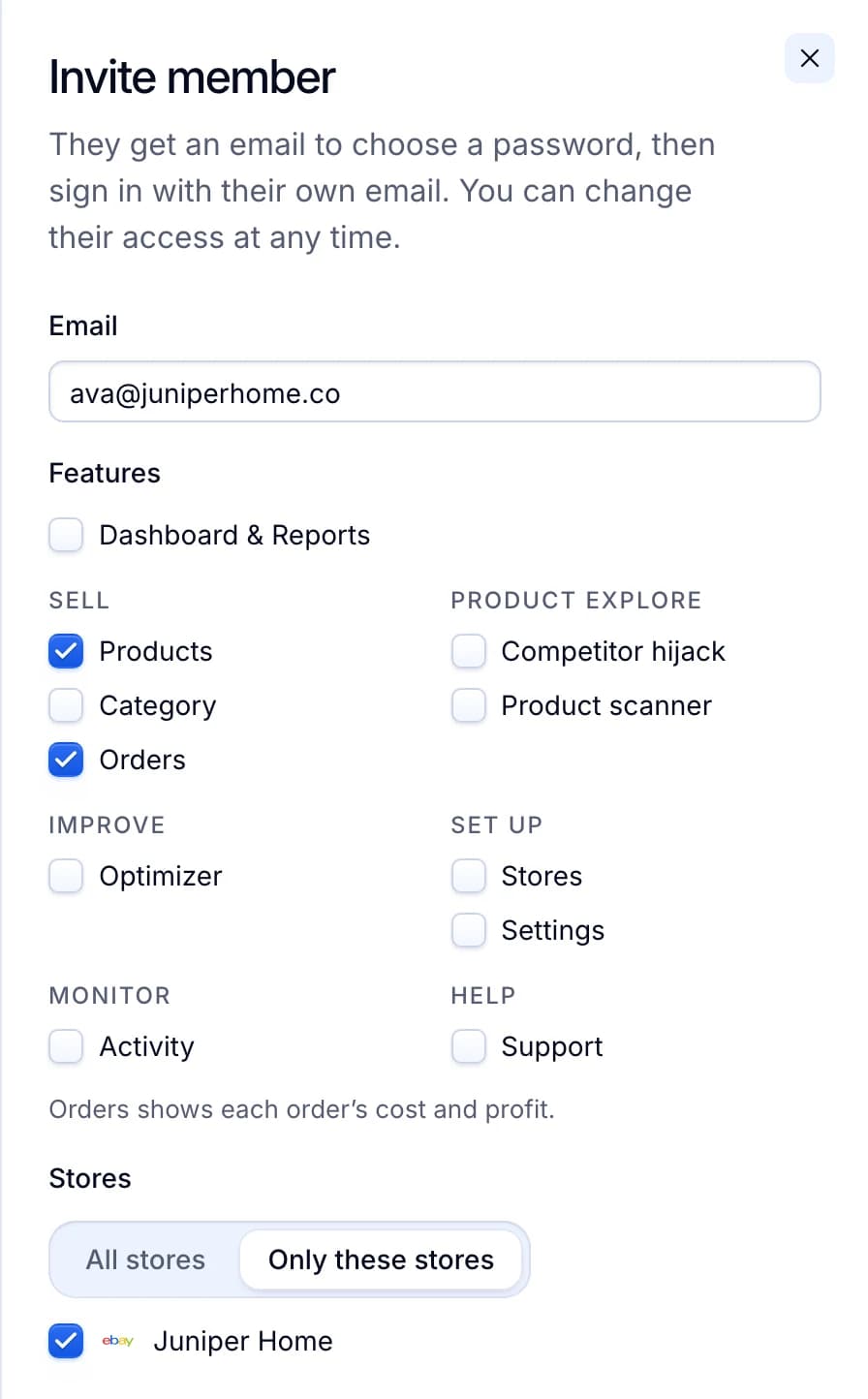
| Step 5 | Helpers get their own Productivo login, with only the pages and stores you pick. Up to 10 members. They never need your eBay password. |
| Step 6 | It connects through eBay’s sign-in page. If eBay stops accepting the connection, for example after you revoke it, the store is marked disconnected and you are told. Nothing runs for it until you reconnect. |
| Step 7 | The Stores page shows how much of each store’s eBay monthly limit is left. You are told once when less than a fifth is left. When it runs out, new listings wait in the queue. |
| Step 8 | Each eBay account connects to one Productivo account only. A plan holds from 1 store on Starter to 5 on Scale. |
Pick what each helper may do
Like eBay’s Team access, each helper gets their own login. You tick the pages and the stores they may use, and change it at any time.
Written by the Productivo team. Source review: eBay’s creating an eBay account, registering as a seller, eBay Export’s seller registration guide, account type page and account protection page, start selling, checking account for payouts, getting paid, how fees are charged, selling fees, keeping your account secure, Team access, User Agreement, eBay Developers’ Sign in with eBay, selling limits, transaction holds, multiple accounts policy and duplicate listings policy, checked 24 October 2026. The four sales and the first sale’s days in step 7 are made up.