
How-to guide · Beginner · 8 steps · Updated 24 October 2026
eBay tracking number: how to add, edit and fix it as a seller
To add an eBay tracking number, open the order in Seller Hub and choose Add tracking number. Enter the number and the carrier, then select Save. Use a carrier that eBay is integrated with, and upload the number within your handling time. Then it protects you if a buyer says the item never came, and your money arrives sooner.
Looking for one thing? Fix a wrong number, upload many at once or see which carriers count.
Steps 1 to 8 work without Productivo. The last part shows how Productivo, the app behind this guide, can help.
Before you start
In shortYou need a shipped order, its tracking number from the carrier, and Seller Hub or the eBay app.
Who it is for
LevelBeginner
WholesaleEasy
Every step works as written. Step 4 saves time when you ship many orders a day.
ResellingEasy
Every step works as written. Step 8 matters most for one-off items of $750 or more.
HandmadeEasy
Every step works as written. Count your making time in step 2’s handling time.
Wholesale dropshippingMedium
Steps 1 and 2 need care: agree on an integrated carrier with your supplier, and get each number within your handling time.
Buying the item from another shop after the sale, for delivery to your buyer, is not allowed on eBay. The eBay dropshipping policy guide explains what is.
- You finish with
- Tracking on every order, from a carrier eBay reads, uploaded in time, and a quick way to fix a wrong number.
- You need
- An eBay order you have shipped, or are about to ship
- The tracking number from the carrier’s receipt or label
- Seller Hub on a computer, or the eBay app
- The 8 steps
Add an eBay tracking number, step by step
Steps 1 and 2 come before the sale. Steps 3 to 5 are three ways to upload the eBay tracking number. Steps 6 to 8 cover what happens after.
One order, and where its tracking counts
Blue rings mark your deadlines.
- The buyer paysYour handling time starts.Day 0
- The carrier’s first scanThe proof that the parcel left. A printed label is not a scan.Within your handling time
- Tracking on the orderThe number and the carrier’s name, uploaded to eBay.Within handling time, and before the estimated delivery date
- DeliveredThe scan shows the buyer’s ZIP code. Orders of $750 or more also need a signature.By the estimated delivery date
- Money releasedA new private seller waits 2 days with an eBay label, 7 with another tracked label.After delivery
If the buyer says it never came: they can report it until 30 days after the estimated date. You answer within 3 business days, with tracking, an update or a refund.
A drawing of eBay’s rules on eBay.com, not eBay’s screen. Steps 2, 3 and 8 give the details.
Step 1 of 8: Ship with a carrier eBay is integrated with
In shortPick a tracked service from a carrier on eBay’s list, so eBay can read every scan by itself.
An integrated carrier is one whose scans eBay reads by itself. eBay sees when the carrier takes the parcel, and when it delivers it. eBay’s shipping options page says you need one of these carriers to be protected from “Item not received” claims.
Carriers eBay is integrated with
eBay.com’s list, grouped by us. eBay reads these carriers’ scans by itself.Group Carriers The big four United States Postal Service (USPS), UPS, FedEx, DHL Other parcel carriers eBay Standard Delivery, Asendia USA, Amazon Logistics - USA, OnTrac, ePost Global, OSM, IMb (USPS Intelligent Mail Barcode), Landmark, Speedex Courier, Parcel Pool, Boxc, EFS Fulfillment Service US only Veho, Spee-Dee, and Dashlink (a same-day courier) Freight 59 freight carriers for large items, such as Estes, R+L Carriers and XPO LTL. You buy their labels from the carrier, not on eBay. eBay.com lists 19 parcel carriers and 59 freight carriers. Most sellers only need the first row. Any carrier you use must offer tracking, or there is no number to upload.
Choose the carrier before you sell, and use the same one for the tracking upload. For very light cards, coins or stamps, eBay’s standard envelope also counts. It has limited, integrated tracking for envelopes up to 3 oz.
Result: A tracked service from a carrier on eBay’s list, chosen before the sale.
Step 2 of 8: Set a handling time you can meet
In shortChoose the shortest handling time you can always meet. The carrier’s first scan must fall inside it.
Handling time is the number of days from the buyer’s payment until the carrier scans your parcel. eBay’s Seller Center gives an example. With 1-day handling, the parcel must be packed and scanned by 11:59:59 p.m. the next day, in your time zone. You count business days only, or add weekends if you ship then.
The scan must come from the carrier. A label you printed is not a scan. eBay’s tracking page asks for an acceptance scan, the carrier’s first scan when it takes the parcel. Using a free USPS pickup? Book it at least a day ahead. eBay’s drop-off page suggests adding a day to your handling time for that.
To change it, open Seller Hub › Listings and select the listings. Choose Edit fields, then Handling time. Pick Change to and the days, then select Save and Close. The delivery date buyers see includes your handling time.
When eBay counts a shipment as late
With tracking from an integrated carrier, eBay reads two dates. A shipment is late only when it misses both.First carrier scan Delivered by the latest date Delivered after it Within handling time Not late Not late After handling time Not late Late Without tracking or a carrier scan, eBay asks the buyer at feedback time if the item came on time. A “no” counts as late. A late shipment that your tracking disproves can be appealed. eBay also removes late shipments caused by severe weather or carrier disruptions.
eBay’s seller standards say a high late shipment rate alone will not make you Below Standard. Top Rated is stricter. It allows no more than 5 late shipments, or 3%. It also needs tracking uploaded within handling time, and confirmed by the carrier, on at least 95% of orders.
Pick a handling time you meet on your busiest day, not your quietest.
Result: A handling time on every listing that you can meet even on a busy day.
Step 3 of 8: Add the tracking number to the order
In shortIn Seller Hub, tick the order, choose Add tracking number, enter the number and carrier, and save.
Ship the parcel first, and keep the carrier’s receipt or label. Then open eBay Seller Hub on a computer, as eBay’s tracking help page describes:
- Open Orders, then Paid and shipped, and find the order.
- Tick the box next to the order.
- Open the Shipped menu and choose Add tracking number.
- Enter the tracking number, pick the carrier and select Save.
eBay emails the tracking details to the buyer, and the order shows as shipped. It works the same for guest buyers. One order can hold up to 6 tracking numbers, so an order sent in several boxes gets one per box.
In My eBay or the eBay app
In My eBay, open Orders. From More actions, choose Add tracking number. Enter the number and the carrier, then select Submit.
In the eBay app, open the item’s page and select Add tracking number. There you can scan the tracking code on the label.
Copy the number from the receipt, and check the carrier matches it. Upload it the same day you ship.
Result: The order marked shipped, with a tracking number and carrier your buyer can follow.
Step 4 of 8: Add many tracking numbers with one file
In shortDownload eBay’s order tracking template in Seller Hub Reports, add carriers and numbers, and upload it.
Shipping many orders a day? Seller Hub’s Reports tab takes every eBay tracking number in one file:
- Open Reports, then Upload on the left.
- Select Get template. Choose Orders as the source and Add order tracking and feedback as the type.
- Pick a date range from 1 to 90 days and select Download.
- Fill in one row per shipped order, as in the table below. Save it as .csv or .xlsx.
- Back in Upload, select Upload template, choose the file and template type, and select Upload.
The columns to fill in
From eBay’s Add order tracking template. Item Title and Custom label only help you find the right row.Column What to write Item Number, Transaction ID eBay’s numbers for the sale. Every row that has them gets a tracking number and a carrier. Order Number eBay’s number for an order with several items. Shipping Carrier Used The carrier’s name, such as UPS. Never the service: UPS works, UPSNextDay does not. Tracking Number The number from the label or receipt. It needs a carrier in the same row. Shipping Status Optional. A row with tracking counts as shipped. Write Shipped only for an order sent without tracking. FeedbackType, Feedback Optional. Positive and a comment of up to 80 characters leave feedback for the buyer. Leave both empty unless you mean it. eBay says an upload usually takes less than 15 minutes. Then you see Your upload is complete, with a report of what happened to each row. Open that report, and fix every failed row before your handling time ends.
Reports can also Schedule an Awaiting shipment report hourly or daily, so the next list of orders is ready. The eBay bulk listing guide covers the same tab for listings.
Result: One file that marks a day’s orders shipped, and a results report with no failed rows.
Step 5 of 8: Let eBay labels and SpeedPAK add it for you
In shortBuy the label on eBay, or ship SpeedPAK from abroad, and the tracking number is uploaded for you.
With a label bought through eBay Labels, there is nothing to copy. You choose Print shipping label on the order, enter the weight and size, and pick USPS, UPS or FedEx. eBay uploads the tracking number by itself. No printer? A QR code arrives by email, and a participating carrier prints the label when you drop off.
eBay labels also add a protection. If the parcel is still on its way when the buyer reports it missing, you do not refund when it arrives within 21 calendar days. That is from eBay’s seller protections. Orders over $5,000, and Authenticity Guarantee orders, are left out.
- eBay standard envelopeFor trading cards, coins, stamps and five other small-item categories, up to 3 oz. Limited, integrated tracking comes with the label at no extra cost. It needs no acceptance scan. A lost single-item envelope is covered up to $20 through a shipping protection claim.
- eBay International ShippingYou send the parcel to eBay’s US hub, with tracking and the reference number on the label. eBay adds the international tracking once the hub has it. From then on, you are protected from item not received claims.
SpeedPAK tracking numbers
eBay SpeedPAK is a shipping service for parcels that start outside the US, for example in China, the UAE or Singapore. Orange Connex runs it with eBay, and you book it on eBay’s CPaSS platform. Its tracking numbers start with EX, EM or EE.
Upload that number, ship within your handling time, and keep the item in your country of registration. Then eBay removes item not received defects and does not count late shipments.
Where you can, buy the label on eBay, so there is no number to get wrong. The eBay shipping labels guide compares label prices and services.
Result: Labels bought on eBay where they fit, so tracking uploads by itself.
Step 6 of 8: Fix a wrong or missing tracking number
In shortEdit the number and carrier where you added them, then check the carrier’s site shows the same parcel.
You fix a wrong eBay tracking number where you added it. In Seller Hub, open Paid and shipped, tick the order and choose Shipped › Add tracking number. Change or delete the number or the carrier, then select Save. In My eBay, use More actions › Add tracking number and Submit.
Tracking on eBay looks different from the carrier’s site? eBay’s help page lists three checks:
- The same numberThe number on eBay must match the one on the carrier’s website, digit for digit.
- The right carrierIf the number is right, check the carrier name and details.
- Uploaded in timeCompare the order date with the upload date. Most carriers only send tracking to eBay for a limited time, so a very late upload may never show scans.
Still no scans? The carrier may not have the parcel yet. After a USPS pickup, tracking should show later the same day. Fix a wrong number fast: eBay may hold your money longer when tracking details do not match.
Shipped without tracking
If the order does not show as shipped, open Awaiting shipment in Seller Hub. Tick the order and choose Mark as shipped. The buyer then sees only the expected delivery date, and you have no proof of delivery.
A buyer says it never came
If a buyer opens an item not received request and you have not uploaded tracking, you have 3 business days to upload it and respond. If the tracking shows delivery to the buyer’s ZIP code, the request closes by itself within 24 hours.
Fix a wrong number the same day you notice it.
Result: A tracking number on eBay that matches the carrier’s own page.
Step 7 of 8: Check what your buyer sees
In shortYour buyer sees the carrier, the parcel’s place and its status in Purchase history.
Once you upload the eBay tracking number, the buyer gets an email. In Purchase history, the tracking number shows as a link next to the item. eBay’s buyer help page says they also see the carrier and where the parcel is now. Without tracking, they see only the expected delivery date.
A guest buyer uses the email whose subject starts with Order Confirmed. View order details, then Show shipping details, shows a status bar with the carrier, the number and the parcel’s place.
eBay tells buyers who see no number to contact the seller and ask for it. Upload tracking before the buyer has to ask.
Result: The view your buyer has: carrier, number, status and the expected date.
Step 8 of 8: Keep the proof for cases and payouts
In shortKeep tracking from an integrated carrier that shows delivery to the buyer’s ZIP, with signature from $750.
When a buyer reports an item has not arrived, eBay looks for proof, starting with your eBay tracking number. The Money Back Guarantee asks for all of these:
- An integrated carrierA tracking number from a carrier on eBay’s list, uploaded to eBay, with a scan before the latest estimated delivery date.
- DeliveredA status of “delivered” or “attempted delivery”, with its date.
- The right addressThe ZIP code on the tracking matches the one on the order.
- A signatureSignature confirmation on orders of $750 or more.
A buyer can report a missing item from the estimated delivery date until 30 days after it. You must answer within 3 business days, with tracking, an update or a refund. Without valid tracking, eBay may step in after those 3 days.
eBay’s seller protections sum it up. Ship within handling time, and upload integrated tracking before the estimated delivery date. If it shows delivery, you do not have to refund the buyer.
Add signature confirmation to every order of $750 or more. Tracking proves delivery, not the item’s value. For loss or damage, buy insurance: ShipCover with a USPS, UPS or FedEx label on eBay, or the carrier’s own. You can build its cost into your shipping price, but not charge it as a separate fee.
Tracking and your payout
eBay uses tracking to decide when it releases a new seller’s money. Its transaction holds page gives these typical times:
When a new seller’s money is released
eBay’s typical times while you build a track record. “Delivery” means the carrier confirmed it. Once a private seller qualifies, funds usually arrive within 2 days of payment.Shipped with New private seller New business seller eBay label 2 days after delivery 24 hours after delivery Other label with tracking 7 days after delivery 15 days after the buyer pays No tracking 31 days after the buyer pays 15 days after the buyer pays You can also spend money on hold on eBay labels. A return has its own tracking rules; see eBay returns for sellers.
Result: Proof that holds in a case, and payouts that do not wait 31 days.
Common eBay tracking mistakes and what they cost
In shortMost eBay tracking number mistakes cost you protection or time. A step prevents each one.
Mistake, cost and fix
| Mistake | What it costs | Fix |
|---|---|---|
| A typo, or the wrong carrier | The buyer and eBay see no scans, and your money can stay on hold longer. | Step 6 |
| A label printed, but no carrier scan | eBay sees no shipment. If it also arrives late, it counts as a late shipment. | Step 2 |
| Uploaded long after shipping | The carrier may no longer send scans to eBay. It also counts against Top Rated’s 95% rule. | Step 3 |
| Shipped without tracking | No item not received protection. A new private seller waits 31 days after payment for the money. | Step 1 |
| A carrier that is not on eBay’s list | A number, but no item not received protection. | Step 1 |
| A handling time you cannot meet | Late shipments. Top Rated allows no more than 5, or 3% of orders. | Step 2 |
| No signature on an order of $750 or more | Delivery is not proven, so you can lose an item not received case. | Step 8 |
| A number from another parcel | It shows another ZIP code, so it proves nothing. The buyer gets a refund. | Step 6 |
| No answer within 3 business days | eBay may step in and decide. A case closed against you counts in your seller level. | Step 8 |
| Feedback columns filled in a bulk file | Every row with them leaves feedback for its buyer. | Step 4 |
Not sure what a parcel will cost to send? The eBay shipping calculator shows label prices by weight before you list.
Common questions about eBay tracking numbers
How do I add a tracking number on eBay?
In Seller Hub, open Orders, tick the order and choose Add tracking number. Enter the number and the carrier, then select Save. Step 3 also covers My eBay and the app.
Can I change a tracking number on eBay after I upload it?
Yes. Open the order where you added it, choose Add tracking number again, and edit or delete the number or carrier. Step 6 shows the checks to run after.
Which carriers does eBay accept for tracking?
For seller protection, the carriers on eBay’s integrated list. On eBay.com that means USPS, UPS, FedEx, DHL and 15 other parcel carriers, plus 59 freight carriers. Step 1 lists them.
How long do I have to upload tracking on eBay?
Upload it within your handling time. That is what Top Rated counts. For seller protection, it must be on the order before the estimated delivery date. If a buyer reports the item missing first, you have 3 business days to upload tracking and respond.
Where do I find an eBay tracking number?
A buyer finds it in Purchase history, as a link next to the item. A seller finds it on the order in Seller Hub’s Paid and shipped list. The eBay order number is not a tracking number. Only the carrier’s number shows where the parcel is.
Why is my eBay tracking not updating?
Usually the carrier has not scanned the parcel yet, or the number or carrier is wrong. Check the number against the carrier’s site first. A number uploaded long after shipping may never show scans. Step 6 lists the checks.
What happens if there is no tracking on an eBay order?
You lose protection, and a new seller waits longer for the money. The buyer sees only the expected date. eBay asks the buyer whether it came on time. A new private seller’s funds typically wait 31 days after payment.
Does USPS tracking work on eBay?
Yes. The US Postal Service is an integrated carrier. A USPS label bought on eBay uploads its tracking by itself; one bought at the post office needs the number added, as in step 3.
What is an eBay SpeedPAK tracking number?
The number of a SpeedPAK parcel, starting with EX, EM or EE. SpeedPAK is eBay’s shipping service for parcels sent from outside the US. The seller uploads that number to the order.
How does a buyer track an eBay order?
In Purchase history, from the tracking link next to the item. A guest buyer opens the Order Confirmed email, then View order details. Step 7 shows what they see.
How Productivo handles eBay tracking numbers
In shortIt brings orders from your stores into one list and follows their tracking. It does not replace eBay’s own rules.
Everything above works in eBay’s own tools. This part is about Productivo, the app behind this guide.
Where Productivo fits in the steps
| Guide step | What Productivo does |
|---|---|
| Step 2 | Orders from all your connected stores arrive every 30 minutes. Orders past their ship-by date have a filter of their own. |
| Step 3 | Orders for products you added by hand or by CSV are marked Manual product. You ship them and add tracking on eBay, and the order moves to Shipped at the next sync. |
| Step 7 | Each order’s history lists every step with its time and who did it, so you can answer “Where is my parcel?” with facts. |
| Step 8 | For Amazon orders, Productivo uploads a number from Aquiline, a tracking service, with Aquiline as the carrier. Aquiline is not on eBay’s integrated list, so those orders get no item not received protection. |
eBay’s policy does not allow buying an item from Amazon or another retailer after the sale for delivery to your buyer. The eBay dropshipping policy guide explains what is allowed.
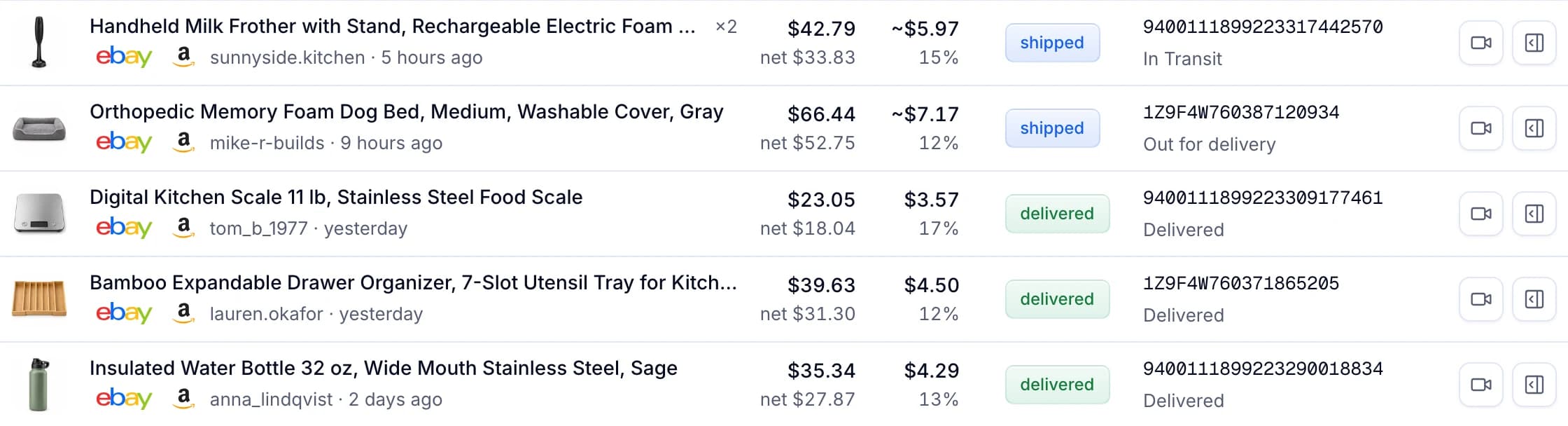
Orders and their tracking, in Productivo
Each order shows its tracking number and the latest status, until the parcel is delivered.
Written by the Productivo team. Source review: eBay’s help pages on tracking items you’ve sold, shipping options and integrated carriers, the seller standards policy, seller protections, the Money Back Guarantee, transaction holds, tracking for buyers, Seller Hub Reports, eBay International Shipping and handing off packages to carriers; eBay Seller Center’s handling time, carriers and eBay Labels and standard envelope; eBay’s file feeds guide and eBay Export’s SpeedPAK page, checked 24 October 2026.