
How-to guide · Beginner · 6 steps · Updated 24 October 2026
eBay out-of-stock option: keep sold-out listings alive
The eBay out-of-stock option keeps a fixed-price listing active when its quantity reaches 0. eBay hides it from search until you add stock, so the same listing comes back with its sales history. This guide shows where to turn it on, what it costs, how long a listing can wait at 0, and when to end it instead.
Quick answer: open Selling preferences, find Multi-quantity listings and turn on Listings stay active when you’re out of stock. Step 1 shows where.
Steps 1 to 6 work without Productivo. The last part shows how Productivo, the app behind this guide, can help.
Before you start
In shortThe eBay out-of-stock option fits any seller who sells the same item again at a fixed price.
Who it is for
LevelBeginner
WholesaleEasy
Every step works as written. Each delivery goes back into the same listing.
ResellingMedium
Step 6 needs care: the option covers every listing, so end sold one-of-a-kind items yourself.
HandmadeEasy
Every step works as written. Hide a design while you make more, then raise the quantity.
Wholesale dropshippingMedium
Step 2 needs care: your supplier’s stock decides your quantity, so check it at least once a day.
Plan to buy each sold item from another shop and have it shipped to your buyer? eBay does not allow that. Our guide to the eBay dropshipping policy explains what is allowed.
- You finish with
- The option turned on, quantities that match your stock, and a monthly check of what to restock and what to end.
- You need
- An eBay seller account with Buy It Now listings
- Your real stock count, or your supplier’s
- About 15 minutes, then a few minutes each month
How to use the eBay out-of-stock option, step by step
Steps 1 and 2 set things up. Steps 3 and 4 cover a listing at 0 and its cost. Steps 5 and 6 bring it back or end it.
Step 1 of 6: Turn on the option in Selling preferences
In shortOpen Selling preferences and switch on “Listings stay active when you’re out of stock”.
Without the option, eBay ends a fixed-price listing when its quantity runs out. The out-of-stock option keeps it active at 0 instead. It comes back when you add stock.
- Sign in to eBay and open Selling preferences.
- Scroll down to Multi-quantity listings.
- Turn on the switch beside Listings stay active when you’re out of stock.
The switch covers every listing in your account. eBay applies it to your existing and new listings until you turn it off. You cannot choose listings one by one.
Older guides send you to Site preferences. eBay’s help page now links to Selling preferences.
Result: The out-of-stock option turned on for your whole account.
Step 2 of 6: Keep the eBay quantity at what you can ship
In shortList only what you can ship today, and set the quantity to 0 the day your stock runs out.
The option acts only when the quantity on eBay reaches 0. eBay counts that quantity down as buyers buy. It cannot see your shelf, or your supplier’s.
So when your real stock runs out first, eBay keeps selling. Lower the eBay quantity the same day your stock drops. To pause a listing by hand, edit it and set the quantity to 0. eBay hides it just as if it had sold out.
eBay says the option may help protect you from a defect for running out of stock. It cannot help once a buyer has paid for an item you do not have.
When a supplier holds your stock
A wholesale supplier’s stock changes without telling eBay. Check it at least once a day. List a little less than the supplier shows, so a late update does not cost you a sale you cannot send. The eBay dropshipping policy guide covers suppliers who ship for you.
When other sales channels share your stock
A sale on your own website or another marketplace does not change the eBay quantity. Lower it by hand the same day, or use an inventory tool that updates eBay for you. With the option on, such a tool can set 0 and raise it again without ending the listing.
Result: An eBay quantity that never goes above the stock you can ship.
Step 3 of 6: Know what buyers see at quantity 0
In shortAt 0 the listing leaves search, but its page, item number and sales history stay.
At quantity 0 your listing stays active but hidden from search results. Anyone with its link can still open the page, marked Out of Stock. Here is how that compares with the option off.
At quantity 0: option off or on
What eBay does with a fixed-price listing when its quantity reaches 0.At 0 Option off Option on The listing Ends Stays active, hidden from search A buyer with the link Finds an ended listing Sees Out of Stock and cannot buy Sales history Stays on the ended listing Kept, and Best Match uses it Monthly renewal Stops Goes on: a free listing, then $0.35 To sell again Relist, for a fee or a free listing Raise the quantity Because the listing never ends, it keeps its sales history. eBay uses sales history to place a listing in Best Match, its default search order. An eBay Community mentor adds that its watchers stay too.
Listings with sizes or colors
What eBay does when a variation’s quantity reaches 0. From eBay’s developer guide, whose example sizes have no sales yet.When Option off Option on One size or color reaches 0 eBay deletes it. It stays, marked Out of Stock. The listing stays in search. Every variation reaches 0 eBay shows an error. The last one cannot go to 0. All stay. The listing leaves search until one has stock. A variation at 0 is paused, not deleted. With the option on, a size you no longer sell stays on the listing as Out of Stock. To remove it, delete the variation when you edit the listing.
Result: You know what a listing at 0 shows, and how your sizes or colors behave.
Step 4 of 6: Count what a listing at 0 costs
In shortA listing at 0 still renews each month and uses a free listing, then $0.35 each.
A Good ’Til Cancelled listing is eBay’s standard fixed-price listing. It renews once a calendar month, with an insertion fee each time. eBay’s developer guide says a listing at 0 is still charged when the month starts.
- Free listings firstEach renewal uses one of your zero insertion fee listings. Without an eBay Store, you get 250 a month.
- Then a feePast those, most categories charge $0.35 a listing each time it renews.
- A credit for a whole month at 0A listing at 0 for the entire monthly billing period may get that month’s insertion fee back. Listing upgrade fees too.
- Your selling limitA listing at 0 is still active, and active listings count toward your monthly selling limit. At the limit, Good ’Til Cancelled listings stop renewing, so listings at 0 you will not restock take room from the ones that sell.
Made-up example: what 40 listings at 0 cost
A made-up store with 300 Good ’Til Cancelled listings and no eBay Store. 40 of them sat at quantity 0 when they renewed this month.This month Listings that renew Past the free 250 At $0.35 each Keep the 40 at 0 300 50 $17.50 End the 40 first 260 10 $3.50 Keeping the 40 listings costs at most $14.00 more this month: 40 × $0.35. Any of them at 0 for the whole month may get its fee back. Under 250 listings in total, keeping them costs nothing.
Weigh $0.35 a month against the listing’s sales history. Ending is not free either. A relist later costs an insertion fee or a free listing, like a new one. An eBay Store subscription gives you more free listings each month.
Result: What your listings at 0 cost each month, worked out.
Step 5 of 6: Restock the same listing, one or many
In shortRaise the quantity on the listing you already have, and never make a second listing for the same item.
When stock arrives, edit the listing and enter the new quantity. It reappears in search once the quantity is above 0. eBay’s help page asks you to add new stock to the existing listing, because its sales history counts in Best Match.
Do not list the item again while the old listing waits at 0. The old one is still active. eBay’s duplicate listings policy allows one fixed-price listing of an identical item at a time.
Restock many listings at once
- In Seller Hub, open Active listings. Listings at 0 are still active.
- Tick the Edit box beside each listing you restock, or tick Select all.
- Choose Edit, then change the quantities.
This Bulk Listing Tool handles up to 2,000 listings. For more, Seller Hub Reports takes a file of changes. The eBay bulk listing guide walks through both.
Result: Restocked listings back in search, with their sales history and no second listing.
Step 6 of 6: End the listings that will not come back
In shortCheck your listings at 0 each month, and end the ones you cannot restock within 90 days.
eBay’s help page and its developer guide give two different limits for a listing at 0. Plan on 90 days, and decide before then.
A listing’s time at 0
Raise the quantity at any point, and the same listing is back in search.
- Day 0The last item sells, or you set 0. The listing stays active but leaves search.
- Each billing montheBay charges the renewal when the month starts: a free listing, then $0.35. A whole month at 0 may earn it back.
- 3 billing monthseBay’s developer guide says eBay ends the listing here. Decide before this point.
- 180 dayseBay’s help page says eBay ends the listing here.
A drawing of eBay’s rules, not eBay’s screen.
Find your listings at 0
- In Seller Hub, open Reports, then Download on the left.
- Select Download report and choose Listings as the source.
- Pick the active listings report. The window shows its columns before you download.
- Sort the file by quantity. The rows at 0 are the listings to check.
Keep it at 0 or end it?
Go through your listings at 0 once a month.The listing at 0 What to do Stock is on the way, or comes back regularly Keep it at 0. Raise the quantity when the stock arrives. It sold well and you are looking for more Keep it at 0 for now. Its sales history is the reason to wait. The supplier stopped making it End it. A different model needs its own listing. A one-of-a-kind item that sold End it. The option keeps sold single items at 0 too. You are away for a few weeks Use Time Away instead of setting each quantity to 0. No stock in sight for 3 months or more End it, or eBay ends it for you. You can end a fixed-price listing at any time. To end several, tick them in Seller Hub’s Active listings and choose End from Actions. Listing one again later costs an insertion fee or a free listing.
Sold one-of-a-kind items stay too
The option covers listings of a single item as well. Sellers on eBay’s Community report that a sold single item stays active at 0 instead of ending. It renews like any other listing, so end those yourself.
Going away is a different job
For a break, use Time Away. With Pause item sales, your fixed-price listings leave search for up to 30 days. With Allow item sales, buyers can still buy for up to 15 days, with later delivery dates. You do not touch a single quantity, and listing fees go on as usual.
Result: A monthly list of your listings at 0: restock, keep waiting, or end.
eBay out-of-stock mistakes and what they cost
In shortMost of these cost a defect, a fee or a listing’s sales history, and each takes a minute to avoid.
- Turning the option on after the first sell-outThat listing has already ended. A relist costs an insertion fee or a free listing, and can take a few hours to appear.
- An eBay quantity above your real stockEach order you cancel is a transaction defect, and the per-order fee is not credited.
- Leaving Relist item after cancellation tickedeBay puts the item you just ran out of back on sale. The next buyer gets the same cancellation.
- Relisting a listing with sizes or colorseBay relists variations at 0 with their original quantity. Fix every quantity first, or you sell stock you do not have.
- A second listing for restocked stockIt can break the duplicate listings policy, and the old listing keeps the sales history.
- Forgetting listings at 0Each one renews every month, uses a free listing or $0.35, and counts toward your selling limit.
- Setting 0 to remove a sizeWith the option on, it stays on the listing as Out of Stock. Delete the variation instead.
Common questions about the eBay out-of-stock option
What does out of stock mean on eBay?
The listing’s quantity is 0, so nobody can buy it right now. With the out-of-stock option on, the listing stays active but hidden from search. Its page shows an Out of Stock label until the seller adds stock.
Where is the out-of-stock option on eBay?
In Selling preferences, under Multi-quantity listings. Turn on Listings stay active when you’re out of stock. It covers every listing in your account.
How long can an eBay listing stay out of stock?
Up to 180 days in a row, says eBay’s help page. eBay’s developer guide still says three billing months. Decide within 90 days whether to restock or end it.
How do I find my out-of-stock listings on eBay?
Download an active listings report in Seller Hub Reports and sort it by quantity. Step 6 shows the path.
Do I pay eBay fees on out-of-stock listings?
Yes, the monthly renewal still counts. It uses one of your free listings, then costs $0.35 in most categories. A listing at 0 for the whole billing month may get that fee back. Step 4 works through an example.
Does the out-of-stock option hurt my search ranking?
eBay names no penalty, and says the sales history you keep helps. While the listing is at 0 it is not in search at all, so it gets no views or sales. When it comes back, it still has its sales history, which eBay uses in Best Match.
Does the out-of-stock option work for single-quantity listings?
Yes, sellers report it does. eBay’s help page speaks of bulk listings, but its developer guide applies the option to all existing listings. Sellers on eBay’s Community see sold single items stay active at 0. That is why a sold item can still show as active. End those yourself.
Does the out-of-stock option work for auctions?
No. eBay’s developer guide describes it for Good ’Til Cancelled listings, which are fixed price.
How Productivo handles listings at 0
In shortFor products it reads from Amazon, Productivo sets the eBay quantity to 0 when Amazon runs out, and back when it restocks.
Every step above works with eBay’s own tools. This part is about Productivo, the app behind this guide.
Where Productivo fits in the steps
| Guide step | What Productivo does |
|---|---|
| Step 1 | Before it lists for a store, Productivo checks that the option is on. With it off, it does not publish there, because a listing at 0 would end. If the option is turned off later, it leaves those listings on sale and alerts you once a day. |
| Step 2 | Every Amazon product is read twice a day. When Amazon shows fewer than your listing quantity, 1 by default, the eBay quantity goes to 0. So does a product whose Amazon page fails 5 reads in a row. |
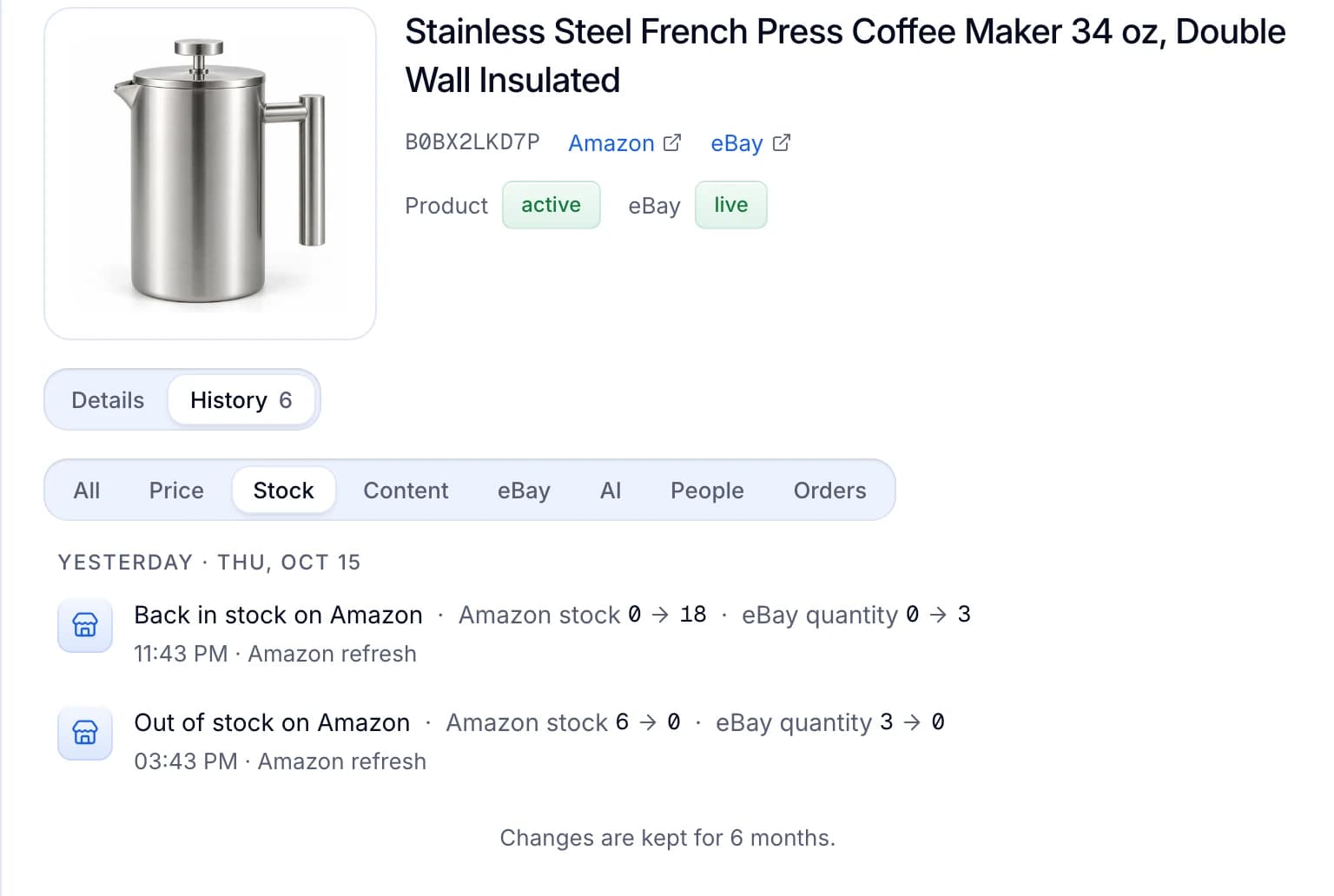
| Step 3 | Each eBay quantity change is in the product’s History tab for 6 months, with the before and after. |
| Step 5 | When Amazon has enough again, the quantity goes back up on the same listing, with no new listing. |
A sell-out and a restock, in Productivo
The product’s History tab, filtered to Stock. Amazon ran out and the eBay quantity went from 3 to 0. Eight hours later Amazon had stock again, and the same listing went back to 3.
Stock monitoring is in every plan. It follows Amazon.com only. Products you add by hand or by CSV keep the stock you give them, so you set their quantity on eBay yourself. It does not read a wholesale supplier’s stock or share one count with other sales channels.
One rule applies whatever tool you use. eBay’s dropshipping policy does not allow buying an item from Amazon, or any other retailer, after the sale to ship to your buyer. The eBay dropshipping policy guide explains what is allowed.
Written by the Productivo team. Source review: eBay’s help on multi-quantity listings and the out-of-stock option, Selling preferences, selling fees, zero insertion fee listings, fee credits, selling limits, the seller standards policy, bulk listing tools, ending a listing, relisting items, the duplicate listings policy and Time Away, eBay’s Seller Hub Reports page, and eBay’s developer guide on out-of-stock control, turning it on, how it works and fees at zero quantity, checked 24 October 2026. Watchers: an eBay Community mentor’s answer. Sold single items: sellers’ reports on the eBay Community. The store in step 4 is made up.