
How-to guide · Beginner · 7 steps · Updated 24 October 2026
eBay VeRO violation: what happens and what to do next
An eBay VeRO violation means a rights owner, such as a brand, reported your listing and eBay removed it. One report costs you the listing. More reports can bring selling restrictions or suspension. This guide reads the removal message with you. Then it shows how to ask for a retraction, appeal, fix the listing and avoid the next report.
Just got the message? Start with step 1. Worried about your account? See what more reports can cost.
Steps 1 to 7 work without Productivo. The last part shows how Productivo, the app behind this guide, can help.
Before you start
In shortThese steps fit any listing removed through eBay.com’s VeRO program.
Who it is for
LevelBeginner
WholesaleEasy
Every step works as written. Your supplier invoices are your proof in steps 4 and 5.
ResellingEasy
Every step works as written. Used branded items need your own photos and honest condition notes.
HandmadeMedium
Steps 2 and 7 need care: reports often concern a character, logo or design printed on your items.
Wholesale dropshippingMedium
Steps 3 and 6 need care: supplier photos and text are a common cause, so ask for written permission.
- You finish with
- Your removed listing sorted out, a retraction request or appeal sent where it fits, and a brand check before every new item.
- You need
- The eBay account the listing was on
- eBay’s removal message, in My eBay Messages
- Your invoice or receipt for the item, if you have one
- About an hour
What happens after an eBay VeRO violation
In shortOne report removes the listing, and more reports can bring selling restrictions, then suspension.
VeRO is eBay’s Verified Rights Owner program. Owners of brands, copyrights, designs and patents use it to report listings that they say break their rights. eBay checks that the report is complete, then may remove the listing. Here is what can follow, from eBay’s own pages.
What a VeRO report can cost
| When | What eBay may do |
|---|---|
| The first report | eBay removes the listing, without asking you first, even if the item is genuine. It stays a violation even if you end or change the listing. A fee refund depends on the policy and your history. |
| More reports | Escalating consequences, from selling restrictions to permanent suspension. eBay names no number of reports and no length of time. |
| While restricted or suspended | You may not be able to sell, create or revise listings. eBay may hold payouts, end listings early and keep listing fees. |
| Relisting a removed item unchanged | eBay says this can lead to suspension and, in some cases, legal action. |
7 steps after a VeRO removal
Steps 1 to 3 limit the damage. Steps 4 and 5 challenge the report, if it was wrong. Steps 6 and 7 fix the listing and prevent the next eBay VeRO violation.
Step 1 of 7: Read the removal message in My eBay Messages
In shortFind eBay’s message in My eBay Messages and note who reported the listing and why.
After an eBay VeRO violation, eBay sends the reason to your registered email address and to Messages in My eBay. No email? Check your spam folder. eBay does not warn you before it removes the listing. It says the law requires it to act as quickly as possible.
What the removal message tells you
Seller Center lists what eBay’s notice explains. The right column is what each part means for you.Part of the message What it means for you Why your listing was removed Tells you which right the report is about: a trademark, a copyright, a design or a fake item. What part may have infringed Points at the cause: the item itself, or only the title, photos, logos or text. How to revise it, if possible Says whether a fixed listing may go up again. The rights owner’s name and contact The only party that can withdraw the report. You write to them in step 4. Check that the message is real. A real removal message also sits in My eBay Messages. eBay’s help on fake notices says: no copy in Messages means the email was not from eBay. Never use a link from an email you cannot find there.
Write down the item number, the rights owner and the reason. The contact may be a law firm or agency. VeRO lets rights owners report through authorized representatives. Seller Help also lists policy issues on your account and how to resolve them.
Result: The item number, the rights owner’s name and contact, and the reason, written down.
Step 2 of 7: Find out whether the item or the listing caused it
In shortMatch the reason to one row of the table: the item itself, or only its words, photos or logos.
eBay’s intellectual property policy covers two kinds of problem. The item itself can break a right, like a fake handbag. Or only the listing does, like copied photos on a genuine handbag.
Item problem or listing problem?
Common causes from eBay’s intellectual property policy and Seller Center, and whether the item can go up again.What was reported Sell it again? What to do A fake, replica or copy of a branded item No. eBay says an item reported as counterfeit can’t be relisted. Stop selling it. A brand name on an item that brand did not make Yes, once fixed. Put “for”, “fits” or “compatible with” before the brand, or leave it out. Several brands in one title Yes, once fixed. Keep one brand in the title. List the others in the description. A plain-looking word that is a trademark, like a style name Yes, once fixed. Remove the word. The message names whose mark it is. Photos or text copied from a website or catalog Yes, once fixed. Use your own photos and words, or eBay’s catalog. Another brand’s logo in photos or text Yes, once fixed. Remove the logo everywhere in the listing. A famous person’s name or photo, without consent Yes, if only the listing uses it. Remove it. An item printed with it can’t be fixed. A genuine item made for one country, offered abroad Yes, once fixed. Exclude the countries where it may not be sold in your shipping policy. A maker’s warranty that does not cover resale Yes, once fixed. Say who gives the warranty, or that there is none. An item that copies a protected design or patent No. Stop selling it. eBay says patent questions are complex, so ask an expert. If the item was reported as counterfeit, never list it again. eBay’s Seller Center says another attempt can bring selling restrictions or suspension.
A genuine item is no shield. eBay’s help says it removes a listing when the rights owner asks, even if the item is genuine.
Result: Your case sorted: an item problem, so you stop selling it, or a listing problem, so you fix it.
Step 3 of 7: Hold off relisting and check your other listings
In shortHold the relist, and first fix every other listing with the same brand, photos or text.
eBay’s help says not to relist before you ask eBay exactly why the listing was removed, even if you think it was a mistake. Relisting can lead to suspension, and in some cases legal action. For some removed listings, the Relist option is gone. Questions about the reason go to eBay through Contact us on that help page.
Ending the listing does not clear the report either. The violation counts from the moment of the report. Ended listings stay visible on eBay, so a rights owner can still report them.
Then check the rest of your store. Go through Active listings in Seller Hub’s Listings tab. Look for the same brand in titles and in the Brand item specific, the same photos and the same supplier text. Fix or end those listings before the rights owner finds them.
Result: No relisting yet, and a list of your other listings that share the brand, photos or text.
Step 4 of 7: Ask the rights owner for a retraction
In shortWrite to the contact in eBay’s message with your user ID, item numbers and photos, and ask them to retract.
Only the rights owner can withdraw a report. If they agree it was a mistake, they email eBay to retract it. You cannot do it for them.
First, look for their VeRO participant profile. Many rights owners explain there what they protect and what sellers may do. It may answer your question.
Then write to the contact in eBay’s message. Keep it short, polite and factual. This outline covers what Seller Center asks you to include, and what the rights owner needs to decide:
- Subject“Retraction request: eBay item” and the item number.
- Who you areYour eBay user ID and the email address on your eBay account.
- Which listingsEvery removed item number.
- What you soldThe item, where you bought it, and photos of the item itself. Offer the invoice.
- What you changedFor example, photos or words you removed, or other listings you ended.
- What you askIf they agree it was a mistake, that they email eBay to retract the report.
Do not relist while you wait for an answer. eBay’s pages set no deadline for a reply. No answer? Fix the listing in step 6. If you hold proof of permission, the appeal in the next step does not depend on them.
Result: A short, polite retraction request sent, with your item numbers and photos.
Step 5 of 7: Appeal to eBay if you have proof
In shortAppeal only with proof: written permission from the rights owner, or a US copyright counter notice.
eBay’s Seller Center names the ways to challenge a removal. Which one fits depends on the proof you hold.
Retraction, appeal or counter notice
The routes eBay’s Seller Center names, by the proof you hold.Your situation What to do, and who decides The rights owner made a mistake Send a retraction request to the rights owner (step 4). Only they decide. If they agree, they email eBay. You have permission to use the brand, photos or text File an appeal with the rights owner’s permission, or send the documents to vero@ebay.com. eBay decides. A US copyright report you believe is wrong Send a DMCA counter notice to copyright@ebay.com. eBay restores the listing after 10 business days, unless the rights owner tells eBay it went to court. You have no proof Send nothing. The removal stands. Revise the listing through the Resolution Hub instead (step 6). eBay judges an appeal on the listing as it was when reported. An appeal needs proof, not a promise to do better. If you revised the listing since, eBay reviews the new version as a separate case.
Result: An appeal filed with proof, or a clear decision to fix the listing instead.
Step 6 of 7: Fix the listing, or let the item go
In shortRewrite the listing in your own words and photos, and drop any item reported as a fake.
A listing problem can usually be fixed. Seller Center says you can revise the listing through the Resolution Hub. Remove whatever caused the report, then relist.
A made-up listing, before and after
A made-up example: a clear magnetic phone case, made by a small case maker for the iPhone 16. Struck words come out, marked words go in.
- Title
- Reported: iPhone 16 Case Clear Magnetic
Apple MagSafe - Fixed: Clear Magnetic Phone Case for iPhone 16, Slim Shockproof Cover
- Brand item specific
- Reported:
Apple - Fixed: The case maker’s brand, or Unbranded
- Photos
- Reported: Product photos saved from a supplier’s website
- Fixed: Your own photos of the case you ship
- Description
- Reported: The supplier’s text, with an
Apple logo - Fixed: Your own words, no logos, models it fits listed once
A drawing, not eBay’s screen. Not a real listing or notice.
eBay’s rule for brand names depends on what your item fits:
- Made by the brandUse the brand name. Do not add other brands to compare or to get more views.
- Made for one brandPut “compatible with”, “fits” or “for” before the brand, like a case for one phone.
- Fits a few brandsName one brand in the title, with “for” before it. List the others in the description, also with “for”.
- Fits every brandA USB-C cable, say. Use no brand names at all.
Take your own photos and write your own words. eBay’s product catalog photos are allowed. A cropped or edited stock photo is still someone else’s photo. On a genuine item, show its own logo clearly. eBay asks for photos from several angles, with no logo hidden or blurred.
Never add another brand’s logo to your photos or description. The eBay listing optimization checklist goes through every field before you publish.
Result: A revised listing in your own words and photos, with correct brand wording, or the item dropped.
Step 7 of 7: Check the brand before your next listing
In shortBefore you list a branded item, read the brand’s VeRO profile and keep the invoice that proves it is genuine.
Rights owners can publish a free VeRO participant profile on eBay’s Seller Center. It says what they protect and what they allow. eBay says the list is not complete. A brand without a profile can still report you.
- Buy from a source you can proveKeep invoices from the maker or an authorized supplier. The wholesale suppliers for eBay guide covers the checks.
- Use your own photosSupplier and maker photos need written permission. Your own photos never do.
- Check where it may be soldSome genuine items are made for one country only. Exclude the other countries in your shipping policy.
- Read the warrantySay who gives it. If the maker’s warranty does not cover resale, say there is none.
- Write “for” before a brandWhenever your item fits a brand but was not made by it.
Check the brand before you buy stock. A brand cannot use VeRO to control your price. eBay says it does not accept reports based only on minimum advertised pricing (MAP) or selective distribution. Then check demand with eBay product research.
Result: A brand check you run before each new item, and an invoice kept for every branded product.
Your VeRO recovery checklist
In shortWork down this list after any eBay VeRO violation, in this order, and tick off each line.
- Message foundeBay’s removal message is in My eBay Messages, so it is real.
- Facts written downItem number, rights owner, contact and reason.
- Case sortedAn item problem or a listing problem.
- Nothing relistedNot the removed item, and not a copy of it.
- Other listings checkedSame brand, same photos or same text: fixed or ended.
- Rights owner contactedA retraction request sent, if you believe the report was wrong.
- Appeal filed, only with proofPermission from the rights owner, or a US copyright counter notice.
- Listing fixed or droppedYour own photos and words, “for” before a brand, no logos.
- Account checkedSeller Help and Messages show no restriction you still need to act on.
- Brand check in placeThe brand’s profile read before you buy the next branded item.
Common questions about eBay VeRO violations
What is an eBay VeRO violation?
A rights owner reported your listing, and eBay removed it. VeRO stands for Verified Rights Owner. Brands and other owners of trademarks, copyrights, designs or patents use it to report listings. It still counts as a violation if you end the listing.
How many VeRO violations before eBay suspends you?
eBay does not publish a number. Its Seller Center says repeat violations bring escalating consequences, from selling restrictions to permanent suspension. See what each stage can cost.
Does a VeRO violation go away?
Not by ending the listing. eBay says ending or changing a reported listing does not remove the violation, because the problem was there when it was reported. eBay names no date when a violation expires. If the report was a mistake, ask the rights owner to retract it.
Can I relist an item after a VeRO violation?
Only if the listing was the problem, and only once it is fixed. Remove the words, photos or logos the message names, then relist. An item reported as counterfeit can’t be relisted. Find your case in step 2.
Can I sell a brand that is in the VeRO program?
Yes, if the item is genuine and the listing is your own. Use your own photos and words, and do not claim to be an authorized dealer if you are not. The rights owner can still report it, and eBay removes a reported listing even if the item is genuine.
Will eBay refund my fees after a VeRO removal?
Maybe. eBay says it depends on the policy you broke and whether you have broken policies before.
Why was my listing removed when others are still up?
The rights owner may not have reported the others yet. The other seller may also be authorized, or the listings may differ in ways you cannot see. VeRO removals happen only when a rights owner asks.
Can a brand report me for selling below its price?
Not through VeRO alone. eBay says it does not accept reports based only on minimum advertised pricing, selective distribution or other private contracts. VeRO covers intellectual property rights.
How do I know a VeRO email is really from eBay?
Look for the same message in My eBay Messages. eBay sends a removal reason to both your email and Messages. Its help on fake notices says that if a copy is not in Messages, the email was not from eBay. Do not use its links or reply with your details.
How Productivo helps prevent the next eBay VeRO violation
In shortProductivo’s Blacklist keeps listed brands, keywords and items off eBay, and ends live listings that start to match.
Every step above works with eBay’s own tools. This part is about Productivo, the app behind this guide, and its eBay VeRO list check.
Where Productivo fits in the steps
| Guide step | What Productivo does |
|---|---|
| Step 3 | Add the reported brand once, under Settings › Blacklist. Productivo ends your live listings that match and keeps the products. Each take-down shows as a job on the Activity page. |
| Step 6 | A keyword rule checks a product’s title, description, bullet points and specs. A product that matches is never published or auto-approved. |
| Step 7 | Every store starts with a shared list of over 1,000 VeRO brands. You add your own brands, keywords and ASINs, one per line. A check every 15 minutes ends any matching listing still on eBay. |
The Blacklist, in Productivo
Your own brands, keywords and ASINs sit above the shared VeRO brands. Products that match are flagged in the Products table and never go to eBay.
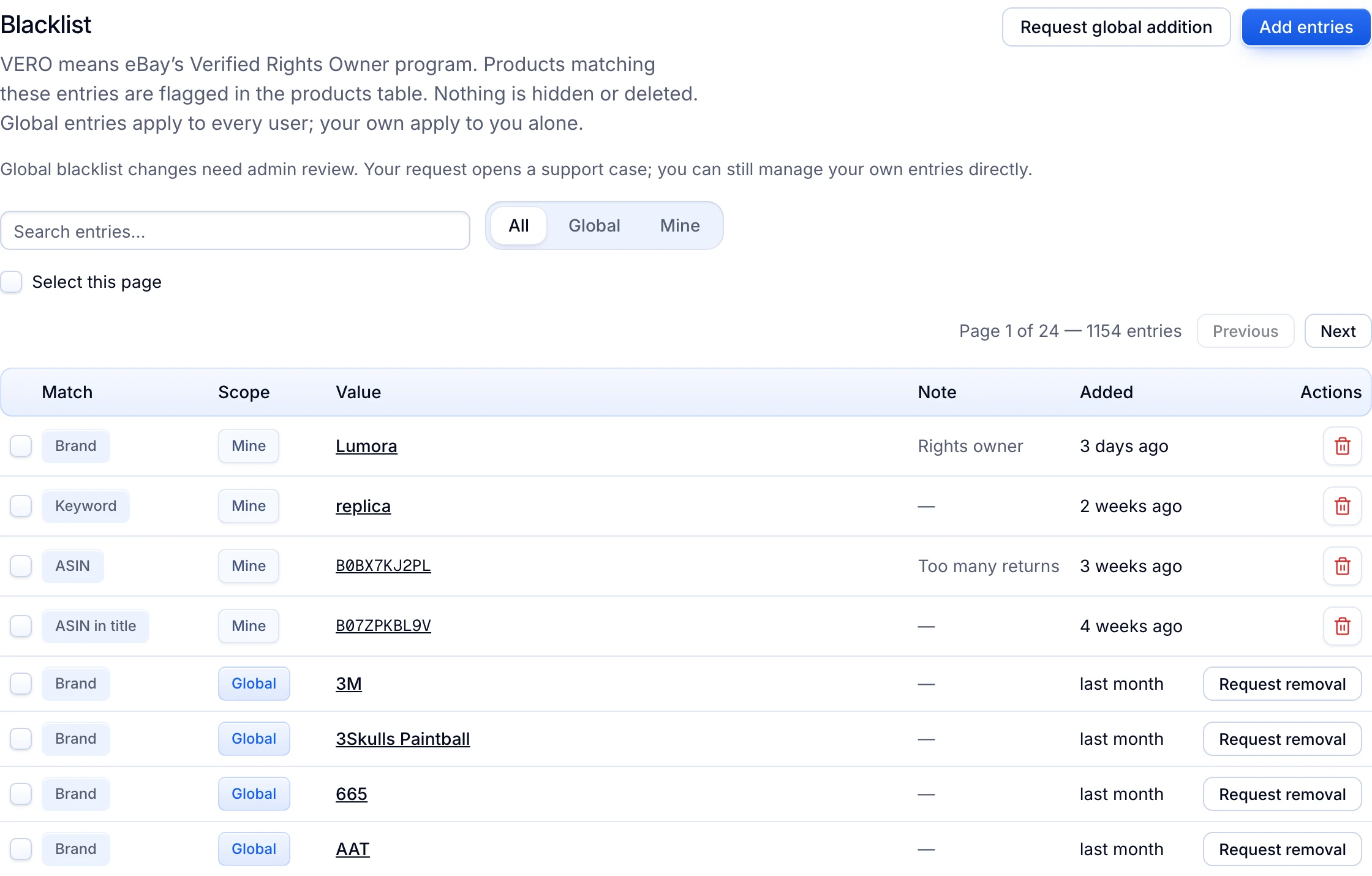
The Blacklist is in every plan. It knows only what is on the list. A rights owner who is not on it can still report you. It does not check your photos or text for copying, and it does not contact rights owners or file appeals.
Productivo can also import products from Amazon. Buying an item from Amazon or another retailer after the sale, for delivery to your buyer, is not allowed under the eBay dropshipping policy.
Written by the Productivo team. Source review: eBay’s intellectual property page in Seller Center, VeRO participant profiles, intellectual property (VeRO) policy, Verified Rights Owner program page, removed or hidden listings, account restrictions and suspensions and the Seller Help tool they link to (it needs a sign-in). The counter notice contents come from US law, 17 U.S.C. § 512(g)(3). All checked 24 October 2026. The phone case listing is made up.