
Comparison guide · Intermediate · 7 steps · Updated 24 October 2026
Connect eBay to ChatGPT or Claude: eBay’s own MCP server, open-source servers and hosted ones
Yes, an eBay MCP server can connect ChatGPT or Claude to your eBay store, but eBay’s own server only reads. It runs on your computer with eBay developer keys. Open-source servers such as YosefHayim/ebay-mcp and jbwashington/ebay-mcp also make changes, with your own keys. Hosted ones, such as Productivo, Frooition for eBay and Zapier’s eBay MCP, need only a sign-in.
Short on time? The options side by side, adding one to Claude, adding one to ChatGPT and removing access each have their own part.
The steps use eBay’s, OpenAI’s and Anthropic’s own pages. Productivo, the app behind this guide, runs one of the hosted servers in the tables, and the last part covers it in detail. You do not need a Productivo account for the steps.
Before you start
In shortYou need an eBay seller account, an AI app that accepts MCP servers, and a list of jobs.
Who it is for
LevelIntermediate
WholesaleEasy
Every step works as written. Order and stock questions in step 1 save the most time.
ResellingEasy
Every step works as written. Photo listing in step 2 suits one-off items.
HandmadeEasy
Every step works as written. Ask for drafts first, so the AI never guesses a material.
Wholesale dropshippingEasy
Every step works as written. Late-shipment questions in step 1 matter most.
Want apps for listing, repricing or shipping instead? See the best eBay seller tools guide.
- You finish with
- One eBay MCP connection that does only the jobs you chose, tested on questions you can check, with a way to remove it.
- You need
- An eBay seller account
- ChatGPT or Claude, on a plan that allows MCP servers (steps 4 and 5)
- For a server on your computer: an eBay developer account and Node.js
- About 30 minutes
What an eBay MCP server is
In shortIt is a connector that gives an AI app tools to read your eBay data or change it.
MCP, the Model Context Protocol, is an open standard that lets AI apps such as ChatGPT and Claude use other services. An eBay MCP server sits between the AI and eBay. It gives the AI tools, like “list my orders” or “change this price”, and calls eBay when the AI uses one.
The AI decides which tool to use. So the tools a server offers set the limit on what the AI can do to your store.
What you need before you connect anything
- An eBay seller accountWith 2 Step Verification turned on. The eBay seller account guide shows how.
- An AI app that accepts MCP serversClaude allows one on its Free plan. ChatGPT allows full use on Business, Enterprise and Edu.
- For a server on your computerAn eBay developer account, its keys, and Node.js 22 or newer (YosefHayim’s needs 24).
- For a hosted serverAn account with the company that runs it.
- A list of jobsWhat the AI may read and what it may change. Step 1 makes it.
eBay MCP servers compared
In shortSix options on the same points: who runs it, sign-in, AI apps, what it does, price, last update.
These five come up most when you ask an AI app or a search engine about “eBay MCP” (checked 23 and 24 October 2026). The sixth is Productivo’s, the app behind this guide. Two run on your computer, one runs inside Claude Code, and three are hosted.
Who runs it, how it signs in, which AI apps
| Option | Sign-in, and AI apps it names |
|---|---|
| Productivo Productivo · hosted | Sign-in: OAuth 2.1 on Productivo’s own page. You choose Read only or Read and change, and which stores. No eBay developer keys. AI apps: ChatGPT, Claude, Claude Code and Codex |
| eBay’s own server eBay · on your computer | Sign-in: Your own eBay developer keys. Your store’s data also needs a refresh token. AI apps: Claude Desktop, Claude Code, Cursor, Cline and GitHub Copilot |
| YosefHayim/ebay-mcp Community developer · on your computer | Sign-in: Your own eBay developer keys, then eBay’s sign-in in its setup wizard. AI apps: Nine set up for you, including Claude Desktop, Claude Code and Cursor. It also has tools for ChatGPT. |
| jbwashington/ebay-mcp Community developer · inside Claude Code | Sign-in: Your own eBay developer keys, then eBay’s sign-in from a command. AI apps: Claude Code only |
| Frooition for eBay Frooition · hosted | Sign-in: Your Frooition account, with your eBay store connected. No developer keys. AI apps: Claude, ChatGPT and Grok |
| Zapier’s eBay MCP Zapier · hosted | Sign-in: Your Zapier account and your own MCP address. How eBay connects is not listed on that page. AI apps: Claude, Cursor and any app that supports MCP |
What it reads and changes, price and last update
| Option | Reads and changes, price and last update |
|---|---|
| Productivo Productivo · hosted | Does: 19 tools read stores, listings, orders, profit and product scans in Productivo. 7 change: add, approve, schedule or remove products, start a scan, and support cases. It does not edit a live listing’s title or price. Price: Every plan, from $18.74 a month. Last change to its tools 19 October 2026. |
| eBay’s own server eBay · on your computer | Does: Searches eBay’s API documentation and calls eBay’s APIs. Changes nothing: production takes read requests only. Price: No fee listed. Open source. Last code change 14 August 2026. |
| YosefHayim/ebay-mcp Community developer · on your computer | Does: 379 tools: listings, orders, refunds, ads, messages, feedback and labels. Changes are on unless you set it to read only. Price: Free, open source (MIT). Version 2.0.1, 20 October 2026. |
| jbwashington/ebay-mcp Community developer · inside Claude Code | Does: A plugin for listing from photos. Its code has 24 tools for listings, orders, shipping, feedback, Best Offers and ads. Price: Free, open source (MIT). Last code change 8 March 2026. |
| Frooition for eBay Frooition · hosted | Does: Reads listings, traffic, orders and messages. Changes price, title, photos and item specifics, marks orders shipped and replies to buyers. Price: Free plan. There, a design or a bulk change costs 1 credit per listing. Page updated 5 October 2026. |
| Zapier’s eBay MCP Zapier · hosted | Does: Three actions: find an order, add a shipping fulfillment, and a raw API request (beta). Price: Each tool call uses 2 tasks from your Zapier plan. Last update not listed. |
Only the hosted options work without eBay developer keys. Only YosefHayim’s, jbwashington’s and Frooition’s can change live listings. Productivo’s adds, approves, schedules and removes products, but leaves a live listing’s title and price alone. Zapier’s raw API request can reach more of eBay’s API, through Zapier’s connection.
How we compared
Each fact comes from the option’s own README or web page, read on 24 October 2026, and Productivo’s from its code. The last code change comes from each repository’s history on GitHub. Every option is checked on the same seven points, from who runs it to its last update. Where a page is silent, the table says “not listed”. None of the servers was installed or tested for this guide. Tool counts and prices change, so check each page on the day you choose.
Does eBay have its own MCP server?
In shortYes. eBay’s server is a developer tool that reads eBay data and changes nothing in production.
eBay publishes npm-public-api-mcp on GitHub, as the npm package @ebay/npm-public-api-mcp. Its README is exact about what it does:
- Two tools and one prompt
query_ebay_apisearches eBay’s API documentation.call_ebay_apicalls eBay’s REST APIs. The promptinterpret_user_requesthelps the AI pick between them. - Read only in productionOnly GET requests work. POST, PUT and DELETE are not available, so it cannot change a listing or an order.
- No sandbox yetThe README says this release does not support eBay’s sandbox.
- Your own keysIt needs an eBay developer account, a Client ID and a Client Secret. Your own orders and inventory also need a refresh token.
- On your computerYour AI app starts it with Node.js 22 or newer. It is not a hosted server.
So eBay’s own server can answer questions about eBay data, but it cannot manage your store. For changes, you need one of the other options.
Which eBay MCP fits which seller
In shortHosted for no-code questions, open source for changes with your own keys, eBay’s own for API work.
If you are this seller, look here first
| If you… | Look at first, because… |
|---|---|
| Want answers about your store, with no code | A hosted server you sign in to, such as Frooition for eBay. It needs no developer keys and nothing on your computer. |
| Want your listings, orders and profit in ChatGPT or Claude, with no developer keys | Productivo’s hosted server, over the data Productivo keeps for your stores. You choose Read only or Read and change. |
| Want the AI to change listings and orders, and can run Node.js | YosefHayim/ebay-mcp. It covers eBay’s selling APIs, and one setting keeps it read only. |
| Build or test with eBay’s APIs | eBay’s own server. It comes from eBay, and it only reads in production. |
| List one-off items from photos in Claude Code | jbwashington/ebay-mcp, a Claude Code plugin built for photo listing. Its last code change was in March 2026. |
| Already run other apps through Zapier | Zapier’s eBay MCP. It has three eBay actions, and each call uses Zapier tasks. |
| Use ChatGPT on a personal plan | An app you can find inside ChatGPT, or Claude instead. OpenAI limits custom servers by plan, as step 5 shows. |
Whatever you pick, the seven steps below are the same: choose the jobs, connect, test, and keep the list of connections short.
How to connect an eBay MCP server safely
Steps 1 to 3 choose the server. Steps 4 and 5 connect it to Claude or ChatGPT. Steps 6 and 7 keep it safe. Repeat step 7 every month.
Step 1 of 7: Write down what the AI may do
In shortList the questions and changes you want, and mark each one read or change.
A server can only do what its tools allow. Some tools only read, like “list my orders”. Others change your store, like “lower this price”. So start with your own list, not the server’s.
- QuestionsWhich orders ship today? Which listings get views but no sales? What did I pay in fees last month?
- Small changesFix one title, add a tracking number, reply to one buyer.
- Bulk changesNew handling time on every listing, a price cut on a whole category.
Mark each line read or change. If your list has only questions, choose a read-only connection. A server that cannot change anything cannot make a costly mistake either.
Bulk changes need the most care. An AI repeats a wrong price on every listing as fast as a right one.
Result: A short list of jobs for the AI, each marked read or change.
Step 2 of 7: Choose a hosted server or one on your computer
In shortHosted servers need a sign-in. Servers on your computer need eBay developer keys and Node.js.
There are two kinds of eBay MCP server. Your list from step 1 and your comfort with setup decide which one fits.
- HostedA company runs it. You sign in to that company, and it calls eBay for you. Frooition for eBay and Zapier work this way. Setup takes minutes, and it works in ChatGPT on the web.
- On your computerYou install it, and it calls eBay with your own developer keys. eBay’s own server and the two open-source ones work this way. You need Node.js, and your AI app must run on the same computer.
A hosted server also sees your data. Read its privacy page before you connect. A server on your computer keeps your keys there, but you install and update it yourself.
Pick a server whose tools match your list, and nothing more. 379 tools sound useful, but each change tool is one more way for a mistake to reach eBay. YosefHayim/ebay-mcp lets you register only some tool groups, or read-only tools alone.
Result: One kind chosen, hosted or on your computer, and one or two servers to try.
Step 3 of 7: Keep eBay keys out of the chat
In shortFor a server on your computer, create keys at eBay Developers and type them only into its setup.
Hosted servers need no keys, so skip to step 4. A server on your computer needs an eBay developer account. The READMEs of all three point to the same place:
- Create a free account at eBay Developers.
- Create a keyset and copy the Client ID and Client Secret.
- To read your own orders and listings, sign in to eBay once to get a user token. YosefHayim’s setup wizard and jbwashington’s
/ebay-authcommand open eBay’s sign-in for you. - Put the keys in the server’s config file or setup wizard, on your computer.
Never paste a Client Secret or a token into a chat. Whatever you type in ChatGPT or Claude goes to that company’s servers. Some setup prompts have spaces for your keys: leave those blank, and type the keys into the wizard instead. eBay’s README adds: never commit keys to code, and never show tokens in screenshots.
Test in eBay’s sandbox first if the server allows it. jbwashington’s README starts with a sandbox keyset. eBay’s own server does not support the sandbox yet.
Result: eBay developer keys saved in the server’s setup on your computer, and nowhere else.
Step 4 of 7: Add the server to Claude
In shortIn Claude, open Customize › Connectors and add the server’s address as a custom connector.
Anthropic calls an MCP server you add yourself a custom connector. Its connector docs give these steps for a hosted server:
- Go to Customize › Connectors.
- Click Add custom connector.
- Enter the server’s address, the remote MCP server URL.
- Click Add. If the server asks, sign in on the page it opens.
This works on the Free, Pro and Max plans. The Free plan allows one custom connector. On Team and Enterprise plans, an Owner adds it in Organization settings › Connectors. Each member then connects with their own account.
A server in Claude’s own directory needs no address. Frooition’s page, for example, says to search for it under Connectors and click Connect.
A server on your computer runs in Claude Desktop or Claude Code instead. In Claude Code, eBay’s README uses one command,
claude mcp add, with your keys as settings. YosefHayim’s wizard writes the Claude Desktop config file for you.Result: The server added in Claude, signed in, and its tools listed.
Step 5 of 7: Add the server to ChatGPT
In shortIn ChatGPT on the web, open Plugins and add a custom MCP server. Check your plan first.
OpenAI’s help page limits custom MCP servers by plan. Full use, with changes, is for Business, Enterprise and Edu. Pro users can connect them to read only. The page does not list Free or Plus.
- On ChatGPT on the web, go to Plugins.
- Select the plus button, then Add custom MCP server.
- Enter a name and the server’s public HTTPS address.
- Set up its sign-in, then tick I understand and want to continue under the risk warning.
- Select Create as a plugin, and review the tools it found.
On a Business plan, only admins and owners can add one. You cannot add a server on a phone: it is web only. ChatGPT also connects to remote servers only. A server on your computer needs OpenAI’s Secure MCP Tunnel.
To use it, type @ in a new chat and pick the plugin. Some servers are also in ChatGPT’s own list: Frooition’s page says to open Settings › Apps and search for it.
Claude and ChatGPT side by side
From Anthropic’s connector docs and OpenAI’s help pages, read on 24 October 2026.Claude ChatGPT Where Customize › Connectors › Add custom connector Plugins › + › Add custom MCP server Plans Free (one custom connector), Pro, Max, Team, Enterprise Business, Enterprise and Edu. Pro reads only. Who adds it at work An Owner, in Organization settings An admin or owner. Enterprise and Edu can allow others. Changes Asks you to approve tool use. A tool can be set to Blocked. May ask you to confirm, based on the app’s permissions Server on your computer Claude Desktop or Claude Code Not directly. It needs OpenAI’s Secure MCP Tunnel. Result: The server added in ChatGPT, or a clear reason to use Claude instead.
Step 6 of 7: Test with read-only questions first
In shortAsk questions you already know the answer to, then approve one small change by hand.
Check the server before you trust it. Open eBay Seller Hub in another tab, then ask three questions it can answer:
- How many orders are waiting to ship?
- What is the price and quantity of one listing you know?
- Which buyer messages have no reply yet?
Compare each answer with Seller Hub. If one is wrong, find out why before you allow any change.
Then try one small change on one listing. Read what the AI is about to send before you approve it. Never approve a bulk change you have not read line by line.
- In ClaudeReview each tool approval request. Anthropic says to click Always allow only for trusted servers. In Customize › Connectors, you can set a tool you do not need to Blocked.
- In ChatGPTIt may ask you to confirm a change, based on the app’s permissions and what it is doing.
- On the serverFrooition shows bulk changes, shipped orders and buyer replies before it acts. Its page says changes go live on eBay at once, with no undo.
Result: Three answers that match Seller Hub, and one small change you approved and checked.
Step 7 of 7: Remove access you no longer use
In shortRemove a server you stopped using in three places: eBay, your AI app and the service.
A connection keeps its access until you remove it. eBay’s developer help gives the path on eBay:
- Sign in to eBay and open Account settings.
- Under Account, click Sign in and security.
- Find Third-party app access and select the app.
- Click Apply to remove it.
Then remove the server from your AI app:
- ClaudeIn Customize › Connectors, click Remove next to the connector.
- ChatGPTIn Settings › Plugins, select it, open the ••• menu or Connection, and select Disconnect. OpenAI says this does not delete your past chats or saved memories.
- The serviceA hosted server has its own page. Frooition’s is Account › Connected apps.
- Your computerDelete the keys and tokens from the server’s config file.
Remove access on eBay first, before you cancel anything else. Check this list once a month, as the best eBay seller tools guide suggests for every app.
Result: Only the servers you still use have access to your eBay account.
Common questions about eBay MCP
Is there an eBay MCP server that lets ChatGPT or Claude manage my eBay store?
Yes, but not from eBay. eBay’s own server only reads in production. Open-source servers such as YosefHayim/ebay-mcp and jbwashington/ebay-mcp can change listings and orders, with your own eBay developer keys on your computer. Hosted ones, such as Frooition for eBay and Productivo, need only a sign-in. The tables compare them.
Does eBay have an official MCP server?
Yes, for developers: @ebay/npm-public-api-mcp. It has two tools, one to search eBay’s API documentation and one to call eBay’s APIs. In production it only reads. It needs an eBay developer account and runs on your computer.
Can I connect ChatGPT to my eBay account?
Yes, through a hosted server, if your plan allows it. OpenAI gives custom MCP servers full use on Business, Enterprise and Edu, and read-only use on Pro. You add them on the web, under Plugins. ChatGPT cannot reach a server on your computer directly. Frooition for eBay and Productivo both name ChatGPT. Step 5 has the path.
Can Claude manage my eBay listings?
Yes, with a server that has tools to change them. Add a hosted server under Customize › Connectors, even on the Free plan (one connector). A server on your computer runs in Claude Desktop or Claude Code. Claude asks you to approve tool use.
Do I need eBay developer keys to use an eBay MCP?
Only for a server on your computer. eBay’s own server and the two open-source ones need a Client ID and Client Secret from eBay Developers. Hosted servers connect to eBay through their own account, so you only sign in.
Is it safe to give an AI access to my eBay store?
Safer with read-only access, approval for each change, and no keys in the chat. Start with questions you can check in Seller Hub. Read every change before you approve it. Remove servers you stop using. Step 6 shows the checks.
Is there a free eBay MCP?
Yes. eBay’s own server lists no fee, and both open-source servers are free under the MIT license. You still need an AI app that accepts them. Frooition has a free plan, with credits for designs and bulk changes. Zapier counts 2 tasks per tool call.
How do I remove an AI app’s access to my eBay account?
In Account settings › Sign in and security › Third-party app access. Select the app and click Apply. Then remove the connector in your AI app too. Step 7 lists every place.
Is it against eBay’s rules to use an AI agent on eBay?
Automated access needs eBay’s permission. The User Agreement bans robots and other automated means, naming “buy-for-me agents, LLM-driven bots” and order flows without human review. The servers here use eBay’s APIs, and the open-source READMEs tell you to follow eBay’s API License Agreement too.
How Productivo’s MCP server compares
In shortProductivo runs its own hosted MCP server over Productivo’s data. It is not eBay’s, and it edits no live titles.
Productivo (productivo.store) is an eBay seller app for US sellers that also runs a hosted MCP server for ChatGPT, Claude, Claude Code and Codex. The AI reads your store data in Productivo and, if you allow it, makes changes there.
It is Productivo’s own server, over the data Productivo keeps for your stores. It is not an eBay MCP server from eBay. Productivo connects to eBay through eBay’s consent page, and the AI app never gets your eBay login.
Productivo’s MCP server on the same points
| Point | Productivo |
|---|---|
| Who runs it, where | Productivo, hosted at api.productivo.store/mcp |
| Sign-in | OAuth 2.1 on Productivo’s own page. You choose Read only or Read and change, and which stores. No eBay developer keys. |
| AI apps it names | ChatGPT, Claude, Claude Code and Codex |
| Reads | 19 tools: stores, listings and their traffic, products, competitors and price history, orders, profit reports, product scans, jobs, the seller guide and support cases. Buyer addresses are left out. |
| Changes | 7 tools: add, approve, schedule or remove products, start a product scan, and open or reply to a support case. Removing a product ends its eBay listing. It does not edit a live listing’s title or price. |
| Price | Every plan, with an active subscription or trial: Starter $18.74, Basic $24.99, Pro $34.99, Scale from $44.99 a month. Listing traffic and product scans need Pro or Scale. |
| Last update | Last change to its tools: 19 October 2026 |
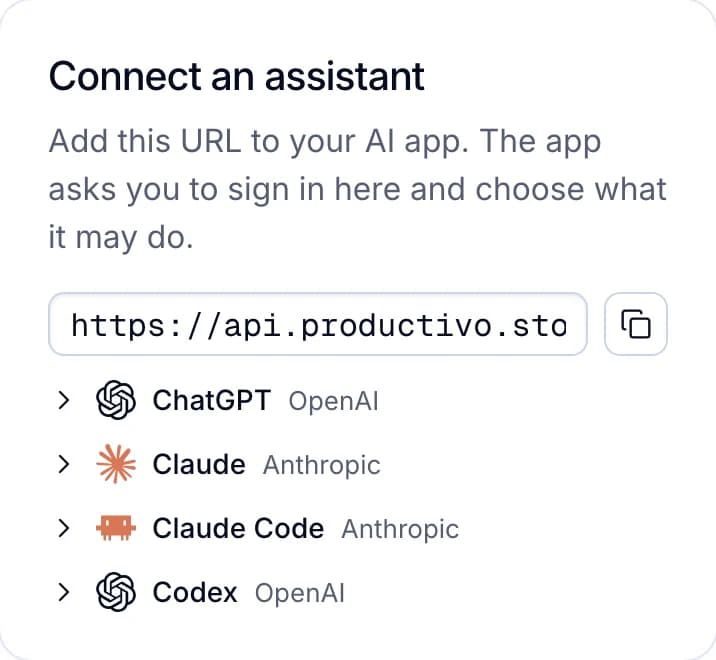
How it signs in: you paste https://api.productivo.store/mcp into your AI app. It sends you to Productivo to sign in and choose Read only or Read and change. Productivo refuses any change from a Read only connection. Billing, team, sign-in and admin pages stay out of reach.
How you remove it: open the profile menu, then AI connections, and click Disconnect. It stops at once. The account owner sees every connection, with who connected it and when it was last used. Team members connect their own, with their own access.
Plans: Starter is $18.74 a month, Basic $24.99, Pro $34.99 and Scale from $44.99. Every plan includes AI connections. A 7-day trial comes with a payment method.
Its product tools add Amazon products to your store. eBay does not allow buying an item from another retailer or marketplace after the sale, for delivery to your buyer. The eBay dropshipping policy guide explains what is allowed.
When another option fits better
- The AI should edit live listingsTitles, prices, item specifics or photos on eBay itself. Frooition for eBay or YosefHayim/ebay-mcp have those tools. Productivo’s do not.
- Buyers and shippingReplies to buyers, or marking orders shipped from the chat. Frooition’s page lists both.
- Raw eBay API accessYou build or test with eBay’s APIs. eBay’s own server is made for that.
- No paid planThe open-source servers and Frooition’s free plan cost nothing to start.
- Other AI appsProductivo names four AI apps. Frooition also names Grok, and YosefHayim’s sets up Cursor and Windsurf.
- eBay sites outside the USProductivo is built for US sellers on eBay.com.
One address, four AI apps
You copy the address into your AI app. The app then sends you to Productivo to sign in and choose what it may do.
Written by the Productivo team. Server facts come from their own pages, read on 24 October 2026: eBay’s npm-public-api-mcp README, the YosefHayim/ebay-mcp README, the jbwashington/ebay-mcp README and server code, Frooition’s eBay MCP page and Zapier’s eBay MCP page, with each repository’s commit history on GitHub. AI app facts: Anthropic’s custom connector docs and OpenAI’s help on custom MCP servers and disconnecting apps. eBay facts: the User Agreement, eBay Developers’ token revocation help and keys page, checked 24 October 2026. Productivo’s tools, sign-in and plans were checked in its code the same day.