
How-to guide · Beginner · 7 steps · Updated 24 October 2026
eBay vs Amazon for sellers: fees, rules and where to sell
eBay takes a little less per sale, has no monthly plan and accepts used, broken and one-of-a-kind items. Amazon asks more to start and gates some brands and categories, but it can store and ship your stock for you. This guide compares eBay vs Amazon for sellers on one made-up item, step by step, and ends with who should pick which.
Short on time? Jump to the side-by-side table or who should pick which.
Steps 1 to 7 work without Productivo. The last part shows how Productivo, the app behind this guide, can help.
Before you start
In shortThese steps compare eBay.com and Amazon.com for items you own and ship from the US.
Who it is for
LevelBeginner
WholesaleEasy
Every step works as written. Steps 1 and 6 matter most when you sell the same stock on both.
ResellingEasy
Every step works as written. Step 4 shows why most used finds start on eBay.
HandmadeMedium
Step 4 needs care: Amazon asks for a barcode or a GTIN exemption for each new product.
Wholesale dropshippingMedium
Step 6 needs care: your supplier ships, so both stock counts depend on its stock.
- You finish with
- Fees for your own item on both marketplaces, the approvals you need, and a clear first choice: eBay, Amazon or both.
- You need
- One item you sell or plan to sell
- Its price, packed weight and box size
- Its barcode (UPC), if it has one
- About 30 minutes
eBay vs Amazon at a glance
In shortEight differences decide where an item sells best. Each row links to the step that explains it.
eBay and Amazon side by side
| Point | eBay | Amazon |
|---|---|---|
| Main fee | 13.6% of the total with sales tax, plus $0.40 an order | 15% of price and shipping, in Home and Kitchen |
| Selling plan | None | $0.99 a sale, or $39.99 a month |
| Getting paid | Funds ready 1 to 2 days after the buyer pays | Funds held until 7 days after delivery |
| Returns | Your choice: none, 30 or 60 days | Amazon’s rules: most items 30 days |
| Brand approval | No approval step. Rights owners can still remove listings | Apply to sell for some brands and categories |
| Used and broken items | Every condition, down to For parts or not working | Working items only, Like New to Acceptable |
| How buyers see you | Your own listing, at a fixed price or by auction | One offer on a shared product page |
| Shipping | You ship, or a service ships stock you own | You ship, or Amazon stores and ships it (FBA) |
eBay vs Amazon for sellers in 7 steps
Steps 1 to 5 compare the two marketplaces on your item. Step 6 is for selling on both. Step 7 turns it into a choice.
Step 1 of 7: Work out the fees on your own item
In shortCount each marketplace’s fees on the same item, price and box, with the label you pay.
The headline rates mislead. eBay’s main fee is 13.6% in most categories, plus $0.40 an order over $10. Amazon’s referral fee is 15% in Home and Kitchen and many other categories, with a $0.30 minimum. But each counts a different total.
- eBay counts the sales taxThe fee is a percent of the total the buyer pays: price, shipping, handling and sales tax.
- Amazon counts price and shippingIts total is the list price, shipping and any gift wrap.
- Amazon adds a planIndividual costs $0.99 per item sold. Professional costs $39.99 a month, however many you sell. eBay has no plan, and your first 250 listings each month are free to list.
Here is one made-up item counted four ways. The Practice KS-1 kitchen scale sells new for $30.00 with free shipping. It weighs 12 oz in a 9 × 6 × 2 inch box.
One $30 sale, four ways to sell it
Made-up item. Money left is before the scale’s own cost. eBay: 13.6% of $32.40 (price plus a made-up 8% sales tax) plus $0.40. The label is USPS Ground Advantage to zone 5.How you sell Fees Label Money left eBay, no Store, you ship $4.81 $8.24 $16.95 Amazon Individual, you ship $5.49 $8.24 $16.27 Amazon Professional, you ship, 40 sales a month $5.50 $8.24 $16.26 Amazon Professional with FBA, 40 sales a month $10.56 Amazon ships $19.44 On Amazon, the referral fee is $4.50 in every row. Professional at 40 sales a month adds $1.00 a sale. It is cheaper than Individual from 41 sales a month.
With Fulfillment by Amazon (FBA), Amazon stores the scale, then packs and ships each order. Its fulfillment fee replaces your label.
The FBA fee for the KS-1 box
The made-up box at Amazon’s 2026 US rates for an item priced $10 to $50, in the holiday peak (15 October to 14 January).Real weight, 12 oz 0.75 lb Size weight: 9 × 6 × 2 ÷ 139 0.78 lb Fee for the heavier one (12+ to 16 oz) $4.89 Fuel and logistics surcharge, 3.5% $0.17 FBA fee per sale $5.06 For most box sizes, Amazon charges the greater of the two weights. At its real 12 oz, the scale would pay $4.48. A big, light box can move an item into a dearer FBA tier. Before the peak, the same tier cost $4.60.
The FBA row leaves the most, $19.44. But it leaves out monthly storage, shipping your stock to Amazon and placement fees. Amazon’s Revenue Calculator estimates fulfillment and storage for your own item. For eBay, the eBay fee calculator does the same.
Result: Fees and money left for your item on eBay, Amazon with your own shipping, and Amazon with FBA.
Step 2 of 7: Check what each one asks to start
In shortAmazon asks for more documents, holds your money longer and sets the return window for you.
Both ask who you are before you sell. Amazon asks for more up front, and its rules on money and returns are stricter.
What each one asks before your first sale
From eBay’s and Amazon’s own seller pages.Step eBay Amazon Who can sell Anyone with a verified address in a country on eBay’s list An individual or a business, no company needed What you provide An eBay account, then seller registration and verification Government ID, credit card, bank account, proof of address and tax information Identity check Verification is part of registration A photo of you with your ID, or a video call. Usually 3 business days or less Limits at the start A monthly selling limit, and limits in new categories Approval for some brands and categories (step 3) Getting paid Funds are ready 1 to 2 days after the buyer pays. Payouts can be daily Funds are held until 7 days after delivery Returns Your choice: no returns, 30 days or 60 days At least Amazon’s own: most items 30 days after delivery On eBay, find your limit in Seller Hub’s Overview tab, under Monthly limits. Active and sold listings both count. Never list in the wrong category to get past a limit. eBay counts that as search manipulation. The eBay seller account guide walks through registration.
Plan your cash for Amazon. Amazon says it is normal for a new seller to have all funds held at first. You pay for the next stock before that money arrives.
“No returns” on eBay still has a limit. A buyer can return an item that does not match the listing, under the eBay Money Back Guarantee. On Amazon, returns within the window are approved for you. The eBay return policy for sellers guide covers the settings.
Result: A list of what you still need for each marketplace, your eBay monthly limit and when each one pays you.
Step 3 of 7: Check brand and category approval
In shortSearch each item in Amazon’s Add Products tool. On eBay, check the brand’s rules instead.
Amazon asks for approval before you list some products. It can apply to a single product, a brand, a brand within a category, a category or a sub-category. Some products need more than one approval.
To check, open Add Products in Seller Central and search the item. Amazon shows one of three answers:
- Sell this productNo approval needed.
- Apply to sellApproval needed. Amazon reviews it in 2 to 7 business days.
- Not AvailableYou cannot list it.
An application asks for purchase invoices dated within 180 days, photos of every side, and a brand letter where one applies. Some categories also need $1 million liability insurance. “Your account does not qualify” is final. Amazon says it cannot be appealed.
The eBay pages read for this guide name no approval step like this. On eBay, a new category can start with a selling limit. Rights owners can have listings removed through eBay’s Verified Rights Owner (VeRO) program, so a brand’s rules still apply. The wholesale suppliers for eBay guide shows how to check a brand before you buy stock.
Result: Each item marked: sell now, apply first or not allowed on Amazon, and any brand rule for eBay.
Step 4 of 7: Decide where used and one-of-a-kind items go
In shortBroken, rare and barcode-free items fit eBay. Amazon wants working items matched to a product page.
Amazon sells most items on a shared product page. A used item joins that page with a condition: Used – Like New, Very Good, Good or Acceptable. Collectible items must add value, such as an autograph or an out-of-print edition.
Amazon refuses an item that needs repair, is missing essential parts or is hard to use. eBay has a condition for exactly that: For parts or not working. Electronics on eBay also take Open box and Seller refurbished.
One-of-a-kind items are harder on Amazon. A new product page needs a barcode (UPC, EAN or ISBN). Without one, you apply for a GTIN exemption with photos of all six sides. It is open to handmade, private-label, generic and bundled products. On eBay, you list the item with your own photos and pick its condition.
Describe every flaw and pick eBay’s condition name for your category. The reselling on eBay guide shows how to price used finds.
Result: Each item sorted: fine for both, eBay only (broken, rare, no barcode), or Amazon after an exemption.
Step 5 of 7: Compare how buyers find your offer
In shortOn Amazon you compete for one Featured Offer. On eBay each listing ranks on its own in Best Match.
On Amazon, sellers of the same product share one product page. The offer next to Add to Cart is the Featured Offer, often called the Buy Box. Other offers sit in a list a click away.
Amazon picks it by total price, delivery promise, free shipping, free returns and seller performance. Since September 2026, every seller’s offer is eligible. Amazon says FBA and Prime do not count by themselves: an offer you ship yourself can win if it is as good.
On eBay, every seller writes a separate listing. eBay search sorts them by Best Match. It weighs how well the listing matches the search, popularity, price, listing quality and completeness, your terms and your record as a seller.
eBay also lets you sell by auction, where buyers compete for rare or unique items. Amazon’s seller pages list no auction option. For an item with no clear price, an auction lets buyers set it.
So on Amazon, price and delivery win the page. On eBay, the listing itself does the work. The eBay listing optimization checklist covers each part.
Result: For each item: what wins on Amazon (price, delivery) and what to improve on eBay (the listing).
Step 6 of 7: Sell the same stock on both
In shortKeep one stock count, update both marketplaces when it changes, and ship each order as its rules ask.
Selling the same stock on both works if each sale updates the other marketplace. Otherwise you sell one item twice. eBay warns that cancelling an order because you ran out can affect your seller standing.
- One stock countKeep one sheet or tool as the true count. Change both marketplaces from it, not one from the other.
- The out-of-stock option on eBayIn Selling preferences, turn on Listings stay active when you’re out of stock. At 0, the listing hides from search and keeps its sales history. eBay ends it after 180 days at 0. The eBay out-of-stock option guide shows the setup.
- A buffer for fast itemsList a little less than you hold on each marketplace, so two sales at once do not oversell.
Ship eBay orders from Amazon’s warehouse
Amazon’s Multi-Channel Fulfillment ships orders from other sales channels out of your FBA stock. It packs them in unbranded packaging by default. eBay allows third-party fulfillment of stock you own on three conditions:
- You are named as the sellerYour name is on every packing slip and invoice.
- The order ships as listedIt arrives within the terms your listing states.
- The provider is bound by contractIt may use eBay order data only for that order.
Check that Amazon’s packing slip names you before you rely on it.
Set the item location to where the stock ships from. eBay requires the tracking number to match it.
Move your Amazon catalog to eBay
In Seller Central, go to Reports › Inventory Reports and request the All Listings report. It holds your active, inactive and incomplete listings, and needs the Professional plan. Open the file in a spreadsheet, and copy each item’s details into eBay’s bulk template. The eBay bulk listing guide shows the upload.
Use your own photos and words, not another seller’s. eBay’s images and text policy needs written permission for content someone else made. A product page you share with other sellers on Amazon may hold their photos.
Result: One stock count, eBay’s out-of-stock option on, and a plan for shipping and moving your catalog.
Step 7 of 7: Choose eBay, Amazon or both
In shortPick by what you sell and how you want to ship, then test one marketplace before adding the other.
Who should pick which
From the steps above. One row fits most sellers. Many end up on both.You sell Start on Why Used, vintage or broken items eBay Conditions for every state, including For parts or not working. Auctions for rare finds One-of-a-kind items without a barcode eBay No product page or GTIN exemption needed A few items a month eBay No monthly plan. Amazon Individual adds $0.99 a sale New, barcoded stock in volume Amazon, then eBay FBA ships for you. Add eBay once one stock count feeds both Your own brand Both Amazon’s free Brand Registry needs a pending or registered trademark. eBay lets you write each listing yourself Gated brands or categories eBay, while you apply Amazon’s review takes 2 to 7 business days, or ends in a refusal. Check the brand’s rules for eBay too Not sure an item sells at all? Check it with eBay product research first. Add the second marketplace only once your stock count is reliable.
Result: A first marketplace for each kind of item you sell, and when to add the second.
Mistakes that cost money when choosing
In shortWhen comparing eBay vs Amazon for sellers, each of these makes one marketplace look cheaper or easier than it is.
- Comparing 13.6% with 15%eBay also counts sales tax and adds $0.40 an order. Compare money left, as in step 1.
- Paying Professional for a few salesUnder 41 sales a month, $39.99 costs more than Individual.
- Counting the FBA fee onlyStorage, shipping to Amazon and the peak season rate come on top. So does a low-inventory fee when stock falls under 28 days of sales.
- Buying stock before Apply to sellA gated brand can leave you with stock you cannot list on Amazon.
- Forgetting when Amazon paysFunds wait until 7 days after delivery. Keep cash for the next stock.
- Two stock countsAn oversold item means a cancelled order, and eBay counts that against you.
- Copying a shared Amazon pagePhotos and text you did not make need the owner’s written permission on eBay.
Common questions about eBay vs Amazon for sellers
Is it better to sell on eBay or Amazon?
eBay for used, rare and one-of-a-kind items. Amazon for new, barcoded stock you want shipped for you. Many sellers use both. Step 7 has the table.
Is eBay cheaper than Amazon for sellers?
Usually a little, if you ship yourself. On the made-up $30 item, eBay left $16.95 and Amazon Individual $16.27. With FBA, Amazon left more before storage and shipping to its warehouse.
How much do eBay and Amazon take from a $100 sale?
About $15 on each, before plans, shipping and ads. eBay takes 13.6% of the total with sales tax, plus $0.40. With a made-up 8% tax, that is $15.09. Amazon takes $15.00 in Home and Kitchen. Individual adds $0.99.
Does eBay or Amazon pay sellers faster?
eBay, in most cases. eBay funds are ready 1 to 2 days after the buyer pays. Amazon holds them until 7 days after delivery. Step 2 compares both.
Can I sell on Amazon and eBay at the same time?
Yes, with stock you own. Keep one stock count and update both after every sale, or you will oversell. Step 6 shows how.
Can I use Amazon FBA to ship eBay orders?
Yes, through Multi-Channel Fulfillment, for stock you own. eBay requires that you are named as the seller on packing slips and invoices, and that the item location matches where it ships from.
Can I sell used items on Amazon?
Yes, if they work and match an Amazon product page. Amazon’s used conditions run from Like New to Acceptable. Items that need repair are not allowed. On eBay they go under For parts or not working.
Do I need a business to sell on Amazon?
No. Amazon’s registration lets you choose “None, I am an individual”. You still need a government ID, a bank account, a credit card and tax information.
How Productivo helps when you sell your own stock on eBay
In shortProductivo lists and counts your own stock on eBay. It does not connect to Amazon Seller Central.
Every step in this eBay vs Amazon for sellers guide works with each marketplace’s own tools. This part is about Productivo, the app behind this guide, for stock you own.
Where Productivo fits in the steps
| Guide step | What Productivo does |
|---|---|
| Step 1 | Each eBay order shows what the buyer paid and the fees eBay billed. Record what the item cost on the order, and Reports counts the money left. |
| Step 4 | A product you add by hand takes its own eBay condition and condition notes, so used items keep their flaws in the listing. |
| Step 6 | Upload your own stock from one CSV file, up to 1,000 products per file, with SKU, price, quantity, condition, photo links and item specifics. The preview shows every row error before anything is saved. |
Your own stock from one CSV file, in Productivo
Start from the template: SKU, title, price, quantity, category and photo links. Rows that already exist or have an error are shown, not imported.
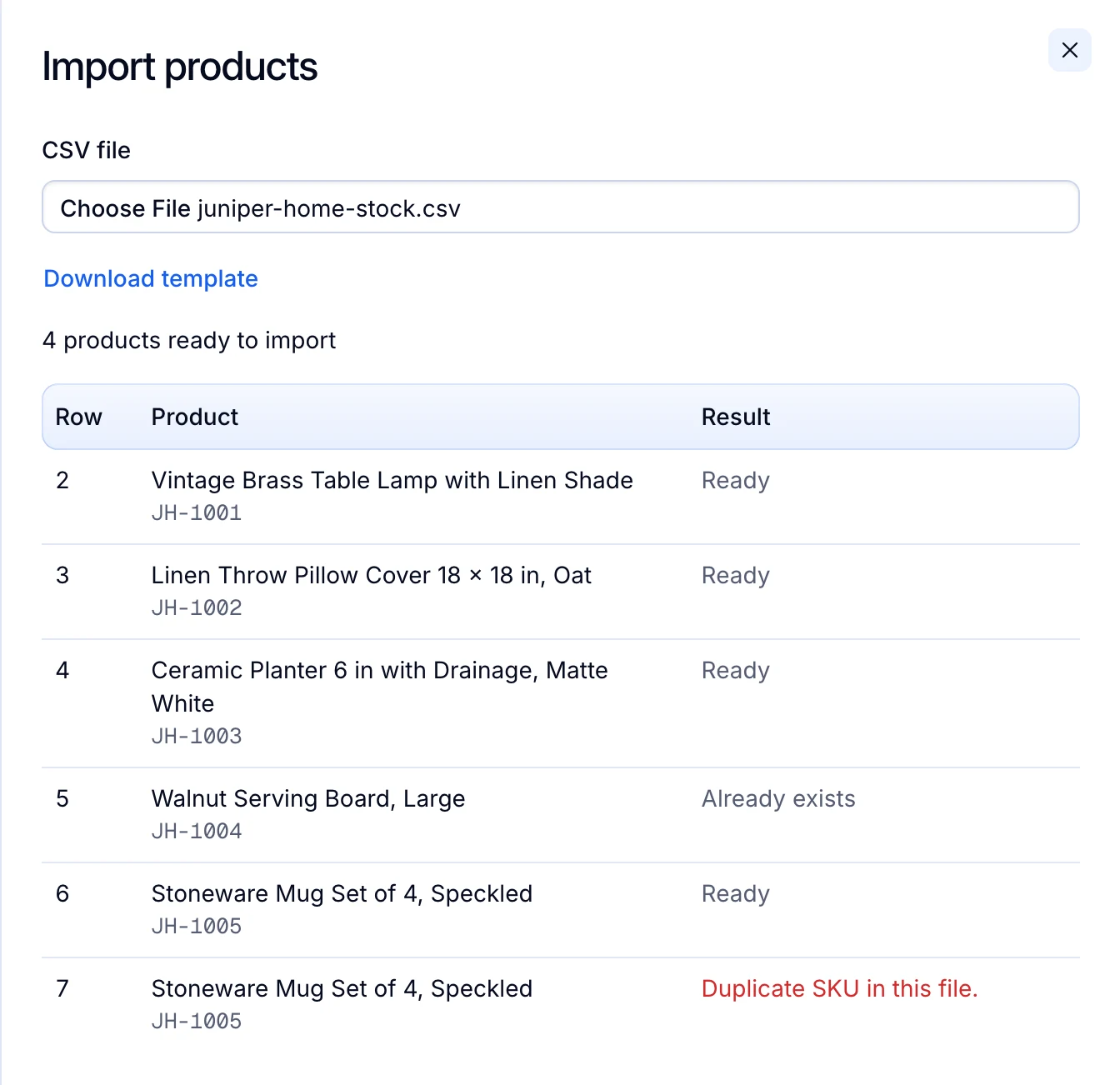
What it does not do: Productivo does not read your Amazon listings, sync stock between Amazon and eBay, or send orders to Multi-Channel Fulfillment. A product you add by hand or by CSV keeps the price and quantity you give it. Once it is live, you change them on eBay.
Written by the Productivo team. Source review: eBay’s selling fees, start selling, selling limits, payouts, return policy, item conditions by category, listing optimization guide, multi-quantity listings, item location policy, images, video and text policy and dropshipping guide, and Amazon’s selling fees, registration guide, payments based on delivery date, seller-fulfilled returns, FBA, 2026 FBA fulfillment fees, categories that require approval, condition guidelines, products without a product ID, Featured Offer, inventory reports and Multi-Channel Fulfillment, checked 24 October 2026. The KS-1 scale, its price, box and sales tax are made up. The label is a USPS Commercial price.